
Mac’s Classic OS continues to fade in compatibility and relevance, with support in crucial areas – especially Web browsers and email software – becoming more and more tenuous. Classic Mode is not supported in Mac OS X 10.5 Leopard on any Macs and was never supported on Intel Macs.
Personally, I still [2008] use Classic Mode on my PowerBooks running OS X 10.4 Tiger to support a handful of applications I’ve never found completely satisfactory OS X substitutes for, and I use it daily on my “utility” Pismo PowerBook. Our old 233 MHz G3 Series WallStreet PowerBook doesn’t get much use any more, but it runs very nicely in Mac OS 9.2.2, and I’m glad have the good, old Classic Mac OS available as a bootable standby even on our G3 iBook and G4-upgraded Pismo PowerBooks, although I very rarely boot into it. When I do, I’m always gratified by the speed and responsiveness compared with OS X, but I do miss the OS X feature set, especially preemptive multitasking, Spotlight, and Spaces.
Fast and Responsive on Old Macs
However, if you have an older Mac that is not supported by OS X or some of the slower G3 machines (like the WallStreet, which officially supports up to OS X 10.2.8 Jaguar), there is still a strong case to be made for running OS 9 – and there are also certain software applications that are only supported in OS 8/9 that may be mission critical for some users.
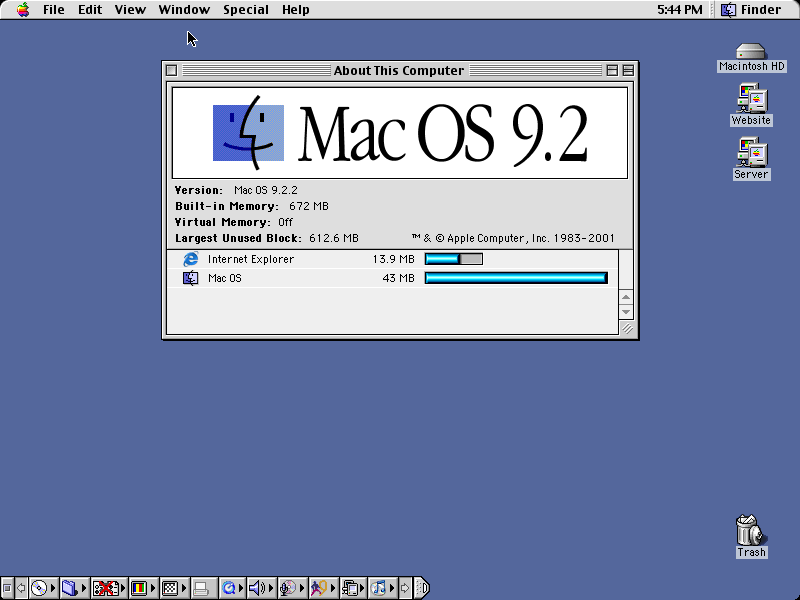
Mac OS 9.2.2 is fast, responsive, and rock-stable on my old PowerBooks and iBook. I once went for more than three months on the WallStreet without rebooting. That’s in 2-3 hours of daily use, and I got up to nearly “Untitled 700” in Tex-Edit Plus documents before I finally had to restart to satisfy a software installer.
No Up-to-Date Browsers
Unfortunately, the most significant drawback to using OS 9 on an Internet-connected computer these days is the lack of any really up-to-date and satisfactory web browser. The most contemporary option is iCab 3, which was last updated on January 1, 2008, but iCab 4 is not being developed for Classic, so the writing is on the wall even there. Other alternatives are Netscape 7.x and Mozilla 1.2.1 (and it’s WaMCom variant).
UPDATE: Although every mainstream browser left the Classic Mac OS behind, Classilla has come to its rescue. Launched in mid 2009, Classilla is built around Mozilla and its Gecko rendering engine – all ported to PowerPC Macs, primarily by Cameron Kaiser. Classilla, a portmanteau of Classic and Mozilla, supports Mac OS 8.6 through 9.2.2. Versions 9.0 through 9.2.2 worked like regular browsers, but with version 9.3 the app reports itself as a mobile browser for access to more lightweight versions of websites.
Special Considerations
There are a couple Macs that require a special version of Mac OS 9.2.2. If you try to run the standard version on these models, they will be missing some crucial ingredients. The Early 2003 iBook G3 (12″ and 14″), 867 MHz and 1 GHz Late 2002 Titanium PowerBook G4, 2003 eMac, Quicksilver 2002 Power Mac G4, and MDD Power Mac G4 (the model without FireWire 800) require a machine-specific version of OS 9.2.2.
OS 9 Installation & Updates
Whether you really can get along without the ability to boot directly into the Classic OS is an important point to consider these days when planning a system upgrade, and Intel Macs don’t support Classic Mode at all.
Apple has posted a handy table, Mac OS 8 and 9 Compatibility with Macintosh Computers, detailing which Mac models – from the 68040 Centris machines of the early 90s through the 2004 aluminum PowerBooks – are supported (or not) by the Classic Mac OS versions 8.0 through 9.2.2. It’s worth a look if you have questions about what OS versions your machine can handle. All G3 Macs and most G4 models can run Mac OS 9.2.2.
For example, Apple’s chart shows that my late-in-the-production-run Pismo PowerBook will support Mac OS 9.1 through 9.2.2, while my four-year-old 700 MHz iBook can only boot into OS 9.2.2 (and, of course, OS X).
System requirements for OS 9 are a Mac or compatible clone that shipped with a Power PC processor and has an optical drive, 40 MB of RAM (32 MB of RAM set to 40 MB virtual memory qualifies), and 150 to 400 MB of hard drive space, depending on installation options. 680×0-based Macs with PowerPC upgrades cannot install Mac OS 9.
Apple has also posted a Knowledge Base article, Mac OS 9: Available Updates, describing the updates available for Mac OS 9 – and the order in which they must be installed. You must install all prerequisite software before installing any update. For example, when updating Mac OS 9.0 to Mac OS 9.2.2 the updates must be installed in this order:
- Mac OS 9.1 Update for OS 9.0 through 9.0.4
- Mac OS 9.2.1 Update for OS 9.1 or 9.2
- Mac OS 9.2.2 Update for OS 9.2.1 only
Note that the free downloadable Mac OS 9.1 Update contains fewer updates and extras than the Mac OS 9.1 CD-ROM disc. This reduces the amount of data that must be downloaded at once.
The downloadable update contains core system software updates, Apple Remote Access (ARA) Client Server 4.0, and QuickTime 4.1.3. The Mac OS 9.1 download may only be used to update a computer that has Mac OS 9.0.x installed. It is available from Apple Software Updates.
The Mac OS 9.1 disc includes additional updates to the Mac OS that are not a part of the downloadable Mac OS 9.1 Update. Some of these additional items are available separately at Apple Software Updates or from third-party websites (non-Apple software). The disc may be used for full installation or clean installation. Apple details differences between the download and the CD in Mac OS 9.1: Downloadable Update versus Mac OS 9.1 Disc.
Also note that upgrading the NuBus motherboard architecture Power Macs (the 6100, 7100, 8100, and related models) to Mac OS 9.1 requires a Mac OS 9.1 Full Install CD, as Apple did not support these oldest Mac OS 9 compatible Macs with its free updaters. For more information on this see Mac OS 9.1: Start Up from CD to Install on Original Power Macintosh Computers.
Another caveat: Your Mac must have the appropriate Mac OS ROM file for the version of the Mac OS that is installed. Using the wrong Mac OS ROM file can cause the computer to behave unpredictably and may even prevent it from starting up. This information should be found on each model’s profile page on LowEndMac.com.
Apple has posted a chart, Mac OS: Matching Mac OS ROM File to Mac OS Version, showing the applicable Mac OS ROM file for the applicable Mac OS version.
Apple recommends: “You should use the latest version of Mac OS 9 [that your hardware supports].” Pre-G3 Macs only support up to OS 9.1. IMHO, this is no major hardship in most instances, as there are a very few applications that require Mac OS 9.2.2.
OS 9 Helper
Mac OS 9.1 is the final version that Apple allows to install on anything previous to the Beige G3. However, there is an installer patch hack, OS 9 Helper, that allows you to install 9.2.1 or 9.2.2 on certain “Old World” Macs that Apple dropped support for.
OS 9 Forever says that the performance improvements added in 9.2.x are clearly noticeable once you install it. In particular, the Finder is incredibly responsive, and Open Transport networking is vastly more stable. However, the four most important reasons for installing 9.2.x are:
- Compatibility with ATI’s latest drivers. ATI dropped support for OpenGL versions lower than 1.2.2. (9.1 has 1.2.1).
- You can’t run DVD Studio Pro 1.2.1 or 1.5 without 9.2.2.
- You can’t run Final Cut Pro 3 without 9.2.2.
- Full compatibility with first- and second-generation iPods.
The hack works with all of the “PowerSurge” models, including the 7300, 7500, 7600, 8500, 8600, 9500, and 9600. The 6500 seems to work as well. The hack also works on the PowerBook 1400, 2400, 3400, and Kanga PowerBook G3, but not on the PowerBook 5300.
The NuBus Power Macs (6100, 7100, 8100 series, and the Duo 2300) have only been a limited success using OS 9 Helper, and the Power Mac 4400 and Motorola StarMax Mac clones are not supported.
Classic Mode
Every version of Mac OS X through 10.4 Tiger supports the classic environment, which allows you to run Mac OS 9.x within Mac OS X. Compatibility is excellent, and if you have a dual-processor Power Mac G4 or G5, you’ll see top notch performance. That’s because the way Classic Mode works is that it enables the processor to dedicate as many resources as necessary to the Classic Mac OS – but only a single processor. That can really tie things up on a single-processor Mac, but on a dual-processor machine, the second processor is free to do all the other work, keeping you productive even when OS 9 has completely taken over the other CPU.
In fact, you may actually get better performance from Classic Mode than booting natively, as the second CPU will handle disk I/O, network I/O, and graphics, letting OS 9 concentrate on other tasks. All in all, Classic Mode is an excellent way to use that old Mac software on Macs with more power than ever booted the Classic Mac OS natively.
Where to Buy OS 9
Speaking of OS 9, a reader question that crops up fairly frequently is where to obtain an OS 9 install CD. They are getting mighty thin on the ground these days. eBay is a possible source, but note well that System software restore CDs that ship with particular Mac models in most cases will not work with machines other than the one they come bundled with.
Several resellers list OS 9 CDs, but often at prices that won’t save you much, if anything, over going the conventional route of paying $129.95 for OS X (through 10.4) plus the $19.95 surcharge for OS 9.2.2. Here are some online sources. Visit the respective Websites and run a search for “OS 9” or “OS 9.1”.
BetaMacs
One outlet that still sells OS 9 CDs is BetaMacs, which offers Apple System 9.0 software for the reasonable price of $19.99, which you can update to any of the later OS 9.x versions using the free updater downloads as described above.
According to BetaMacs, this OS 9 installer Installs a full suite of Apple software, unlike the iMac CD that is often sold on eBay, and works on:
- Power Mac 7200-9600 (request OS 9.1 CD)
- Power Mac G3
- PowerBook G3
- iBook G3
- iMac G3
- Power Mac G4
- PowerBook G4
HardCore Mac
HardCore Mac still has a pretty comprehensive selection of OS 9 (and other Mac OS back to System 7.5) CDs (or floppies for older system version), but their prices are very high. A few examples:
- Mac OS 9 – $149.99
- Mac OS 9.0.4 full installation CD, in sleeve. – $149.99
- Mac OS 9.1 Many people think a Mac OS 9.0 installation is needed before Mac OS 9.1 can be installed. This is NOT TRUE. If you need Mac OS 9.0, Mac OS 9.1 will work. – $159.99
- Mac OS 9.1 Retail Shrinkwrap packaging – $199.99
- Mac OS 9.2.1 CD in sleeve. Full installation. Not an upgrade CD. – $159.99
- Mac OS 9.2.2 – $159.99
Also see , which is updated a few times a year.
Note well that any version of OS 9 – including OS 9.0, 9.0.4, 9.1, 9.2, and 9.2.1 – can be upgraded to the current 9.2.2 using free updaters that can be downloaded from Apple’s software support site (except for the above-mentioned NuBus machines).
PowerPC Macs came to the end with OS 9.2.2, bundled on their Software Restore CDs, although on the later machines not installed by default, and if you choose to install it, it only supports Classic Mode. If you install, it’s a good idea to drag a fresh copy of the OS 9 System Folder to backup media, which will allow you to restore it by simply dragging it back to your hard drive, instead of the tedium of running the software restore CD or DVD.
Helpful Addons
Apple generally provides excellent software, but sometimes a third-party app turns out to be a better solution – especially if you want to use a multi-button mouse.
- Clean-Install Assistant makes migrating to another Classic Mac OS machine or a newer version of the Mac OS a lot easier.
- MenuChoice provides a better implementation of a hierarchical Apple menu than Apple’s Menu Options.
- SmoothType does a better job rendering TrueType and Type 1 fonts than Apple’s own rendering engine – or Adobe Type Manager.
- USB Overdrive gives you control over the “extra” buttons on third-party USB mice. You can now download USB Overdrive 1.4 for Mac OS 9 for free. (It used to be $20 shareware.)
- BBEdit Lite, a great freeware text editor.
Online Support
- Mac OS 9 Lives
- Mac OS 9 – It’s Still Alive!, Facebook
- Mac OS 9 group, Google Groups
Links
This document is that latest in a series of Mac OS 9 compatibility, upgrades, and resources guides that Charles W Moore has been updating since May 2003. This has been the most popular topic in the history of the Miscellaneous Ramblings column; earlier versions have been viewed over 170,000 times.
Note: This article has been updated from the 2008 edition. As we publish this article, os9forever.com is offline, so we are unable to verify that links to it still work. Dan Knight, publisher.
* No, it isn’t a typo. Compleat is a legitimate, albeit archaic, alternate spelling for complete. As Kenneth G. Wilson says in The Columbia Guide to Standard American English: “This obsolete spelling of the adjective complete suggests an air of antiquity that seems to please some of those who name things….” We find that fitting for Low End Mac’s Compleat Guides to “obsolete” hardware and software.
Short link: http://goo.gl/epytJJ
searchword: compleatos9
