Taking it from the top: I'm personally not much of a wireless input
devices enthusiast. Wireless keyboards and mice usually cost more than
their wireless counterparts, and they require the expense and hassle of
batteries, which in the case of mice also make them heavier and
less-comfortable to use.
With Bluetooth devices, there is the bother of pairing, and I've not
used a wireless mouse or trackball yet that wasn't afflicted by
noticeable latency - milliseconds in most instances - but still
off-putting. If you're using a desktop computer or a laptop in
desktop-substitute mode, you're in a static environment in which
plugging in a USB cord or two just isn't an onerous task, and it's
arguably a lot less annoying than the hoops wireless devices make you
jump through to get them powered up and connected.
When I'm using a laptop for road warrioring, I generally prefer to
just use the machine's built-in keyboard and trackpad, although I do
carry a USB mouse in my computer case in case I want it. Frankly, I
mostly fail to see the point of wireless keyboards and mice, except
perhaps if you have a computer with a poverty of USB ports (e.g.: most
Apple laptops, especially the MacBook Air), in which case
Bluetooth input devices will free up a port (or two).

Now that I've got that off my chest, I'll proceed with reviewing the
Kensington Ci70 Wireless Desktop Set, which consists of a thin wireless
keyboard and a matching wireless mouse, neither of them Bluetooth. Both
interface with the computer through a common USB receiver dongle that
happily is plug and play and doesn't demand the pairing hassle. Similar
form factor products are available from Kensington in wired versions,
which are what I would opt for personally, but there's no denying that
wireless input peripherals are popular with many users, so it's great
that there's a choice.
Apple offers both modes in its aluminum keyboards, but one
shortcoming of the wireless version is that, like notebook keyboards,
it has no separate numeric keypad, but rather depends upon a
NumLock-mediated embedded pad.
The advantage, of course, is smaller physical dimensions, which does
make the Apple wireless 'board easier to pack for mobile users, but if
you use the numerical pad a lot, it can be a pain.
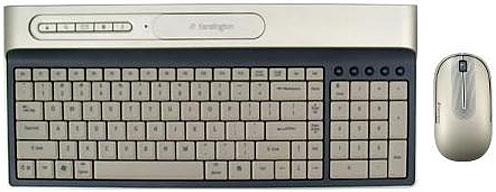
However, even if you're smitten with a razor-thin keyboard form
factor, the Apple Aluminum 'board isn't your only alternative.
Kensington's super-thin keyboard (3/8", same as Apple's) measures 16
inches x 7 inches and is available as the anchor of Kensington's Ci70
Desktop Set, which also includes the Ci70 wireless notebook mouse that
is about one-third thinner in vertical height than a standard
mouse.
The keyboard is almost (but not quite) as compact as the Apple
wireless aluminum keyboard, but it has the advantage of including a
real numeric keypad and has nearly all of the standard keys without
having keys do double-duty using a function modifier. Another advantage
that the Kensington Ci70 'board enjoys is that it is supported by any
OS X Mac, while the Apple wireless unit requires v10.4.10 or later.
Kensington's Ci70 Wireless Desktop Set is designed
for low-profile compactness with a footprint 35% smaller than standard
multimedia keyboards, and it includes a wireless mouse that docks in
the keyboard when not in use, saving space and battery power. The set
is available in either black or metallic silver ("platinum") livery, so
it will harmonize nicely with most Macs. The Ci70 'board slips neatly
into my Waterfield Racer X computer bag's front compartment, leaving
plenty of room for my other stuff.
My favorite keyboard for the past several years has been the Kensington SlimType, a low-profile and
compact 'board that uses notebook-style, short-travel, scissor-switch
key technology. In fact, the longer I've used the SlimType, the more
I've grown to like it, and I would now rate it as the best freestanding
keyboard I've ever used - and not necessarily taking a back seat to my
favorite laptop keyboards - the ones in the WallStreet, Lombard, and Pismo PowerBooks.
I find the Kensington SlimType easier on my neuritis-plagued hands
and arms than any other freestanding keyboard I've ever used. Oddly,
it's not a 'board that strikes you as super-comfortable when you first
try it out, but it sticks with you, and for some reason it doesn't
fatigue you the way many keyboards do - including ones that feel more
comfortable initially.
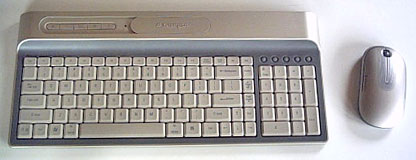
Consequently, I was curious to see whether the Ci70 'board would
compare favorably with the SlimType for comfortable action. The
verdict: not bad, better than average, but not up to the SlimType's
comfort standard. The Ci70 'Board is more like the 'boards in the
MacBook, MacBook Air, and the freestanding aluminum Apple keyboards in
feel, while the SlimType is more like the best laptop keyboards.
This keyboard is easily the slimmest I've used yet, and its key
travel is even shorter than the SlimType's (there simply isn't room for
much travel at all), but still with a positive action and soft landing.
Unlike the Apple USB aluminum keyboard keys, the Kensington key caps
are concave and fit the shape of our finger tips better than the flat
key caps of the Apple keyboard.
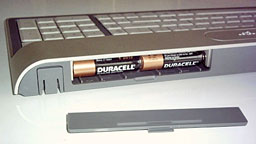 Because the key caps are only a fraction of
an inch above the desk surface level, I can dispense with the palm rest
I usually use to keep my hands even with or slightly higher than the
level of the keys. There are also a set of flip-down "feet" at the back
of the 'board for those who prefer some rake.
Because the key caps are only a fraction of
an inch above the desk surface level, I can dispense with the palm rest
I usually use to keep my hands even with or slightly higher than the
level of the keys. There are also a set of flip-down "feet" at the back
of the 'board for those who prefer some rake.
With its low-profile design, the avant-garde styled Ci70x Wireless
Desktop Set conserves desk space and will probably fit in your computer
bag or backpack bag as well to take on the road. Its look is definitely
more contemporary than that of the retro-themed SlimType's chrome
highlights on glossy white. The test Ci170x keyboard and mouse's livery
is a tastefully understated matte platinum.
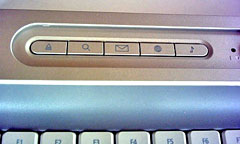 Aside from
its full compliment of standard alphanumeric keys (and a nonstandard
positioned modifier key I'll say more about in a moment), the Ci70x
keyboard has two pads of multimedia keys - one above the numerical
keypad and the other on the raised console at the back of the keyboard.
Personally, I've never been a heavy user of multimedia keys (the
SlimType has them too), but they do fit in with the computer as digital
hub concept Steve Jobs promotes.
Aside from
its full compliment of standard alphanumeric keys (and a nonstandard
positioned modifier key I'll say more about in a moment), the Ci70x
keyboard has two pads of multimedia keys - one above the numerical
keypad and the other on the raised console at the back of the keyboard.
Personally, I've never been a heavy user of multimedia keys (the
SlimType has them too), but they do fit in with the computer as digital
hub concept Steve Jobs promotes.
However,
something the Ci70x does not have is a full complement of 15 F-keys -
only up to F12, as with Apple laptops. Nominally, I'm used to that with
laptops, but my 'Books have the Fn-key that lets some keys do
double-duty. The Ci70x keyboard has no Fn-key, so the three missing
F-keys are, well, missed, especially for functions like adjusting the
display brightness on my PowerBook. Annoyingly, the F13 through F15
positions are occupied by "Print Screen", "Scroll Lock", and "Ins"
keys, which may be meaningful to Windows users - but not to me.
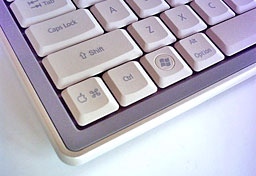 This 'board also has only one Command key, and it's oddly
placed, way over on the far left of the bottom row where the Fn-key
would be on a notebook. The positions normally occupied by the Command
keys are filled by two Alt/Option keys, with a Windows key where the
Option key is on Mac keyboards. At least the Control key is in its
customary spot.
This 'board also has only one Command key, and it's oddly
placed, way over on the far left of the bottom row where the Fn-key
would be on a notebook. The positions normally occupied by the Command
keys are filled by two Alt/Option keys, with a Windows key where the
Option key is on Mac keyboards. At least the Control key is in its
customary spot.
I guess we should be grateful that this 'board has a dedicated and
properly labeled Apple/Command key, but its banishment to the outer
fringe of the keyboard does make on feel a bit like a second-class
citizen. Executing two-key modifiers one-handed is an awkward stretch,
if possible at all, and not having a right-hand Control key is a royal
pain.
Another Ci70 shortcoming is that there is no Caps Lock warning
light, but there is a forward delete key, which I do like to have.
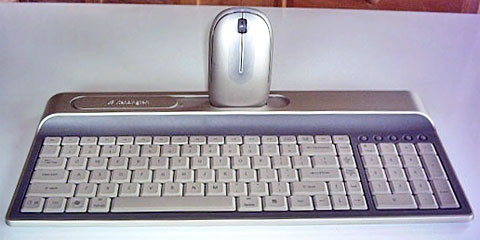
The keyboard console also has a dock for the mouse when it's not in
use. Inserting the mouse in the dock powers the rodent down to conserve
battery power.
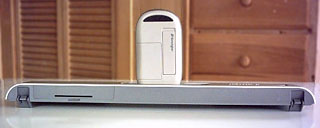
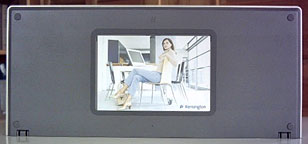 And here's a feature I'll bet you never expected to
see in a computer keyboard: When the 'board is not in use and the mouse
is docked, you can upend the whole rig and use it to display a favorite
photo in the provided picture frame. I don't know how useful that it or
what percentage of users might take advantage of it, but it's an
out-of-the ordinary wrinkle that adds character, so why not?
And here's a feature I'll bet you never expected to
see in a computer keyboard: When the 'board is not in use and the mouse
is docked, you can upend the whole rig and use it to display a favorite
photo in the provided picture frame. I don't know how useful that it or
what percentage of users might take advantage of it, but it's an
out-of-the ordinary wrinkle that adds character, so why not?
Speaking of the mouse, the other component of the Ci70x Wireless
Desktop Set is a wireless mouse, which is also available separately for
$34.95. The Kensington Ci70 mouse measures 4.5" long x 1-1/8" high x
2.5" wide and weighs 4 oz. with two AA batteries, while Apple's
wireless Mighty Mouse measures 4-3/8" long x 1-1/4" high x 2-3/8" wide
and weighs 8 oz. with two AA batteries, making it more than a bit of a
lead-sled, even for wireless mice.
The
Ci70 Wireless Mouse is a slim-profile design up to 35% thinner than a
standard mouse in a symmetrical design that works with both right and
left hands. It is a pure wireless mouse, with no wired alternate
option, as offered in the quite similar in design Kensington Ci75m
Wireless Notebook Mouse. Also different from the Ci75m is that the Ci70
uses larger, heavier AA cells as opposed to the AAA cells used in the
Notebook Mouse.
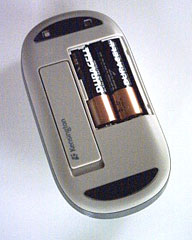 IMHO, the biggest Achilles' Heel of wireless mice is
their weight, which is in turn largely due to their need to contain
batteries. The AA cells no doubt provide longer battery life than the
AAAs, but in my estimation the tradeoff is not worth it. The Ci70 mouse
does glide smoothly on the mouse pad, but one still has to overcome its
inertia of rest with each cursor movement, and I much prefer lighter
mice - the lighter the better. I will say that this mouse has the most
comfortable feel of any mouse I've used carrying AA cells.
IMHO, the biggest Achilles' Heel of wireless mice is
their weight, which is in turn largely due to their need to contain
batteries. The AA cells no doubt provide longer battery life than the
AAAs, but in my estimation the tradeoff is not worth it. The Ci70 mouse
does glide smoothly on the mouse pad, but one still has to overcome its
inertia of rest with each cursor movement, and I much prefer lighter
mice - the lighter the better. I will say that this mouse has the most
comfortable feel of any mouse I've used carrying AA cells.
Happily, the Ci70 mouse's buttons and scroll wheel are excellent.
The mouse's split top panel flexes for the left/right button click
functions, and these have a positive feel. I also like the scroll
wheel, which is clickable for a third-button function. I find the
unit's low profile very comfortable, with its sides clad in a rubbery
traction material for a positive grip.
As I noted above, the Ci70 Mouse is not a Bluetooth device; it
operates on the 27 MHz frequency with a nominal range of up to 30 feet
and has its own dedicated receiver (shared with the companion keyboard)
that plugs into a USB port on the computer or a USB hub. This has its
advantages and disadvantages: On the one hand, you don't have to be
bothered with the tedium of Bluetooth pairing and wake-up lag; on the
other, it eats up a precious USB port, and the little receiver module
is another loose bit with the potential to get lost.
Actually, that latter issue has been
addressed by Kensington in the form of a receptacle in the bottom of
the mouse itself in which to store the wireless receiver when it's not
in use. Inserting the receiver in its slot also automatically powers
the mouse down to conserve battery charge. Happily, the Wireless Mouse
requires no driver installation or other software and is supported by
OS X.
As for wireless performance, the mouse is instantly recognized by
the system without having to muck around with pairing connections, like
you have to do with Bluetooth mice. This mouse, like all wireless mice
I've ever used, is afflicted with a degree of latency in response to
user-input, but I'm happy to report that there seems to be some
progress on this issue, and the Ci70 and Ci75m mice are the least
troubled by this symptom of any I've sampled to date, but it is still
there. Just a tiny micro-millisecond lag between the time you move the
mouse and when the movement registers with the cursor, as opposed to
the right now response you get with wired mice.
The most significant aggravation associated with this is that it
causes me to overshoot onscreen targets. Actually, after a few days of
using the Ci70 mouse, I began to reflexively compensate, which rendered
it only a minor annoyance.
 The mouse features a sleep mode for power
conservation that is entered manually when you store the receiver
module in its storage slot in the mouse base - or automatically after a
few minutes of inactivity. Speaking of sleep, one minor glitch I
experienced is that the mouse drops its connection when the computer
goes through a sleep-wake-up cycle. The drill to restore the connection
is simply to hold the left button down for a second or two - a minor
thing, but another of those little aggravations that simply don't exist
to trouble you with wired mice.
The mouse features a sleep mode for power
conservation that is entered manually when you store the receiver
module in its storage slot in the mouse base - or automatically after a
few minutes of inactivity. Speaking of sleep, one minor glitch I
experienced is that the mouse drops its connection when the computer
goes through a sleep-wake-up cycle. The drill to restore the connection
is simply to hold the left button down for a second or two - a minor
thing, but another of those little aggravations that simply don't exist
to trouble you with wired mice.
The Ci-series Kensington mice have 1,000 dpi sensors, and I expected
it to feel "nervous" with that high a resolution, but it doesn't. Other
than the aforementioned wireless latency issue, the mouse is nicely
responsive and precise.
In summary, I can't fault the Kensington Ci70 Wireless Desktop
Set for its looks, and it's a great concept, especially if you use your
computer in living space that you would rather didn't look like an
office or workstation and where space is at a premium. This combo also
makes taking a real keyboard and full-sized mouse along when road
warrioring practical, if you are so-inclined, and you won't have to
hassle with wires to plug in or get tangled.
Ergonomically, both units are very good, with a nice tactile feel
and comfortable action. The only serious shortcomings are the
keyboard's unorthodox modifier key locations, the lack of a right
Command key and Scroll Lock light, the missing F13 through F15 keys,
and the weight of the mouse.
I'll give the Kensington Ci70 Wireless Desktop Set a
three-out-of-four LEM rating, but wireless peripherals fanciers might
rate it higher than that.
Features
- Mouse features a design up to 35% thinner than a standard
mouse
- Keyboard footprint is 40% smaller than standard multimedia
keyboards
- Unique secondary function keys
- Mouse docks into keyboard when not in use to save space and
conserve power
- Automatic sleep state conserves power and protects the optical
sensor
- Sleek, ergonomic design provides comfort and mobility
- Symmetrical design works with both right and left hand
- Eject button (Mac OS only)
Specifications
- 27 MHz wireless
- Performance Optical sensor (1000 dpi)
- Up to 6-months battery life
- Low battery indicator on scroll wheel
Dimensions
- Keyboard dimensions. L=kb left to right, W=kb front to back, H=kb
from surface to highest part. 16.0"L X 0.75"H X 7.0"W
- Mouse dimension 4.5"L X 0.75"H X 2.5"W
- USB receiver dimension 25.5"L X 0.75"W
Warranty
- Ci70 Wireless Desktop Set - Platinum is backed by the Kensington
5-Year Warranty and free technical support.
Price: $79.99
Go to the Miscellaneous Ramblings Review index.




