Mac Musings
Older Macs in the Age of Leopard
The Future of G3 PowerBooks in the Age of Leopard
Daniel Knight - 2007.09.11, updated
When I began Low End Mac ten years ago, there were no G3 Macs. When Apple introduced the first G3s, which were about 50% more efficient than earlier PowerPC 604e CPUs, everyone was excited.
When Apple releases Mac OS X 10.5 Leopard in October, there will be no support for G3 Macs.
The first G3 Macs, the PowerBook G3 and beige Power Mac G3, were introduced in November 1997. The 250 MHz PowerBook G3 was the world's most powerful notebook, and the 266 MHz Power Mac G3 held its own against the Power Mac 9600 with a 350 MHz 604e CPU.
The last G3 Macs, the 12" iBook and 14" iBook, were discontinued in October 2003. The fastest G3 Macs were those upgraded with a 1.1 GHz PowerForce upgrade (recently reintroduced at 1.0 GHz for US$140).
The best selling G3 Macs were the iMacs, which took the market by storm in 1998, going through two major versions and numerous revisions between the 233 MHz Bondi blue iMac of August 1998 and the 700 MHz iMac that was phased out in March 2003.
The question is: What does the future hold for G3 Macs?
Today we'll look at G3 PowerBooks.
Kanga: The First G3 PowerBook
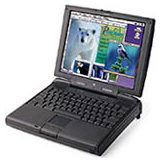
Introduced on Nov. 10, 1997, the original PowerBook G3 was essentially a PowerBook 3400 with a 250 MHz G3 processor replacing the 3400's 603e. "Kanga" shipped with a 5 GB IDE hard drive and 32 MB of RAM (expandable to 160 MB). It is the only G3 Mac never officially supported by any release of Mac OS X.
Yes, people have hacked installers and put OS X on Kangas, but this machine is far better suited to the Classic Mac OS. It shipped with Mac OS 7.6 and can run Mac OS 9.1. Our recommendation is to ignore OS X on this one and go with 7.6.1 for best performance or 8.1 for very good performance and support for the HFS+ file system.
WallStreet: PowerBook, the Next Generation
Just six months later, Apple released the PowerBook G3 Series (a.k.a. "WallStreet"), the first notebook designed from the ground up for the G3 processor. The first release offered 233, 250, and 292 MHz CPUs with 12", 13", and 14" displays. The 233 MHz had no level 2 cache, which slowed it significantly, and is nicknamed "MainStreet".
Only four months after that, Apple revised the PowerBook G3 Series. The Series 2 models ran at 233, 266, and 300 MHz and, with the exception of a special 233 MHz edition with a 12" display, all used the same 14" screen.
WallStreets can handle up to 512 MB of RAM and are officially supported from Mac OS 8 through OS X 10.2.x "Jaguar". Using XPostFacto, it's possible to install 10.3 "Panther" and 10.4 "Tiger" on WallStreets. Because they are not completely modern Macs, there is an important restriction OS X users must be aware of: OS X can only be booted from the first drive partition, and that partition must be under 8 GB in size.
WallStreets are excellent machines with the Classic Mac OS. We recommend OS 8.1 as a minimum, and 9.2.2 runs nicely. If you choose to install OS X, we recommend maximum RAM, a fast hard drive, and using 10.2 or 10.3, as 10.4 is more demanding of resources. A G4 upgrade can help, but all things considered, it's hard to recommend the investment.
For all practical purposes, Tiger has already left the PowerBook G3 Series behind. However, they should continue to serve nicely through OS X 10.3.x.
In terms of hardware, there are only two cautions: First, the 13" screen was troublesome and should be avoided. Second, the hinges that hold the screen in place have a tendency to break. This can be repaired, but it's generally expensive and/or time consuming to do so.
Overall, a WallStreet can be a very affordable field computer as long as you're willing to forgo Tiger.
Further Reading
- Jaguar on WallStreet: Not as Slow as You Might Think!, 2007.07.11
- PDQ PowerBook G3 at 8: Still Useful or Too Long in Tooth?, 2006.09.05
- How Good a Value Is a Used PowerBook G3 WallStreet?, 2003.03.18
Lombard: Slimmer with USB
The first truly modern PowerBook was the "Lombard" PowerBook G3 (a.k.a. "Bronze Keyboard") introduced on May 10, 1999. Almost two pounds lighter and 20% thinner than WallStreet, it's a much nicer notebook for taking into the field. This was the first PowerBook with USB, which replaced Apple's older ADB.
There's no 8 GB restriction on OS X installs, 512 MB and 333 or 400 MHz CPUs make it a great match for Mac OS X - even Tiger. You can run Mac OS 8.6 and later, and OS X 10.3 is the latest version officially supported by Apple. As always, a faster hard drive will improve performance.
Although it is possible to upgrade to a G4 CPU, which theoretically makes it possible to run Mac OS X 10.5 on Lombard, the 512 MB memory ceiling argues against it. Consider Tiger the last version of the Mac OS to run well on this model.
Lomobard can be a great field computer and a good value right up through Mac OS X 10.4. Although there are G4 upgrades for Lombard, we have not received any reports of Leopard running on a G4-upgraded Lombard.
Further Reading
- Lombard: A Great $400 Field Computer, 2005.12.06
- Lombard, the 'Middle Child' PowerBook G3: Good Enough for OS X?, 2006.10.02
- The Strong Value of the Lombard PowerBook G3, 2003.03.19
Pismo: FireWire and Faster
The fastest G3 PowerBook was the "Pismo" model released in February 2000. Available in 400 MHz and 500 MHz speeds, it supports 1 GB of RAM and is the oldest PowerBook with built-in FireWire. It's the oldest PowerBook that can run Tiger without having to resort to XPostFacto.
Pismo is a wonderful PowerBook, and you can make it even better with a G4 upgrade (usually 550 MHz). Many consider this the best PowerBook ever made, as it has plenty of power, accepts lots of RAM, and has two expansion bays (as do WallStreet and Lombard). With a G4 upgrade, it is possible to run Leopard on a Pismo, and as long as you have 1 GB of RAM and a fast hard drive, it will run reasonably well (assuming it can be installed).
This is the only G3 PowerBook we know of to make the transition to Leopard. See Unsupported Leopard Installation for tips on how to get Leopard installed on unsupported Macs.