I recently got a new WallStreet
Series II off eBay, a 300 MHz
model with a 14" LCD, 64 MB of RAM, and no hard drive. I bought it
to replace my Series I, which had
a dead hard drive and the troublesome 13" LCD, which had died.
You'd think that bad experience with a WallStreet would put me
off these machines, but the fact that they are so modular, the
great keyboard, and their cheap price on eBay (I got this one for
$160, and it came with the DVD drive and card - which go for
$50-100 individually - so this was a awesome deal).
I had a spare 40 GB hard drive, 128 MB of RAM (bumping the RAM
up to the Apple maximum of 192 MB), and a battery from my old
WallStreet (the hard drive came from a friend's dead HP Pavilion),
so installing the RAM and hard drive was the first thing I did. I
then installed Mac OS 9 and upgraded to version 9.2.2.
It was fine, but after two weeks it started acting up and slowed
down significantly. I was also noticing how bad the Internet ran,
and my initial intentions to port Firefox fell through the
cracks.
So, I figured, why not throw Mac OS X 10.2 "Jaguar" on it, just
to see how it runs. The worst that could happen is the machine
dies, and since this isn't a production machine (that title is
reserved to my faithful Blue & White
G3 running Mac OS X 10.4 "Tiger"), that wouldn't be a big
deal.
Besides, I was sure I could make more than I paid for it if I
parted out the new WallStreet if the worst case scenario came
true.
The Downgrade
One thing I must point out: When the WallStreet came to me, it
wouldn't boot. Over the course of two days, I determined it to be
the 300 MHz processor card. This was a top-of-the-line machine in
its day, as the bottom sticker indicates it came with the 8 GB
hard drive. However, with the 300 MHz card it would produce a
chime, but nothing on the LCD or an external display.
I quickly swapped in my old 233 MHz processor card. My old
WallStreet was something of a hybrid; it had the ill-fated 13" LCD,
but it's 233 MHz processor card had the 512 KB level 2 cache of the
233 MHz Series II model.
A quick transfer of RAM, and I got a flashing question mark,
beckoning me to install an OS. I did just that, and as I mentioned
previously, it quickly went south.
Installing Jaguar
Now that I had the excuse to install Jaguar, I needed a copy of
it. By Blue & White G3 came with a Jaguar CD set (on three CDs:
two for installing and one with updates to 10.2.8). However, every
time I attempted an install on my old B&W, it would install
fine, but after the first reboot, I would get some weird horizontal
lines (almost like static) over the gray Apple logo. A quick Google
search indicated that this was a sign of a bad CD set. (There was
a video of
this phenomenon on YouTube.) Anyway, another trip to eBay, and
I had a retail CD set in my hands in days.
I hastily installed this copy on my WallStreet, taking into
account the 8 GB limit. Following guidelines on Low End Mac, I
partitioned the hard drive into three partitions: 7.45 GB at the
beginning of the drive for OS X, 5 GB for OS 9, and
the remaining 25 GB or so for everything else (documents, photos,
music, movies, etc.).
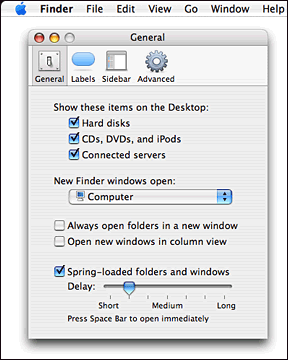 Two hours later I had a nice new copy of OS X Jaguar.
I set it up and logged in, but one thing I noticed - there was
nothing on my desktop! No hard drives. Nothing. I even chose
Preferences for the Finder and made sure the boxes were
checked.
Two hours later I had a nice new copy of OS X Jaguar.
I set it up and logged in, but one thing I noticed - there was
nothing on my desktop! No hard drives. Nothing. I even chose
Preferences for the Finder and made sure the boxes were
checked.
I had to choose New Finder Window if I wanted to navigate about
my computer. I traveled to my Home folder and discovered there was
no desktop item to choose. That's not right. I quickly determined
that something messed up during the install. So I rebooted off the
installer CD, formatted, and reinstalled.
This time I did a custom install and unchecked everything. I
could always install the BSD subsystem, additional applications,
and HP printer drivers later. This time it only took an hour, and
after setting up again, I was presented with my three partitions on
my desktop. It worked!
Then I installed everything I had left out, did a few software
updates to get it all updated, and now I have a fresh, clean
interface.
How Well Does It Work?
I was very surprised at how new my PowerBook felt - and how fast
it really was. Apps launch quickly, and the system boots in less
than 3 minutes, almost as fast as my Blue & White G3. I'm
really enjoying the default background, the pinstriped Aqua, and
the semitransparent inactive window title bars, something I had
never experienced with OS X, since I came in at version 10.3.
I must say I like this better and am looking for a haxie that will
restore this functionality to Tiger.
A few things I was unfamiliar with. One was having to go to
System Preferences, click the Software Update panel, then click
Check Now, and then get a list of available software updates. I
miss the Software Update... link in my Apple menu. Also, the
toolbar at the top of Finder windows is a bit weird, and I miss
having the shortcuts in the sidebar - but not the brushed metal
Finder windows. I like the lighter feeling of Aqua.
One thing I am pleased to see is that network printing works. I
have an old HP DeskJet 842c hooked to my B&W G3 over USB, and I
just turned on printer sharing in the Sharing system preference on
the B&W, and now I can print to it from the WallStreet over my
network.
This never worked in OS 9, even though I followed the article in
Tiger Help on setting it up as a Postscript printer in OS 9.
I'm just happy it works - and very well, too.
My Office Suite of choice, AppleWorks 6, runs very well in it's
OS X incarnation, something I found out in Tiger. I wish Apple
would update AppleWorks, but I doubt that will happen, as it has
not received an update since 2004. It still feels very light and
fun in 2007. In fact, I am writing this article in AppleWorks 6.2.9
on my WallStreet using it's awesome keyboard. Take that, iWork.
Safari 1.0 just doesn't work as nicely as I am sure it did back
in 2003. The Web of 2007 has changed significantly. I was surprised
to see that Firefox 2.0.0.1 (the latest as of this writing) runs
just fine on Jaguar. It's nice to have a browser with a modern
interface, something I struggled with in OS 9. I'm having to
get used to using older versions of several programs I use with
Tiger on my B&W, though some of the latest versions of some
programs I use work just fine.
A Few Caveats
Although I have only experienced one major crash (when I
inserted a WiFi card, which I assume was not supported, I got the
"please restart your computer" dialog), I have experienced a few
minor oddities. One of these is that when I mount the hard drive of
my B&W over the network and am browsing around, sometimes I get
an invisible icons bug, almost like what I have seen in some
Panther betas. Also, when trying to copy over large amounts of
files, it will get through part way, then give me an error type
-50.
Both of these are resolved by going in reverse and mounting the
hard drive(s) of the WallStreet on my B&W G3's desktop.
Another weird bug is a -127 when putting my admin password into
Onyx
(version 1.3.1 works with Jaguar), the best maintenance tool there
is. No big deal, as I haven't had anything bad go wrong - and if it
does, I could use something else.
Conclusion
Should you load Jaguar onto your WallStreet? If you have the
RAM, I would say yes. Even with only 233 MHz, the big cat really
purrs.
However, first make sure all your peripherals are supported, or
you may end up with a panic, as I did. Or you may not.
I inserted a Belkin WiFi card, which is 802.11g and uses a
Broadcom chipset (same as AirPort Extreme), and it wouldn't work.
It would show up in the PC card quay, but it showed up as an
unknown network controller. It turns out that the card I have is a
newer revision than what is supported. No big deal; since my
batteries are shot, I mostly run this tethered to a spare ethernet
cable.
If you haven't made the switch to OS X yet, I suggest you pick
up a copy of Jaguar and do so. If you're afraid you won't like it,
make a backup of your hard drive first. You can always go back.
However, I don't think you will, as even in 2007, Jaguar is a very
modern feeling OS. 
Further Reading
- Mac
OS X 10.2 Jaguar, John Siracusa, Ars Technica, 2002.09.05. An
in-depth review posted 10 days after Jaguar shipped.



