Is the MacBook Air
inevitable, or are all of us stick-in-the-mud curmudgeons right in
thinking that it's just not right?
Limited Connectivity Options
Last time I wrote about the lack of connections on the MacBook Air
(see MacBook Air: What Do You
Do When There's No WiFi?) and foolishly compared it to the Swiss
Army Knife versatility of my Pismo PowerBook.
Well, I'm now forced to say that it was not my intention to compare
anything more than the connectivity of the Pismo with the brandy new
MacBook Air. I would like to reply more in sorrow than anger to those
who wounded the pride of my 8-year-old laptop in their emails: I know
that the Pismo is limited, but it still works for me. Graphics are a
definite concern, as downloaded video is not too good, and the only way
I can use Cover Flow in iTunes is by downloading images manually. (It's
not that much fun, believe me.) I can't use Cover Flow full screen
unless I turn down the display to "thousands of colors", because the
graphics card is just not up to it.
I have the same issue with my G3
iMac and can understand why Leopard (with all it's built-in visual
effects) will only run on a G4 processor.
The MacBook Air Needs a Dock
But let's get back to the MacBook Air. I'm still concerned about the
built-in battery, permanent RAM, and lack of FireWire. What would get
me more excited about the MacBook Air would be a suitable way of
docking the laptop with a base station that has more memory, a bigger
hard drive, and a connectivity options. In short, I am talking about a
new PowerBook Duo.
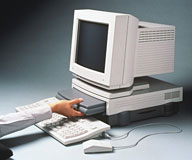 This is Low End Mac, so I'm pretty sure that we all remember
Apple's efforts in building a laptop that tried to combine the best of
two worlds. The Duo allowed users to take a small (8-1/2 by 11 inch
footprint) laptop and "dock" it with a desktop that had a floppy drive,
more VRAM, and the possible addition of a SCSI hard drive. Good idea,
but perhaps a little too far ahead of the curve.
This is Low End Mac, so I'm pretty sure that we all remember
Apple's efforts in building a laptop that tried to combine the best of
two worlds. The Duo allowed users to take a small (8-1/2 by 11 inch
footprint) laptop and "dock" it with a desktop that had a floppy drive,
more VRAM, and the possible addition of a SCSI hard drive. Good idea,
but perhaps a little too far ahead of the curve.
In the meantime, portable computers have gotten as powerful as
desktops, and the need to provide anything more than the convenience of
a permanent connection to peripherals is gone.
Even the biggest fan of the MacBook Air has to admit that it is a
device intended to provide an extremely small and limited computer to
users willing to compromise what a larger laptop brings to the table.
What if you could bring it back to base and automatically have it
backup to a larger hard drive (using Time Machine). What if you could
use the Air to send out faxes from your home or office? What if you
could switch to a larger display and keyboard? What if you could use
FireWire and wired ethernet? What if you could
dock the MacBook Air?
The old Duo had a physical connection to both it's Dock and a
miniDock. Take my word for it, that connection had all the permanence
of a jail cell door. There were hooks, giant hooks. Okay, the hooks
were big if you compared them to the small size of the Duo.
A Wireless Dock?
Does the MacBook Air need to make a physical connection to the Dock
nowadays? Consider the Remote Disc feature that the MacBook Air uses to
install (or reinstall) software. It doesn't require a physical
connection. You can't use Remote Disc to view DVDs, but how long do you
think that state of affairs is going to last?
With VNC (I'm thinking of Apple's Remote Desktop) there are a lot of
computer functions that be controlled by a host computer. In the office
of the future, your laptop might never make it out of your briefcase:
you could back up all the data you gathered when you were out on the
road. You probably wouldn't have to buy a special computer to do this,
you might just have to buy software ("VirtualDock", "AirDock" ) to turn
your desktop or powerful laptop into a host for your MacBook Air.
Is wireless the future? Is the MacBook Air more viable then we
think? Only time (and development) will tell.
I would still like a FireWire port.
Share your perspective on the Mac by emailing with "My Turn" as your subject.




