
2007 – With all the rumors and speculation about a new subcompact MacBook Pro, which some have even suggested might be called the MacBook Pro Duo (I’m exceedingly doubtful about that), I thought it would be timely to take a retrospective look at the original subcompact Mac notebooks (aside from the PowerBook 100, which was quite small and light for its day) – the PowerBook Duo and its successor, the PowerBook 2400c.
- Got a PowerBook Duo? Join our PowerBook Duo and PowerBook 2400c Club on Facebook.
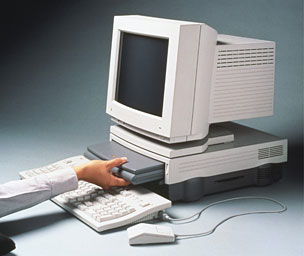
PowerBook Duo in DuoDock
Apple’s dockable first subnotebook PowerBook seemed to me one of the coolest computer ideas when I first heard of it back in the early 1990s. The original concept was for the portable module to function as a normal laptop computer while on the road, but when you returned home or to the office you could insert the closed Duo into a dock with a full-size CRT monitor, a full set of ports, a floppy drive, an internal hard drive, two internal NuBus expansion slots, a mouse, and a keyboard, and have it function as a no-compromise desktop computer. This was a particularly compelling concept in the days before large active-matrix color laptop screens.
There were also smaller, portable mini-docks that could plug into the 152-pin Duo connector, providing a set of standard ports and a connector for an external floppy drive.
The Duo was Apple’s longest-serving laptop form factor of the 1990s, and Duos were eventually built with 68030, 68040, and 603e PowerPC chips.
PowerBook Duo Models
Power Book Duo 210 and 230 (October 1992)
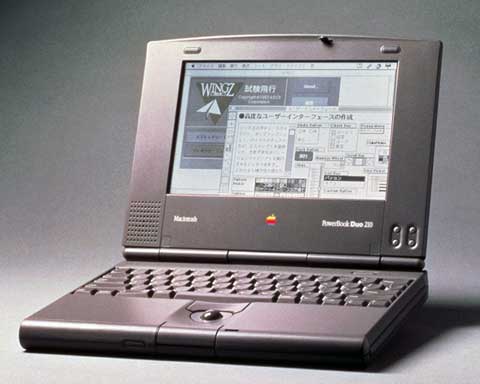
PowerBook Duo 210
- Passive-matrix 9″ grayscale (4 bits, 16 grays) display, 640 x 400 pixels
- Type I NiMH battery (about 2 hours use)
- 19mm trackball
- optional external floppy drive
- optional dock supports video-out, NuBus expansion, and FPU
- optional Mini-dock (standard ports only)
- up to 160 MB hard drive
- Maximum RAM: 24 MB (70ns DRAM)
- 25 MHz (210) or 33 MHz (230) 68030
- Weight: 4.2 pounds
The original Duos set the basic compact form factor, built around a robust magnesium chassis frame that was used for the entire Duo family. They have no built-in floppy drives and just one LocalTalk-enabled serial port, along with a special 152-pin connector for connecting to a DuoDock. All Duos had a slot for an optional internal modem.
The PowerBook Duo 200 series all come with a 19mm trackball that was much smaller than the trackballs in the PowerBook 100 series. The Duo keyboard was slightly smaller at about 95% as large as a standard PowerBook keyboard as well.
The first generation of 68030 Duos offer performance comparable to a PowerBook 145/165, but the Duo supports more RAM – up to 24 MB.
There are three generations of Duo batteries, and the later Type II and Type III units will work in the 210 and 230.
Power Book Duo 250 (October 1993)
- Active-matrix 9″ grayscale (4 bits, 16 grays) display, 640 x 400 pixels
- Type II NiMH battery (about 2.5 hours use)
- 19mm trackball
- optional external floppy drive
- optional dock supports video-out, NuBus expansion, and FPU
- optional Mini-dock (standard ports only)
- up to 240 MB hard drive
- Maximum RAM: 24 MB (70ns DRAM)
- 33 MHz 68030
- Weight: 4.2 pounds
The principal difference between the Duo 230 and Duo 250 is the 250’s active-matrix screen.
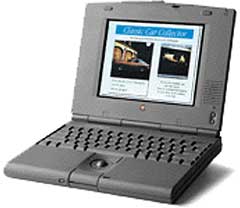
PowerBook Duo 280c
Power Book Duo 270c
- Active-matrix 8.4″ color (8 bits, 256 colors) display, 640 x 480 pixelsType II NiMH battery (about 2 hours use)
- 19mm trackball
- optional external floppy drive
- won’t fit in original DuoDock – requires DuoDock II
- optional Mini-dock (standard ports only)
- video output (with docks)
- up to 320 MB hard drive
- Maximum RAM: 32 MB (70ns DRAM)
- 33 MHz 68030
- Weight: 4.8 pounds
The Duo 270c added a tiny, jewel-like 8.4″ active-matrix color display to the 250’s feature set. It is also 1/4″ thicker, half a pound heavier, and suffers the customary shorter battery life penalty for color. The Duo 270c also had two other advantages over its Duo 250 sibling: greater RAM capacity and a 68882 floating point math coprocessor, the latter making it only Duo 200 series choice for running programs that require floating point math unless you upgraded to a DuoDock II (see below). The faster 68LC040 based Duo 280s had no math coprocessor, but the Power PC Duo 2300 does.
Incidentally, you could upgrade any of the Duo 200 models to PowerPC by replacing the motherboard with Apple’s Logic Board Upgrade Kit, which had a 100 MHz PowerPC 603e processor and 8 MB of built-in RAM (expandable to 56 MB). This upgrade provided any Duo with the functionality of a Duo 2300, but it has been long since discontinued
PowerBook Duo 280 (May 1994)
- Active-matrix 9″ grayscale (4 bit, 16 grays) display, 640 x 400 pixels
- Type III NiMH battery (about 3 hours use)
- 20 mm trackball
- optional external floppy drive
- requires DuoDock II
- optional Mini-dock (standard ports only)
- video output (with docks)
- up to 320 MB hard drive
- Maximum RAM: 24 MB (70ns DRAM)
- 33 MHz 68LC040
- Weight: 4.2 pounds
PowerBook Duo 280c (May 1994)
- Active-matrix 8.4″ color (8 bit, 256 colors) display, 640 x 480 pixels
- Type III NiMH battery (about 3 hours use)
- 20 mm trackball
- optional external floppy drive
- requires DuoDock II
- optional Mini-dock (standard ports only)
- video output (with docks)
- up to 320 MB hard drive
- Maximum RAM: 24 MB (70ns DRAM)
- 33 MHz 68LC040
- Weight: 4.8 pounds
In May 1994, Apple introduced its first “Quadra” PowerBooks and Duos with Motorola’s stripped-down 68LC040 CPU (no floating point unit). The obvious advantage of these machines is a substantial speed bump from the ‘030 machines, and the ‘040 supports up to Mac OS 8.1. The Duo 280s were essentially the Duo 250/270 upgraded with the faster ‘040 chip.
The Duo 280 came with 4 MB of RAM soldered to the motherboard and tested slightly faster than the contemporary 500 series full-size PowerBooks, probably due to faster video circuitry and the Duo’s smaller display. The Duo 280c added a 640 x 480 color display to this. However, the Duo 280, like all Duo 200s, came with only 8-bit mono sound out as opposed to the 16-bit stereo sound in the 500 series ‘Books.
DuoDocks
With the Duo 280s, Apple also introduced the DuoDock II, which includes an ethernet port and 1 MB of standard VRAM to support 21″ monitors with 256 colors or 16″ monitors with thousands of colors. The DuoDock II also included two features that worked only with ‘030 based Duos – a 32 KB RAM cache for the processing unit and a floating point unit, neither of which would work with the ‘040 based Duo 280 machines.
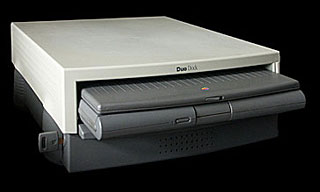
DuoDock
The original DuoDock includes 512 KB of VRAM for connecting external Apple RGB, VGA, and SVGA display monitors and displaying up to 256 colors. You can expand the VRAM to 1 MB and display 32,000 colors.
The DuoDock looks and functions pretty much like a desktop computer and can support a monitor up to 85 pounds. The DuoDock’s ports included an HDI-30 SCSI port (standard for PowerBooks), sound-in and -out ports, an ADB port, two standard Mac serial ports (a LocalTalk-enabled printer port and a modem port), as well as a pass-through port for the Duo 200 models’ optional internal modem.
The DuoDock Plus has the same ports and slots as the DuoDock plus an ethernet port and a higher specification – 1 MB of VRAM standard, supporting thousands of colors on monitors up to 17″ and 256 colors on 20″ and 21″ monitors The DuoDock Plus also supports multiscan monitors.
Apple’s Duo MiniDock, at only 10.6″ long by 3.2″ and weighing only 1.24 lb., was designed to be carried with the Duo. Despite its small size, the MiniDock contained 512 KB of VRAM for its video out port, an ADB port, two serial ports, an HDI-30 SCSI port, and an HDI-20 port for an external floppy drive. It also has the modem pass-through port and sound in and out ports.
Duo Batteries
Several types of nickel-metal-hydride (NiMH) batteries were used in the Duo series. The Type I NiMH battery used in the Duo 210 and 230 offered about 2 to 4.5 hours life and a recharging time of 2 hours. The Type II NiMH battery used in the Duo 250, 270c, and 280 offered 2.5 to 6 hours life (or an optimistic 4 hours on the color 270c). The Type III NiMH battery introduced with the Duo 280c provided 2 to 4 hours use on these ‘040 color machines.
PowerBook Duo 2300c (October 1996)
- Active-matrix 9.5″ color (256 colors) display, 640 x 480 pixels
- Type III NiMH battery (about 3 hours use)
- tappable trackpad
- optional external floppy drive
- requires DuoDock II (including FPU)
- optional MiniDock (standard ports only)
- video output (with docks)
- 750 MB to 1.1 GB hard drive
- Maximum RAM: 64 MB
- 100 MHz PowerPC 603e
- Weight: 4.8 pounds
The PowerPC Duo 2300c debuted with the PowerBook 5300 in the Fall of 1996 and uses the same 100 MHz 603e processor as the three lower-end 5300s, although it was somewhat slower (by about 15%) than the 5300 due to its antiquated internal motherboard architecture dating back to the original Duo 210. The 2300c featured a NiMH battery offering up to three hours use between charges and supports up to 64 MB of RAM.
The 2300c has the best Duo display – the same 9.5″ active matrix unit used in the PowerBook 540c – and it actually trumped the newer PowerBook 5300 series by having the first “tappable” trackpad (shared with the ‘040 PowerBook 190 series) that Apple offered. The Duo 2300 was not cheap – with 20 MB of RAM and a 1.1 GB hard drive it sold for a breathtaking $4,700, and that was with no dock or floppy drive. With virtually necessary peripherals added, it was easy to add $1,000 more to that price.
The PowerBook 2400c
In May 1997, the PowerBook 2400c was introduced as the Duo 2300’s replacement, and it began shipping in August of that year for $3,499 (more than today’s 17″ MacBook Pro). Built for Apple by IBM Japan, the 2400c was based on the PowerBook 3400c/180 motherboard with 256 KB L2 cache and the 3400’s video subsystem with a built-in VGA port. It was small, sleek, and lightweight (at 4.4 pounds, nearly half a pound lighter than the Duo 2300, and still the lightest Mac notebook ever, although Apple is rumored to be shooting for 3.5 pounds with the subnotebook MacBook Pro).
-
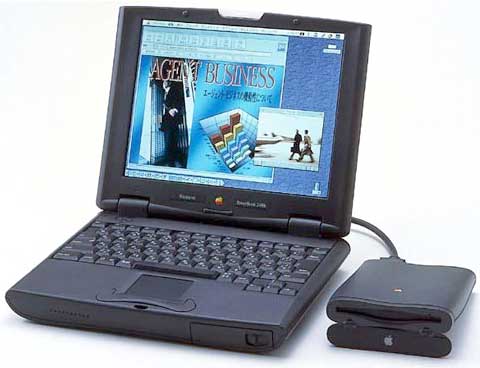
PowerBook 2400c
Active-matrix 10.4″ color display, 800 x 600 pixels
- NiMH battery (roughly 2 hours use)
- tappable trackpad
- built-in speaker and microphone
- 2 PC card slots
- infrared support and video-out
- Full set of PowerBook ports (unlike the Duo)
- 16-bit stereo sound input/output
- External floppy drive
- 1.3 GB to 2 GB hard drive
- supports SCSI Disk mode
- Maximum RAM 80 MB (16 MB soldered)
- PowerPC 603e 180 MHz 256k Level 2 cache
- internal slot for 8-bit video or ethernet card
- Weight: 4.4 pounds
- MacBench 4 (Processor) Score: 299
The 2400c’s built-in monitor is the 10.4″ TFT active-matrix 800 x 600 color screen inherited from the PowerBook 5300ce. Its NiMH battery offered 2 – 4 hours use between charges.
Unlike the Duos, the 2400c has a full complement of standard PowerBook ports, including a GeoPort (an oddball Apple modem technology that never caught on) enabled serial port, plus a 1 Mbps IrDA Infrared port and two PC Card slots.
In other words, no mucking about with docks was necessary for 2400 connectivity. Like the Duo, the 2400’s tiny form factor (under 2″ thick with a 10.5″ by 8.5″ footprint) left no room for either a CD-ROM drive or an internal floppy drive. An external floppy drive was included, something that was an extra-cost option with the Duo.
There was also a tappable trackpad, a built-in speaker and microphone, 16-bit stereo sound input/output, 1.3 GB to 2 GB hard drives, support for SCSI Disk Mode, support for up to 80 MB RAM (16 MB soldered), an internal slot for 8-bit video or an ethernet card (ethernet could also be supported with a PC Card).
As tiny as it was outside, internally the 2400c, being based on the same speedy PCI architecture as the PowerBook 3400/80, offered considerably higher performance than the bigger, “full-size” PowerBook 1400.
The 2400 was not originally intended to be marketed outside Japan, and it never did make it to Canada. It was designed with a much smaller than standard sized (87%) keyboard – even smaller than the Duo’s. The good news was that small it may have been, but the 2400’s scissors-action keyboard is smooth as silk, and Apple used the same technology for the G3 Series PowerBook keyboards. Most users reported that they got used to the 2400c’s smaller keyboard quickly.
Like the 1400, the 2400 had its processor mounted on a daughter card, making it upgradable to G3. Both Newer Technology and Vimage at one time offered a selection of G3 upgrades for the PowerBook 2400, and, for a while, the 2400 with Vimage’s 340 MHz G3 upgrade installed was technically the fastest PowerBook in the world. However, no upgrades for the 2400 are currently being marketed.
There was a fairly long stretch between discontinuation of the PowerBook 2400c in early 1998 and the introduction of the 12″ dual USB iBook on May 1, 2001, during which time there was no subnotebook Apple laptop at all (the original clamshell iBook was bigger and heavier than the contemporaneous Lombard and Pismo PowerBooks).
Fans of small Apple notebooks have been enduring another of those dry spells since the 12″ PowerBook was discontinued in May 2006.
Here’s hoping for a break in the weather soon.
Publisher’s note: Four months after this was published, Apple introduced the first MacBook Air, giving a whole new definition of subnotebook and going in a whole different direction than the netbooks that were popular in that era.
Keywords: #powerbookduo #powerbook2400c
Short link: http://goo.gl/N9EQBi
searchwords: powerbookduo, powerbook2400c
