Low End Mac Reader Specials
TypeStyler For Mac OS X is Now Shipping! Download The Free Fully Functional 60 Day Tryout at www.typestyler.com
OWC: We Make DIY Upgrading Easy! Maximize your Apple MacBook / MacBook Pro. Up to 8.0GB Memory, up to 1.0TB HD & More. Easy Guide + Free, Detailed Installation Videos. Click here
Don't install Parallels to play poker online! Poker Mac will show you how
to download and install a native Mac poker application such as Full
Tilt Poker Mac.
Laptop Hardware Provided by TechRestore - Overnight Mac & iPod Repairs.
Compare products like desktop computers, apple laptops, apple macs, and LCD Monitors side by side! All the information and reviews to make the best purchasing decision for new mobile phones, sat nav systems, or MP3 players. The Ciao online shopping community makes searching products easy for you.
The Wonderful PowerBook 100
- 2000.12.11
My Turn is Low End Mac's column for reader-submitted articles. It's your turn to share your thoughts on all things Mac (or iPhone, iPod, etc.) and write for the Mac web. Email your submission to Dan Knight .
Recently, I acquired my tenth Mac and my third PowerBook: a mint
PowerBook 100 from 1991. I was
really lucky, as I got it with the external floppy drive and the AC
adapter (mine says Sony on the back, not Apple, though the front has
the Apple logo!) for a mere
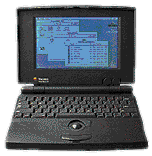
$20 at Goodwill Computerworks here in Austin,
TX! Those of you who have read my Mac
Obsession article on My First Mac
will recall that I was looking for a 100-series PowerBook at the time I
wrote it. Well, firstly, I found a mint PB 145B and then, two months later, this
great PB 100!
The PowerBook 100 is my favorite PowerBook to this day. I also have a PowerBook 540c, which is a really great machine, but there's just something so cool about the 100.
There are several reasons I prefer it. Firstly, there's the size and weight. It's around 5 pounds, making it almost a full two pounds lighter than any of the other 100-series 'Books. Plus, since it uses an external floppy instead of an internal one, it's smaller and slimmer than those machines, as well. The result is a sleeker looking, easier to tote around PowerBook, which I believe was the whole idea in the first place!
My 540c weighs like 7 pounds, which isn't super heavy - and cool looking as the 540c is, it's far from sleek! That applies to most PowerBooks, though. I think the only ones that truly embody the original intent are the 100, the Duos (but they lack too many features without the DuoDock), the 1400 (my next PowerBook!) and the 2400 (way cool machine!). The newer PowerBooks and the iBooks are just far too weighty and big when compared to these models.
My first Mac was also a PowerBook 100, so there's a lot of sentimental value there for me. The 100 was also Apple's very first PowerBook, debuting on October 21, 1991. True, it was conceived in the pre-World Wide Web-era, as we know it, and it's lowly 68HC000 CPU and 8 MB RAM ceiling preclude any kind of modern software, but the PowerBook 100 can still do a lot, making it a very useful Mac.
For example, it will run ClarisWorks 3.0 beautifully, a great program for writing, painting, drawing, etc. As I write a lot, I find CW 3.0 on the 100 perfect for that, plus the 100 is so easy to travel with! Of course, viewing web pages is not really an option on the 100, but it does email fine. I'm on AOL, and the 100 will only run up to AOL 2.7 (no browser), but that does allow for email, instant messaging and chatting. I have a Global Village TelePort Platinum 19.2 kbps external modem I take with the 100 when I travel (I must confess, for major road trips I take my 540c, as I can access my websites and the Internet from it). Really, the 100's forte is as a writing machine. When inspiration hits (like right now!), it's the Mac I choose, hands down.
There's still a lot of software that can be run on the 16 MHz PowerBook 100. Basically, anything that will run on a Plus, Classic, SE, or Portable will run on the 100. That's a lot of software, and it can usually be found for cheap or free! The PowerBook 100 will run the software better than those other Macs, too.
As far as an operating system, I find that 7.1 is best, and about as high as one should go on the 100. It will run up to 7.5.5, but there's a lot of stuff in there that won't work with the 100's 68HC000 CPU. System 7.1 still does a lot, anyway, and the 100 boots in no time, letting you get to work quickly.
So there you have it, the still stylish, still useful, sleek, and highly inspiring PowerBook 100! It usually can be found for less than $50, and when you realize just how cool it is, that's a steal.
Much maligned (unfairly!) in 1991-1992, this machine has stood the
test of time and become a classic Mac, just like the Mac Plus, the II-series, and the SE/30. To quote Neil Young, to my
PowerBook 100 I say long may you run!
Share your perspective on the Mac by emailing with "My Turn" as your subject.

Recent My Turn articles
- Using Low End Macs for Internet Radio, 08.18. When the local public radio station moved classical music to HD radio, it was time to find another way to listen. An old iMac with iTunes solved the problem.
- 'That's Not a Computer', 07.30. Salvaging a broken PowerBook by turning it into a desktop computer.
- Upgrading a Digital Audio G4 to work better in Leopard, 06.02. In its original configuration, the dual 533 MHz Power Mac G4 was slow with Mac OS X 10.5, but add the right upgrades, and it runs Leopard quite nicely.
- My 4 favorite PowerBooks, 05.28. The PowerBook 150 has a big screen for a vintage PowerBook, the 165c has color, the 100 is diminutive, and Lombard has USB and a great keyboard.
- More in the My Turn index.
Links for the Day
- Mac of the Day: 17" iMac G4/800 MHz, July 2002 - The iMac 'grows up' with a 17" 1440 x 900 display.
- Group of the Day: LisaList supports Lisa users.
- November 8 in LEM history: 99: OS 9: I think I like it - 01: The simplified Mac life - Soured on Windows - Flea market Mac - 02: Little room for improvement in new 'Books - Combo drive upgrade for iceBooks - 04: Re-Porter - 05: Fix the old iMac or buy a Mac mini? - Apple's Copland project - 06: MacBook Core 2 - MacBook value equation - Cheap is as cheap does - 07: Problems with Classic mode in Tiger - The G4 Power Mac that won't run Leopard
- Support Low End Mac
Recent Content on Low End Mac
- Quad-Core CPU Makes Sense in MacBook Pro, OS X 10.6 Causing Overheating, Overseas Power, and More, The 'Book Review, 11.06. Also Late 2009 MacBook reviewed, how to add RAM to new MacBook, 18.4in Acer notebook used Intel i7, and SanDisk SSD chosen for Sony VAIO X.
- Dumping Macs for Google Apps, SSD in iMac, Late 2009 iMac Performance Problems, and More, Mac News Review, 11.06. /newsrev/09mnr/1106.html
- WiFi Paranoia, iMac-O-Lantern, Magic Mouse Does Click, Free Clipboard Managers, and More, Charles W. Moore, Miscellaneous Ramblings, 11.05. Also strange time stamps, problem with ColorIt on Intel Mac, and the story behind OS X 10.5.4 install discs.
- IDE Is Dead; Long Live SATA!, Dan Knight, Mac Musings, 11.04. SATA has displaced parallel ATA. While IDE hard drives haven't disappeared, the best deals are in SATA hard drives.
- QuickTime X in Snow Leopard Imports, Trims, and Publishes Video Quickly and Easily, Alan Zisman, Zis Mac, 11.04. The long, slow process of importing video into iMovie to edit it, then render it to another format, is history as QuickTime X does that much more quickly.
- More links in our archive.
Recent Deals
- Best Mac Pro Deals, 11.03. Used 2.66 GHz 4-core, $1,300; 3.0 8-core. $2,299; refurb 2.66 4-core Nehalem, $2,149; 2.93, $2,549; 2.26 8-core, $2,799; 2.93, $4,999.
- Best iPhone Deals, 11.03. New 8 GB iPhone 3G, $$99; refurb 16 GB 3GS, $149; new, $199; 32 GB, $299.
- Best 12" PowerBook G4 Deals, 11.03. Used 867 MHz SperDrive, $348; 1 GHz, $499; 1.33 Combo, $298; SD, $559; 1.5 Combo, $448; SuperDrive, $589.
- Best Power Mac G3 and PCI Video Card Deals, 11.02. Used beige 300 MHz, $25; G4/366, $49; blue & white 350, $80; 400, $90; 450, $105; PCI video cards from $15; shipping additional.
- Best Power Mac G4 and AGP Video Card Deals, 11.02. Used 400 MHz, $50; 733 MHz, $69; 933 MHz, $209; 1.25 GHz dual, $299.
- Best 15" MacBook Pro Deals, 11.02. Used 2.0 GHz, $800; 2.2, $900; 2.4, $1,000; refurb 2.53, $1,449; 2.66, $1,699; 2.8, $1,949; 3.06, $2,169; new 2.53, $1,579; 2.66, $1,799; more.
- Best Mac mini Deals, 10.30. Used 1.33 GHz G4 mini, $379; 1.42, $389; 1.5, $419; 1.83 GHz Core Duo, $350; Core 2, $439; new 2.26 GHz nVidia, $580; 2.53 GHz, $770; Server, $990.
- Best G4 iBook Deals, 10.30. Used 12" 1.07 GHz Combo, $225; 1.33 GHz, $298; 14" 1 GHz, $349; 1.33 GHz, $398; 1.42 GHz SuperDrive, $498.
- Best Classic Mac OS Deals, 10.30. System 6.0.8 floppies, $10; 7.1, $12; 7.5, $20; 7.5 CD, $4; 7.6 $13; 8.1, $11; 8.5, $20; 8.6, $90; 9.0, $20; 9.2.2, $30.
- More deals in our archive.
About LEM | Support | Usage | Privacy | Contacts
Navigation
Used Mac Dealers
Apple History
Video Cards
Email Lists
Favorite Sites
MacSurfer
MacMinute
MacInTouch
MyAppleMenu
InfoMac
Macs Only!
The Mac Observer
Accelerate Your Mac
RetroMacCast
PB Central
MacWindows
The Vintage Mac
Museum
DealMac
DealsOnTheWeb
Mac2Sell
ramseeker
Mac Driver Museum
JAG's House
System
6 Heaven
System 7 Today
the pickle's Low-End
Mac FAQ
Abandonware
Petition
Mac vs. PC Info
Affiliates
The Apple
Store
Mac
Connection
B&H
MacMall
TechRestore
ExperCom
Crucial
Memory
batteries.com
Advertise
MacMinute
MacInTouch
MyAppleMenu
InfoMac
Macs Only!
The Mac Observer
Accelerate Your Mac
RetroMacCast
PB Central
MacWindows
The Vintage Mac
Museum
DealMac
DealsOnTheWeb
Mac2Sell
ramseeker
Mac Driver Museum
JAG's House
System 6 Heaven
System 7 Today
the pickle's Low-End
Mac FAQ
Abandonware
Petition
Mac vs. PC Info
Mac Connection
B&H
MacMall
TechRestore
ExperCom
Crucial Memory
batteries.com



