This Week's Apple and Desktop Mac News
This week's 'Book Review: Laptop
security, PowerBook G5 delayed, SoundBite portable USB speakers,
iPresent It, and more. Also the Mac/ThinkPad shuffle, 8x dual
layer PowerBook G4 SuperDrive, Negroponte's $100 laptop, bargain
'Books from $319 to $1,739, and more.
Apple Posts Mac mini Service & Support
Page
NEWS:
Learn more about Mac mini on Apple's Mac mini Service
& Support Page
- Mac mini external ports and connectors
- Compatible Apple displays
- About the DVI to VGA Adapter
- Memory Specifications and Upgrades
- The power LED indicates the computer's status
- Learn about which kind of keyboard and mouse to use
- Positioning your Mac mini for best ventilation and wireless
reception
- Connecting headphones or external speakers to your Mac
mini
- Tips for cleaning the outer case of your Mac mini
- Macintosh: How to Use FireWire Target Disk Mode
Troubleshooting and compatibility information
- What to do if your Mac mini won't turn on
- What to do if your Mac mini won't display video
- The Apple logo on top of Mac mini does not light up
- How to Reset your Mac mini
- How to Reset the Power Management Unit (PMU)
- Don't use nonstandard-shaped discs in slot-loading CD-ROM or
DVD-ROM Drives
Mac mini: The Emperor's New
Computer
NEWS: Divisiontwo Magazine's Jorge Lopez
says:
"Both the Apple hype machine and Jobs' reality distortion field
have kicked into overdrive this year with the recent release of the
bold, innovative and affordable G4 Cube...oops I mean the Mac
mini.
"I'll admit, we were excited at first to get one in the lab to
put through its paces....
"If you believe Apple's marketing department, the new Mini is
'smaller than most packs of gum' and weighs 'less than four
quarters'. Well, we received our test unit from Apple yesterday,
and let me say right off the bat that those claims are a wee bit of
an exaggeration. Far from being Trident-sized, the Mini actually
measures about 6.5" x 6.5" x 2", about the size of two wonderbread
cheese sandwiches stacked on top of each other, or about 50 packs
of Bubble Yum. As for the weight, it feels about three pounds. Hold
a Mini in one hand and four quarters in the other and tell me which
one feels heavier. You could perform this experiment yourself at an
Apple store....
"So is the mini a maxi value? For me, clearly, no. When I
consider that a good deal of my time is spent running applications
like Disk Defragmenter, Scandisk, Norton AV, Windows Update and
Ad-Aware - none of which are available for the Mac platform - it
doesn't make sense for me to 'switch' to a Mac at this
time...."
DoubleCommand Keyboard Remapper
PR: DoubleCommand is
software for Mac OS X (a kernel extension) that lets you remap
keys, in other words change the way your keyboard works. Often used
to make a PC keyboard more comfortable with a Mac, swapping the Alt
(Option) and Windows (Command or Apple) keys, since they are in
swapped positions on Mac and PC keyboards. DoubleCommand is a quick
and easy way to fix this if you use a PC keyboard with your Mac.
Called DoubleCommand because originally it was used to give the old
PowerBooks a second Command key, where there was an enter key.
DoubleCommand started out as a hack of iJect, which was
generously GPL'd by Christian Starkjohann. So go check out the
great software he makes over at Objective Development
www.obdev.at
As a result, DoubleCommand is released under v2 of the GPL.
Please read the file Licence.txt for more information.
DoubleCommand 1.5.3 released for Mac OS X 10.3, added support
for Control + Home/End PC style and fixed a bug with Command ->
Option mapping.
DoubleCommand Feature List
- Disable DoubleCommand
- Enter key acts as a Command key
- Enter key acts as a Control key
- Enter key acts as an Option key
- Enter key acts as an fn key (partial support, cursor keys
only)
- Command key acts as an Option key
- Command key acts as a Control key
- Option key acts as a Command key
- Control key acts as a Command key
- Swaps Control key and Option key
- Capslock key acts as a Control key
- fn key acts as a Control key
- Swaps numpad . with numpad shift+.
- Shift + Delete acts as a Forward Delete
- Disable Command and Option
- PC style Home and End keys
- Backslash (\) acts as a Forward Delete
- Swap function key behaviour on new 'Books
- Disable Capslock
Any sensible combination of the above can be used.
The Plasticsmith Releases Line of Sleek Mac
mini Accessories
PR: The
Plasticsmith, makers of the Dome laptop stand, have been
quick out of the blocks to release a cool new line of products
designed exclusively to enhance Apple's new Mac mini.
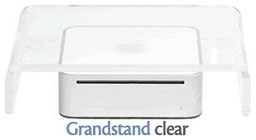 Apple warns against stacking
anything on top of the mini's case, so the Plasticsmith mini Grand
Stand gives the mini a protective covering while supporting the
weight of an LCD or CRT monitor.
Apple warns against stacking
anything on top of the mini's case, so the Plasticsmith mini Grand
Stand gives the mini a protective covering while supporting the
weight of an LCD or CRT monitor.
Available in clear acrylic or steel finished to complement the
mini, they are both sleek and attractive as well as functional and
space-saving.
For the more contemporary look, the acrylic model offers an
elegant enclosure for the mini. It measures 11" wide by 9" deep by
2-1/2" high and is made of 3/8" acrylic with richly polished
edges.
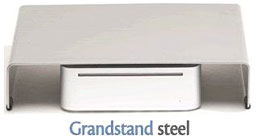 The steel model's durable coating
is designed to color complement the Mac mini. In addition to
housing the mini, it can conceal a power brick , USB hub and excess
cords. Measuring 11" wide by 9" deep by 2-3/8" high, it is made of
3/32" powder-coated steel.
The steel model's durable coating
is designed to color complement the Mac mini. In addition to
housing the mini, it can conceal a power brick , USB hub and excess
cords. Measuring 11" wide by 9" deep by 2-3/8" high, it is made of
3/32" powder-coated steel.
Both models can safely support 60 lbs., have nonskid pads, add
protection for the Mac mini and sell for $34.95.
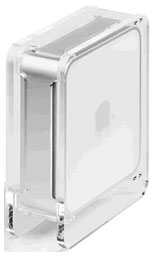
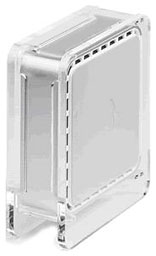
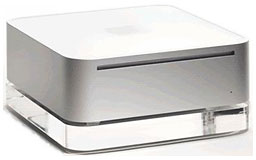
Plasticsmith mini Tower
The Plasticsmith mini Tower is a custom made flame-polished
acrylic enclosure that turns the mini on its side for a more
dramatic presentation.
Slots provide full ventilation and DVD access whichever side it
is turned on. Designed to be a functional art piece, it gives the
mini a unique look and saves space at the same time It sells for
$39.95.
 Plasticsmith mini
Skirt
Plasticsmith mini
Skirt
The Plasticsmith mini Skirt is a 3/4" thick flame-polished
acrylic pedestal the size of the mini that gives it an even
classier look.
It, too, comes with nonskid pads and sells for $19.95.
All four products are sold exclusively on The Plasticsmith
online store.
IOGear Connects Mac mini with Any Computer
PR: IOGear,
the mobile connectivity and peripheral specialist, announces that
its MiniView Micro USB PLUS KVM (Keyboard, Video, Mouse) Switch
(model # GCS632U) is a simple, low-cost solution for consumers to
connect any computer to the new Apple Mac mini. Since the low-cost
Mac mini computer does not come with a keyboard or monitor, users
can connect their favorite keyboard, monitor, speakers and mouse to
the new Apple system, along with their current desktop computer.
This enables PC users to have affordable access to the simple
computing and graphic interface of Macs.
The MiniView Micro PLUS KVM is a self-powered switch with
built-in cables for simple Plug-n-Play use. This product allows
users to simultaneously run and share audio between two computers
with a single keyboard, monitor and mouse. The KVM comes with a
unique USB Sniffing Technology that reduces the delay typically
experienced when switching computers and allows multiple computers
to be booted simultaneously.
The MiniView Micro PLUS KVM switch is the smallest two-port KVM
switch available on the market with audio support. With KVM cables
molded into the unit, users are now able to manage two PCs or Macs
from a single keyboard, monitor and mouse and share the multimedia
speakers between them. In a breakthrough in KVM technology for Mac
users, IOGear has enabled the functionality of the special keys on
the Mac systems. When using a PC keyboard, a special set of 'hot
keys' have been designed to emulate the special keys on all Mac
machines.
"Consumers who purchase the new Apple Mac mini are able to save
their old computer and switch back and forth between the two
computers, depending on what computing solution is needed," said
Miranda Su, vice president of sales and marketing at IOGear, Inc.
"IOGear's affordable KVM switches are an ideal solution because
they connect two computers with just one keyboard, monitor and
mouse, while allowing consumers to share multimedia speakers. That
old computer no longer has to sit around and collect dust. PC users
can now have the best of both worlds."
The MiniView Micro PLUS KVM switch is priced at $79.95 (MSRP)
and is available immediately from all major catalog resellers,
online resellers and selected retail outlets. The KVM switch
functions on Microsoft Windows 98/98SE/ME/2000/XP, Mac OS 8.6 or
higher and Sun Solaris workstations. The product comes with
IOGear's standard three-year warranty.
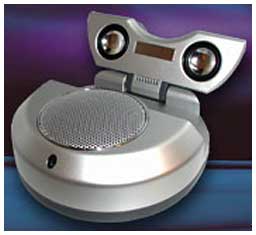
Sound Bite, a 2.1 Speaker System
PR: Tritton has introduced the Sound
Bite music system designed for portable computers. The USB
portable 2.1 speaker system delivers quality sound across the
entire musical spectrum in a compact design. With a built-in
subwoofer, you will enjoy the highs and lows as it was meant to be
herd. Both the audio and power come from the single attached
foldaway USB cable so there are no batteries, power adapters or
cables to carry around. Sound Bite is small enough to fit in your
pocket, just plug into any PC or Mac USB port and start enjoying
music on the go.
 Features
- Compact, portable fold up design
- Plug and Play USB Connectivity
- No external power adapter or batteries required
- Superior 2.1 audio sound with built-in subwoofer
- Registers as a second sound device on system
System requirements:
- Available USB port
- Windows 98SE/ME/2000/XP
- Mac OS 9/OS X
Specs.
- 2 x 28 mm magnetically shielded satellite speakers
- 1 x 52 mm magnetically shielded subwoofer speaker
- Attached 50cm USB type-A cable
- Maximum output power - 1.2W + 1.2W
- 5W rated input power
- Power LED
- USB bus powered (5V, 500mA)
- Product Dimensions: 110 mm x 110 mm x 42 mm
- Mass: 280g
Available in pearl white or dark gray finish.
Price: $49.95.
Drive Genius 1.0.1 Storage Management:
Maintain, Manage, Optimize
PR: Drive
Genius is an OS X utility designed to provide unsurpassed
storage management. Featuring an easy-to-use interface, Drive
Genius is packed with powerful tools such as a drive optimizer, a
comprehensive repair facility for analyzing, repairing and
rebuilding volumes, plus excellent testing capabilities with media
surface scanning, performance benchmarking and data integrity
checking. It can be used to initialize drives, create and delete
partitions, and erases them securely as per Department of Defense's
standard. Drive Genius can also hide partitions and duplicate
volumes or drives swiftly. Last but not least, Drive Genius
features advanced tools for resizing and moving of volumes without
reformatting, and sports a sector editing tool to modify the data
on any sector of the drive - powerful features that will satisfy
even the seasoned Mac experts.
Emails. Digital pictures. Work files. Music collection.
Financial records. Lets face it, your computer has become and
important part of your life. As you use your computer, your hard
drive becomes bloated with thousands of files, mechanical parts
wear and fatigue, your computer begins to operate more slowly, and
eventually fails. Your only defense is to carefully monitor and
manage your hard drive so you can be sure it is in good health and
working at peak efficiency at all times - doing so might mean the
difference between your productivity and complete data loss.
Thankfully, Drive Genius makes these tedious tasks painless, fast,
and easy. From performance tuning, to disaster recovery, Drive
Genius provides all the tools needed to take control of your hard
drive, and your digital life.
Drive Genius includes essential maintenance tools, effective
optimization tools and powerful management tools.
Essential Maintenance Tools
- Duplicate - Fast and easy volume or entire drive cloning.
- Integrity Check - Find problems before they find you with these
comprehensive hardware verification tests
- Repair - Quickly fix corruption on OS X volume structures to
get your damaged drive up and running fast
- Rebuild - Rebuild and replace OS X volume structures to regain
access to files that have become lost or hidden
- Verify - Check OS X volume structures for possible
corruption
- Fix Permissions - Reset OS X boot volume permissions to improve
application performance and compatibility
- SMART Status - Read and display SMART diagnostic codes from
your hard drive to avoid dangerous hardware failures
Effective Optimization Tools
- Defragment - Get the most speed and efficiency possible by
Optimizing your OS X volumes
- Benchtest - Make sure your hard drive performance is what it
should be with comprehensive speed tests and graphical comparisons
to other common configurations
- Surface Scan - Verify your hard drive's reliability with a
complete suite of nondestructive read verification tests for any
drive or OS X volume
- Sector Editor - Fine tune all aspects of your system with
direct, advanced byte viewing and editing of all data on your
drives, volumes and files (for expert users only)
Powerful Management Tools
- Partition - Add, delete, hide, expand or shrink OS X partitions
so you can organize your data more efficiently
- Shred - Stop prying eyes with DoD compliant (5220.22 - m)
secure erase. Removes all traces of data from free space and
deleted files on any device or OS X volume
- Details - In-depth report of specifications and space
utilization of all devices and OS X volumes
- Initialize - Easy, high level OS X formatting to prepare new
hard drives for use on your computer
System requirements:
- Mac OS X Panther
- Mac OS X Jaguar
Temperature Monitor 2.4 Displays CPU
Temperature
PR: Temperature
Monitor is an application to read out all available
temperature sensors in Macintosh computers. The program can display
and visualize measured values in a large variety of fashions. The
application supports the following operations on the measured
readings:
- display in a default window
- output in a screen display in front or in the background of the
screen
- tabular display in an overview window
- display in the menu-bar
- display of a maximum of two readings in the Dock
- graphical display of short-term and long-term history
curves
- speech output of readings
- display of minimum and maximum values
- export to text files
Moreover, the application can display additional technical
information about your computer. Among other information this
includes:
- Processor type
- Processor and bus frequencies
- Manufacturing information
Of course the application can read out the data only if your
computer is equipped with the necessary sensors, and if Mac OS X
can access them without needing third-party device drivers.
Beginning in summer 2002, Apple has begun to massively drive
forward the use of monitoring probes in the PowerMac series, the
Xserve series, and in portable computers. Some models are equipped
with 38 and more sensors. But Temperature and Hardware Monitor can
detect sensors on many older systems as well if they are
available.
We try to detect all sensors on as many Macintosh computer types
as possible. However, a prediction which sensors are available in
which models is not possible, because Apple very often releases
"silent product updates", where the hardware equipment of some
models are changed but the names are not (specifications are
"subject to change without notice"). The particular graphics card
and hard disk configuration used is also important because these
parts can include independent sensors, too.
Please note that Apple does not support an official or
standardized way of reading out sensor data in Mac OS X (the only
exception is the Server Monitor application for the Xserve series).
Moreover, there is no documentation or other technical note about
the individual function of the sensors. For this reason, the
development of Temperature Monitor and Hardware Monitor is very
costly because the necessary data has to be determined by reverse
engineering and tests run on a variety of computer models.
New in this version:
- Support for many new hard disk models has been added.
- Support for some previously undetected sensors of the Xserve
and the Xserve G5 has been added.
- A workaround for a bug in Mac OS X 10.3.7 has been added: On
computers with incorrect DNS configurations, Panther 10.3.7 imposes
a delay of approximately 1 minute to applications which have to
know the computer's TCP/IP name. Among many other programs,
Temperature Monitor and Hardware Monitor were affected by these
delays. The applications will now detect this problem and cancel
the request after 3 seconds. This allows the programs to be used in
incorrectly configured TCP/IP networks with Mac OS X 10.3.7.
- Alarm triggers for temperature sensors now automatically
recompute their thresholds when the user switches to a different
temperature unit.
- The boot ROM version is now additionally displayed in the
system overview.
- The application notifies users who have forgotten to define
different colors for curves in the history graphs.
- Fixes a problem where old readouts could be displayed in the
Dock when the application was quit.
- Many small changes and optimizations in the user
interface.
Requires Mac OS X 10.2.5 or higher.
Temperature Monitor is freeware.
Desktop Mac Deals
Low End Mac updates the following price trackers every two
weeks:
For deals on laptops, see our Best PowerBook G4 Deals,
Best iBook G4 Deals,
and Best iBook G3
Deals. For deals on iPods, see our Best iPod Deals.