Compiled by Charles Moore
and edited by
Dan Knight
- 2006.07.14
PowerBook, iBook, MacBook, and other portable computing is covered
in The 'Book Review.
All prices are in US dollars unless otherwise noted.
News & Opinion
Tips
Products
News & Opinion
Some 'Argh' Moments while Switching from
Windows to Mac
PC Magazine says:
"During the initial start-up sequence, OS X asked me if I wanted
to log into my home Wi-Fi network, which it had already found. That
impressed me. After clicking "Yes," I entered my WEP password and
clicked to proceed. No go: Authentication error. So I entered the
password again, and again, and again. I even used a Windows machine
to log into my router to verify that I had the correct information.
I did. Argh. There went an hour of my life that I'll never
get back....
"Confession: It's important to note that I never read
instruction manuals unless I'm totally clueless. As of today, I
still haven't read an OS X manual (Apple's 'Argh' back at me?). But
hey, should I need to read a manual? Isn't the point of OS X and
all Apple products, in general, that they're dead easy to use? I
thought so."
- Link: Switching
from Windows to Mac - Some Argh Moments
Going Back to a G3 iMac: OS 9 'Amazingly
Fast'
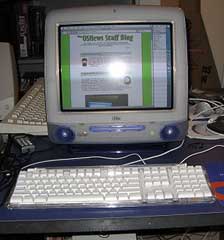 OS News' Eugenia
Loli-Queru reports:
OS News' Eugenia
Loli-Queru reports:
"A few months ago Thom bought and reviewed an iMac G3 333 MHz while it was running
Mac OS 9. I was always fond of the looks of the classic iMacs.
They were just too cute to not want one. Recently Geeks.com
restocked their Mac line with refurbished iMac G3s. They sent us
one in, a 400 MHz DV model
(first released in October 1999) and we tried out not only Mac OS
9.2.2 but also the latest Mac OS X, v10.4.7....
"Once again (since I used to use a G4 Cube) I was amazed at how fast Mac OS
9.2 boots and operates. OS 9 reminded me of another era, a
more innocent era in operating systems. Today users require so much
from their desktop software that developing and delivering an OS
has lost lots of its joy. But even today OS 9 could serve a
less-needy user. It comes with IE, Netscape, Outlook Express and
there are still thousands of applications to freely download or
purchase. OS 9 might not be supported anymore by Apple, but it
can be used to fill up most modern needs....
"I was impressed by the speed of Tiger on this 400 MHz G3. I
remember a time in 2001 when our ex-housemate bought a 500 MHz iMac
with Mac OS X 10.1.5. It crawled! But Apple has made an
exceptional job optimizing Mac OS X since then. Especially with
Panther and now with Tiger, a supported 400 MHz G3 is more than
enough for some basic Internet usage (browsing, email, IM
etc.)...."
- Link: Review: Going Back
to a G3 iMac
Turn a Mac with OS X 10.2 or Later into an
Anti-spam Machine
MacUser's Dan Moren says:
"Do you hate spam? I mean, hate it. With the passion of a
thousand fiery suns. Would you, given the chance, obliterate it
from the face of the earth? How about for a Klondike bar?
Excellent.
"Your mail program's spam filter is probably pretty good, but if
you really do detest spam, it's not nearly good enough. Adding an
extra layer (or two) to junk mail filtering may just help kill
those sneaky fellows dead....
"Many of us probably have an old Mac lying around that could be
sacrificed for this sort of duty, and it may very well be a
meaningful sacrifice to stop the evil that is spam."
- Link:
Turn That Old Mac into an Anti-spam Machine
Macintosh OS X Routine Maintenance Page
Updated
MacAttorney's Randy B. Singer has updated his excellent
Macintosh OS X Routine Maintenance page:
"I've created this site because so many of the Macintosh users
that I have encountered have expressed frustration that they don't
know what to do, or what to use, for performing routine maintenance
on their Macintosh running OS X. There is also a huge amount
of misinformation going around on the subject. Even Apple has
contributed to the confusion with conflicting tech notes on their
Web site. With the assistance of a few free utility programs,
routine maintenance under OS X is very easy. The problem for
most users is figuring out which utility to use, and for what. This
site will tell you that.
"Just a little routine maintenance can be as effective as buying
an expensive accelerator for some Macintoshes! It can also banish
vexing spinning beachballs, rid you of 'out of memory' error
messages, make an old Mac perform like a newer one, and keep your
valuable data from being lost."
- Link: Macintosh OS
X Routine Maintenance Site Updated
Tips
17" iMac for Education Developer Note
Posted
Apple has posted a developer note for the new education-only iMac.
"This developer note gives a technical description of the
17-inch iMac for education computer, based on the Intel Core Duo
microprocessor and introduced in July 2006, to help developers
design products compatible with these computers. The note provides
information about the computer's internal design, input-output
features, and expansion capabilities."
- Link:
17-inch iMac for Education Developer Note Posted
Products
StorCase SATA Enclosure for Mac
PR: StorCase Technology, a world leader in data
protective storage enclosures, today announced the release of a new
InfoStation 5-Bay SATA desktop model with support for both PC and
Macintosh systems. The latest version of this high-density RAID
enclosure allows increased configuration flexibility for up to five
removable SATA 3 Gbps drives, providing the performance, data
protection and adaptability required for today's demanding and
dynamic storage applications.
The 5-Bay InfoStation integrates a SATA port multiplier that
greatly simplifies cable management by allowing a single cable
connection for up to five SATA devices. The versatile enclosure is
capable of using all five bays for RAID levels 0, 1, 10 and JBOD,
and uniquely supports twice the SATA-specified external cable
length. This complete, turnkey solution incorporates a 64-Bit PCI-X
133 MHz HBA and includes a shielded 2-meter cable with standard
eSATA external connectors. The new enclosure is PC and Mac OS-
compatible; support for Linux is anticipated in the near
future.
"The 5-bay InfoStation now with Mac support is one of the first
external SATA enclosures on the market that doesn't require
bridging to a SCSI, Fibre or Ethernet host interface," stated Joel
Tang, StorCase Director of Engineering. "StorCase is providing an
efficient, reliable and platform- adaptable solution that supports
up to 3.75 TB of storage within a single, cost-effective and
compact enclosure," added Tang.
For added application flexibility, two desktop InfoStation units
can be mounted horizontally in a standard rack cabinet with the use
of an available 3U rack mount kit.
Exceeding hard drive and controller manufacturers' requirements
for operation of high performance, high capacity devices, all
StorCase enclosures are supported by industry-leading warranties
and 24/7 technical phone support.
- Link: StorCase
Desktop Mac
Deals
Low End Mac updates the following price trackers every two
weeks:
For more deals on current, recently discontinued, and older
notebooks, see our MacBook and
MacBook Pro deals, 12" PowerBook
G4 deals, 15" aluminum PowerBook G4
deals, 17" PowerBook G4
deals, titanium PowerBook G4
deals, iBook G4 deals,
PowerBook G3 deals, and iBook G3 deals.



