Compiled by Charles Moore
and edited by
Dan Knight
- 2007.04.05
This Week's Apple and Desktop Mac News
It's been widely anticipated, and this week Apple released an
8-core Mac Pro using a pair of
Intel quad-core "Clovertown" CPUs. We cover this new build-to-order
option below and looked at its value in The 8-core Mac Pro Value Equation
yesterday.
For those who want to make the most of their recordable CDs and
DVDs, BurnAgain DVD looks like a clever rethinking
of the entire process. Shareware.
PowerBook, iBook, MacBook, and other portable computing is
covered in The 'Book Review.
All prices are in US dollars unless otherwise noted.
News & Opinion
iPod Accessories
Software
News & Opinion
Apple Releases 8-Core Mac Pro
In one of its somewhat puzzling "stealth" product releases,
Apple quietly added an 8-core Xeon processor option to the Mac Pro.
Instead of the standard two multicore "Woodcrest" Intel Xeon
processors running at 2.0 GHz, 2.66 GHz, or 3.0 GHz, Mac Pro
purchasers can now go with two 3.0 GHz quad-core
"Clovertown" processors - the fastest quad-core Intel Xeon
available - for unprecedented 8-core power.
You can also install up to four 750 GB hard drives in four
independent, 3 Gbps Serial ATA drive bays using a cable-free,
direct-attach system.
Every Mac Pro graphics card supports dual displays and at least
one 30" display. For added performance, you can choose upgraded,
workstation-class graphics cards that can also power two 30" Apple
Cinema HD Displays.
Install additional PCI Express cards into the three full-length
PCI Express expansion slots, which feature a tool-less bracket for
easy installation and removal of cards.
Add up to 16 GB of 667 MHz DDR2 ECC fully buffered memory - a
memory architecture that's up to 256 bits wide and allows for
greater memory capacity, faster speeds, and better reliability.
Mac Pro Configuration Options
- Two 3.0 GHz quad-core processors or two dual-core processors up
to 3.0 GHz
- Memory up to 16 GB
- Upgraded graphics cards
- Hard drive storage up to 3 TB
- Up to two SuperDrives
- AirPort Extreme
- Bluetooth 2.0+EDR
Apple Reduces Cinema Display Prices
Apple also dropped prices on its Cinema Display monitors
- 20" Cinema Display was $699, now $599
- 23" HD Cinema Display, was $999, now $899
- 30" HD Cinema Display, was $1,999, now $1,799
Seven Apples in 50 Best Tech Products of All
Time
PC World Christopher Null says:
"From breakthrough hardware to time-honored software, we salute
those amazing products that changed technology - and our lives -
forever."
- 2. Apple II (1977)
- 6. Apple iPod (2001)
- 14. Apple Macintosh Plus
(1986)
- 21. Apple iTunes 4 (2003)
- 30. Apple Mac OS X (2001)
- 34. Apple AirPort Base Station (1999)
- 41. Apple HyperCard (1987)
Link:
Seven Apples in 50 Best Tech Products of All Time
'Apple Has My Back'
ATPM's Mike Chamberlain says:
"Shh! Don't tell the PC people, but the truth is that sometimes
our 'designed in Cupertino' but 'assembled in China' Macs have
. . . how shall we put it? Problems. I had intended to
say that thankfully these seem rather rare, but the truth is that
depending on the model of Mac that you own, repair experience can
be surprisingly high. A quick look at MacBook and MacBook Pro reliability
statistics over at MacInTouch, for instance, reveals some
surprisingly high percentages for laptop repairs. As you might
imagine, user comments and experiences range from the sublime to
the terminally aggravating. Will it not ever be so?
"I'm writing this month's column on my 'newly returned from
AppleCare' MacBook Pro. I am, thankfully, one of the happy
campers."
Link: Who's Got Your
Back?
Why I Chose OS X over Linux
A processwrite.com blog says:
"I finally made a new computer purchase, the first time in
almost seven years. Yes, even though I am a computing professional
working in cutting edge grid computing, my personal boxes were from
the days when Windows 2000 was new.
"I work on Linux for the grid, installed Linux desktops at home
- this is being written on a 800 MHz desktop with a failing
graphics card, in Firefox on Mepis, an Ubuntu variant. I have
administered Solaris and Windows 2000, and run Windows XP
Professional on my current old HP laptop.
"But after using an older Mac PowerBook G4 at the lab, I
couldn't do anything but buy a Macintosh. They just work....
"I know, I know: Apple is the Fascist Party in OSes right now.
They make unreasonable demands of their development community and
often will pull stupid stunts. But things actually work."
Link:
Why I Choose Mac OS over Linux
Synchronize Your Mac's Clock with a Time
Server
MacInstruct's Leonard says:
"It happens to the best of us: We purchase new Macs and
everything is fine. But then, slowly and inevitably, our Macs'
clocks start losing time - a minute here, a minute there, and
before we know it our clocks are substantially slower than their
accurate counterparts. How do you fix this? Synchronize your Mac's
clock with a time server!
"Linking your Mac's clock to a time server will sync the time on
your Mac with a server. If you are using Mac OS 10.4 Tiger, you're
probably automatically synced to Apple's time server, which is
time.apple.com. But you can also set up a time server so your clock
will be set to your office's time, or maybe your college's time
(many colleges have their own time servers). Time servers ensure
that everyone has the right time, since your Mac will check the
time server throughout the day.
"Here's how to synchronize your Mac...."
Link: Synchronize
Your Mac's Clock with a Time Server
iPod Accessories
In-desk iPod Dock
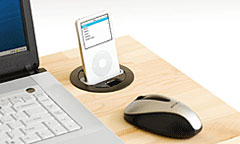 PR: The Belkin
In-Desk Dock saves your valuable desk space with an easy install
right into it, through a 3" circular hole. You can now seamlessly
charge and play your iPod as you sync it to your computer. A
stereo-output jack on the Dock lets you listen to your music
through your stereo, powered speakers, or headphones.
PR: The Belkin
In-Desk Dock saves your valuable desk space with an easy install
right into it, through a 3" circular hole. You can now seamlessly
charge and play your iPod as you sync it to your computer. A
stereo-output jack on the Dock lets you listen to your music
through your stereo, powered speakers, or headphones.
Note: Requires a 3" opening in your desktop or other surface. If
your desk does not have a pre-drilled hole in it, you can drill one
yourself using a 3" hole saw (requires separate purchase, not from
Belkin).
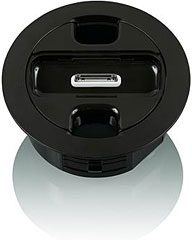 Package Includes:
- In-Desk Dock for iPod
- Mounting Ring
- USB Device Cable
- Quick Installation Guide
iPod and universal wells not included
Advantages
- Charges and syncs your iPod as you listen
- Includes a stereo-out jack
- Mounts through a 3-inch circular hole
Color: Black
Lifetime Warranty
Belkin online price $39.99
Link:
In-desk Dock for iPod
Software
Multisession CD and DVD Burning Reinvented
PR: BurnAgain DVD will change the way you use burnable
media - just add files to CD-R, CD-RW, and now also DVD+RW media
several times (without creating multiple volumes and without
erasing the disk).
With BurnAgain DVD you can add files to CD-R, CD-RW, and now
also DVD+RW several times into the same volume (and without erasing
it). If you burn items twice, BurnAgain will automatically compare
them to the versions already burned and only new or changed files
will be added, overwriting the previous versions if required. This
makes BurnAgain a unique Mac-like burning tool and a great backup
solution to recordable media.
Multisession Burning Reinvented
Using BurnAgain DVD you can also change the title of your disk
at each burn. At any time you can decide to start over and hide the
files of previous burns, making the disk look like you would have
used an empty one. BurnAgain DVD can also be used to erase CD-RW or
DVD+RW media. To simplify the use of BurnAgain DVD for backup
purposes, each disk can optionally store its own source setup, and
BurnAgain DVD loads this setup automatically when the disk is
inserted.
Use Burnable Folders and Aliases
BurnAgain DVD is capable of resolving aliases and supports using
Burnable Folders in Tiger.
Platform Independence That Just Works
BurnAgain DVD automatically preserves your special Mac file
attributes (resource forks) and burns the disk in a platform
independent format that can be used on Windows and Linux.
Ready for Intel-based Macs
BurnAgain DVD is a "universal binary" that runs natively on
Intel based and PPC Macs.
BurnAgain DVD Features
- add files to same volume
- supports CD, CD-R, DVD+RW
- change title at each burn
- add only new or changed files
- resolves aliases
- supports burnable folders
- hide previously burned files
- preserves resource forks
- platform independent format
New in version 1.1:
- improved performance and usability
- improved handling of aliases
- German localisation
- bug fixes and improvements
System requirements:
- Mac OS X 10.3 or later for CD-R/CD-RW, Mac OS X 10.4 or later
for DVD+RW
- CD-Writer (internal or FireWire)
- DVD-Writer for DVD+RW burning
System support: PPC/Intel
$24.50 shareware
Upgrade from BurnAgain v2.x available for $9.50.
Link: BurnAgain DVD
Make and Print Calendars with My Calendar
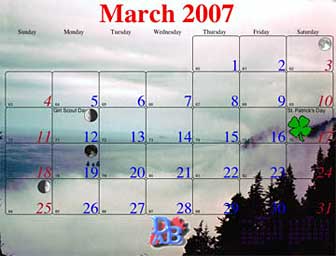 PR: My Calendar is a calendar maker and printer.
Full graphic controls. Include notes, graphics, banners. Full
control of sizes, fonts, orientation, banners, notes, included
images and more. Great for groups and individuals. Creates
beautiful printed calendars with your customizing.
PR: My Calendar is a calendar maker and printer.
Full graphic controls. Include notes, graphics, banners. Full
control of sizes, fonts, orientation, banners, notes, included
images and more. Great for groups and individuals. Creates
beautiful printed calendars with your customizing.
Now International Date format aware! Create calendars using many
international date formats and names of months and weekdays.
It doesn't matter if your date convention is to display the
month or day first, use a period instead of a slash to separate
date elements, show or not show the century. My Calendar uses your
International Settings control panel to display and edit your
dates.
In additional to this great new feature is added network note
sharing!. Now any computers running My Calendar on a LAN can use
the same notes and be notified when anyone else changes a note.
Previous feature additions such as full background images keep
My Calendar one of the few calendar programs for the Mac that can
create and print beautiful calendars for your personal use, your
church, school, university or other group.
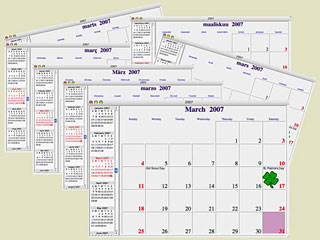 New in
version 12.5:
New in
version 12.5:
- Starting with version 12.5 My Calendar can use and display many
international date formats and display calendar months and weekdays
in the language of your localized settings.
- Added option to display dates in short, abbreviated or long
versions.
- Fixed repeating note bug when adding by frequency.
- Added more calendars before and after current month on main
calendar window scrolling month display.
- Added more sizing abilities to the note and banner
windows.
- Fixed bug in updating notes in the Day View window.
- Minor modifications to several window layouts.
- Fixed bug in printing daily notes.
System requirements: Mac OS X 10.2 or later.
System requirements: PPC
$40 shareware
Link: My
Calendar
Desktop Mac
Deals
Low End Mac updates the following price trackers monthly:
For deals on current and discontinued 'Books, see our 13" MacBook and MacBook Pro,
MacBook Air, 13" MacBook Pro, 15" MacBook Pro, 17" MacBook Pro, 12" PowerBook G4, 15" PowerBook G4, 17" PowerBook G4, titanium PowerBook G4,
iBook G4, PowerBook G3, and iBook G3 deals.
We also track iPad,
iPhone, iPod touch, iPod classic, iPod nano, and iPod shuffle deals.



