PowerBook, iBook, MacBook, and other portable computing is covered
in The 'Book Review. iPod, iPhone,
and Apple TV news is covered in The iNews
Review.
All prices are in US dollars unless otherwise noted.
News & Opinion
Reviews
Products
Software
News & Opinion
I Will Switch from Apple (Someday)
AppleMatters' James R. Stoup says:
"I really like Apple's products. I love the iPod. It rocks. I have
three. I love Macs. They rock too. I have two (working on a third). The
iPhone is amazing, iTV shows great promise, and just about every piece
of software they make is wonderful. And in spite of all that, one day I
see myself switching to Linux.
"I realize that is a bold statement, so let me clarify my position.
When I say 'one day,' what I really mean is 'one day, after Steve Jobs
leaves Apple.' Because as much as I don't want to admit it (and if you
think I'm in denial, just imagine Apple's stockholders), Apple is going
to become a radically different company once Jobs leaves. And, sadly,
it will change for the worse. . . . In fact, I expect it will
mirror the history of Disney after Walt Disney died...."
Link:
One Day I Will Switch from Apple
3-core CPUs: Why AMD Is 'the Smarter Choice'
PBCentral's Joe Leo says:
"The question of whether Apple, Inc. should have stayed with IBM for
the PowerPC chip, or gone with the smarter choice of AMD - instead of
making the leap ahead to Intel - may never be answered when the three
different companies have all rolled out their own unique technologies
over the course of the year. In the fast-growing world of technology,
it's hard to keep up with all these, advanced devices. Much less, stay
on top or ahead of the game.
"(One day you're the new iPod nano, the next day you're yesterday's
new iPod nano).
"Case in point, when IBM announced their new 'Airgap Processor'
technology - which allows for smaller and faster chips that don't use
as much energy - back on May 4th of this year, it brought up the
question on this site whether Apple should have stayed with their
former chip maker. The week after? Intel, maker of the processors found
inside all current Macs, announced news of their own that put
everything back to the status quo.
"Intel's invention? A technological breakthrough that allowed for
their Core 2 Duo processors to work faster but use less energy at the
same time.
"Enter Advanced Micro Devices, or AMD as it's more commonly known,
who rolled out a new - and currently unique to them (for now at least)
- innovation that they feel will advance them in the department of
processor technologies, proving why they are, to quote their own
slogan, 'the smarter choice.'"
Link:
AMD: Why They're 'the Smarter Choice'
Reviews
New 24" iMac Disappointing
Hardmac's Eric reports:
One of our readers, Joe B., sent us his comments after comparing the
previous iMac 24" Nvidia GF and the new iMac 24" Alu:
We just compared these side-by-side:
- The new iMac is significantly LESS bright at maximum setting than
the older model, contrary to what I have seen written on the Web.
- The ATI GPU in the new iMac is about 1/2 to 1/3 as fast as the
Nvidia GPU in the old iMac for volume rendering (tested with a 3D data
set in OsiriX).
- The glare from the new screen is a distraction for professionals in
the medical and graphics industries. I sure looks handsome, though, and
will likely attract PC converts.
- The 2.8 GHz processor speeds routine computing tasks by about 20%,
as expected. We like this, but it does not make up for the
shortcomings.
- Overall, I am quite disappointed in the new iMac for my intended
use....
Link: New
iMac 24": Disappointing LCD Panel and GPU?
New ATI Drivers Do Not Improve New iMac's 3D
Performance
Hardmac's Lionel reports:
"With the release last week of new Mac drivers by ATI, we were
expecting to see performance gain, as current results are significantly
lower than what we could expect. As we reported last week, some 3D
rendering are even slower with the new iMac 24" than the previous 24"
model."
Link: iMac
Aluminum: New ATI Drivers Do Not Improve 3D Performance
Apple's New Keyboards: Atrocious
The Apple Core's Jason D. O'Grady doesn't much like Apple's new
aluminum keyboards.
"And boy, do Apple's new keyboards ever stink.
"I've tolerated the evolution of the Apple mouse from the very first
model (complete with DB-9 connector), the ADB versions, the the
carpel-inducing hockey puck design and the button-less, seven-button
Mighty Mouse. Mostly because the complement the Mac well and usually
work ok.
"Keyboards are a different story altogether...."
Link: Review: Apple's
New Keyboards (Verdict: Atrocious)
Apple Updates
Apple Releases iMac Software Update 1.1
Apple says: this update provides important bug fixes (but doesn't
specify what they are) and is recommended for 20-inch and 24-inch iMac
models with 2.0, 2.4, or 2.8 GHz processors.
System Requirements
- Mac OS X 10.4.10
- iMac (Mid 2007)
File Size: 5.1 MB
Link: Apple
Releases iMac Software Update 1.1
Products
QuickerTek Debuts 802.11a/b/g/n Wireless Solutions
for Mac Pro
PR: QuickerTek have just created a complete wireless
networking solution for Apple Mac Pro Intel-based computers. Available
as either antenna upgrade for $129.95 or as a wireless card/antenna
combination upgrade for $179.95.
The Mac Pro computers were available without wireless altogether, or
with a special order 802.11g or n card. This QuickerTek upgrade adds an
external antenna for a 50% improvement in wireless performance. This
new upgrade card simply replaces the slower factory card and requires
no extra steps to use in day-to-day wireless networking.
The Mac Pro Antenna Upgrade is a superior solution because it moves
the antenna itself outside the confines of the Mac Pro case. The case
is often a source of wireless signal degradation and the external
antenna cable allows the antenna to be positioned up and out of way of
typical office or home clutter that decreases wireless performance.
This antenna also has three connectors to attach the antenna to the
internal 802.11 wireless card, necessary for the highest wireless
speeds.
Rick Estes, QuickerTek president, said, "The Mac Pro Antenna Upgrade
is essential for any Mac Pro user who wants to experience wireless
networking the way it's supposed to work. Just getting the antenna up
and away from the stuff in most offices is a huge win, but using a
tri-band antenna really does the trick. But, if only the best will do,
then go for the new wireless card with [802.11] a speed and the
tri-band antenna for the absolute best wireless anywhere," Estes
continued.
These wireless networking upgrades are made to the same
specifications as the Apple factory networking products. They work with
all 802.11/b/g/n WiFi equipment including Apple AirPort, AirPort
Extreme and the latest 802.11n version of AirPort Extreme, as well as
wireless hardware from Linksys, Belkin and other popular brands found
in wireless networks across the country.
Like most QuickerTek products, these 802.11b/g/n wireless upgrades
are backed with a one-year warranty on parts and labor.
QuickerTek has been a recognized leading innovator of antennas and
RF products for Apple Power Macintosh, Mac Pro, iMac PPC and Intel,
PowerBook, MacBook and MacBook Pro computers. QuickerTek products can
be purchased online and from authorized dealers.
Link: QuickerTek
Software
Carbon Copy Cloner 3.0 Released
PR: Unlike our old free and easy practise in the Classic Mac
OS, you can't use the Finder to drag a copy of an OS X System Folder or
even an entire Mac OS X boot volume to another drive or partition while
retaining bootability. However, there is a way, namely Mike Bombich's
Carbon Copy Cloner software, CCC as it's colloquially known - which can
copy your System Folder preserving data, permissions, ownership, and
bootability. Version 3.0 of CCC has just been released.
CCC can also perform regular backups of your data. When you select a
source disk in CCC, you are presented with the contents of that disk
(hidden items too). Simply uncheck the items that you do not want to
backup, and CCC will provide ample indication what will and will not be
copied. Select a target disk to which you would like to backup, then
press the clone button.
CCC 3.0 features a new interface designed to make the cloning
procedure as well as scheduled data backups more intuitive and more
responsive. Users have better control over what gets backed up, and are
provided with detailed information about the progress of their backup.
In addition to general backup, CCC can also clone one hard drive to
another, copying every single block or file to create an exact replica
of your source hard drive. CCC's block-level copy offers the absolute
best fidelity in the industry!
Among the new features are:
- Support for block-level disk-to-disk clones.
- Synchronization built-in, not bolted on.
- Support for backing up across the network to another
Macintosh.
- Advanced scheduling capabilities - Backup tasks can now be
scheduled on an hourly, daily, weekly, or monthly basis, or you can
indicate that a backup task should run when the backup device is
attached (e.g. an iPod).
- CCC recognizes iPods specifically, allowing time for the
iPod:iTunes synchronization to complete.
- The ability to drill down into folders to select exactly what gets
copied and what doesn't (you can drill down indefinitely).
- Built-in software update feature notifies you when updates are
available.
Carbon Copy Cloner is now available as a Universal binary. As with
previous versions, Carbon Copy Cloner is labeled "Uncrippled shareware"
- try the full-featured product until you trust it, then consider a
donation to the Bombich Software Tip Jar.
System requirements: Mac OS 10.4.8 or later.
System support: PPC/Intel
CCC is considered donation-ware (uncrippled shareware). I worked
hard developing CCC and its methodology and documenting it on the
internet for the rest of the Mac OS X community. If you find CCC
indispensable, please consider making a donation. Please note that if
you are using CCC for an educational institution, you should not
donate to Bombich Software. My heart is in Education and all software
that I write shall always be free to Education.
Link: Carbon Copy
Cloner 3.0
Sweet Home 3D: Free Interior Design Software
PR: Sweet Home 3D is an interior design Java application for
quickly choosing and placing furniture on a house 2D plan drawn by the
enduser, with a final 3D preview.
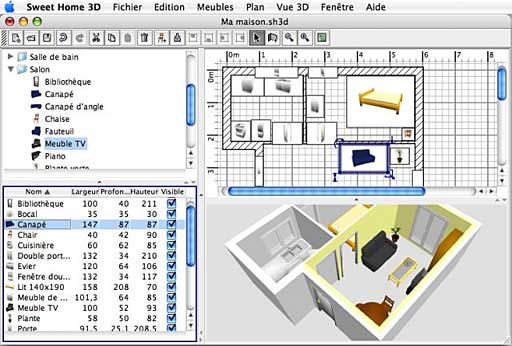
The Website is pretty light on descriptive documentation. I've
downloaded the application and will report on it soon. It appears to do
a few of the same things as Belight Software's Live Interior 3D, which
I
recently reviewed for Applelinks.
System requirements: Mac OS X 10.4 or later
Available in English and French.
Link: Sweet
Home 3D
MacSpeech Releases iListen 1.7.1 Dictation
Software
PR: MacSpeech has announced the immediate availability of
iListen 1.7.1, the latest version of the top-selling speech recognition
solution for Mac OS X. Version 1.7.1 of iListen includes bug fixes to
address issues that were discovered since the release of version 1.7.0.
Various issues in the documentation have also been addressed, a new
QuickStart Guide, and a QuickPick for Apple's backup program have also
been added.
Summary of Changes
- All bug fixes included in the 1.701 through 1.706 "fixers" are
included in this release.
- Full versions of iListen are now installed by dragging the iListen
folder to your Applications folder. This addresses a rare permissions
issue that occurred on a small percentage of Macs.
- The MSRegistration program now displays the Read Me and the End
User License Agreement, and had other changes to improve performance
and stability, including a better user interface and changes to address
an incompatibility with the new version of web kit that is installed
with Safari 3.0.
- The MSSupport program has been modified to provide a better user
interface and more information for our technical support team.
- We made a small change to the search routines iListen uses to
locate existing Voice Profiles to prevent it from timing out when
searching folders with many nested folders inside them.
- WAV files will now be correctly recognized on Intel Macs when the
optional TranscriptionPak is installed
- Added a new MacSpeech QuickPick for Apple's Backup program that
allows .mac users to easily backup their iListen Voice Profile Packages
to their iDisk. This QuickPick can be found inside the Extras folder on
the iListen CD or disk image.
- Other minor enhancements to improve performance and accuracy.
The update is free to registered users of version 1.7.0 through
1.7.0.7. Those who have versions of iListen older than 1.7.0 can
purchase an upgrade to version 1.7.1 starting at only $39.95 from the
MacSpeech website.
Code Rebel's iRAPP 1.0 Networks Macs and PCs
PR: Do you have both a Mac and a PC at home or at work? Do
you wish you could work on all of your computing devices at the same
time? iRAPP is an innovative software application, which enables you to
do just that - sit on your PC and work on both your PC applications as
well as on your Mac applications at the same time. What is even better,
if you have several Macs, you can control and work on all of them at
the same time. All you need is the iRAPP software and place all of your
computers onto a same local network.
iRAPP's unique and innovative event handling technology allows you
to work on individual Mac and PC applications side by side, as if they
were part of the same operating system.
As the computing platforms evolve, and the price of PCs and Macs
continue to decline, there are increasingly more people who have and
use more than one computer regularly. With the recent revival and
popularity of Apple's Mac computers, both consumers, and increasingly
working professionals find themselves in a situation where they not
only have multiple devices with the same OS, but also have both a Mac
and a PC.
iRAPP application seeks to simplify the working environment for
these "multiplatform", "multi-device" users. iRAPP essentially replaces
a hardware KVM switch and gives you valuable additional flexibility.
First, it gets rid of a mess of monitor and keyboard/mouse cables.
Second, you can de-clutter your desk by placing your Mac computers away
from your desk (the only requirement is that they stay connected to
your network, wirelessly or via the ethernet cable). Third, iRAPP's
unique event handling technology gives you a superior user experience.
Since you can open individual Mac and PC applications side by side, it
appears as if you are working on a single computer. As a user, you are
both device and operating system independent.
With iRAPP 1.0, you can:
- Work on both your Mac and your PC at the same time, using one
screen and one keyboard
- Control and work on a single or multiple Mac machines directly from
your PC
- Cut and paste text and images from Mac applications to PC
applications
- Access printers, USB devices and other peripherals that are
attached only to your Mac device
iRAPP 1.0 Features
- Connect to your remote Mac machine from your PC and work
simultaneously on both your Mac and your PC applications using the same
keyboard, screen and a mouse (both PC and Mac have to reside on the
same local network)
- Open and work on any Mac application directly in your PC
environment
- View Mac navigation bar and Mac desktop icons on your PC
- Float the Mac menu anywhere on your PC system via OS X Smart Menu
Bar, or dock it at the top of the screen (just like the default
position on the Mac itself)
- Place OS X Menu Bar to be topmost in the windows desktop
- Copy and paste text (plain text, Unicode text, RTF, HTML) between
Mac and PC applications
- Copy and paste photos and other graphics between Mac and PC
applications
- Choose to display Mac-only environment, PC-only environment, or
both environments fused together
- Support for multi monitor displays (you can assign Mac and PC to
different monitors, drag Mac applications across two monitors; and
stretch applications across multiple monitors)
- Connect to multiple accounts on the same Mac OS X system
simultaneously from a single PC. iRAPP application allows you to easily
switch between active Mac accounts or assign them to different screens
if you have a multi monitor system
- Simultaneously connect from your PC to multiple OS X systems on
your network
- Print from any Mac application to a printer that is connected to
your Mac (physically or via WiFi)
- Access peripherals/USB devices that are connected to your Mac
- Resize and move the iRAPP workspace on your PC desktop, or dock it
at the top of the screen
- Define and store preferred monitor and iRAPP workspace options for
each connection address
- Choose preferred screen mode on the Mac side to set it
automatically at the session start
- Keep your user session working on the Mac even when you are
disconnected and then reconnect to the same user-session later
System Requirements
PC: iRAPP Client system requirements
- Supported operating systems: Windows 2000/XP/2003/Vista
- Minimum recommended CPU: Pentium(R) 4, 1.8 GHz
- Minimum free HDD space: 3 MB
In addition, we recommend that you have a graphics card with
DirectDraw hardware acceleration support.
Mac: iRAPP Server system requirements
- Supported operating systems: Mac OS X 10.4.8 or higher
- Supported devices: Mac mini, iMac, MacBook, MacBook Pro, Mac
Pro
- Minimum recommended CPU: Intel Core Solo 1.5 GHz
- Minimum free HDD space: 2 MB
Network: speed requirements
The mouse movements and keyboard strokes will be faster at higher
network speeds, although iRAPP will work in a lower bandwidth
environment down to 128 kB/s. At the recommended network speed or
higher, you will experience minimal delays and hence you will get a
similar user experience as if you were sitting and working directly on
your Mac.
- Lowest supported speed: 1024 kbit/s (128 kB/s)
- Recommended speed: 10 Mbit/s (1.2 MB/s)
iRAPP sells for $79.95 and includes Server software for Mac OS X
10.4.8 and up.
Link: iRAPP
Desktop Mac
Deals
Low End Mac updates the following price trackers monthly:
For deals on current and discontinued 'Books, see our 13" MacBook and MacBook Pro,
MacBook Air, 13" MacBook Pro, 15" MacBook Pro, 17" MacBook Pro, 12" PowerBook G4, 15" PowerBook G4, 17" PowerBook G4, titanium PowerBook G4,
iBook G4, PowerBook G3, and iBook G3 deals.
We also track iPad,
iPhone, iPod touch, iPod classic, iPod nano, and iPod shuffle deals.



