I do not have a "problem." I can get rid of my extra Macs anytime I
want to. I just don't want to right now.
My wife has an annoying habit of regularly asking me why I need "all
those computers." One can never have too many computers in general -
and Macs in particular. Each one has a specific purpose, although at
the moment I seem to have forgotten the purpose of some of them.
I have heard of and met many Mac "collectors." There is something
about a Mac, even an older Mac, that makes you not want to part with
it. I have observed no such phenomenon among Dell or Compaq owners.
At work, we have an upgraded Power Mac 6100 still happily
chugging along. It has only been in the last year that I tearfully
parted with my PowerBook 2300
Duo and PowerBook 540c. I am
currently faced with the prospect of selling my PowerBook 3400c. With an iceBook, iMac
DV, upgraded Power Mac
7500, and my wife's PowerBook G4, it really is surplus. At least
from a purely practical standpoint.
The PowerBook 3400c was the fastest portable on the planet, Mac or
PC, at its introduction. In fact, it was faster than many desktops. My
particular model is the mid-line, with a 200 MHz 603e processor.
According to the PB 3400c profile on this website, "The PowerBook 3400
was designed as a no compromise laptop." And that it is.
It has 144 MB of RAM (which is the maximum), built-in modem and
ethernet (ingeniously using the same RJ45 port), 2 GB hard drive,
a great sound system (for a notebook anyway), an 800 x 600 active
matrix screen, two PC card slots, IR capability, a standard VGA monitor
connector, an external SCSI connector, ADB, and a standard Apple serial
port.
It has spring-loaded retractable legs on the back, which allow you
to tilt the PowerBook to a comfortable angle for typing. I wish my
iBook had those legs; it would certainly make typing on it more
comfortable.
The 3400c also has an expansion bay that accepts a floppy drive,
CD-ROM, Zip drive, or even an additional 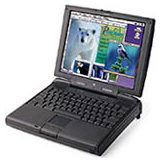 hard
drive, among other things. I have owned this PowerBook for over three
years and only learned today, while doing some reading on Low End Mac,
that the modules that go in this bay are hot swappable.
hard
drive, among other things. I have owned this PowerBook for over three
years and only learned today, while doing some reading on Low End Mac,
that the modules that go in this bay are hot swappable.
This is a more amazing Mac than I ever knew. When first introduced
just over six years ago, this PowerBook, as currently equipped, would
have retailed for over $6,000.
On my PowerBook, I have installed Microsoft Office; Adobe Photoshop
and PageMaker; Macromedia Dreamweaver, Fireworks, Flash and Freehand;
Connectix (soon to be Microsoft, but that's another column) Virtual PC;
Corel WordPerfect; ClarisWorks; Internet Explorer; Netscape; and Quark
XPress. I have added a Farallon SkyLine wireless PC card, which allows
me to work on my home AirPort network. Granted, most of the programs
mentioned above are not the latest and greatest versions, but every one
of them suits my needs.
All of this on OS 8.6. There may have been an advantage to upgrading
to OS 9 at one time; however, since the 3400c will not run
OS X (there is actually a utility that will allow OS X to be
installed, but reports are that the PowerBook runs it so slowly as to
be virtually unusable), I never bothered.
Experiencing an attack of nostalgia, I got out the 3400c today. In
fact, I am typing this column on it, using ClarisWorks 4. When I
starting browsing the hard drive, it was almost like opening a time
capsule. My Documents folder contained work up to the last time I used
the 3400c for work - on the plane returning to Atlanta from Oakland,
CA, in 2001. I put the 'Book in my bag after using it during a layover
in Raleigh, never suspecting that was the end of the line for my
faithful companion.
The day after I got back, I found a deal too good to pass up, bought
a clamshell iBook on an impulse, and copied all my files over.
That clamshell iBook gave way to my current iceBook. However, I
still have no SCSI, PC card slot, ADB, serial port, or option for
internal floppy or Zip. I have USB and FireWire, but I could add that
to the 3400c via PC Card. Of course, I now have 1024 x 768 video,
OS X, and Quartz Extreme.
When you place the two notebooks side by side, there are some
features each has which the other lacks. However, when comparing a
six-year old computer with a currently shipping model, to have the two
come out anywhere close to even is an astounding tribute to the
six-year-old model.
Perhaps that is why I have grown so attached to my PowerBook
3400c.
Am I being overly sentimental and underly (is that even a word?)
practical? What do you think? Should I hang on to my 3400c? Or should I
finally admit that all good things must pass and put it out to pasture?




