Once upon a time, Apple and Adobe were best buddies. While only
a minority of personal computers were Macs, if you were serious
about graphics or design, you ran Adobe software like Photoshop,
and while that software was available for both Windows and Mac, you
probably ran it on Apple hardware.
While there's been nothing as definitive as a divorce, the
Apple/Adobe relationship has been somewhat strained for the past
few years. As Windows system became more graphics-able, an
increasing percentage of Adobe's revenues came from Windows
versions of the company's software.
And as Adobe's attentions turned more and more to Windows users,
Apple began releasing Mac-only products, such as Final Cut Pro,
that competed with Adobe products, in this case Premiere.
When Apple began bundling iPhoto with new Macs, Adobe developed
the similar Photoshop Album - for Windows only.
Despite the tensions, Adobe continues developing Mac versions of
much of its product line. (Though not all - development of the Mac
version of Premiere stopped in 2003, for instance.)
Photoshop Elements 4.0
While Adobe made its reputation with graphics software aimed at
professional users, one of my favourite Adobe programs is graphics
software for the rest of us, Adobe Photoshop Elements. Version 4.0
is available for Mac users.
Priced at US$90 ($80 for download; upgrade pricing: $70 on disc,
$60 download), Photoshop Elements delivers a significant percentage
of the power of the full version of Photoshop (like like previous
versions of Elements) at a significant discount. (The full version
of Photoshop sells for US$649.)
Elements 3.0 significantly changed the interface. Versions 1 and
2 had an interface barely modified from big-brother Photoshop,
which was nice for people looking for a cheaper version of the
pro-level toolkit - but not especially easy for new users. Version
4.0 keeps the newer, easier to use interface.
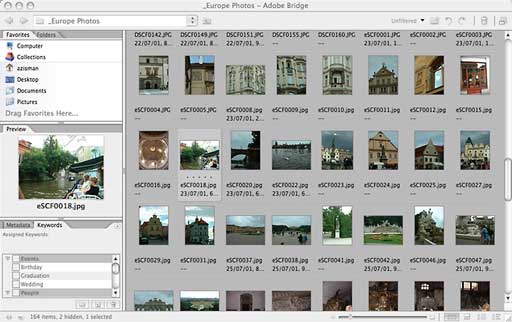
New to Elements is Adobe Bridge, also available in the latest
versions of Adobe's pro-level Creative Suite. Bridge, like iPhoto,
makes it easy to access a large collection of photos through sets
of thumbnails; keywords can be assigned to individual photos or
sets to simplify searches.
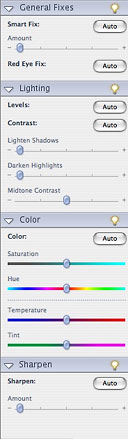 A Quick Fix
mode may be all many users ever use. (Two buttons on the toolbar
make it easy to switch between Quick Fix and Standard Edit modes.)
The Quick Fix interface offers a minimal number of tools, along
with lighting, coloring, redeye, and sharpening fixes. Users can
experiment with sliders to make changes to their photos or simply
click Auto buttons to see what the software suggests. A single Auto
Smart Fix button lets Elements make all its proposed changes at
once. (All these Auto tools can be accessed from the Enhance menu
in either mode.)
A Quick Fix
mode may be all many users ever use. (Two buttons on the toolbar
make it easy to switch between Quick Fix and Standard Edit modes.)
The Quick Fix interface offers a minimal number of tools, along
with lighting, coloring, redeye, and sharpening fixes. Users can
experiment with sliders to make changes to their photos or simply
click Auto buttons to see what the software suggests. A single Auto
Smart Fix button lets Elements make all its proposed changes at
once. (All these Auto tools can be accessed from the Enhance menu
in either mode.)
Users who would rather have more hands-on control will prefer to
work in Standard Edit mode. They will be rewarded with some new
tools, in a number of cases brought over from the latest versions
of Adobe's pro-level programs, and in a few cases improved over the
higher-priced (but older) equivalents.
Often the toughest task in photo editing is selecting just the
right area of a photo; the new version of Elements gains a Magic
Selection Brush; scribble on part of a picture and (with luck) the
software will be able to pick it out from the background. When it
works (it will take practice, and it won't work if there's little
contrast between foreground and background), your object will be
neatly selected - like magic.
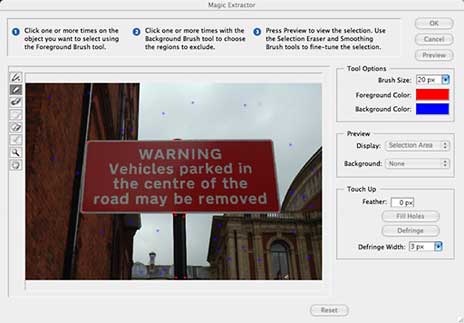
Similarly, the new Magic Extractor tool lets you brush over your
desired foreground and background, this time letting you preview
(and clean up) the results before discarding your background. Very
slick - and even better than the comparable tool in big sibling
Photoshop.
Other improvements: The Skin Tone Adjustment tool alters color
balance to produce more natural-looking skin tones. Red-Eye Fix
works better with less selection required. And (also migrating from
the pro-level programs), the Straighten tool lets you draw a
horizontal or vertical line and align a horizon or other line in
your photo to it.
One of my favourite features in early Elements versions has been
the ability to easily create a panorama image, perhaps merging
multiple landscape shots into a single 180-degree image. It's still
there, but you'll have to look for it. The secret: Choose File/New
and then select "Photomerge Panorama". This will let you select
multiple images to be merged into one.
...85% of Photoshop's power for 15% of its
cost.
Despite its 2006 copyright date, Photoshop Elements, like other
current Adobe products for the Mac, is compiled for PowerPC Macs
only; new Intel Macs will run it using Rosetta, with resulting
impacts on performance. Despite this limitation, Photoshop Elements
4.0 continues to provide a good balance between power and
ease-of-use; nonprofessionals who need to do more with their photos
than iPhoto allows should appreciate Adobe providing them with 85%
of Photoshop's power for 15% of its cost.
Adobe Lightroom
Also of potential interest to Mac-using digital photographers:
Adobe
Lightroom. Aiming at much the same audience of users working
with camera RAW formats as Apple's Aperture. (Camera RAW is an
optional file format on many digital cameras, allowing users to
save images without any compression or processing by the camera
hardware, offering users the ultimate raw material for hands-on
photo editing. Like every uncompressed format, RAW images are big;
if you save in this format, expect to fill up your memory card
fast.)
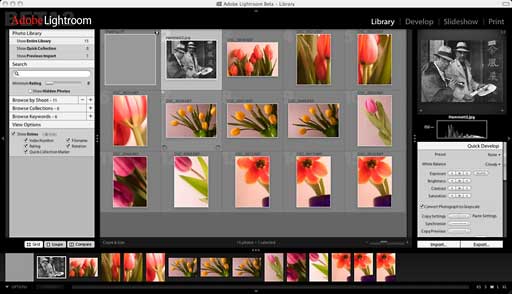
Currently, Lightroom is available only as a prerelease public
beta for free download. And surprise of surprises: the Lightroom
beta is Mac-only (though Adobe is noting that the release product
will have both Mac and Windows versions). Adobe is hoping for user
feedback, noting that feedback may be reflected in the final
release.
The current Beta 2 is set to expire on June 30, 2006, and it's
possible that there will be a new version available before then.
Registration with Adobe is required; after that would-be users can
select a 6.4 MB download of the core program or a 113 MB download
of the program along with a set of RAW formatted images, projects,
and metadata.
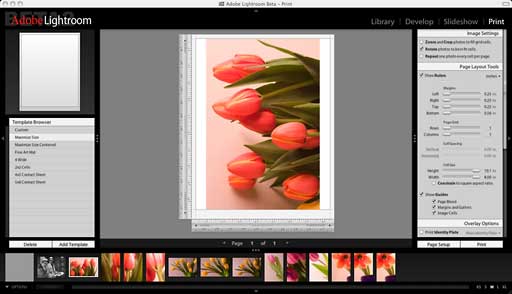
Although Lightroom is being presented as a tool for working with
RAW image files, it can also be used with images saved in more
common file formats such as JPEG. In fact, Adobe seems be aiming it
(and eventually pricing it) somewhere in between its existing
Photoshop Elements and full-blown Photoshop products.
Where both Elements and Photoshop have common parentage and
overlapping toolsets, Lightroom was developed fresh from the ground
up. (Some references within the program suggest it was initially a
Macromedia project; Adobe purchased Macromedia last year.) It
promises a complete photographer's toolkit, with everything from
working with albums of thumbnails (a la iPhoto or Adobe Bridge) to
editing, presentation, and printing tools.
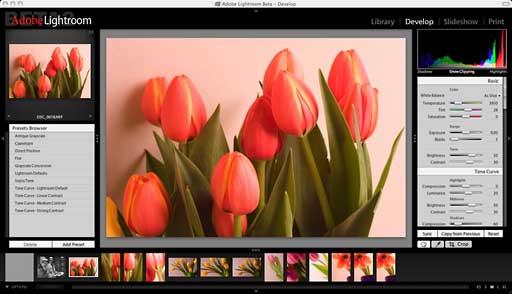
I'm not going to give a complete review of Lightroom at this
time - especially since Beta 2 is set to time-out relatively soon.
If you want to read more about Lightroom, the Adobe link listed
above includes links for several beginner video tutorials.
Alternatively, while based on the earlier Beta 1, Michael
Reichmann's
First Look and Primer is the most comprehensive guide that I've
seen.
If you work with digital photos or are interested in the shape
of graphics software in the near future, it's worth downloading the
Lightroom Public Beta. And given the sometimes on-again/off-again
nature of Adobe's relationship with Apple, it's nice to see
something from Adobe that's (at least for now) just for Mac.

Manufacturers and distributors: Interested in having
your product reviewed? Please read our review policy.



