In my last article, Upgrade
Your Pismo with a Dual-Layer DVD Burner, I mentioned that I had
just purchased a PowerBook 3400c.
This week I'd like to take the time to inform readers about my
experience trying to maximize this new part of my Mac family.
Why a 3400?
I would first like to explain why I purchased a laptop that was
old and really underpowered compared with the rest of the Macs I
use. First, I wanted another laptop. Although I primarily use a
Pismo for portable duty, it belongs
to my wife. Another 'Book would give me portability without having
to worry about her snatching it from me.
Going with an older 'Book would also present a challenge:
getting it to run on my OS X only network, running wirelessly,
and finding programs that would make it usable for me.
The last reason is that it is just plain fun! It's something new
to tinker with and bring up (hopefully) good memories of the old
days on Mac OS.
My 3400c
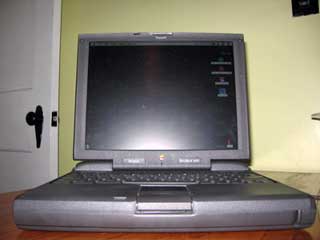
Let's start by looking at exactly what I have here. I purchased
a 3400c using eBay for what
seemed like a steal. When I received it, that would be proven,
because this Book was in excellent physical and working condition.
There were only a few small marks that were easily cleaned up, and
although it was missing its rear port door, that wasn't a problem
for me.
The screen was brilliant with great color and no missing pixels.
All of the ports were in working condition, as were all of the
important hardware pieces. The battery even held a full charge! It
a 200 MHz model and came with 16 MB of memory, a 2 GB hard
drive, and a 12x CD-ROM.
 The 'Book was running Mac OS 7.6 and came with a
couple of programs on it. Only two pieces of software were going to
be useful, the text program and CD Player.
The 'Book was running Mac OS 7.6 and came with a
couple of programs on it. Only two pieces of software were going to
be useful, the text program and CD Player.
As many people running Tiger (OS X 10.4) on their Macs already
know, classic OSs will not connect to them on a network. That was
the first thing I found out. I looked around the Internet and came
up empty handed after the one hack I tried ended up useless.
Now I had to try to get this thing on the Net to get some useful
software. Much of it is free, too, which is a bonus to people using
an aged OS such as this one.
When trying Internet Explorer and Netscape I was greeted with
many system bombs. Drat! This is one of those bad memories I have
of the Classic Mac OS. Crash after crash, but I managed to get a
download of iCab (which is free) onto
my desktop.
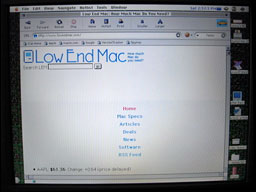 After another crash and restart, I loaded it up
and hopped online. Much better, I thought - well, on some websites
that is. Another bomb, and I realized that some websites just were
not going to happily load for me. Hmmm, this is going to take some
time to iron out, I thought. At least I can get onto the Net more
stably than before. I could now transfer files, too. For now, the
only way is to email documents and files between email addresses.
Hey, it works.
After another crash and restart, I loaded it up
and hopped online. Much better, I thought - well, on some websites
that is. Another bomb, and I realized that some websites just were
not going to happily load for me. Hmmm, this is going to take some
time to iron out, I thought. At least I can get onto the Net more
stably than before. I could now transfer files, too. For now, the
only way is to email documents and files between email addresses.
Hey, it works.
With no access to my network, I couldn't remote print as I did
with the rest of my Macs. Aha! I remembered that my mother still
had (fingers crossed) a LaserWriter in her basement that was going
unused. I had tried to link it to my newer Macs to no avail in the
past. I ran over to her house (six blocks from mine, how lucky is
that) and found it with its wiring intact. I also found some other
classic mac peripherals that I will most likely mention in the
future. I plugged in the TurboNet phone line adapter and booted up.
Oh yes, it showed right up in the Chooser and printed a text doc
that I had played with earlier that night. That was pretty
exciting, considering I normally use an ink swallowing inkjet. This
printer had plenty of toner left for hundreds of prints - and they
looked fantastic.
Now I had maximized the Internet access and printing documents.
I know that I haven't gotten into any hardware upgrades yet, but if
you have one of these 'Books or are looking at one, stayed tuned,
as I will get to that in another article.
For now, I needed to get some more software. You would think
that software for an OS this old would be very hard to find. Well,
you'd be right - and wrong.
First I downloaded the update from 7.6 to 7.6.1 from Pure-Mac. Why Pure-Mac rather than
Apple? Because it's a site that I can go to without crashing. This
took some time. Actually, it took a lot of time. The paltry 10 Mbps
ethernet was painfully slow for surfing and downloading despite my
fast 2 Mbps DSL connection. All good things come to those who wait,
as I was hoping that this update would keep the Internet access
more stable.
Darn! This document said that I need a 3400c-specific update.
Back on the horse, I checked on my PM dual G4 to speed up the
search. It would not be found at Apple.com or System7Today or Pure-Mac. Ah,
but Download.com had it.
After several attempts, I couldn't get the OS to update. Not
what I had hoped, but I'm going to update to Mac OS 8.5 via CD
anyway. As for software, I do have iCab, Microsoft Word, and CD
Player. At this time, I 'm going to stick with that, as it is all I
will need until the next update. At that time I'll also list some
sources for getting software to use on the classic OS.
So now that I have let you in on what it's like to get started
on one of these cool little 'Books, I will delve even deeper next
time. I have a 6 GB hard drive ready to go in as soon as I get
an OS CD.
I've decided to try out both Mac OS 8.1 and 8.5. I'm guessing
the latter will be better for me and my 'Book.
Memory is another area that I'll address, as you can never have
enough of that no matter how old your OS and software are. I found
a 128 MB stick for a song -well as far as comparing it to other
places on the Net.
An AirPort Base Station and Lucent style card should arrive at
my door sometime this week. By the time you read the next chapter
of Maximize Your PowerBook 3400, I hope to have written it and sent
it to Low End Mac from my faster, wireless 3400c.
Oh, and I picked up a PowerBook 520c for $6, too. What have I
gotten myself into? 



