I find myself typing this article on my trusty Pismo PowerBook. Last year I considered
myself a "power user," running a dual G5 loaded with memory, a
high-end video card, and a RAID system. For me it's always been
about power and speed.
After the departure of that G5, I find myself using this laptop
more and more. Funny how things change. I still have a couple of
loaded Power Macs, but because of my love for this laptop, I have
recently purchased another classic PowerBook, a 3400c.
Enough of that - let's get down to business. FastMac sent me
their
latest DVD burner to try out, and I'm going to fill you in on
how this little slot loader burns up the dual layer discs!
One of the great things about the Pismo is how easy it is to
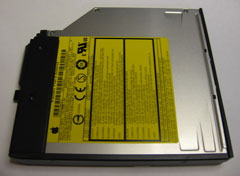
upgrade. When I received the burner, it looked much like the
standard DVD-ROM I had removed. After all, the burner is in an
Apple DVD-ROM casing.
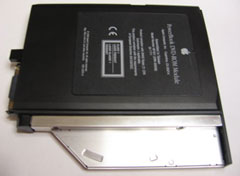
Well, looked similar for the most part. After sliding it into
position, I booted up, and it was recognized instantly by Tiger
(OS X 10.4.x). That was enough to get me really excited.
Yeah, Macs are much easier to upgrade, but this laptop is seven
years old. Kudos to FastMac on the upgrade!
Here are the specifications of my 'Book: FastMac G4/550
MHz CPU, 256 MB memory, and a 40 GB Toshiba hard drive.
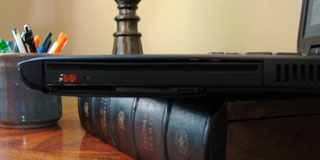 Let's look at some differences
between the new burner and Apple's original drive. The first thing
I noticed was that the new drive is a slot-loading drive. That is
great, considering how fragile tray loading drives are. Slid the
disc in part way, and the drive sucks it in.
Let's look at some differences
between the new burner and Apple's original drive. The first thing
I noticed was that the new drive is a slot-loading drive. That is
great, considering how fragile tray loading drives are. Slid the
disc in part way, and the drive sucks it in.
From the outside, it's easy to tell that this is not an Apple
part. That is something I was a little let down by. It doesn't fill
up the entire drive bay and leaves the laptop susceptible to dust,
hair, or food crumbs. The PowerBook also looses some of its smooth
look and feel. It's also missing an eject button or emergency
"paper clip" disc eject hole.
This drive is all about performance, which is FastMac's goal as
an upgrade retailer.
A friend of mine stopped by and wanted some quick copies of her
camera's recent photos. I was using the 'Book at my couch and
figured I would see how fast this drive is. I grabbed five blank
CDs and started the burn. The drive was recognized by iPhoto and
seemed to burn just as fast as the new burner in my Power Mac G4.
That was impressive.
The standout feature of this drive is that the user can burn
dual layer discs. Not even the current MacBook Pros can do
that.
Although I do my video editing on my Power Macs, there are
several reasons to have a dual-layer burner in a laptop. The first
is backups, and they are even more important on a laptop, as they
can be more easily damaged or stolen. It's also good for
transferring large files.
If this was my only Mac, it could be used for burning iMovies,
too. Although I don't have another laptop burner to compare
performance to, it burned successfully every time and did so
quickly.
 If you
have a Pismo and would rather upgrade it than buy a new 'Book, this
US$150 drive will make it faster and more useful. The slot loading
makes it more durable than the tray loader, and it burns every type
of disc that OS X allows.
If you
have a Pismo and would rather upgrade it than buy a new 'Book, this
US$150 drive will make it faster and more useful. The slot loading
makes it more durable than the tray loader, and it burns every type
of disc that OS X allows.
After watching many movies and burning several types and sizes
of discs, I find it to perform very well.
Although aesthetically it doesn't look like an OEM drive, it's
usability and performance were stellar. I rate this drive as a
"must buy" for Pismo owners seeking a burner. 



