To begin, I would like to apologize to our readers here at Low End Mac.
I've been away for about a year-and-a-half for personal reasons.
Fortunately, things have gotten better, and I plan to get back to being
a regular contributor.
I would also like to thank all of the readers who keep sites like
this available for all of us. Without you guys, we wouldn't have an
excellent resource like Low End Mac.
I still feel that Linux is a viable option for our low-end Macs, and
I hope to be able to help our readers get it up and running on their
machines.
My WallStreets
I am typing this on my son's PowerBook WallStreet Series
II. In the last two years, there have been good times and bad times
with the WallStreets. But even though it's almost 10 years old it's
still a very useful machine.
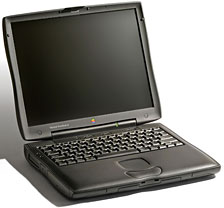 Let
me tell you my story: Back in March of 2006, I acquired my first
WallStreet PowerBook, a Series I. Having some
experience with Macs, I was looking for a PowerBook and paid $75 for
it. Unfortunately, it was the
MainStreet version with the 233 MHz G3 with no Level 2 cache
and the 13.3" screen. It had 160 MB of RAM, the original
2 GB hard drive, and was running Mac OS 9.2. The battery would not
charge even after finding and using the battery reset program.
Let
me tell you my story: Back in March of 2006, I acquired my first
WallStreet PowerBook, a Series I. Having some
experience with Macs, I was looking for a PowerBook and paid $75 for
it. Unfortunately, it was the
MainStreet version with the 233 MHz G3 with no Level 2 cache
and the 13.3" screen. It had 160 MB of RAM, the original
2 GB hard drive, and was running Mac OS 9.2. The battery would not
charge even after finding and using the battery reset program.
I purchased a PowerLogix G3/466 via
eBay, upped the RAM to 320 MB, and added a 40 GB Seagate hard
drive. Now that I had space, I installed openSUSE v10.0. (I plan on going over
how to install Linux on this machine. It's a little complicated setting
up the hard drive and probably not for the faint of heart.) I was
impressed with the performance of the machine. However, it would not
play XviD encoded movies properly
due to the lack of the AltiVec unit that the G4 has. Since I gave this
machine to my son, it needs to have the ability to play our movie
collection (so I could free up my ThinkPad for my use).
Other drawbacks to the Series I were the 2 MB ATI Rage II chipset,
the hinges weren't very tight, and it had the notorious problem
associated with the 13.3" screen cable.
Thanks to the LEM Swap List, I was
able to acquire this Series II machine. It has the original 266 MHz G3
with 1 MB L2 cache, and I swapped in the 40 GB hard drive and 320
MB RAM from the Series I. I then sold the Series I and the G3/466 on
the Swap List. Why give up the faster G3? To look for a G4/500 chip
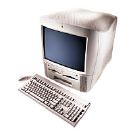 (I
have a G4/366 in my G3
All-in-One, and it plays movies with no problem with the same Rage
LT Pro video chip). It has Mac OS v9.2.2 installed, and I use the BootX
program to restart the system into Linux.
(I
have a G4/366 in my G3
All-in-One, and it plays movies with no problem with the same Rage
LT Pro video chip). It has Mac OS v9.2.2 installed, and I use the BootX
program to restart the system into Linux.
It turned out that the Series I unit had a bad battery charge card,
because the battery from that machine charges and works just fine in
this Series II. While I haven't stressed it, I have gotten over 2 hours
out of it. It does take a really long time to recharge if the machine
is running though. And lately it has started saying it was fully
charged at only 85% charge, so it may finally be going bad.
Linux Performance
I originally installed openSUSE v10.0. It ran very well on the
Series I with no noticeable problems. System performance was very good
with the G3/466.
I was unable to install openSUSE v10.1 because it would not run on
any Old World Mac due to a compatibility issue with the version of the
Linux kernel. This is partly my fault, because while I had helped to
beta test v10.0, I didn't do any beta testing with v10.1. If I had,
it's possible that they would have been able to correct the problem. Oh
well.
openSUSE v10.2 installed and ran well. However, an issue arose
similar to one that OS X v10.2.3 had with the backlight going out
and not coming back on. This made the system almost totally unusable
with Linux. (I do have this version installed on my G3 All-in-One, and
it works very well)
After reporting the backlight problem, the openSUSE developers were
able to provide a fix (and since it was a kernel problem, that means
that all versions of Linux should now work properly with the
WallStreet.
v10.3 ran well, but the package management system was really slow,
and it took a long time to do the installation. Unfortunately, system
performance isn't as good as the previous versions with the G3/266 I am
using now.
I have openSUSE v11.0 Beta 2 currently installed. Package system and
installation is much faster (probably 3-4 times faster than 10.3). I
haven't noticed any stability issues, but there are some problems that
I am hoping will be taken care of soon. One issue was that while my
Atheros based WiFi card was detected, it wouldn't work until after I
had compiled the driver from source (which is what I had to do for the
previous versions anyway).
Web browsing isn't too bad, and it's more than adequate for typing
on. A faster processor would definitely make things snappier though. It
plays MP3s just fine, and it will play movies, although at a low
resolution and with frame dropping enabled.
There is also a program for Linux called Mac-on-Linux. This allows me
to run the installed Mac OS 9.2.2 inside Linux. Mac-on-Linux also has
the ability to run Mac OS X. This allows my son to play some of
his older CD games that run under the Mac OS without having to restart
the computer.
WallStreet Quirks
While fellow contributor Charles Moore raves about the keyboard on
this machine, I personally prefer my ThinkPad 390X. The
390X has separate Insert, Delete, Home, End, PgUp, and PgDn keys as
well as the TrackPoint pointing
device (having used ThinkPads off and on for over 15 years, I prefer
the TrackPoint to a touchpad). Further, the lack of the second mouse
button is kinda frustrating under Linux, because there are so many uses
for it, and to emulate it you have to use Shift-F12, which isn't very
intuitive. Also, the third mouse button (which almost no laptops have
these days, but the 390X does) is very useful in Firefox for opening a link
in a new tab. Finally, for some reason the keyboard feels spongy on
this machine. It's nowhere near as rigid as the keyboard on my
ThinkPad.
Other than that, once you get used to it's quirks, it's not bad.
Don't remove the modem - I pulled the modem out with the idea
of fabricating a heatsink for the processor that could vent out through
the modem door. However, this led to numerous problems. The battery
refused to take a charge, and it was only after I got back to it after
a year that it started to charge properly. I've also had some serious
issues with the backlight not working in either Linux or the Mac
OS recently. After about 2 days of aggravation, I remembered that I had
taken the modem out, and now that it's back in, everything seems to be
working. Hopefully that was the problem.
Future Plans
- Purchase a G4/500 to enable it to play MP4 encoded movies.
- Max the RAM out at 512 MB
- Purchase a DVD-ROM drive (the hardware DVD Decoder won't be
necessary because the G4 will be fast enough to play DVDs).
- Maybe get a bigger drive for it. I've seen a Western Digital 250 GB
for $119 recently on NewEgg that I
would like to try in this machine.
Final Thoughts
While my experience with the WallStreet PowerBooks hasn't always
been positive, I feels it's a very useful machine that could be even
better with a G4 upgrade. Thanks to Linux, I can run current software
like Firefox, do it wirelessly, and do it on the go. It does have an
extremely bright screen and, while it lacks things like USB, I feel
it's a solid laptop overall. 



