Old Power Macs and SATA Not a Marriage Made in Heaven
Low End Mac Reader Specials
Download Typestyler, still the Ultimate Styling Tool for Internet, Print and Video Graphics. Works great in Classic with a Native OS X Version on the way. Free Tryout: www.typestyler.com
LA Computer Company: LA Computer Company: Specials on AppleCare, Apple Displays, MacBooks, iMac's, MacBook Pros, Laptop and iPod accessories and more. Apple A/C Adapters for laptops starting at $25.00 Call 1-800-941-7654 or Click Here.
Other World Computing has the Upgrades, Enhancements, and Accessories for getting the most from your Mac. Quality Products, Competitive Prices, Expert Support Staff - www.macsales.com
Mac users can finally play Party Poker for Mac. Not only that, they can also learn how to play PokerStars for Mac.
Laptop Hardware Provided by TechRestore - Overnight Mac & iPod Repairs.
Compare products like desktop computers, laptops, and LCD TVs side by side! All the information and reviews to make the best purchasing decision for a new cell phone GPS products or MP3 players. The Ciao network makes searching products easy for you.
New iMac 800Mhz Memory 4GB $98, 2GB $50. Click to Maximize your Macs...
- 2006.11.03
"I needed another hard drive for backup storage, and I had this Power Mac 7600 sitting here just begging for some higher capacity drives."
So the story began.
I decided to take a chance that the US$50 OWC 2+2 SATA PCI card, with two internal and two external SATA ports, was indeed compatible with Macs older than the Blue and White Power Mac G3 (as listed on the product page, B&W G3 through early generation Power Mac G5s were supported).
I spent a decent time researching the card before making the purchase. While I did not discover concrete evidence that some intrepid Mac aficionado had tested this particular configuration, I did uncover enough peripheral evidence to indicate the possibility of success.
After purchasing the SATA card, it took a few weeks to find a SATA drive that matched both my price point and storage needs. I also spent a little time shopping around for SATA data and power cables. MonoPrice.com came through with some of the best prices I've seen, along with reasonable shipping rates.
I finally collected the necessary parts to put my plan into action. I see no reason to lavishly detail my testing procedure and the resulting irritants that were to foil my best intentions, as that story can be found on the AppleSwitcher blog (see SATA Hates Me and Here's a Little Story About It).
I'll give a concise report here and then meander into my course of action since the initial testing. I installed the OWC SATA card into the Power Mac 7600 and connected my drives as shown in visual aid #1:
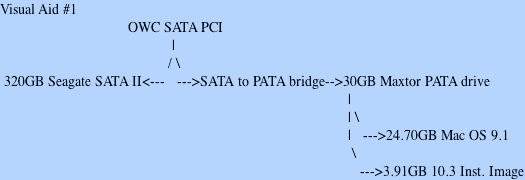
Summary: Mac OS 8.1-9.1 all recognized the 30 GB PATA (parallel ATA) drive and the two formatted volumes on it, but they could not mount the 320 GB SATA Seagate connected to the OWC SATA card. XPostFacto would not boot into OS X 10.3.9 from it's volume resident on the PATA 30 GB drive. Connecting an OS X 10.3.9 SCSI drive to the internal bus allowed XPostFacto to boot the 7600 from the internal bus into OS X. 10.3.9 could not see the installed SATA card nor the drives connected to it's bus (SCSI bus 2).
Drive Setup in the classic Mac OS could not format the drives connected to the SATA card. I had no success, whether booted from the SATA card or from an installation CD. Any Mac OS volume already formatted into HFS or HFS+ before being placed in the Power Mac 7600 could be formatted via the Finder's "Erase Disk" command.
However, I was not able to discover a way for whole drives or individual partitions that weren't already formatted as HFS or HFS+ partitions with classic Mac OS drivers installed to be recognized by the Finder (no luck with a drive formatted in OS X without the Mac OS 9 driver option checked). Also, the Finder utility only allows the volume to be erased; the whole drive cannot be formatted and partitioned.
This article may seem short, but the next installment (planned for Monday) will look at the various findings I have uncovered between my initial test and now.
A quick note before I go: The OWC SATA 2+2 Internal/External PCI
card has given every indication that it is operating within
specifications. As you will see next time, the issues I have most
likely (98% chance) pertain only to unsupported setups like my own.
Further Reading

Recent Embracing Obsolescence articles
- Steve Jobs stirs up the DRM hornet's nest, 02.12. Stripping DRM would level the playing field for players and allow digital music services to compete on price, quality, and selection.
- SoundApp an audio workhorse for PowerPC, 680x0 Macs, 12.22. For those using the classic Mac OS, SoundApp can convert tracks, play music, and look up CD tracks online.
- The iAudio G3: More features than an iPod nano at an iPod shuffle price, 12.14. The iAudio G3 lets you avoid DRM lock-in while providing multiformat support, more features than an iPod nano, and a price lower than Apple's iPod shuffle.
- More in the Embracing Obsolescence index.
Recent Content on Low End Mac
- Mac Pro overclocking, Windependence with Darwine, Blu-ray for Macs, and more, Mac News Review, 07.04. Also more on running Leopard on non-Apple hardware, Ubuntu on a Mac mini, the first autofocus webcam with Zeiss optics for Macs, and more.
- Wouldn't life be great with an iSlate?, John Hatchett, Recycled Computing, 07.04. PDAs and smartphones are too small for some tasks, full-fledged Tablet PCs are overkill, and ebook readers are too limited. Apple has the tech to own this niche.
- Mac of the Day: iMac G3/266 MHz, Jan. 1999 - The first multicolored iMac runs at 266 MHz, loses infrared communication.
- List of the Day: G4 List is for those using Power Mac G4s or G4 upgrades.
- July 6 in LEM history: 00: 3 user accelerators - 01: SCSI and FireWire Disk Mode - Stick with the Mac - Computers for college - 05: Optimizing OS X performance - Return of the bumper snicker - 06: Can consumer MacBook replace 2 PowerBooks and a ThinkPad? - Vintage Macs with System 6 run circles around 3 GHz Windows PC - Run Windows apps without Windows
- The Macintosh Portable started a notebook revolution, Carl Nygren, Classic Macs in the Intel Age, 07.03. Before Apple introduced the Mac Portable, notebook computers were text-based and ran MS-DOS. Ever since, graphical interfaces have been the norm for laptops.
- More links in our archive.
About LEM | Support | Usage | Privacy | Contacts




