Alan Zisman on the Mac
iPod Drive Failure: Culprit May Not Be the Drive, Fix May Be Free
- 2006.09.11
Apple's iPod has been wildly successful; even though it was
neither the first handheld MP3 player (models such as the Diamond
Rio were first with flash players) nor the first to feature hard
drive storage (Creative's Discman-sized Nomad Jukebox predated it),
the iPod's combination of clean design, easy to use software both
on the player and the computer, and the growing ecosystem of
third-party add-ons have all contributed to Apple's 80+% market
share.
Still, the iPod has come in for its share of complaints.
The polished chrome backs and the plastic screen scratch too
easily. The rechargeable batteries only last a few years and then
fail to hold a charge (and are not easily user-replaceable).
These complaints have gotten lots of media attention - some
might even say too much media attention. All lithium-ion batteries
fail to hold a charge after a couple of years, and while the iPods
are hard to open, the batteries can be replaced.
Another issue is lurking in the background, however. I don't
have any statistics on how widespread it is, but my personal
experience suggests that it may be affecting huge numbers of owners
of hard drive-based iPods.
 The symptoms
appear to be a hard drive failure; the iPod tries to start up, but
part way through there are several clicking sounds, like a computer
hard drive that has crashed, and finally a "sad iPod" icon (right)
appears on screen.
The symptoms
appear to be a hard drive failure; the iPod tries to start up, but
part way through there are several clicking sounds, like a computer
hard drive that has crashed, and finally a "sad iPod" icon (right)
appears on screen.
This is not a rare occurrence. I know five people who bought 40
GB fourth-generation ("click wheel") iPods. Three of the five have
had this happen to their iPod; one person had it happen while her
iPod was still under warranty. Apple replaced it; later, the same
thing happened with the replacement unit.
The other two iPod's failed after the standard warranty ran out,
suggesting that it may be worthwhile to budget for the extended
AppleCare warranty, at least for hard drive iPods.
Apple's iPod
support page gives steps users can try if their iPod doesn't
start; maybe they work for some users, but they haven't helped the
people I've known with these problems. Contacting Apple's tech
support about an out of warranty iPod can be frustrating. Their
advice: Pay to ship it back to Apple and pay to have them replace
it with a reconditioned replacement.
That's too expensive; you might as well just ditch it and buy a
new one - and I suspect many people have done just that.
Unnecessarily.
Certainly hard drive failure might seem like a possible
explanation - like laptop hard drives, the iPod's 1.8" Toshiba
drive certainly gets bounced around a lot. These drives are
available from computer shops; I was quoted a price of C$155 for a
40 GB 1.8" Toshiba drive from my local computer store. And
replacing the hard drive wouldn't be much more work than replacing
the battery.
For both repairs, prying open the case is the hardest part.
In fact, I tried replacing the hard drive in one
of these problematic iPods; the new drive didn't seem to make any
difference. Nicely, my vendor let me return it. Instead, the
problem often lies elsewhere - and is less expensive to fix. But it
still requires opening the case.
I had earlier replaced a battery on another iPod; the
replacement battery (from Newer Technology) included instructions
for opening the iPod case and a couple of nylon tools to pry the
case open without scratching it.
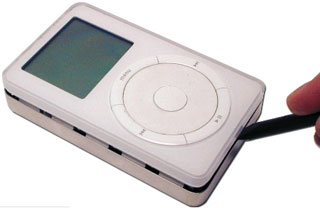 I've never
been able to make the nylon tools work for me. Instead, a small
slot-head screwdriver works, though I have to admit to leaving a
few scratches on the chrome. I've had the best results starting on
the side to the right of the display panel, and with one hand
squeezing the top and bottom while trying to slip the screwdriver
between the plastic and the metal shell.
I've never
been able to make the nylon tools work for me. Instead, a small
slot-head screwdriver works, though I have to admit to leaving a
few scratches on the chrome. I've had the best results starting on
the side to the right of the display panel, and with one hand
squeezing the top and bottom while trying to slip the screwdriver
between the plastic and the metal shell.
Once you've got the screwdriver in at one point, you can move it
around the case, gradually prying it open (as in these
illustrations from Newer Technology's battery replacement
manual).
Once you pry the case open, gently turn everything face down;
you'll see the iPod's hard drive in the plastic shell.
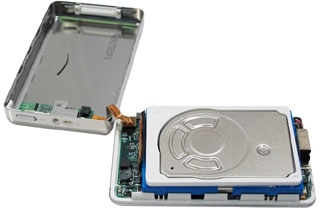 You can
(again gentle and carefully) lift out the hard drive, turning it
upside down. You'll note that there's a wide ribbon cable that
plugs into one end of the hard drive. Check to make sure the
connector is firmly plugged into the drive - but that's not usually
the problem. Look at the other end of the cable, underneath the
hard drive.
You can
(again gentle and carefully) lift out the hard drive, turning it
upside down. You'll note that there's a wide ribbon cable that
plugs into one end of the hard drive. Check to make sure the
connector is firmly plugged into the drive - but that's not usually
the problem. Look at the other end of the cable, underneath the
hard drive.
There a piece of black tape presumably holding the other end of
the cable in place. Lift the tape; the end of the cable fits into a
connector. There are no pins plugging into sockets - the cable just
sits, more or less snugly in a connector on the iPod's logic
board.
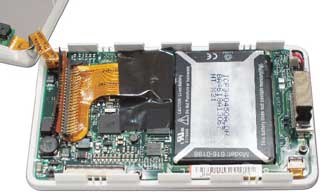 Several times I've found that just pressing the
cable-end in a bit was all it took to bring the iPod back to life.
Then replace the black tape, put the hard drive back in place, snap
the back on again, and you're back in business.
Several times I've found that just pressing the
cable-end in a bit was all it took to bring the iPod back to life.
Then replace the black tape, put the hard drive back in place, snap
the back on again, and you're back in business.
Total time: under five minutes. Cost in materials: zero.
It doesn't always work; when it didn't work on my daughter's
iPod, I brought the iPod to Eric Dressler, a local freelance iPod
repairperson. He did the same thing I had tried, but completely
removed the cable and reinserted it in the connector. His touch was
better than mine, and the iPod has worked ever since.
A loose connector. Or given the number of people I've run into
with the same problem, a plague of loose connectors.
According to Dressler, "I see a lot of iPods that I have to
reseat or replace the cable. I am unsure if this is a 'product
flaw' or if this problem is happening mainly due to people dropping
their iPods."
He adds, "The black tape inside does not really do all that
much, I think it is meant to hold down the arm that holds the cable
down, but usually the arm is not raised when I open the iPod. In
fact, the cable even looks as if it is seated properly.
"I honestly find Apple's repair strategy on these to be comical,
as I work for an Apple service provider as well and am a fully
certified tech. I think Apple has really dropped the ball on any
warranty issues customers have. This is a common problem, but at
least nothing actually fails inside of the iPod when this
happens"
He warns, however, "iPods are very sensitive devices. I see a
lot of people who attempt to repair their iPod or replace a battery
only to damage it. I do not recommend opening the iPod if you are
not familiar with taking small sensitive stuff like this apart. I
worry that a lot of people may try to repair their iPod themselves
and damage them."
Has your iPod failed to start up? It could be a minor and easily
correctable problem as a loose connector.
And Apple may not be much help if you have this sort of problem.

Join us on Facebook, follow us on Twitter or Google+, or subscribe to our RSS news feed
Alan Zisman is Mac-using teacher and technology writer based in Vancouver, BC, Canada. Many of his articles are available on his website,
www.zisman.ca. If you find Alan's articles helpful, please consider making a donation to his tip jar.
Today's Links
Recent Content





