Yes, it was time - time to get a new Mac. Usually the life of my
computers extends from 1 year (secondhand) to 3 years (new).
It was a big decision to make - I had to choose the make, model,
amount of RAM, hard drive size, etc. The first of those was easy. I
was going for the Mac OS, so it has to be an Apple. I also wanted a
desktop (as opposed to portable). That left me with an iMac, Power
Macintosh G4 Cube, Power Macintosh
G4 400, 450, or 500 (the odd number
models weren't out yet). I didn't want an iMac, because I like
a 17" monitor. So that left me with the Cube or the G4.
I really was leaning toward the Cube. I was. It had what I
wanted - support for a 17" monitor, USB, DVD-ROM drive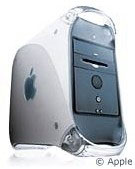 , 16 MB of VRAM, a 20 GB hard drive, and the
ability to add lots of RAM. I didn't want to mess with PCI,
adapters, expansion bays, cables, or anything else. I wanted
something that worked.
, 16 MB of VRAM, a 20 GB hard drive, and the
ability to add lots of RAM. I didn't want to mess with PCI,
adapters, expansion bays, cables, or anything else. I wanted
something that worked.
I was sick of playing with the sound card in my G3, reformatting
the slow and noisy hard disk every time my system crashed, and
trying to learn how to type on the poorly made AppleDesign
Keyboard - Apple's worst keyboard ever (I still haven't learned.
It's been six years since I first got one with our Performa 5215CD).
I decided to get a bit more advice. I asked people on the
G-List. Everyone said a G4 would
be best for me. I then asked the computer tech in my school. He
told me that the Cube was really best purchased with the 15" flat
panel display. In other words, you buy the Cube because of its
coolness factor. I wanted a 17" monitor, and I don't like LCD
displays (they give me a headache).
At this point I was again unsure of what model - but had a bit
more of an idea in my head. I went to our local Apple dealer,
TBI Computer. The
question they asked me was "Do you consider yourself somewhat of a
power user?" Yes, I do consider myself a bit of a "power user."
Their answer was that it would be better for me to go with the G4
tower in case I ever wanted to add any upgrades or new features. I
trust them, and their opinion on things, so I went home that night
thinking G4 tower. And that is just what I ordered.
What I am about to say might shock you. Everything that I do now
on my new G4, I could do on that old Performa 5215CD, which I had
stopped using regularly in 1997. I use my computer for word
processing, email, Internet, listening to music, and making graphs
and presentations. That's it. The 5215 could run all of the current
versions of software that I want to run - Office 98 (I haven't
upgraded to 2001), Internet Explorer 5, Outlook Express, and
Napster (yes, I have joined the "MP3 revolution").
But there is one problem: I work fast. If my computer can't keep
up with me, I am not happy. I like to be current as well; that is,
I want to be able to run OS 9.1, QuickTime 5, etc., with the
machine still feeling responsive. The last time the Performa
actually responded to my every command was when it was running
7.5.5 (a side note - never upgrade from 7.5.5. to 8.5 without doing
a clean install).
When I got my G3 in 1997, it
felt much slower than the Performa, and I didn't like it at
all. There was no way for me to return it (since it wasn't just my
computer). However, when OS 8.5 came out, it started feeling fast.
Then 8.6 slowed it down a bit, and 9 is a bit of a pain. I do run
9.1 on it, but it's not as fast as I would like it to be. It would
take a while to get emails - even on my cable connection. When I
had to run AOL, it occasionally would feel slower than running it
with a dialup connection. Now, I know you are about to say that it
is my connection, not the computer, but ever since I bought my G4,
I have had no problems with slow connections. Everything comes up
right away - just like I want it to.
About the machine itself. It is a G4/400 with DVD and a 20 GB
hard disk. It has Mac OS 9.1, 64 MB of RAM (I just ordered 256 MB
more from Memory To
Go.com), a 56K modem (which I don't use), and an Adaptec 2906
SCSI card. I had a little problem with the SCSI card at first. When
I brought the machine home from the dealer, the drivers for the
SCSI card weren't included. A quick call to my dealer fixed that.
They told me that I can either download it, or if I need them on a
disc they can arrange for that. I downloaded them, and it has
worked fine since.
I am very happy with my new G4, and it will last several years I
am sure. I love the ability to play DVDs - something I had wanted
for a while. I also like the video card that's in there - 16 MB,
compared to 2 MB in my G3. Seeing millions of colours instead
of thousands is a big improvement when I am on the Internet-
thousands is good, but there is noticeable difference when looking
at high-resolution images.
I don't particularly like the colour of the G4's case (I
personally liked the blue G3), but the performance that this
machine delivers makes me forget about the colour of the case.
The G4 wasn't the only machine we ordered. We also ordered an
Indigo iMac DV+ for my sister. It's
a 450 MHz G3 with 64 MB of RAM (we ordered 128 more), a 20 GB hard
drive, and a DVD-ROM drive. The whole system was priced at about
$1,200.
After I finished copying some of her software from one computer
to the other (via ethernet - much faster than reinstalling
everything from CDs. Also, some of the software is on diskettes,
and we don't have a diskette drive for the iMac), I put a CD in to
install a game that wasn't on the hard disk of the other computer.
The game installed fine, but when I tried to eject the CD, it would
come out part way and go back in.
Our dealer gladly fixed the problem, and within a few days the
iMac was working exactly as it should have been.
I have yet to experience any major crashing, freezing, or
software incompatibilities with either machine. So far they have
been running very smoothly.
I highly recommend the base model G4 to home or business users
who like expandability and want a system that will last them 3 or 4
years. The iMac DV+ is great for home users with kids who want to
be able to access the Internet, make digital movies, and watch DVDs
(good excuse for a family movie night!). Too bad the new G4s left
out the DVD-ROM drive.
So far, for the past few weeks, both computers have been working
great. I hope they will continue to do so for the next several
years.
Low End Mac is an independent publication and has not been authorized,
sponsored, or otherwise approved by Apple Inc. Opinions expressed are
those of their authors and may not reflect the opinion of Cobweb
Publishing. Advice is presented in good faith, but what works for one
may not work for all.
unless otherwise noted. All
rights reserved. Low End Mac, LowEndMac, and lowendmac.com are
trademarks of Cobweb Publishing Inc. Apple, the Apple logo, Macintosh,
iPad, iPhone, iMac, iPod, MacBook, Mac Pro, and AirPort are
Additional company and product names may be trademarks or
registered trademarks and are hereby acknowledged.
: We allow and encourage links to
any public page as long as the linked page does not appear within a
frame that prevents bookmarking it.
Email may be published at our discretion unless marked "not for
publication"; email addresses will not be published without permission,
and we will encrypt them in hopes of avoiding spammers. Letters may be
edited for length, context, and to match house style.
: We don't collect personal
information unless you explicitly provide it, and we don't share the
information we have with others. For more details, see our



