You've seen the articles before: A PC-focused magazine or websitereviews a Mac and complains that it's too expensive. Or perhaps you'veread a Mac-oriented article where the reviewer added FireWire cards anda copy of Nanosaur to an el-cheapo PC to get a "meaningful" pricecomparison with a Mac.
One constant is that whichever platform - or specific machine, forthat matter - the reviewer prefers can be made to win with a fewjudicious tweaks.
This is something of a pet-peeve of mine, which I've debated in manyreplies to both types of articles.
My favorite articles of this type are the ones that try to suggestthat an entry-level Mac is no more expensive than an entry-level PC -and there's a rush on beach front property in Arizona.
The simple fact is that a new PC can be had for $250 and a new Macfor $600. $250 is cheaper than $600, and those are the entry-levelprices. End of story.
Where things go wrong is when the reviewer tries to make the twomachines "even". There's no such thing as even unless you arecomparing the same model at two stores.
Mac mini vs. a Cheap PC
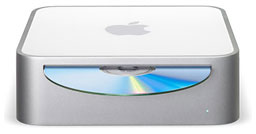 Let's look at thecheapest Mac, the Mac mini.I like the Mac mini; it packs a full-function Intel-powered Mac into adevice about the size of a few CDs in their cases. There's nothingentry-level about the presentation of the Mac mini.
Go to a PC store, and you won't find anything that small and stylishat any price - and believe me, smaller is more expensive when it comesto Windows computers.
Look at the specs on the mini, and you'll see a mixture ofunimpressive specifications and components - but you're missing thereal story. The mini is as small as it is because Apple uses laptopcomponents, and laptop components have the twin distinctions of beingmore expensive than desktop components and of offering comparativelymediocre performance.
If you're looking to make an entry-level,bang-for-the-buck computer, laptop components make no sense....
If you're looking to make an entry-level, bang-for-the-buckcomputer, laptop components make no sense, as they are expensive andslow. If you're making an image machine - a computer designed to sellon style and panache - things like frame rates in Doom 3 don'tmatter as much as that stylish, tiny enclosure.
So why do people insist on comparing the Mac mini to an entry-levelPC? Because the mini is the least expensive Mac that you can buy.
It's not the typical car analogy that Mac fans use of Chevy vs. BMW;it's actually more like comparing a digital and a mechanical watch. Adigital watch is cheaper and keeps more accurate time, while amechanical watch is, well, more stylish and has more panache.
I wouldn't be caught dead wearing a digital watch - and haven'tsince 1977 (forgive me, I was 10 years old at the time).
So let's do a real comparison. In this corner, the Mac mini Core Duoat $600. In the opposite corner, a bargain basement Compaq at $300. Themini looks oh so cool, takes almost no space, and - paired up with thekeyboard, mouse and lovely 19" LCD - set you back a total of $1,000after adding sales tax.
Not bad. It could use more RAM, but not bad.
Here we have the $300 PC. It's big, it's ugly, and it's fast. With a19" LCD (the keyboard and mouse came with it), it will set you back$600 after adding sales tax, and like the Mac mini, it could use moreRAM.
Take one or the other one home and hook it up, which is equally easy- same number of cords that go to the same USB and video ports (you mayneed a $20 DVI-VGA adapter for the mini) - and turn them on. You'll getwhat you expect to get.
The Mac has lots of cool software installed, but you'll be surprisedthat the PC isn't stripped either. The $300 Compaq I bought last yearhad a version of Microsoft Works that included a full version ofMicrosoft Word 2003. Apple gives you a trial version of iWork and atrial version of Office; you have to pay if you want a full version ofWord (to be compatible with the world), and if you don't, you've gotfreeware options, which you also have for the PC.
The Real Market
This is where the Mac-biased reviewer extols the virtues of iLifeand the PC-biased reviewer extols the virtues of PCI slots andupgradeable processors and graphics cards.
The only group of PC users who usually upgrade components arehobbyists, just as the only Mac users who use most of iLife's abilitiesare hobbyists. That the mini can't be upgraded to a faster processor orbetter video card means about as little to its intended buyer as thefact that you have to use Picassa (or the upcoming iPhoto rip-offin Vista) instead of iPhoto means to the average PC user.
The Mac mini's hardware specs were clearly compromised to get thatgorgeous form factor, while the PC's software bundle was clearlycompromised to get that low price. Neither really matters much to theintended buyer.
So Which Is Better?
Where does that leave the price comparison? Clearly, if you'rebuying based on specifications, the mini is a very poor value. And ifyou're buying based on style and panache, the PC isn't even in therunning.
Which is the better value for the money? The PC, easy.
Which is cooler computer? The mini, without a doubt.
Which is the better choice? It depends on what you want.
Bias
One thing is certain, when comparing a Mac against a PC, it helps toknow the bias of the reviewer.
Gene Steinberg is a writerwho's blog I read and enjoy daily. He backs his opinions with wisdom,experience, and common sense. He is also Mac-biased.
When he did a price comparison, he added the retail cost of aFireWire card, antivirus software, Bluetooth and wireless modules, anda DVD writer to the $300 cheapo PC he compared with the Mac mini,bringing both machines to within about $50 of each other - so the Miniwon the value comparison for him.
The point is, the buyer of a $300 PC doesn't want a DVD writer, aFireWire or Bluetooth card, or a copy of Norton Antivirus. The $300 PCbuyer wants the cheapest computer he or she can get - probably toreplace a cheap computer from 4-5 years ago. This buyer may alreadyhave an antivirus package or is getting one free when he or she buystax software, or is using one of the many free antivirus packages thatare even better than the big names (I use AVG Anti-Virus Free Edition).
This buyer probably isn't buying such a computer to edit highdefinition video, will use either the cheap keyboard and mouse that itcomes with, their old ones, or buy a very nice replacement, and verylikely isn't looking at cheap desktops to connect to the Internetwirelessly through their Bluetooth cell phone. Wireless PC cards, ifthe computer is located away from their Internet connection, cost about$20 for PCs.
My favorite price comparison article was about two years ago wherethe reviewer (and I forget who it was) was comparing an eMac to a PC. He added $39 to thecost of the PC for a copy of the Nanosaur game that comes bundled withthe Mac and $69 for a copy of AppleWorks, which also came bundled withthe Mac.
Now I like AppleWorks a great deal and have it installed on both myMac and my PC, but were I comparison shopping the eMac against aWindows PC, I would not add the price of a game and a Workssuite when plunking down my plastic. Believe me, if I had the option todelete Nanosaur and Marbleblast from the iMac I bought last year for asavings of even half their retail value, I'd delete them and enjoy thesavings.
It's Your Call
In the end, the only real comparison is the one you make based onyour own needs, wants, and budget. Were I buying a new computer for myhome, I would balance style, performance, and features against mybudget and get the computer that I would enjoy using the most.
For the last 13 years that has been a Mac for my home desktop. Ilike that I can set it up once and then ignore it, not having to botherwith maintenance chores very often and trusting that it will just workwith a minimum of fuss.
Where I buying a computer for a secretary to type letters andreports on, I'd take my $300 to whichever first tier brand had a salethat week and stay away from the options and upgrades - or better yet,I'd go to eBay and take advantage of other people's perceived need for speed.You see, for typing letters, email, and web browsing, anything over 600MHz with high quality components and enough RAM will do the job justfine. 
Andrew J Fishkin, Esq, is a laptop using attorney in Los Angeles, CA.



