We're
in the middle of yet another of Apple's big transitions.
In the first half of the 1990s, there was the transition from
the Mac's original 680x0 family of CPUs to the PowerPC chips. In
the early 2000s, there was a transition from the classic line of
Mac operating systems to the Unix-derived OS X family. And now
Apple has released the first models powered by Intel CPUs, with
promises that the whole product-line will be Intel-powered by the
end of 2006.
While each transition has ultimately been good for users, each
time there's been a rough period as software had to catch up with
the new hardware. Early adopters of PowerPC-based Macs had to run
software designed for the earlier models; it would run on the Power
Macs, but at nothing like the speed those models were capable
of.
If OS X users need to run software designed for pre-OS X Mac
operating systems, they can launch Classic-mode; a window running
Mac OS 9.2.x on their OS X desktop. It's a bit awkward, but it
works - at least most of the time.
Owners of the new Intel-powered Macs are hit with a double
whammy. OS X had to be rewritten to run on this very different
processor family, and to get best performance applications also
need to be recompiled (and in some cases completely rewritten) to
support the new hardware and operating system version.
OS X software compiled for PowerPC processors will run on the
Intel Macs, using a translation layer called Rosetta. But Rosetta's
on-the-fly translations sap computer performance. Those
applications run noticeably slower than on comparable
previous-generation Macs.
Mac OS 9 isn't usable at all on the new hardware, so users who
still rely on old Classic mode applications are simply out of luck
if, lured by promises of double or triple the performance, they
purchase a new Intel-powered Mac.
Or are they?
There are a couple of ways to make an end run around the Intel
Macs' lack of Classic mode support. For instance, if users still
have their previous Mac around (or if they buy a low-cost Mac like
a mini), they could simply keep
using it when they need access to that old Classic mode
application.
VNC: The Hardware Solution
Somewhat more high tech would be to keep that PowerPC Mac up and
running, then access it from the Intel Mac using a remote desktop
application like the open source VNC (Virtual Network
Computing). A wide range of versions of VNC are available for a
wide range of computing platforms, including both OS X and
OS 9.
Running a VNC server on the old Mac (running either OS X or even
OS 9) and a VNC client on the new Intel Mac with both
connected on a TCP/IP network would let a user sitting at the new
Mac open up a window to the old one and run the Classic application
remotely.
Emulation: The Software Solution
I'm taking a different course, however. Instead, I'm trying out
emulators. Here's why:
I have a teacher colleague who just replaced his Windows PC with
a brand new Intel iMac. Everything's
fine, except that elementary teachers in our school district often
use a program called Silhouette for generating report
cards. Duet Software has produced a Windows version and a Classic
OS Mac version. Since the Classic OS version runs fine under
OS X Classic mode, they haven't created a native OS X
version.
When I queried them, the two teachers who are Duet Software in
their spare time said that it would require a complete rewrite to
produce an OS X version, and with rumours that the school
district will be moving to other software within the next year or
so, it's not high on their to-do list.
Why not emulate Windows?
So those teachers with new Intel Macs who need Silhouette would
seem to be out of luck. Current versions of Windows emulators -
Virtual PC and Guest PC (see Guest
PC: A More Affordable Way to Put Windows on Your Mac) - won't
run on Intel Macs. Another emulator, iEmulator is promising an
Intel-capable version soon, while OpenOSX WinTel claims its emulator
already runs on the Intel hardware.
I'm waiting for the promised version of iEmulator and have spent
a lot of time working with various versions of OpenOSX WinTel
without having gotten to a point where I feel comfortable
recommending it as a solution.
Instead, I'm looking using emulation to put an older Mac in a
window on my colleague's Intel iMac.
Emulate a 680x0 Mac
I've previously written about Basilisk II, an open source
emulator that puts a 680x0 Mac in a window on a Windows (or other
operating system) desktop (see Mac
Emulation With Basilisk II, vMac and Basilisk II Puts a Mac on a Windows
Computer). Since those 2002 articles, a version of Basilisk II
has been released that lets it run
under Mac OS X as well. I've tried this on my PowerPC Mac,
and it works - though I haven't been able to get the networking
functional, something that works fine on the Windows version, in my
experience.
- (It may be just me - any reader who is able to get the Mac
version's networking into gear should please drop me a line!)
It's kind of cool. But since my PPC Mac has Classic mode, I
don't have much need to run a 680x0 Mac in a Window on my G5 iMac.
(Your needs may differ. If you have old software that won't run
under OS 9 or won't run at all in OS X's Classic mode, maybe
this will let you continue to be productive).
I was pessimistic about running Basilisk II on an Intel Mac,
however. After all, the various Windows emulators don't seem to run
with the Intel Mac's Rosetta translation. They require extensive
rewriting.
 So I was pleasantly surprised when I
copied the Basilisk II folder from my PPC iMac to my colleague's
Intel iMac and discovered that it just worked!
So I was pleasantly surprised when I
copied the Basilisk II folder from my PPC iMac to my colleague's
Intel iMac and discovered that it just worked!
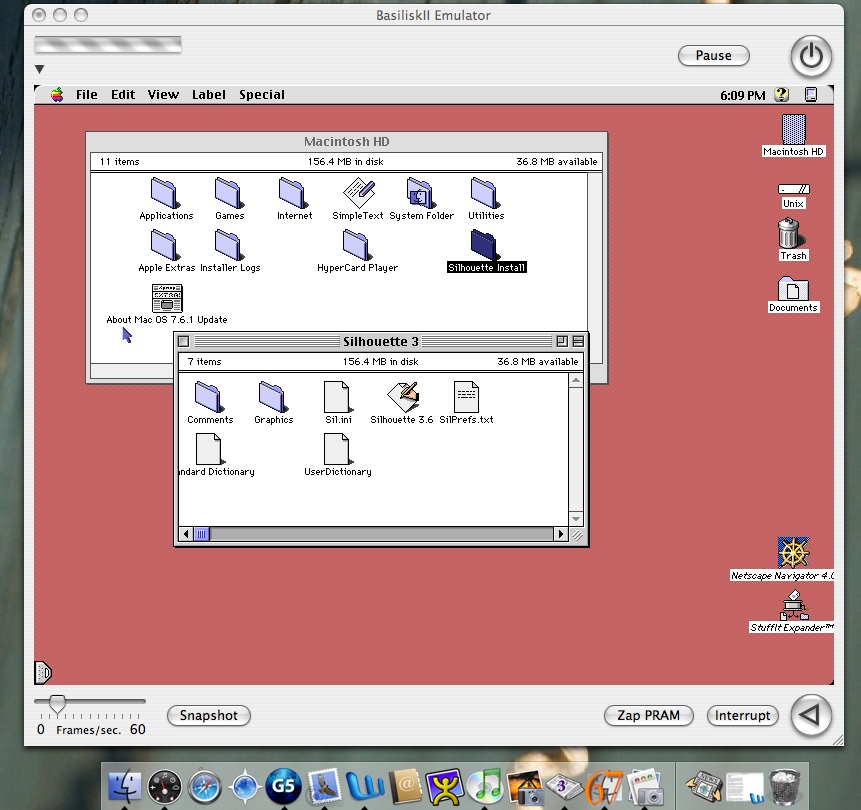
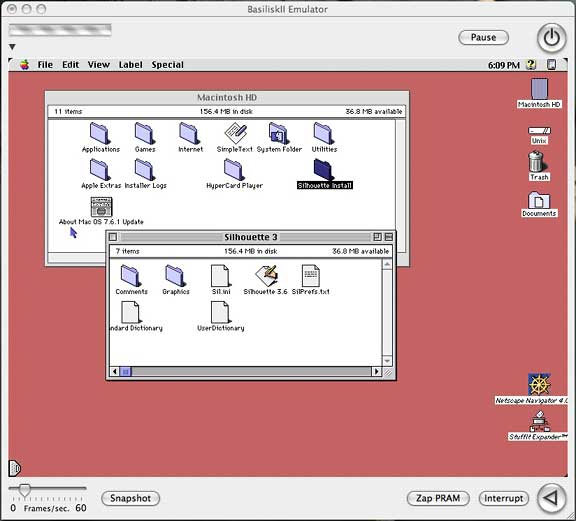
There it was, a 68040-powered Mac Performa running Mac OS 7.6 in
a window on an Intel iMac. A nice touch in Basilisk II is that it
puts a "Unix" icon on the desktop, allowing easy transfer of files
between the emulated Mac and its host system. That will be a big
help in getting report card files out to the world.
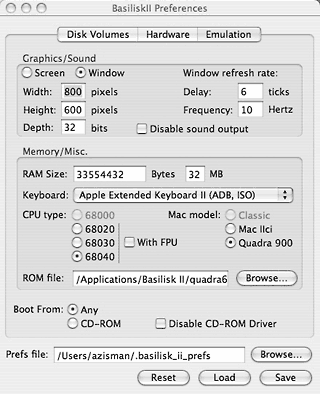
Basilisk II Setup
In order to make Basilisk II work, you need three things:
- The Basilisk II application. Since it's open source, it can be
downloaded freely
- A copy of an older Mac operating system. Apple has made
operating system versions up to System 7.5.5 freely downloadable.
You can find links for a wide range of older Mac operating system
versions on Low End Mac's Classic Mac OS
Downloads and Updates page. Apple included 680x0 support in
operating system versions up to Mac OS 8.1, so that's the last
version that Basilisk II can run.
- An image file of the ROM from a 680x0 Mac. In general, you'll
get best performance from a more recent 68040 model. Apple retains
copyright on their ROM code, so you can't legally download these
(and I won't send my copies out, so please don't email me).
Instead, if you find a working older Mac, you can "capture" a ROM
image (see Capturing
a Mac ROM Image)
You can find more details on getting set up with Basilisk II on
68k
Classic Mac Gaming on OS X Using Basilisk.
While it works, Basilisk II is limited to emulating 680x0 Macs;
in effect, models up to about 1994.
Emulate a PowerPC
Another open source project, SheepShaver, promises PowerPC
emulation, in theory allowing emulation of hardware up to the 1998
beige G3s with operating systems up to
Mac OS 9.0. The project has recently announced what they describe
as an "experimental" port to Mac OS X for Intel.
Like Basilisk II, SheepShaver requires a Mac ROM image. In some
ways, however, it may be easier to get the required ROM. According
to Gwenole
Beauchesne's SheepShaver Wiki, the so-called New World ROM
image files included on Mac OS 8.5 and 8.6 CDs should be usable.
Alternatively, a
ROM Grabber utility can be used to make an image from the ROMs
on any of a wide range of Power Macs.
SheepShaver has borrowed a number of features,including CD-ROM
and ethernet support, from Basilisk II, updating them to run on
(emulated) newer hardware. At least so I've heard.
I've been trying to make it work with the ROM file from a Mac OS
8.5 CD. So far, all I get is a black window.
I'll keep you informed - and again, if any of you are having any
better luck with SheepShaver, please let me know!
For now, with Basilisk II running happily on the Intel iMac, my
teacher colleague is able to get the Classic support he needs - as
long as he's prepared to use software that will run on vintage Mac
hardware and operating system versions.
In other words, putting a low-end Mac on a new Mac.
Works for me!