Korin Hasegawa-John
- 2001.12.17
Some Macs are just really good. They have a balance of built-in
features with plenty of room for expansion. They also have easy-to
open, fun-lovin' cases. All of the computer below are PowerPC
computers. I'm not biased against 68k Macs, but most of these are
intended for everyday use. Also, a lot of you will not agree with
me, but that's okay - these are just my opinions.
Minitowers
For a higher-end Minitower, I cast my vote with the G3 Yosemite, also known as Blue and White.
This computer had many notable firsts: First to use Rage 128 video,
first to have FireWire, first to use the 100 MHz System Bus, first
Mac to use the what would become industry standard PC100 DIMM for
RAM, and first to include ATA/33. It also included USB and an
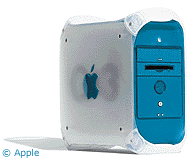 ADB port (so you could add a keyboard
that wasn't undersized or a mouse that didn't have more in common
with a hockey puck than a real mouse), but had no serial or SCSI
ports (some models had an Ultra Wide SCSI card and drive, giving
you a SCSI port). All models include CD-ROM, and some include a 5x
DVD-ROM drive and or a Zip drive.
ADB port (so you could add a keyboard
that wasn't undersized or a mouse that didn't have more in common
with a hockey puck than a real mouse), but had no serial or SCSI
ports (some models had an Ultra Wide SCSI card and drive, giving
you a SCSI port). All models include CD-ROM, and some include a 5x
DVD-ROM drive and or a Zip drive.
The Yosemite is supported under OS X. It also has
reasonable graphics performance, thanks to its advanced (for the
time) 66 MHz PCI slot and Rage 128 with 16 MB VRAM. All of these
goodies are housed in the fore-runner of the modern G4 case. It
opens very easily (just pull a handle) and can be opened while
running. There are two free hard drive bays inside and, if there's
no Zip drive installed, a free bay above the speaker, too. Pretty
cool. The biggest problems with this model are that it holds its
value too well and the ATA/33 implementation, though faster than on
older G3s, was tempermental and buggy.
Pricing? It depends on configuration. A 300 MHz model with a
6 GB drive and CD-ROM will go for $600 or so. At the top, a
tricked-out 450 MHz model with a 9 GB SCSI drive and DVD-ROM
will set you back $900 or more.
Lower down the list, the 8600
wins. Although the 9600 has some
great features, so does the less costly 8600. They both use the
same case, which is very easy to open. The 8600 has built-in
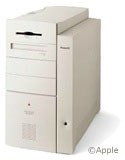 video, so video does not take up a
PCI slot, as it does on the 9600. It also has AV inputs and
outputs, something which the 9600 does not have. However, the 9600
does have four more RAM slots and two more free PCI slots. If you
want to have the most expansion, go with the 9600.
video, so video does not take up a
PCI slot, as it does on the 9600. It also has AV inputs and
outputs, something which the 9600 does not have. However, the 9600
does have four more RAM slots and two more free PCI slots. If you
want to have the most expansion, go with the 9600.
The 8600 shipped in 200 to 300 MHz configurations; the 300 is
probably the best buy. It had 4 MB VRAM, a 4 GB fast
(7200 rpm) hard drive, 64 MB system RAM, and a zip drive, as well
as a 24x CD-ROM. It has one full-size drive bay available for a
hard drive, CD-RW. or whatever you want to put there. There's no
OS X support from Apple, but if you upgrade the machine with
G3 or G4, OS X can be installed via
Unsupported UtilityX by Ryan Rempel. Also, there are no modern
interfaces included, so unless you have a horde of SCSI, serial,
and ADB peripherals, be prepared to invest in USB and FireWire
cards.
Pricing for a stock 8600/300 should be about $300.
Desktop
Apple hasn't made a real modular desktop computer since 1998,
unless you count the Cube. Therefore, only one computer has been
chosen for this category.
Power Mac G3/300 AV Desktop (rev
B). Don't be put off by the long name. The last of Apple's
desktops used the same case as most of the excellent 7x00 series, so it's really easy to open. It
includes AV in and out on it's Personality Card, has ATI Rage Pro
graphics, and comes with a Zip drive. It also supports modern 3.3V
RAM and EIDE hard drives, so those kinds of expansion are very
inexpensive.
The G3 shipped in several configurations, with the 300 MHz model
at the top. It included 6 MB VRAM (but lackluster Rage Pro
acceleration), an 8 GB EIDE hard drive, and 64BM RAM, along
with a Zip drive. There are no free drive bays, but you get three
PCI slots. A DVD-ROM drive was a build-to-order option, but most of
the beige G3s didn't have one. OS X support is provided by
Apple.
There are lots of things to watch out for. First of all, make
sure that you get the revision B motherboard. This includes
better EIDE support and a Rage Pro graphics chip (rather than the
even worse Rage II+). As with the 8600 and 9600, there are no
modern ports on these G3s, so unless you have a slew of legacy
peripherals you will need FireWire and USB cards to connect new
peripherals.
Laptop
At the high end sits the PowerBook G3
Pismo (a.k.a. FireWire). It was the first portable Mac to
include FireWire. Other PowerBook firsts include AirPort, a 100 MHz
system 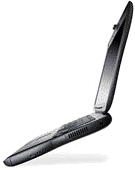 bus, and Rage 128 graphics.
Other goodies include a 5.25" drive bay (for the included DVD-ROM
drive, which supports CD-RW drives, hard drives, Zip drives, an
extra battery, and all sorts of other stuff), an S-Video out port
for projecting, a CardBus PC slot, and ATA/66 hard drives. The case
is relatively easy to open for a laptop, and adding RAM isn't too
much of a hassle. Weight is about 6 pounds, even with the large
14.1" screen, and OS X support is provided by Apple.
bus, and Rage 128 graphics.
Other goodies include a 5.25" drive bay (for the included DVD-ROM
drive, which supports CD-RW drives, hard drives, Zip drives, an
extra battery, and all sorts of other stuff), an S-Video out port
for projecting, a CardBus PC slot, and ATA/66 hard drives. The case
is relatively easy to open for a laptop, and adding RAM isn't too
much of a hassle. Weight is about 6 pounds, even with the large
14.1" screen, and OS X support is provided by Apple.
What to look for: The high-end 500 MHz model. It shipped with
12, 18, or 20 GB hard drives, a DVD-ROM drive, 128MB RAM, and the
trademark 14.1"1024 x 768 screen of the G3 PowerBooks. If you can
get another battery, go for it. You can take out the DVD drive and
put the second battery in that bay, effectively doubling you
battery life from three hours to six. Performance is comparable to
a PowerBook G4/500 in non-AltiVec
applications.
Many of the earlier G3s with 14.1" screens, especially the
WallStreet series, have a problem with the screen clutches (the
parts which hold the screen in one place when it's open) breaking.
This may have been solved in the Pismo, but they might not be old
enough to experience the problems yet.
Price: It's the most expensive on the list. For a 500 MHz Pismo
with a 12 GB hard drive, 128 MB RAM, DVD-ROM, and an extra battery,
you'll pay about $1,700. For the same price, you can get a G4/400,
but it doesn't include the nifty expansion bay.
Lower down, a perennial favorite, the PowerBook 1400c. Sure, it's slow as death by
today's standards, but the screen's nice, it keeps running, and it
can survive falling down a flight of stairs. This was the first
PowerBook to 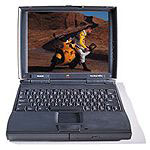 include an 11.3" screen and
a CD-ROM drive. No OS X support, even with a G3 upgrade,
because it only supports 64 MB RAM. The case is very easy to open,
and it's virtually indestructible (my old one survived falling down
the stairs in my house and still ran fine). There is a 5.25"
expansion bay, which includes a CD-ROM and a floppy module. You can
also add a hard drive, a Zip drive, or a magneto-optical drive.
Weight: 7 pounds with the CD drive, 6.5 with the floppy. It has two
PC card slots.
include an 11.3" screen and
a CD-ROM drive. No OS X support, even with a G3 upgrade,
because it only supports 64 MB RAM. The case is very easy to open,
and it's virtually indestructible (my old one survived falling down
the stairs in my house and still ran fine). There is a 5.25"
expansion bay, which includes a CD-ROM and a floppy module. You can
also add a hard drive, a Zip drive, or a magneto-optical drive.
Weight: 7 pounds with the CD drive, 6.5 with the floppy. It has two
PC card slots.
What to look for: The mid-range 133 MHz model. The higher-end
166 MHz model costs more and isn't too much faster. The lower end
117 MHz model has no L2 cache, so it's much slower than the others.
It includes a 1.3 GB hard drive, an 8x CD-ROM, and a floppy. Look
for one with a combo modem/ethernet PC card, since neither a modem
nor ethernet is built in. Also, if you can pick up one with a
video-out card, go for it, since video-out is not built into the
motherboard.
What to look out for: The 117 MHz model. It's slower than death.
Also, look out for the passive-matrix model. It's labeled
1400cs rather than 1400c. Passive matrix screens use less
power, but at the expense of quality. It's a bad trade.
Price: A 1400c/133 with 48 MB RAM, a CD drive, a 28.8 modem, and
ethernet should go for about $450. You'll pay a premium for more
RAM, but it's worth it, as RAM is hard to find (and expensive) for
this model.
Those are my picks for some of the best, fairly modern Macs out
there. There are a lot of other choices that are very good, such as
the PowerBook 2400c, the Power Mac 7300, the Power Mac 9600, the
Power Mac G4/400 (Sawtooth), and
others. However, the ones above are, in my opinion, the best due to
their combinations of features and price.



