Leopard Almost Running on a Beige G3
From James Little:
Hi LEM and Dan,
Though I'd like to share the progress I've made with booting Leopard
on my G4 upgraded Beige
G3. These should also apply to G4 upgraded B&W G3s and Yikes G4 towers.
The most common problem other people seem to be getting is a 'driver
missing for this platform' error at boot.
Prior to this I had Tiger running on both a G3 Desktop and G3 AIO. Interestingly, on the
1st revision iMac I
gave up trying to install Tiger, as it would always kernel panic. Both
of these with the help of XPostFacto.
I was initially interested in trying to install Leopard, as I knew
from the 2006 WWDC Preview release that G3 support and platform drivers
were built in - both of which, as everyone knows, have been removed
from the retail version.
Here are the steps I used:
- Used a Digital
Audio tower to install a new copy of leopard onto a 7 GB
partition.
- Compared the extensions folder in /System/Library/Extensions/ from
a Tiger partition with XPostFacto installed to the new Leopard
installation.
- Manually copied the missing ones from Tiger to Leopard.
- Installed OS 9 onto the same partition
- Transferred to the Beige G3
- Booted in OS 9 and used XPostFacto to configure booting from the
new Leopard partition and re-install extensions.
- Booted into OS X.
This then boots as far as just before launching the GUI - just after
login window starts - but then a crash occurs. Prior to this booting
just hung with a 'driver missing for this platform' error.
As far as I can tell the problem lies in the iographics driver
extension and is probably traceable to the fact that these machines are
PCI-graphics based. This might also explain why the reader report of a
G4-upgraded slot loading iMac works, because they were the first model
to support AGP graphics.
Technically, with a few extension/driver work-arounds, it should be
possible to overcome the above problem, as previous versions of
XPostFacto have done.
Hope this gives inspiration to any G4 Yikes owners or G4-upgraded
B&W G3s to give the above method a go and see how far they get.
Regards,
James
James,
Thanks for writing. I think you're right about the
lack of AGP video being the problem. We've had reports of success with
the Pismo PowerBook G3
and the Sawtooth Power
Mac G4, the oldest Macs with AGP graphics (it took
some digging to learn that about Pismo), but nothing older.
The best solution might be to find someone who has an
older developer version of Leopard and find out if at any point it ran
on Macs without AGP video. If so, it shouldn't be hard to extract the
drivers and try them on your beige G3.
Dan
Microsoft Word vs. Apple's Pages
From Clinton MacDonald:
Mr. Adkins:
I read with interest and pleasure your article comparing Microsoft Word
and Apple Pages for professional writing (in your case, in writing
two books). I too would like to adopt Pages as my academic/professional
writing tool, but Apple has left several roadblocks in place.
Specifically, Apple has not published an application programming
interface (API) for Pages, so third party developers have been unable
to expand Pages with professional tools.
As an academic scientist, I write many manuscripts, grants, and
other documents that require references and endnotes. There are several
reference managers on the market, notably EndNote, Bookends, and
Sente.
Each of these interacts with Microsoft Word (all three) or other Mac
word processors (Sente and Bookends). However, only Endnote has
versions available for both Mac and Windows, which is important for
collaboration.
Sadly, none of these reference managers can function with Pages,
because Apple has not made the APIs available for their interaction.
Therefore, academic writers are doomed to using using Microsoft Word
(probably Word 2004) until Apple opens up Pages to developers. Most of
us don't like it, but there are no other choices.
Ironically, even Endnote's support for Microsoft Word might dry up
with Office 2008: Endnote uses Microsoft's Visual Basic scripting to
embed its reference markers, and Microsoft is eliminating VB from
Office 2008.
More cheerfully, Pages 3.0 has AppleScript support. Since
AppleScript support implies an underlying API, enterprising third-party
developers may finally have a way to add reference manager support to
Pages. I look forward to seeing innovative reference managers from
smaller developers that finally support Pages.
Best wishes,
Clint MacDonald
Texas Tech University
Addonics Compact Flash Adapter and PowerBook
190cs
From Grant Davis following up on Addonics Compact Flash Adapter
Questions:
Hi Dan,
I have begun testing the Addonics
CF adapter card using the PowerBook 190cs to start with. This Mac
was given to me by a friend, so I thought it would serve as a good test
machine, as I have no data to loose or financial loss to incur should
anything go wrong. I had successfully performed the transplant, using
the dual slot adapter, but the second card does not seem to show up for
formatting, which is what I had suspected.
The leaflet which comes in the box with the adapter states that
there are some compatibility issues with the slave connection, and they
recommend removable cards, which sounds rather strange. I suspect they
may be referring to a Compact Flash adapter that allows other card
types to be used in a CF slot.
So far I can say that using the Dual CF adapter in a 190 is not
going to work.
It has been rather difficult to install a proper system on this
machine, which only has a floppy drive and SCSI connection. I have been
able to get the System 7.6 Disk Tools floppy system onto the machine
and have it boot, but I have not had much success in getting the full
System 7.6 installed.
It seems the IDE-SCSI for docking does not work from a 680x0 Mac to
a PowerPC Mac, my PB 1400, but
it does work from one 680x0 to another, my father's LC 630.
With the 630 I have been able to start an installation, but it seems
to get stuck while writing the system file. I chose to use the
universal install, seeing as I was using a different machine as the
boot machine, and the other in docking mode. I will attempt to boot the
630 using the docked 190, so the 190 CF is the boot drive for 630, and
try installing 7.6 that way instead, using the Disk Tools system as the
initial boot system.
Failing that, I may just use my 1400 to do the install and swap the
whole thing back over to the 190, again using a universal install.
I also purchased 2.5" to 3.5" inch drive adapters to later use CF or
2.5" drives in some desktop machines, I will report on them at a later
time if you wish.
Cheers,
Grant
Grant,
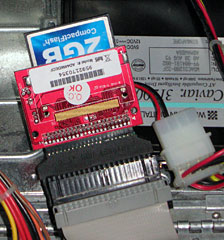 I have the Addonics
2.5"-to-3.5" adapter as well. One of my "when I can find the time"
goals is to install it in my Blue & White G3, which has
a much faster IDE bus than the PB 1400, so I'll better be able to
measure the difference between different Compact Flash card speeds.
I have the Addonics
2.5"-to-3.5" adapter as well. One of my "when I can find the time"
goals is to install it in my Blue & White G3, which has
a much faster IDE bus than the PB 1400, so I'll better be able to
measure the difference between different Compact Flash card speeds.
I haven't worked with a PB 190 in 7 years, but I don't know of any
reason it shouldn't work with Compact Flash in an IDE adapter. It may
be that the PC 190's IDE controller isn't designed to handle two
drives, but that's just conjecture.
Dan
Beige G3 Won't Book Mac OS 8.1
From Sean M. Kelly following up on Newly Acquired Macintosh Classic:
Dan,
On Jan 11, 2008, at 12:25 PM, Dan Knight wrote:
Those old Macs can be wonderful writing machines with
System 6 installed - anything later really bogs down the 8 MHz CPU.
Yeah, it came with 7.1 on it, and it was a dog. I just downloaded 6
from the Apple website and installed it cleanly. Nifty.
I was also given an unopened OS 8.1 retail box. I wanted to load
that on one of my G3s, since I've read somewhere that it tends to be a
little smoother running than 9.2. I was completely unable to get either
machine to boot to the disk. I tried just about everything I knew
including reformatting the hard drive. Still, the 8.1 disk seemed
unbootable. I put in my OS 9.2 disk in, and it started right up with
it. Oh well.
Since your beige G3s have Apple serial ports, it
should be possible to network your Classic to one of them using an
ImageWriter II cable. Set up Internet Sharing, and your Classic could
access the Internet, albeit slowly and with outdated browsers.
I'll avoid the Internet completely, since I use my MBP for that. But
the idea of using the serial ports might work. I'll see if I can find
some anywhere.
Thanks again for keeping up the great site. You are much
appreciated!
Endeavoring to make a difference,
Sean M. Kelly
Sean,
System 7.x was a bad match for the Mac Plus, SE, and
Classic, although it worked nicely once you moved to a 16 MHz Mac, even
one with a 68000 CPU (such as the Mac Portable, PowerBook 100, or my Brainstorm-upgraded Mac Plus).
I have no idea why a beige G3 wouldn't boot into Mac
OS 8.1, as these models shipped with Mac OS 8.0.
Dan
Speeding Up an eMac?
David,
I wanted to know if there is a way to upgrade eMacs here at school.
Can we add a board to increase the speed of the CPU? I have upgraded
CPU's in the past. But I have not seen anything out there for eMacs. I
have several hundred 700 MHz machines still working fine.
Thanks for the help.
Jack McIntosh
Department of Technology,
Northridge Local Schools
Dayton, OH
Jack,
There are no CPU upgrades for the eMac as far as I
know, but there are ways to overclock them. Leo Bodner's Upgrading
Apple eMac tells how to overclock an 800 MHz as high as 1.33 GHz,
but it requires soldering. There was another overclocking page by
BigBadMac, but it's gone MIA.
Dan
Google Mac Friendly?
From Adam Fothergill:
Hi Dan
Just got this little gem from Google adwords (which I use for work).
With Eric Schmidt [CEO of Google] joining the Apple board, you'd have
thought that all Google services would be Safari/Mac friendly, well
think again.
"Please note that the AdWords Webinars will be held in
cooperation with WebEx. Therefore, the sign-up process will be handled
and any notification e-mails will be sent from WebEx. To access WebEx
please use Internet Explorer since WebEx only runs smoothly with this
browser."
Okay, so Google don't own WebEx and can't dictate to them which
browsers to support, in which case how about using a company that don't
just support Billy G's Internet Nightmare. Unless of course WebEx also
make antivirus software. Eric, this is not a good way to make friends
in the Mac community.
Keep up the good work,
Adam
Adam,
Membership on Apple's board doesn't seem to have
anything to do with the company supporting the Mac platform. Chairman
and former CEO of Intuit Millard Drexler has long been a board member,
and there was a period of some years when Intuit stopped making
QuickBooks for Mac users.
Of all companies on the planet, Google should realized
more than anyone the breadth of browsers in use nowadays. Internet
Explorer still dominates on Windows, but it's almost unused on the Mac
and simply not available for Linux, BSD Unix, etc. Firefox and the
other Mozillas have a huge presence in the Linux/BSD world, have made
huge inroads in the Windows market, and are fairly popular on Macs.
(More visitors to Low End Mac use Firefox than either Safari or
Internet Explorer.)
It's shortsighted to limit yourself to Internet
Explorer and Windows, a problem I ran into last year using ADP for payroll. No IE on Windows, no way to
use the service on the Internet. (We've gone back to doing our own
payroll in house.)
Dan
AirPort Card Drivers
From Travis Patocka:
Dan,
I finally broke down and upgraded the technology in my classroom. I
gave in and bought one of those 500 MHz iBook G3s from Wegener Media for only
$140. Unfortunately, the iBook does not come with an AirPort Card.
Looking around on eBay, I found some pretty good deals. Thanks to
iFixit.com, I have been able to
find the install instructions and shouldn't have any problems.
While I have done all of the necessary updates on my new-used iBook,
what I was wondering is, would I have to install any additional
software to get the Airport Card to work with my iBook? I have read a
few articles on LEM, but I wasn't sure if the card was simply "plug and
play" or not. Any information that you might have on this would be
greatly appreciated, as many of the cards for sale online don't come
with instructions or a driver disk, if one is needed.
Thanks again for everything that you guys do at LEM!
- Travis
Travis,
Older versions of the Mac OS didn't include AirPort
drivers because there were no AirPort Cards back then. That's why Apple
provides AirPort drivers separately. If you're running Mac OS 9.x or
any version of OS X, the drivers should already be in place making
the card plug-and-play.
Dan
You are right, with Google acting this way with computers it will be
interesting to see the compatibility their cellphone OS will have.
Anyone want to bet it will be much more compatible with Windoze
machines? At least we have Yahoo, who have said that they will be
trying to support everyone. Good on 'em.
Adam
Dan Knight has been publishing Low
End Mac since April 1997. Mailbag columns come from email responses to his Mac Musings, Mac Daniel, Online Tech Journal, and other columns on the site.



