SCSI-to-Ethernet Adapter Sources
In response to SCSI-to-Ethernet
Converter?, Walter J. Ferstl writes:
Hello Charles,
Referring to Philip Croff's letter who was looking for a source
for an SCSI-to-Ethernet adapter:
Such adapters seem to be available here:
- http://pluto.njcc.com/~hjohnson/m_net.html#scsi
Please note that there are versions for the special square HDI-30
(30-pin) connector found only on some PowerBooks (e.g., the 1400) as
well as for the more common 25-pin DB-style connector like the one in
most older desktop Macs.
Another source might be:
- http://www.oldmac.mich-u.net/hard.html
Regards,
Walter
- Thanks for the links, Walter.
Charles
SCSI-to-Ethernet Adapter Available
From Ed Hurtley
I happen to have three of these wonderful devices. All three are
Asanté EtherTalk EN/SC models (the big network-hub-sized
models). Two in "Apple Platinum" and one in "Older PowerBook Charcoal
Gray". While it's nice having these things for my collection of older
Macs and accessories, I know that someone with more need could use
them.
I can confirm that one works perfectly with a PowerBook
2300c, at least in a full-sized DuoDock. I would be happy to
offer one of them to Mr. Croff, for only the price of shipping from
U.S. Zip code 97219.
Ed Hurtley
- Hi Ed,
Very generous of you. I've forwarded your note to Mr. Croff.
Charles
Cheesy WallStreet Hinge
 From
Dean Hausladen
From
Dean Hausladen
Hi Charles,
I had the loose hinge problem on my WallStreet
300/DVD. Found little advice online other than replace it. I took
the screen apart to diagnose the situation better. I was unimpressed
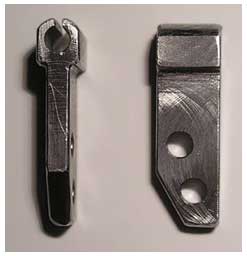
by Apple Industrial Designs' cheesy cast part. One side was
repairable with a part I made as a machinist. The other side has a
splined pin pressed into the aluminum frame. More cheese.
I've attached a pic of the part I made and used. I made extras and
a dimensioned sketch. Works smooth now. Oh well, Apple tries.
Dean
- Hi Dean,
No, the WallStreet screen hinges were not one of Apple's better
efforts.
Yours look great.
Charles
Another WallStreet Hinge Source
After reading WallStreet Hinges, Andrew
Main responds:
Charles,
Might I suggest another source for PowerBook parts, including
replacement display hinges: PBFixIt. Haven't bought anything from him
yet, so I can't vouch for the service, but the website is
well-designed (always like to see that), he offers free online repair
manuals with photos (or purchase for use offline), and recent price
comparisons show him significantly lower than the other suppliers you
list.
http://www.ifixit.com/cart/customer/search.php?substring=hinge
P.S. You might also enjoy this page: Want
to fix more than your computer?
Marsha Jackson wrote:
- "I had a friend's iBook that had power-up problems, too, and
the voltage on the PRAM seemed fine, but since it continued to
lose settings, I replaced it anyway. It's worked great
since."
Perhaps that's an iMac? iBooks have never had a PRAM battery; see
https://web.archive.org/web/20060418224108/http://docs.info.apple.com/article.html?artnum=86181
Seems odd that settings would be lost with a PRAM battery whose
voltage "seemed fine" (36.V?), then retained when it was replaced
with a new one; perhaps it just needed to be removed and replaced, to
clean the contacts?
Andrew
- Hi Andrew,
Yes; the PBFixIt people are good folks. Thanks for the links.
See my
review of the PB FixIt PowerBook Teardown Guides on Mac
Opinion.
Also, you're correct about the PRAM battery issue.
Charles
Dying iBook 500
From Walter Jamison
Charles,
I recently purchased an iBook
G3/500 (192 MB/10 GB) from the
PowerBook Guy, and up until last week, I had absolutely
nothing to complain about, other from the sluggishness of running
Jaguar with only 192 MB of RAM. However, last week (Thursday, I
think), I launched iMovie for the first time, hoping to import some
comedy videos a friend downloaded for me and make a compilation. As
soon as iMovie launched, the hard drive appeared to "hang" - it
would spin, search, then spin down. Spin, search, spin down. Over and
over, and after ten minutes I manually restarted the computer. The
problem vanished - temporarily, anyway. On Monday, the hard drive
freeze occurred while importing music from my MP3 player.
Manually restarted, it happened while opening iTunes right after
the restart. Called it quits for the night. I turn the computer on
the next morning, and the hang occurred while launching the Finder. I
let it sit and reboot into Classic Mode. The problem appeared while
launching a Nintendo emulator. The computer is now so unstable that
waking it from sleep sends it over the edge. It's two days out of
warranty, and I've called the PowerBook Guy twice. To no avail - he
suggested booting into Classic (I tried it, and it didn't help). What
should I do?
Walt Jamison
- Hi Walt,
Since booting into Classic doesn't help, this is probably not a
software problem. However, it would be well worthwhile to run some
disk diagnostic and repair software such as Disk Warrior,
DiskGuardian, TechTool, or Norton, to see if it finds any disk
directory corruption.
The two most likely candidates are either the hard drive itself or
perhaps the motherboard. In either case, replacement would be the
remedy.
Charles
B&W G3 Upgrade Questions
From Nicolas Collart
Hello Charles...
It's Montreal again ;)! Once again, thank you very much
for your great articles - they are always more than useful!
I just bought a nice Power Mac G3
B&W. I was really happy to see that it was a Rev. 2 when I
open the case; it will limit the problems known in Rev. 1.
I would like to upgrade this computer a bit, and so I had one or
two questions for you - hope you won't mind!
I saw the nice G4 upgrade made by OWC
(the OWC Mercury
G4/450-500 MHz). Do you think this accelerator makes sense
coming from a G3/300, and have you heard good comments about this
processor?
Also, I wanted to install a Combo drive. I wanted to know if it is
possible install any drive I want. I mean, can I install a PC drive,
or do I need to buy a special brand?
Finally, as my system is Rev. 2, I shouldn't have a problem with
newer drive, but do you think ATA/33 is too limiting? Would an
Sonnet
Tempo ATA/133 be justified?
Thank you very much for your time and answers, Nicolas
- Hi Nicholas,
I have heard no specific reports about that OWC upgrade, but I
would anticipate that it's a good product. Given the substantial
performance boost I got from upgrading a 500 MHz G3 Pismo
PowerBook to a 550 MHz G4, I would say that you would notice
quite a difference from that upgrade, especially in OS X.
You might also check out FastMac's
processor upgrades for the B&W G3.
I think Combo drives are fairly generic, but I can't affirm
that for certain. I would suggest checking with the vendor
regarding compatibility.
As for the Sonnet ATA/133 upgrade, the higher spec will likely
result in better performance. The cost/benefit evaluation is a
subjective issue.
Charles
Bad OS X Utility Link
From Dan Hermon
Charles,
Small error in your article on Mac OS
X utilities:
Address for Onyx is incorrect:
http://www.titanium.free.fr/us/onyx/index.html
Correct address is:
http://www.titanium.free.fr/english/onyx/index.html
Thank you for the article,
Dan Hermon
- Hi Dan,
Thanks for the correction.
I'm at a loss as to where the incorrect address originated.
Perhaps it's an obsolete one? The article was posted some time
ago.
Charles
Editor's note: All published links are tested prior to publication
to assure accuracy. However, there is no guarantee that links will
continue to function as websites disappear or are overhauled. We do
our best to make sure all links to Low End Mac remain correct.
dk
Letters sent may be published at our discretion. Email addresses
will not be published unless requested. If you prefer that your
message not be published, mark it "not for publication." Letters may
be edited for length, context, and to match house
style.
Go to Charles Moore's Mailbag index.



