Re: iMac G3 Bizarre Startup Problem
From Mat Schulte
SUCCESS! Although . . . I'm not exactly sure why. I did the
reset-NVRAM thing, as outlined in the article linked above, and that did
not immediately seem to do the trick. Then I also fiddled around
with some of the procedures outlined on this page: http://www.bombich.com/mactips/openfirmware.html
During the course of the day, I also ended up reinstalling
Panther yet again, but only after dragging onto the hard drive a
different 9.2.2 system folder (the one used as Classic on my wife's
G4 iMac) via the network.
I wish I could file a more precise follow-up, but the fact is it
was a long day, and I didn't really keep track of the order of
experiments, nor when exactly the magical moment was when I saw
that old smiley face Mac OS pop up on the screen.
But anyway, it's working fine now, and I got huge hugs from my
daughter for it, so thanks very much to you and Steven Hunter!
- Mat
:-)
C.
PowerBook 5300 Memories
From Andrew J. Fishkin, Esq.
Charles,
I really enjoyed your article on the
PowerBook 5300's birthday. I too owned one back in the day, a
5300c (1 MB VRAM version) purchased
through Apple's employee discount program for the then-princely sum
of $2,700. I was moving up from a PowerBook
520 purchased about 8 months earlier on the same program, which
itself was an upgrade to a PowerBook
145b.
Your article brought back fond memories of this compromised,
though capable machine. I concur with your assessment that System
7.5.2 was responsible for most of the 5300s bad press, and found
that under Mac OS 8.1 the 5300 was both fast and stable.
Thanks for the memories,
Andrew J. Fishkin, Esq.
Hi Andrew,
Glad you enjoyed the article.
Yes, I found that System 7.5.5 was the sweet spot
for me, although I tried out up to Mac OS 8.5.
Charles
I Love My PowerBook 5300
From Joshua Coventry
I must also say that I love my PowerBook 5300, too. The passive
matrix screen is really bad, but they all are. Someday I plan to
get an active matrix 5300 (I think the ce model). More RAM would be
good, too, but sadly the 5300/190 use their own proprietary RAM
that is extremely hard to get ahold of.
Thanks for the article, it was a good read.
Joshua Coventry
Hi Joshua,
The 5300c had a 640 x 480 dpi active matrix
display, and the 5300ce was the first Mac laptop ever with a 800 x
600 display.
RAM is definitely a challenge with these 'Books
now.
Charles
PowerBook 5300 Not Apple's Most Expensive
Laptop
From hoddy
 Correction to "The PowerBook
5300 Turns 11: A Reminiscence"
Correction to "The PowerBook
5300 Turns 11: A Reminiscence"
"...the 5300 also has the distinction of being the
most expensive laptop Apple ever sold, with the top-end 5300ce
model originally selling for a whopping $6,500!"
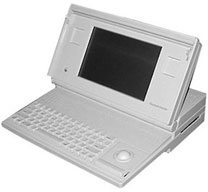
Depending on what you consider "laptop". The Mac Portable (is it really a laptop?) sold
for $7,300 (with hard drive) and $6,500 (without hard drive).
Hi,
It's a debatable point. It's hard to seriously
consider the Mac Portable, at 16 pounds or so, being a "laptop." On
the other hand, I have included it in
The Compleat Buyer's and User's Guide to Antique and Collectable
Macintosh Laptops articles on MacOpinion since 2002, noting
that "it was absurdly expensive at $6,500 ($7,300 with the optional
hard drive), and weighed nearly as much as the CPU/monitor unit of
the original compact desktop Macs."
Charles
Kanga Is All I Need
From William D. Bandes
Ho! I just happened on your 5300 reminiscence.
I feel the same about my Kanga,
except it's still steaming along with its 12.1" display, CD-ROM
drive, and WiFi with a PCMCIA card from MacWireless. Plus a USB-2
PCMCIA card from IOGear.
Running OS 8.6, this gem is all anyone could want!
At home, it's connected to a Magnavox 15" LCD TV, which doubles
as a monitor. On the road, it's on the Net everywhere.
It started about $5,600, but I bought it new in-the-box a year
later for $2,400.
I don't think this gem can be stopped! And it has the crisp 5300
styling. And it's solidly made. I love it so much that I picked up
an identical twin el cheapo in case of trouble. I have an external
CD writer, scanner, and backup HD. I have all of the great old
inits still running which give me a boffo environment.
In case I really need OS X, I picked up an old WallStreet, which dual-boots 9.2.2 and
10.2.8. It sits idle in a closet most of the time.
Best regards from another retard; everybody else thinks that I'm
crazy.
Bill
Hi Bill,
I understand the enduring attraction of the
5300/3400/3500(Kanga) family. Good on you for squeezing the value
out of yours, and if it continues to satisfy you needs and tastes,
more power to you.
Being as the original G3 was only built for five
months and it was monstrously expensive new, there are not a whole
lot of them available in the used- refurb channels, and it's
destined to become one of the more collectable PowerBooks.
Charles
Another WallStreet/PDQ Upgrade
From Larry
You missed one:
http://www.wegenermedia.com/wllstg4.htm
Which is a G4/500 priced $10 lower than their G3/500. They also
require you to return an original processor card with a L2 cache or
the price is $30 more.
Thanks for the heads-up, Larry.
Charles
Pismo Upgrades Solves Problem
From J.D.
Greetings!
While your article is a few years old - and you may already know
this - I figured you might appreciate the feedback since your
article was one of the ones I used when my Pismo decided to get
sick. Long story short, it became clear I had a "hardware"
problem. I was lucky to be referred to a Mac expert not connected
with Mac who gave me advice rather than charging me $$$ to figure
out the problem. He basically determined in a few minutes that I
had a problem with either the memory, the hard drive, or the
processor-processor board. When I cleaned up everything and loaded
OS X - changed my 9nome for piXies! - I would get "kernel panics"
and the thing would crash even when started on an external
disc.
Welcome to eBay - found a cheap and better hard drive. Found
cheap 1 GB total memory . . . but I still had problems.
So . . . it came down to the processor or something connected to
it - "cache" chip. After reading your article, I contacted the
various dealers. Did I need to get a new processor?
One vendor was very helpful:
http://www.wegenermedia.com/pg4550.htm
Their kit was far cheaper than others and, yes, it took only
about ten-minutes to exchange. What I liked was they agreed to give
me a major discount in repair if it turned out I had "something
else" wrong.
Now PowerBook is happy. I rarely get the "spinning" ball unless
I am downloading while running my old Photoshop off of System 9 et
cetera.
Do not know if this helps or is relevant.
Best,
- J.D.
Hi J.D.,
Thanks for the report.
I've found Wegeners good folks to deal with.
Glad you got your problem ironed out.
Charles
G3 Dual USB iBook Thoughts
From Jimmy James
In your latest Miscellaneous Ramblings,
one writer asked about the reliability of dual USB iBooks. One
thing to consider is that the failure is due to a faulty ATI Radeon
board. The 8 MB VRAM ATI Rage 128-equipped 500 and 600 MHz iBooks
(original and Late 2001 models) don't have this issue. You lose
Quartz Extreme and the ability to run some games, but if
reliability is an issue to you, then this is an important factor to
consider!
The Jimmy James
Excellent point, Jimmy.
However, the Radeon 7500 GPU in my own 700 MHz 12"
iBook has been trouble-free for nearly four years, although
statistically, this model was about the most problem-plagued in
that regard.
Charles
Re: Problem Reading CD-R
From Tom Lee
Hi Charles,
Another terrific column - congrats! I saw the question about the
Beige G3 having trouble reading CD-Rs. You were correct in thinking
that no special drivers are needed. Some drives - particularly
older ones - are finicky about the type of dye used in the CD-R
media, so that might be his problem. My old clamshell iBook is this
way, and it's about the same vintage.
I recommend trying Taiyo Yuden media (they also OEM their stuff
under other brand names), burned at about 4x or 8x. In my informal
"compliance testing lab" (i.e., big room full of old Macs), that
seems to be readable on every Mac I own. Other brands may work,
too, of course, but I can attest to TY working with all the
Macs I have. This includes an old Performa 630CD, a TAM, PowerBook
3400, WallStreet, dual USB iBooks, TiBooks - you get the idea.
:) I've used other media, burned at higher speeds, and
they will work with most, but not all, of my Macs. Perhaps this is
the problem in this case, too. Just a thought.
- Cheers,
Tom
Hi Tom,
Thanks for the kind words and helpful tips.
Charles
Re: Beige G3 Unable to Read CD-R
From Steven Hunter
If it has a DVD-ROM drive, that would explain it. A lot
of early DVD-ROM drives simply will not read CD-R/RW discs. I was
never quite sure as to the reason but I suspect it has something to
do with the method the drives used to detect if the disc inserted
was a DVD or CD.
Also check to make sure the "ISO 9660 File Access" and "UDF
Volume Access" drivers are in the Extensions folder. I don't know
if Apple's CDs are ISO-9660 compliant, so that can't be a totally
reliable test.
BTW, I have yet to find a single CD drive that does not read
CD-R discs. The oldest CD drive I've ever seen (an old external
SCSI 2x) read a disc I burned just fine. Of course, there's a first
time for everything... It may also help to use CD-R discs with a
silver reflector layer rather than blue or green.
Thanks Steven,
Charles
Removing Mac OS X Language Packs
From Tom Gabriel
Hi Charles,
I recently installed Mac OS X 10.3.3 on my Power Mac G4 and did
not specify "English Only" in the language selection, which took a
lot of time installing the various language packs, which I will all
but certainly never use. But I then went ahead and installed the
10.3.9 upgrade with Java security update.
The system has been doing great, but I've since been told that
the language packs slow system response and take up unnecessary
space on my hard drive.
My questions: Can I reinstall the original 10.3.3 system via the
"Upgrade" option, even though I have a higher version, 10.3.9, and
specify "English Only", then reinstall the 10.3.9 upgrade? And if
so, is it really worth it doing to do so?
Thanks for any help you can give.
God Bless,
Tom Gabriel
Hi Tom,
An easier way is to just use Monolingual, a freeware
program for removing unnecessary language resources from Mac OS X,
in order to reclaim several hundred megabytes of disk space. It
requires at least Mac OS X 10.3.9 (Panther) and also works on Mac
OS X 10.4 (Tiger).
Charles
Hey Charles,
Excellent help, as usual. Monolingual worked like a champ! A
couple of things I found to be helpful:
- You have to be signed in as "Administrator" or sole user.
- If you choose English, as most of us will, do not delete any
other "form" of English (such as British, Canadian, or
Australian).
After Monolingual has done its thing, boot from your OS X
installation disk and in Disk Utility run "Verify Permissions" and
"Verify Disk". This gets everything back the way it should be.
BTW, in case any of your readers would be interested,
sourceforge.net also makes a freeware application called Audacity for Mac OS X (and a
version for OS 9), which is a music/sound source editing program
which can clean up sound files for CD recording or whatever, adjust
sound levels, and do some other things that programs like Toast or
Audion (or iTunes) don't even pretend to do.
Thanks for the information, and God Bless,
Tom Gabriel
Go to Charles Moore's Mailbag index.



