Bring Back Rugged Mac Notebooks
From John in response to Bring Back the Macintosh
Portable:
Hi, Charles,
You make lots of good points about a new approach to laptops, or a
return to the original philosophy, for Apple. I agree that a PowerBook
with easily accessible hard drive and RAM, plus upgradable processor
and video cards, is an idea whose time is here. A little more bulk to
the machine would indeed be needed. Even this Pismo that I'm typing on isn't
ideal for laptop use, as its thinness makes it prone to flex.
I don't know though that I'd be interested in a big laptop that
could serve as a legitimate desktop too. I haven't used one of the 17"
'Books, so I don't have a reference point for that option. I'm content
with the smaller form factor.
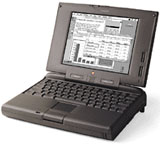 I've
recently acquired a pair of 5300cs
PowerBooks that are in excellent working and cosmetic condition.
This is my first experience with this vintage PowerBook, and there are
things I like about it. One is the bulk of the computer. Its thicker,
heavier base seems to be really durable for transporting and using
literally in the lap. Also there's actually enough lid area that a
widescreen display could be fitted to the 5300 case or a similar one,
making a really attractive little computer, provided it were fitted
with at least a G4, a gig of RAM, and 32 MB or more of VRAM.
I've
recently acquired a pair of 5300cs
PowerBooks that are in excellent working and cosmetic condition.
This is my first experience with this vintage PowerBook, and there are
things I like about it. One is the bulk of the computer. Its thicker,
heavier base seems to be really durable for transporting and using
literally in the lap. Also there's actually enough lid area that a
widescreen display could be fitted to the 5300 case or a similar one,
making a really attractive little computer, provided it were fitted
with at least a G4, a gig of RAM, and 32 MB or more of VRAM.
Since where I live isn't subject to more than occasional power
interruptions, a big portable substitute for a laptop isn't a need for
me. But a sturdier, more powerful, small PowerBook would be very
attractive.
BTW, I believe the WallStreet came out in 1998,
not 1978 :-)
John
Hi John,
Arrgh, typo. :-b [Editor's note: We've fixed
it.]
Yes, the WallStreet was the high water mark in Apple
laptop versatility, with its robust build, two expansion bays, two PC
Card slots, and comprehensive array of I/O ports. The Pismo has proved
a more successful upgrader only because it's more modern - "New World"
ROM, 100 MHz frontside bus, better video card, supports 1 GB of
RAM - not because its from factor is superior to the WallStreet's in
the upgrade context. On the other hand, the WallStreet is a pretty
heavy rig to lug around. The Pismo is no lightweight, but it is a lot
nicer to handle. On the other hand, the 17" PowerBook was a pleasant
surprise in terms of handling. The footprint is definitely large, but I
find it surprisingly unbothersome.
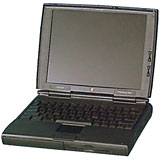 I love the PowerBook 5300's size and
proportions. Ditto the PowerBook
1400. I still have examples of both in working condition. Actually,
the footprint of the 12"
iBook is pretty close to the 5300 and 1400, and I was a fan of it
as well. Those two PowerBooks are amazingly heavy considering their
trim footprint. The 1400 has proved rugged as well, but the 5300 not so
much. I liked my 5300, but I would have to rate every other Mac laptop
I've owned since as better machines.
I love the PowerBook 5300's size and
proportions. Ditto the PowerBook
1400. I still have examples of both in working condition. Actually,
the footprint of the 12"
iBook is pretty close to the 5300 and 1400, and I was a fan of it
as well. Those two PowerBooks are amazingly heavy considering their
trim footprint. The 1400 has proved rugged as well, but the 5300 not so
much. I liked my 5300, but I would have to rate every other Mac laptop
I've owned since as better machines.
Charles
Pismo 'One Durable and Fun Mac'
From James:
Hello again, Charles,
Actually,
when I tried a different bay, the drive has been working better for me
(no errors since then). Also (just in case) after I notified the seller
via
eBay about the difficulty, he/she said that another drive would be
on the way once they get one in, and they'd notify me with a tracking
number once it shipped to me. So one way or another, I will have at
least one working drive. My problem may possibly have been that the
internal connector in the other bay had a little
dirt/corrosion/oxidation in it that caused the problems, so I'll get
around to trying to clean the other bay shell before the other drive
assembly arrives. If the first one stays good for me, I will
probably/likely be sending a second payment, and I may be able to get
the other PowerBook enough parts to make it work, and have a second
Pismo with DVD/CD±RW and (eventually) 1 GB of RAM and 120
GB hard drive.
I am not somewhat noticing my system seeming not as quick, so I may
get a G4 for this Pismo next, or else go for a used AlBook G4
perhaps.
But this Pismo has been one durable and fun Mac to work/play with!
Not sure if an AlBook would be quite as much fun and expandable...
;-)
Thanks,
Jim
Hi Jim,
Glad to hear that you're getting it all sorted
out.
As one who uses both Pismo and AlBook every day, I can
affirm that they both have their virtues. I like the bigger display and
the greater speed and power of the AlBook, but I prefer the feel - both
tactile and intangible - of the (G4) Pismo, and the latter definitely
has the edge in expandability and general versatility.
Reliability-wise, it's a wash so far.
Charles
Pismo Issues with 1 GB of RAM
From Ted :
Mr. Moore:
In your excellent article, Low End Mac's Compleat
Guide to the Pismo PowerBook, there is a portion that addresses RAM
upgrades, as follows:
"...even 1024 MB with two 512 MB modules, although
there are some minor limitations that inhere with 1 GB of RAM
installed."
I cannot find a source of information anywhere that explains these
limitations. I've recently upgraded to 1 GB in my G4 upgraded
Pismo and have not noticed any problems whatsoever. Could you please
tell me what these limitations are?
Furthermore, it may be helpful to add this info to your article,
thus making it a more Compleat Guide.
Thanks very much for your help.
Ted
Hi Ted,
As I understand it, the minor caveat pertaining to the
use of more than 640 MB or so of RAM in the Pismo is that the PRAM
battery may not have enough reserve to keep more RAM than that alive
during battery changes with the PowerBook sleeping. I haven't
experimented with this issue personally because I've never had more
than 640 MB memory in my Pismos, however, I don't think it's a major
issue, and many people report very satisfactory results with two 512 MB
RAM modules installed.
Charles
What More Do You Need?
From Tom:
15" MacBook
Pro w/4 GB RAM - what more do you need? (Display for home (I don't
use mine), a wireless mouse and keyboard)
Tom
Hi Tom,
Well, nothing really. A 15" MacBook Pro with 4 GB of
RAM is a nice setup. I've never used external displays on a routine
basis with my laptops, which I suppose is partially why I'm partial to
the 17" units. With the MacBook Pros and aluminum PowerBooks, the 17"
models are a bit easier to work on, although neither of them is
a pleasure in that context, something I hope will improve (at least in
terms of hard drive access) in the next revisions.
I've never been a fan of wireless input devices, but
some new products from Logitech are changing the game. The new Logitech V-550 Nano wireless mouse
almost instantly became my favorite mouse I've ever used, and the
diNovo Edge keyboard is pretty
seductive, although I still like my wired Kensington SlimType 'board better.
Charles
Why POP3 Email Instead of IMAP?
From Jonathan White:
Nice article on email (8 Free POP3 Email Options),
but why not IMAP? So much more useful for those of use that
access email from more than one place because the mail stays on the
server and all locations are in sync. I use fastmail.fm - check it out
Jonathan
Hi Jonathan,
I can appreciate how that aspect of IMAP would appeal
to users who access their mail from different locations frequently.
My preference for POP 3 is to a large degree due to
the fact that I like to have my email archives on my hard drive without
the necessity of an Internet connection to access them. Broadband is
still not available where I live, so I'm stuck with a dialup
connection, and in mobile mode one is not always (or, in this neck of
the woods, very often) in range of a WiFi hotspot.
Gmail and several other webmail services also support
POP 3 with the option of leaving copies of downloaded messages on the
server, which isn't quite the always-synchronized solution that IMAP
offers, but it is a reasonably versatile compromise.
Charles
Buying Glasses Online
From Andrew:
Charles,
Maybe you've seen this, but anyway: article in Slate about buying
glasses online: How To Get
an Unbelievable, Amazing, Fantastic, Thrilling Deal on New
Glasses
Andrew
Hi Andrew,
Thanks for the link to that article. I hadn't seen it,
but the experience described almost exactly mirrors my own.
This pair of specs I bought from Goggles4U last fall
are the best glasses I've owned in nearly 50 years, most importantly
because the titanium frames and high-density lenses make them
feather-light, but optically they are excellent as well. And they only
cost me about $35 Canadian delivered to my door.
Charles
Go to Charles Moore's Mailbag index.



