PowerBook, iBook, iPod, and other portable computing is covered
in The 'Book Review. iPod news is
covered in The iNews Review.
Mac News
Mac Reviews
Mac Tips
New Products
Mac News
The New Bluetooth: More on the Beam
BusinessWeek's
Stephen H Wildstrom says:
"When the short-range wireless technology called Bluetooth first
appeared about five years ago, it was hyped as a way to finally
sweep all those messy cables from our lives. Then cost and
complexity took their inevitable toll, and many people wrote the
technology off. Now Bluetooth is back, and it has become a useful
tool in a variety of settings.
"Bluetooth has had more success in Europe than in the U.S. It's
standard on nearly all high-end European handsets....
"Bluetooth is also moving beyond hands-free phone use. Although
Microsoft is a 'promoter member' of the Bluetooth Special Interest
Group that's responsible for the standard, Bluetooth support in
Windows remains primitive.
"Not so with Apple Computer. The technology is standard in many
Apple Macintoshes and optional in the rest, and with its new line
of PowerBook laptops, Apple is the first to use a new, faster
version of Bluetooth. If a Mac detects a Bluetooth keyboard and
mouse during setup, it will automatically link to them."
CherryOS Mac Emulator Goes Open Source
ZD Net UK's
Ingrid Marson reports:
"The company behind the CherryOS Mac emulator has decided to
release the source code of the product to put an end to accusations
that it has taken code from open source projects.
"Developers working on PearPC, an open source PowerPC emulator,
claim that Maui X-Stream used code from the project to write its
Mac emulator for Windows. But Jim Kartes, the president of Maui
X-Stream, said it wrote the code for CherryOS from scratch."
Mac Reviews
The Mac mini: Apple's (Not Quite) Budget
Computer
Consumer Reports reports:
"For many Mac Mini users,
upgrades will be a virtual necessity that cost more than upgrades
to a Windows PC (see Battle of the budget PCs). And they're even
costlier if you don't order them when you buy the computer (at
which time labor is free), because they must be performed by an
authorized Apple dealer or
the Apple Store. Some important upgrades include: doubling
memory to 512 MB (recommended if you run more than one application
at a time), adding an internal AirPort Extreme Wi-Fi card (if you
have a wireless home network), and adding a wireless keyboard and
mouse or a DVD burner. There are also no audio inputs - just a
stereo headphone jack in the back of the case - though Apple sells
a $35 sound adapter that provides an input.
"There are other hidden costs...."
Mac Tips
About the Security Content of Mac OS X 10.3.8
Update
A new Apple
Knowledge Base Article says:
"This document describes the security content included with the
Mac OS X 10.3.8 Update, which can be downloaded and installed
using Software Update, or from Apple Downloads.
"For the protection of our customers, Apple does not disclose,
discuss, or confirm security issues until a full investigation has
occurred, and any necessary patches or releases are available. To
learn more about Apple Product Security, see the Apple Product
Security website."
Mac mini Developer Note Posted
This
developer note gives a technical description of the
Mac mini. The note provides
information about the computer's internal design, input-output
features, and expansion capabilities.
This developer note is intended to help hardware and software
developers design products that are compatible with the products
described here. If you are not already familiar with Macintosh
computers or if you would simply like additional technical
information, refer to Appendix A, "Supplemental Reference
Documents", for details.
The information in this note is arranged in four chapters and
two appendixes.
- Chapter 1, "Overview to the Mac mini", introduces the Mac mini,
describes its features, and mentions a few software issues of
interest to developers.
- Chapter 2, "Architecture", describes the internal organization
of the computer. It includes a functional block diagram and
descriptions of the main components on the logic board.
- Chapter 3, "Devices and Ports", describes the I/O ports and the
built-in I/O devices.
- Chapter 4, "RAM Expansion", includes development guidelines for
the RAM expansion modules.
- Appendix A, "Supplemental Reference Documents", provides
sources of additional information about the technologies used in
the Mac mini.
- Appendix B, "Abbreviations", lists standard units of measure
and other abbreviations used in this developer note.
New Products
OWC Announces Mac mini Upgrade Installation
Program
PR: Apple Computer's new Mac mini is flying off shelves. And, as
usual, when Apple releases a new product, Other World Computing is
there with hardware to enhance it.
One reason the mini is so popular is its small footprint and
lack of surrounding clutter. OWC offers three internally installed
upgrade options, providing significant enhancement while
maintaining the Mac mini's clutter-free appeal.
OWC's Mac mini internally installed upgrade options include:
- 1 GB (1024 MB) DDR Memory Upgrade Module for $129
- 5400 RPM and 7200 RPM hard drives 60 GB to 100 GB storage from
$119 that are up to 43.8% faster and 150% higher capacity than
stock 4200 RPM factory options
- 8x SuperDrive for $149.95, which is twice as fast as the stock
option SuperDrive and has dual layer DVD burn support.
For those who are comfortable doing the installation themselves,
OWC has created a free QuickTime video demonstrating proper
installation. But some customers already have been asking for
professional installation, prompting the service's addition to
OWC's catalog.
"Although it's not the most difficult of installations, the Mac
mini was not designed for easy opening," said Larry O'Connor,
president of OWC. "That said, we're happy to be able to support the
do-it-yourselfer as well as those who would prefer a professional
installation be performed."
For a $99 service fee, customers will receive a proper packing
box for shipping their mini to OWC complete with a return FedEx
Overnight shipping label. Within 24 hours of receipt by OWC, the
customer's Mac mini is returned via FedEx Overnight with upgrade(s)
installed.
The original components are returned with the upgraded mini. Or
the customer may take advantage of OWC's trade-in rebate program
and get cash back instead.
More details regarding OWC's Mac mini upgrade program are
available online, by calling 800-275-4576, or via email at sales@macsales.com
DiskGO! 3.5" Portable Hard Drive
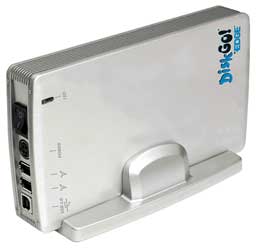 PR: Protect your
priceless digital photos, critical financial records and all of
your hard work with DiskGO!
Portable Hard Drives by Edge. These sleek, aluminum-encased
portable hard drives quickly and easily store up to 350 CDs worth
of data. Ranging from 80 GB to 400 GB, the DiskGO! Portable Hard
Drives are perfect for home or office use - freeing valuable hard
drive space and providing a fast and convenient way to perform
routine back-ups.
PR: Protect your
priceless digital photos, critical financial records and all of
your hard work with DiskGO!
Portable Hard Drives by Edge. These sleek, aluminum-encased
portable hard drives quickly and easily store up to 350 CDs worth
of data. Ranging from 80 GB to 400 GB, the DiskGO! Portable Hard
Drives are perfect for home or office use - freeing valuable hard
drive space and providing a fast and convenient way to perform
routine back-ups.
With transfer rates up to 480 Mbs, DiskGO! Portable Hard Drive
by Edge can back-up an entire notebook or desktop hard drive in
just minutes. Don't risk losing thousands of dollars worth of work,
years of valuable digital photos and more.
DiskGO! 3.5" Portable Hard Drive Features/Benefits:
- Plug-And-Play, Easy To Install
- Attractive Base Included
- Lightweight And Easy To Transport
- External Power Adapter Included
- Sleek Aluminum Cover Offers Protection And Efficient
Cooling
- Backed By A One-Year Manufacturer's Limited Warranty
Technical Specifications:
- Interfaces: USB2.0, IEEE1394, Combo
- Operating System: Windows 98/98SE/ME/2000/XP and Mac OS 8.6 or
later
- Transfer Rate: Up to 480 Mb/second
- Power Supply AC input: 100VAC to 240VAC
- DC output: +5V/+12V
- Dimensions: 8.25" (L) X 4.7" (W) X 1" (H)
Prices
- 80 GB DiskGO! 3.5" Portable Hard Drive, $109.95
- 120 GB DiskGO! 3.5" Portable Hard Drive, $139.95
- 160 GB DiskGO! 3.5" Portable Hard Drive, $159.95
- 250 GB DiskGO! 3.5" Portable Hard Drive, $219.95
- 400 GB DiskGO! 3.5" Portable Hard Drive, $349.99
DVI KVM with 1920 x 1200, USB 2.0, FireWire,
and Audio Support
PR: Addlogix's
PowerReach DVI 2G include two of the most advanced DVI KVMs
on the market today.
First, PowerReach DVI 2G is a 2-port DVI USB KVM with audio
support and an integrated USB 2.0 hub. The second model is
PowerReach DVI 2G, FireWire Edition. Similar to the DVI 2G, DVI 2G
- FireWire is 2-port DVI USB KVM with audio and FireWire support,
along with an integrated USB 2.0 hub.
Both models are designed to control two computers with a DVI
display and USB keyboard and mouse. Both models are equipped with
an integrated 2-port USB 2.0 hub and audio support that allow
connected USB devices and audio components (microphone, speakers)
be shared between two computers.
The PowerReach DVI 2G, FireWire Edition further offers FireWire
support that allows high-speed FireWire devices such as external
storage drives to be switched and shared between the two
computers.
The one-of-a-kind "Independent Switching" makes peripheral
sharing simple! Users can select the computers, the connected USB,
FireWire devices, microphone, and speakers independently, using
either front-panel buttons or keyboard hotkeys.
For example, this special "uninterrupted connection" feature
allows the user to control computer #1, while files are being
transferred between a high-speed external drive that's connected to
the KVM and computer #2. Similarly, user can get control of
computer #2, while the speakers connected to the KVM are still
playing the files from computer #1.
Features:
- Control 2 DVI computers using USB keyboard, mouse, and a DVI
flat panel display
- Integrated audio ports allow independent/simultaneous switching
and sharing of microphone and speakers
- Integrated 2-Port USB 2.0 Hub allows independent and/or
simultaneous switching and sharing of high-speed USB 2.0
devices
- FireWire Support (available on the FireWire Edition model)
allows FireWire devices to be shared between 2 computers
- High-Speed USB 2.0 compliant
- UHCI, OHCI USB interface support
- Simple push button and hotkey switching
Computer Port Connectors
- 2 x USB Type B
- 2 x DVI-I Single Link
- 2 x 3.5mm audio in/out jack
- 2 x 3.5mm mic in/out jack
- 2 x USB Type B
- 2 x DVI-I Single Link
- 2 x 3.5mm audio in/out jack
- 2 x 3.5mm mic in/out jack
- 2 x FireWire 6-Pin jack
Console Port Connectors
- 2 x USB 1.1 Type A for Keyboard/Mouse
- 2 x USB 2.0 Type A device hub port
- 1 x DVI-I Single Link
- 1 x 3.5mm audio in/out jack
- 1 x 3.5mm mic in/out jack
- 2 x USB 1.1 Type A for Keyboard/Mouse
- 2 x USB 2.0 Type A device hub port
- 1 x DVI-I Single Link
- 1 x 3.5mm audio in/out jack
- 1 x 3.5mm mic in/out jack
- 1 x FireWire 6-Pin jack
BrickHouse 1.3 Firewall
PR: Brian Hill says:
As Apple's built-in firewall preferences improves in both
functionality and security, I will be aiming BrickHouse more at
users who need the advanced firewall configuration, logging, and IP
sharing options found in
BrickHouse.
There is no reason that a new or inexperienced user cannot use
BrickHouse, but Apple's own Firewall preferences will likely remain
a simpler interface for configuring a basic firewall.
However, if you need:
- Firewall filters that include qualifiers on host or network
addresses
- Firewall filters that operate on other than TCP or UDP
protocols
- Firewall filters that include the whole range of ipfw
qualifiers, such as IP options, ICMP types or TCP flags
- Per-filter logging configuration, including the ability to log
allowed connections and the option to not log certain types of
denied connections
- NAT port forwarding or other custom NAT configuration
- Different filter configurations on different network
interfaces.
- A persistant, searchable firewall log entry database with
graphical log viewer
- Scriptable control of your firewall, such as via cron or other
shell automation
- Access and ability to easily edit the raw firewall
configuration text, including an integrated ipfw filter syntax
checker.
- The ability to switch between different firewall configuration
sets quickly and easily.
...then you should consider using BrickHouse.
Tested on both Panther (10.3) and the latest seed of Tiger
available at the time (8A425). Includes several changes to support
Tiger. NOTE: It has come to my attention that this version no
longer runs on 10.2 due to the being linked against the 10.3
SystemConfiguration frameworks. Updated (and now working on Panther
and higher) online documentation under the Help menu. Please read
the Read Me file for more information.
Changes Since 1.2b12
- Tested on both Panther (10.3) and the latest seed of Tiger
available at the time (8A425). Includes several changes to support
Tiger. NOTE: It has come to my attention that it does not run on
10.2 or earlier. Apparently the SystemConfiguration frameworks I
linked against on 10.3 are incompatible.
- Updated (and now working on Panther and higher) online
documentation under the Help menu.
System requirements: Mac OS X 10.3 or higher
BrickHouse is $25 shareware.
Desktop Mac
Deals
Low End Mac updates the following price trackers every two
weeks:
For deals on laptops, see our Best PowerBook G4 Deals,
Best iBook G4 Deals,
and Best iBook G3
Deals. For deals on iPods, see our Best iPod Deals.



