MacBook, PowerBook, iBook, and other portable computing is covered
in The 'Book Review. iPod, iPhone,
and Apple TV news is covered in The iNews
Review.
All prices are in US dollars unless otherwise noted.
News & Opinion
Apple Updates
Products
Software
News & Opinion
Ubuntu 9 as Slick as Windows 7 and Mac OS X?
ZD Net
Australia's Renai LeMay says:
"Here's what the official press release won't tell you about Ubuntu
9.04, which formally hit the streets overnight: its designers have
polished the hell out of its user interface since the last release in
October.
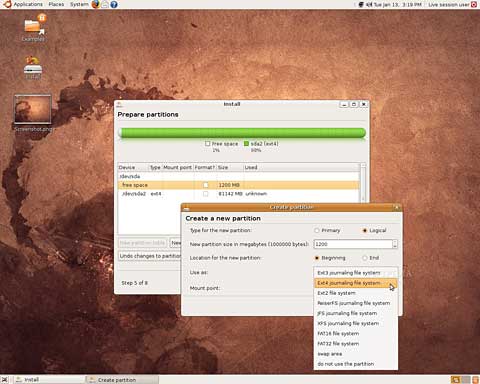
Ubuntu 9.04 shows off its new interface.
"So much so, in fact, that I am starting to prefer using my Ubuntu
'Jaunty Jackalope' desktop over the similarly slick Windows 7 beta
(which I am currently running full-time on one desktop) and Mac OS X
Leopard operating systems, which I also use regularly....
"In short, Ubuntu is now as slick and beautiful as Mac OS X or
Windows 7."
Link:
Ubuntu 9.04 Now as Slick as Win7, Mac OS X
8 Reasons Your Next Computer Should Be a Mac
Writing in PC
World, Technologizer's Harry McCracken contends that there are lots of
extremely rational reasons exist to choose a Mac running OS X over a
Windows PC and that many Mac user have excellent basis to believe that
they're getting good value for your money even though the Mac is never
the cheapest option.
He profiles eight such reasons in this article (although he
evenhandedly wrote an article called
"Eight Reasons Your Next Computer Should be a PC" as well.
- Macs are consistently consistent.
- The joy of predictability.
- Who needs security headaches?
- Crud, or the lack thereof.
- Details count.
- Apple is one of the world's best software companies.
- The Apple Store's Genius Bar rocks.
- Hey, Macs are PCs.
Link:
Eight Reasons Your Next Computer Should Be a Mac
Repair Your Startup Drive
Macworld's Ted
Landau has posted a good tutorial on hard drive maintenance and repair,
covering use of the OS X Disk Utility Application, booting into
Single-user Mode and using the /sbin/fsck -fy command in the Terminal,
using the freeware utility AppleJack, Safe Booting, and if necessary
moving on to commercial software disk utility tools like Alsoft's
DiskWarrior 4 or Micromat's TechTool Pro 5 (or, not mentioned by Ted,
ProSoft's Drive Genius)
Link: Repair
Your Startup Drive
The Non-Terminal Users Guide to Not Using
Terminal
MacFixIt's Ted
Landau says:
"As a MacFixIt reader, you are probably aware that a UNIX engine
supplies the power behind Mac OS X's glittering graphical user
interface. For most Mac users, however, this is completely irrelevant
information. Mac users happily browse the Web, check their e-mail, use
iTunes and iPhoto, or run Microsoft Office - all without any thought as
to what may be going on behind the scenes. Which is exactly as it
should be.
"Still, there are occasions, usually either when you need to
troubleshoot an issue or want to customize the user interface, where
UNIX commands are often recommended as the solution. The typical way to
enter these UNIX commands is via Terminal, the command-line application
included in the Mac OS X Utilities folder. Of course, using Terminal
requires either that you know UNIX or that you follow a 'cookbook' set
of instructions for a specific task."
Link: The
Non-Terminal Users Guide to Not Using Terminal
Mac mini Media Center: Is It Worth It?
Macworld's
Christopher Breen reports on what it costs to turn a $599 Mac mini into
a media center and how it performs compared to Apple TV.
Link:
Mac mini Media Center: Is It Worth It?
Steve Jobs Deposition Offers Fascinating Peek
Inside Apple
AppleInsider's
Prince McLean reports that a deposition given by Apple chief CEO Steve
Jobs to the Securities and Exchange Commission last year offers a
window into the Jobs' role at electronics maker and the largely
fictitious history erected around his return to the company in
1997.
A fascinating glimpse from the horse's mouth, so to speak, based on
a review of the 120 page deposition obtained by AppleInsider.
Link:
Steve Jobs Deposition Offers Fascinating Peek Inside Apple
Apple Updates
What to Ask Your ISP If You're Having Issues
Sending, Receiving, or Configuring Mail
A new Apple Knowledge Base
article says:
"Are you having issues sending, receiving, or configuring Mail? If
so, ask your Internet service provider (or email provider) the
following questions to verify that your account is set up correctly in
Mail. You can print (or copy and paste to a text document) and keep
this 'cheat sheet' to record your email provider's settings for future
reference. This sheet can make it easier for you when configuring Mail
in Mac OS X or on iPhone or iPod touch, or when contacting your
provider."
Link: What
to Ask Your ISP If You're Having Issues Sending, Receiving, or
Configuring Mail
Products
iWork '09: The Missing Manual
PR: Apple's productivity applications have come of age.
Unfortunately, their user guides are stuck in infancy. That's where
iWork '09: The Missing Manual (O'Reilly Media, $39.99) comes in.
This book quickly guides you through everything you need to know about
the Pages word-processor, the Numbers spreadsheet, and the Keynote
presentation program that Al Gore and Steve Jobs made famous.
 Friendly and entertaining, iWork '09: The Missing Manual
gives you crystal-clear and jargon-free explanations of iWork's
capabilities, its advantages over similar programs - and its
limitations. You'll see these programs through an objective lens that
shows you which features work well and which don't.
Friendly and entertaining, iWork '09: The Missing Manual
gives you crystal-clear and jargon-free explanations of iWork's
capabilities, its advantages over similar programs - and its
limitations. You'll see these programs through an objective lens that
shows you which features work well and which don't.
Author Josh Clark understands the importance of having a great
working environment. "Many of us take care to arrange our desks and
offices, but we often don't think much about our software environment -
the screens where our eyes and minds spend much of the day. For
decades, word processors and spreadsheets have been bland, even
frustrating, work environments. Bland gets the job done, sure, but it
doesn't inspire. iWork '09 is a real departure, providing a bright,
creative workspace worthy of your work and ideas."
Josh continues, "I wrote iWork '09: The Missing Manual to
help readers understand not only how to use iWork's various features
but also how it can help them be at once more productive and more
creative. With Pages, Keynote, and Numbers, Apple gives us a fresh take
on the word processor, presentation software, and spreadsheet
. . . iWork puts an unprecedented emphasis on the design and
polish of your final document, making it almost effortless to create
results that look not only professional, but actually stunning. This
isn't about glitz, it's about the quality of your working life: When
even your spreadsheets sparkle, it's hard not to feel energized about
your work."
With this book, you will be able to upgrade your skills by learning
how to:
- Create gorgeous documents and cinema-quality digital presentations
in minutes with iWork's theme and templates
- Craft perfect prose with Pages' typo-busting power tools
- Master budgets, student records, and invoices with Numbers'
formulas and functions
- Animate your slideshows with Keynote's amazing cinematic
effects
- Build insightful charts to give shape to your figures
- Share your files with iWork's collaboration tools, including
iWork.com
- Discover pro design tricks for making your documents dazzle
- Learn expert presentation tips for edge-of-the-seat
performances
One of the few sources available on Apple's incredible suite of
programs, iWork '09: The Missing Manual will help you get the
best performance out of Pages, Numbers, Keynote, and more in no time.
With a uniquely witty style that helps you learn quickly, this Missing
Manual explains not only how to use every feature, but why and when,
with entertaining and helpful examples every step of the way.
Josh Clark is a writer, designer, and developer who helps creative
people get clear of technical hassle to share their ideas with the
world. When he's not writing about clever design and humane software,
he's building it. Josh is the creator of Big Medium, friendly software
that actually makes it fun to manage a Web site. He lives in Paris,
France, with his wife Ellen. You can find him on the web at
globalmoxie.com.
More information about the book, including table of contents, index,
author bios, and cover graphic, available online.
- iWork
'09: The Missing Manual
- Josh Clark
- ISBN: 9780596157586,
- 888 pages
- Book Price: $39.99, £30.99
- Ebook Price: $31.99
- 1-800-998-9938
- 1-707-827-7000
Kinesis Freestyle Adjustable Split Keyboard for
Mac
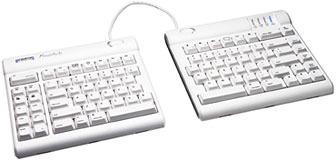 PR: Most keyboards, including ergonomic
models, have a 10°r; positive slope from front to back. These
designs tend to bend your wrists (extension). The Freestyle Solo has a
0°r; slope, which minimizes the height, effectively creating
negative slope and reducing wrist extension
PR: Most keyboards, including ergonomic
models, have a 10°r; positive slope from front to back. These
designs tend to bend your wrists (extension). The Freestyle Solo has a
0°r; slope, which minimizes the height, effectively creating
negative slope and reducing wrist extension
Freestyle Solo Mac Keyboard Features:
- Accommodates a wide range of humans
- From small to tall and body types in between, the Freestyle Solo
allows for maximum flexibility catering to each individual's unique
needs.
- Narrow footprint for comfortable mousing and keying.
At only 15-3/8 inches wide, the Freestyle Solo provides for close
placement of any pointing device reducing over reach issues.
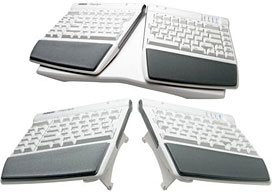
Pivot Tether
Both modules are connected together by a flexible pivot tether,
allowing an infinite range of splay and greatly reducing ulnar
deviation.
Slide Release Button
- Each keyboard module incorporates a slide release button that
allows the attachment of both the pivot tether and the Incline
Accessory.
- Provides total separation of both keyboard modules
- Disconnecting the pivot tether allows up to 8" of complete
separation of both left and right keying modules. Perfect for
individual needs ranging from a narrow footprint to complete
separation. This design greatly reduces and/or eliminates ulnar
deviation one of the leading causes of discomfort and pain while
typing.
- Also available is a custom version that offers up 20" of
separation.
Left Side Driverless Hot Keys
Driverless hot keys for commonly used mouse actions (Internet Page
Forward and Back, Beginning of Line, End of Line, Cut, Undo, Copy,
Select All, and Paste).
Top Row Driverless Hot Keys
Like the new iMac keyboards plus more! Esc/force quit, Brightness,
Exposé, Dashboard, Play Audio, Audio Volume, Dock, Eject &
Off/Sleep (not shown).
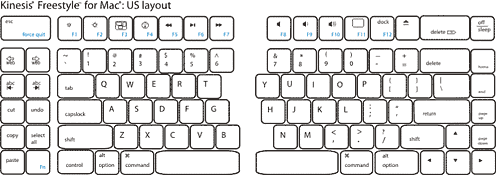
Doublewide Escape and Fwd Delete keys
The Kinesis Solo for Mac employs double wide Escape and Forward
Delete keys making for an easier target for your fingers to press.
Familiar key layout
Familiar key layout provides for minimal adaptation time.
Quiet, tactile key switches
The Freestyle Solo utilizes a quiet, low-force, tactile membrane key
switch. Rated at 10 million operations the Solo will provide years of
comfortable typing.
 Two year limited warranty.
Physical Specifications:
- Length: 15 3/8 inches
- Depth: 7 1/4 inches
- Max Height: 1 3/16 inches
- Key Height: 1 1/8 inches
- Weight: 2 lb. 3 ounces
- USB Cable Length: 6 feet
Kinesis Freestyle Mac Compatibility:
Requires available USB port
- Will operate on virtually any USB system.
- Driverless hot keys on left side only compatible with Mac operating
systems.
- Special actions on function keys F3, F4 & F11 require OS X 10.4
or newer.
- Hot keys on F5-F7 require the Apple keyboard update 1.1. or
newer.
Prices:
- Freestyle Solo Keyboard for Mac (8 inch separation): $99.00
- Freestyle Solo for Mac (20 inch separation with black linking
cable): $139.00
- Kinesis Low-Force Numeric Keypad for Mac: $59.95
- Freestyle Palm Supports - White, 1 pair (includes set of palm
pads): $24.95
Link: Freestyle Adjustable
Split Keyboard for Mac
Contour Roller Mouse Free
PR: Award winning design captures 2008 national ergonomics
conference attendees choice award for best new product.
Roller Mouse Key Features and Benefits:
Eliminates reaching for a traditional mouse, relieving neck,
shoulder and elbow pain. Asymmetrical reaching with one side of your
body and not the other causes your muscle groups to compensate for the
weight of your extended arm while reaching for a traditional mouse.
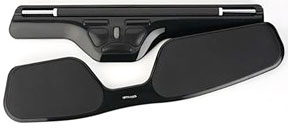 Repetitive reaching oftentimes leads to tightness and pain in
the neck, shoulder and elbow areas. The Roller Mouse Free allows you to
keep your elbows comfortably by your side, which is a more beneficial
ergonomic position. Thousands of users have thanked us due to the pain
relief they have realized after using the Roller Mouse for a short
period of time.
Repetitive reaching oftentimes leads to tightness and pain in
the neck, shoulder and elbow areas. The Roller Mouse Free allows you to
keep your elbows comfortably by your side, which is a more beneficial
ergonomic position. Thousands of users have thanked us due to the pain
relief they have realized after using the Roller Mouse for a short
period of time.
There is no gripping necessary, thus avoiding the threat of
Repetitive Strain Injuries such as Carpal Tunnel Syndrome and
Tendonitis. The Roller Mouse Free is controlled with the use of an
unflexed hand, so there is no need to clutch or hold the device in
order to navigate the cursor. Your fingertips roll a narrow bar both up
and down and from side to side simultaneously to navigate the cursor
over the entire screen, with very little friction or resistance. The
elimination of flexing your fingers avoids activity through the carpal
tunnel, overuse of a traditional mouse can aggravate the carpal tunnel
and lead to numbness, tingling and pain.
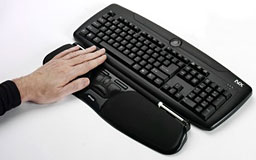 Promotes the equal use of both hands, reducing the risk of
injuring your dominant "mousing" hand. With the mouse buttons centered
beneath the keyboard home keys, mouse control is equidistant from
either hand. Ambidextrous use is encouraged and easily accomplished
with your command buttons literally at your fingertips, for both
hands.
Promotes the equal use of both hands, reducing the risk of
injuring your dominant "mousing" hand. With the mouse buttons centered
beneath the keyboard home keys, mouse control is equidistant from
either hand. Ambidextrous use is encouraged and easily accomplished
with your command buttons literally at your fingertips, for both
hands.
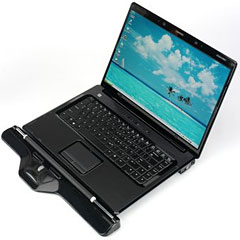
Useful for both laptop and desktop computer applications, the Roller
Mouse Free has been designed to fit immediately adjacent to your
keyboard or laptop. This places the mousing controls just a few inches
below the home keys, keeping your hands within a small work area,
eliminating large reaching motions.
 Convenient, out of the box, "plug and play" connectivity for
both PC and Mac computers. This HID compliant device has the drivers
"on board" and simply needs to be plugged into any empty USB port,
without the need for a cumbersome connection routine.
Convenient, out of the box, "plug and play" connectivity for
both PC and Mac computers. This HID compliant device has the drivers
"on board" and simply needs to be plugged into any empty USB port,
without the need for a cumbersome connection routine.
Seven powerful button functions right out of the box. There are two
easy options to perform a "left click." Either push down on the
navigation bar itself, or click on the large left button in the button
control area. Other button functions include a traditional "right
click" button, a single touch "double click" button, a scroll wheel, a
scroll lock , "one touch" copy and "one touch" paste.
Custom button configuration available with the use of the Driver
Disk included in the box. Although most customers use the Roller Mouse
button functions "as is," specialized functions can be mapped to the
button controls after loading the device drivers provided on a
convenient CD-ROM.
30 day, no risk, product refund if you are not satisfied. You won't
appreciate this product's ease of use and responsiveness until you try
it out for yourself. If you are dissatisfied with your purchase in the
first 30 days for any reason, simply ship it back to Contour for a
refund.
$219.95
Link: Roller
Mouse Free
Software
ExpanDrive 2.0 for Mac: Access Remote Files Within
Any Application
PR: ExpanDrive acts just like a USB drive plugged into your
Mac. Open, edit, and save files to remote computers from within your
favorite programs even when they are on a server half a world away.
ExpanDrive enhances every single application on your computer by
transparently connecting it to remote data.
New for 2.0
ExpanDrive 2.0, released in April, is a major upgrade. We've
rewritten the SFTP core and it's extremely fast. In addition we now
offer support for Amazon S3 as a drive type in ExpanDrive. Our GUI has
undergone a major refresh and FTP is much improved. More info is
available here
Add FTP, SFTP, and Amazon S3 to Finder
With ExpanDrive, you can securely access any remote file server
directly from Finder, or even the terminal. No need to open a separate
transfer client just for file transfer. ExpanDrive extends the way all
applications on your Mac can access data.
Reconnect with grace
Once you re connected, you stay connected. If you change access
points or bring your computer out of sleep, you ll stay connected. Our
robust networking core ensures that if a connection is available, your
drive is available.
Zero Configuration - it just works
Our client is dead simple there is nothing to install or configure
on the server. No complicated instructions. No administrative hassles.
Just use your existing login credentials to securely access your remote
files.
Powered by MacFUSE
Using MacFUSE, ExpanDrive can do all kinds of things that
traditional file transfer clients can t. MacFUSE is a powerful software
library, developed at Google, that helps ExpanDrive to extend Mac OS
X's native file handling capabilities.
International
ExpanDrive is available in Deutsch, Nederlands, Français,
Español, Dansk, Norsk, Svenska, Suomi, and several other
languages.
Free Download
Buy Now: $39
(Already own ExpanDrive 1.3? Upgrade for $19.95)
ExpanDrive is also available for Windows.
Link: ExpanDrive 2.0 for Mac
Smart Document Management in a Box
PR: DEVONtechnologies, LLC introduces two new 'Paperless
Office' bundles to the US market consisting of the smart document
manager DEVONthink Pro Office and the reliable and fast document
scanners Fujitsu ScanSnap S300M or S1500M.
In today's world, everything is digital. From shopping receipts to
important research papers, peoples' lives often fill their hard drives
in the form of emails, PDFs, Word documents, multimedia files and more.
Questions eventually pop up, like where to store all of this stuff? How
to organize these very different file types, and even better, how to
find the exact file one is looking for the second one needs it? It's
almost as if one needs a second brain just to keep one's digital life
straight.
DEVONtechnologies offers the fast desktop document scanners ScanSnap
S300M and S1500M bundled with its flagship product DEVONthink Pro
Office in its online shop. The devices digitize paper documents with up
to 20 pages per minute, scan both sides in one go, and with up to 600
dpi in full color. Reliability and ease-of-use are the driving factors
in all ScanSnap designs.
DEVONthink Pro Office directly supports the ScanSnap scanner range
for the Mac by taking over the PDF files created from the paper
documents and automatically making them searchable using optical
character recognition (OCR). Artificial intelligence assists the user
file the document by suggesting the most suitable places as well as
related documents.
"Many of our DEVONthink Pro Office users heavily rely on Fujitsu
ScanSnap scanners for digitizing their correspondence, articles, notes.
But they had to buy the devices separately. So it was a logical step
for us to bundle the power of our software and these perfectly
integrated scanners and offer them for convenient one-stop shopping in
our online store," says Eric Bohnisch-Volkmann, President of
DEVONtechnologies.
The ScanSnap S1500M is the workhorse scanner for higher volumes,
scans up to 20 pages per minute, and has a ADF (automatic document
feeder) capacity of 50 sheets. The smaller S300M is the optimal
solution for lower volumes or for mobile environments. It takes up to
10 sheets into its ADF, scans up to 8 pages per minute, and is able to
work on battery or USB power.
As of this writing, the Paperless Office Bundles are solely
available in the United States.
Enter DEVONthink: The solution to this digital age conundrum. It is
a second brain, the one and only database for all digital files, be
they PDFs, emails, Word documents or even multimedia files. Boasting a
refined artificial intelligence, DEVONthink is exceedingly flexible and
adapts to the user's personal needs. And if the files are not digital
yet, paper capture support is already built-in (DEVONthink Pro Office
only.)
Users can use it as their document repository, their filing cabinet,
their email archive, or their project organizer; DEVONthink can do it
all. One can even collect and organize data from the web, enrich it
with sound and movie files, and then export the finished product as a
website or to an Apple Pages document to print. Or one can copy the
content to an iPod! The possibilities are only as limited as the user's
imagination.
The Database For The Internet Age
Because DEVONthink keeps all important data in one database, it
doesn't matter where the data is physically located. DEVONthink
uniquely integrates both local documents and live content from the
Internet to keep all project-related information together in one place.
No more folders full of loosely organized files and overflowing
bookmark bars in Safari; with DEVONthink, the user seamlessly mixes
local documents, clippings, and live web pages in one dynamic
database.
The Digital Workplace
DEVONthink is not only a simple database, it's a flexible work
environment, too, with powerful management features suited to any
professional project. It provides the user with all the tools she or he
needs to effectively work with documents. The integrated RTF editor
makes it easy to write new documents, or the users can open documents
in a third-party application.
Intelligent Assistant
DEVONthink is based on a powerful artificial intelligence (AI)
architecture that helps organize and navigate information collections
quickly and accurately. It assists its users with both filing documents
and with finding similar items, and can help make connections that they
might have missed on their own. It can even master huge data
collections with a few simple clicks, saving time and aggravation.
Share the Knowledge
Finally, DEVONthink Pro Office allows to share the accumulated and
organized knowledge. Users can post it to their websites, or they can
let their coworkers access databases with a familiar search-engine like
interface using standard web browsers. Depending on the network setup,
it's even possible to search shared databases over the Internet. A
JavaScript applet gives convenient access to the database also from the
Apple iPhone.
The Paperless Office bundles, consisting of DEVONthink Pro Office
2.x and a document scanner, sell for $419 with the Fujitsu ScanSnap
S300M and for $569 with the ScanSnap S1500M (plus shipping) in
DEVONtechnologies' online shop.
The public beta releases of DEVONthink Pro and Pro Office 2.0,
DEVONthink Personal 2.0, and DEVONnote 2.0 require Mac OS X 10.5 or
later and can be downloaded from devon-technologies.com. DEVONthink and
DEVONnote can be test-driven for free for 150 hours of noncontinuous
runtime until they need to be properly licensed. The public beta
releases run without registration until May 31, 2009, before they need
to be replaced by new betas or the final 2.0 releases.
Desktop Mac
Deals
Low End Mac updates the following price trackers monthly:
For deals on current and discontinued 'Books, see our 13" MacBook and MacBook Pro,
MacBook Air, 13" MacBook Pro, 15" MacBook Pro, 17" MacBook Pro, 12" PowerBook G4, 15" PowerBook G4, 17" PowerBook G4, titanium PowerBook G4,
iBook G4, PowerBook G3, and iBook G3 deals.
We also track iPad,
iPhone, iPod touch, iPod classic, iPod nano, and iPod shuffle deals.



