Low End Mac Reader Specials
TypeStyler For Mac OS X is Now Shipping! Download The Free Fully Functional 60 Day Tryout at www.typestyler.com
OWC: We Make DIY Upgrading Easy! Maximize your Apple MacBook / MacBook Pro. Up to 8.0GB Memory, up to 1.0TB HD & More. Easy Guide + Free, Detailed Installation Videos. Click here
Don't install Parallels to play poker online! Poker Mac will show you how
to download and install a native Mac poker application such as Full
Tilt Poker Mac.
Laptop Hardware Provided by TechRestore - Overnight Mac & iPod Repairs.
Compare products like desktop computers, apple laptops, apple macs, and LCD Monitors side by side! All the information and reviews to make the best purchasing decision for new mobile phones, sat nav systems, or MP3 players. The Ciao online shopping community makes searching products easy for you.
Mac Fallout Shelter
Installing Mac OS X 10.4 'Tiger' on Unsupported Hardware
- 2006.01.09 - Tip Jar
Popularity: ![]()
![]()
![]()
![]()
![]()
![]()
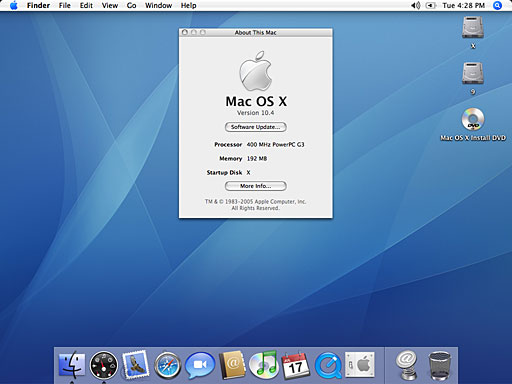
This week we're going to break the rules and be rebels. We're going to install Mac OS X 10.4 "Tiger" on a Lombard PowerBook G3. These instructions should work with most Macs with a G3 or later CPU or a G3 or later upgrade.
Apple officially saays it is not going to support any Mac that doesn't have built-in firewire ports and at least 256 MB of RAM. My Lombard does not have firewire and only has 192 MB of RAM, but it's pretty much the same hardware as the supported Pismo model.
Remember to backup all your data before installing anything.
What you need:
- A Mac that has at lease a G3 processor
- More than 128 MB of RAM for usable speeds - 96 MB is possible but very slow
- 6 GB hard drive or larger, split into two partitions
- Mac OS 9 installed on one partition
- XPostFacto from Other World Computing
- Mac OS X 10.4 install DVD or CDs or on a external hard drive
The first step is to have your hard drive partitioned into at least two partitions. One is going to be the Mac OS 9 partition, which only needs to be at around 1 GB or so depending whether your going to install much "classic" software or not. The second partition is for Mac OS X and needs to be at least 2 GB. I used a 40 GB drive in my Lombard and selected 10 GB for OS 9 and 30 GB for OS X. [Editor's note: My 40 GB drive is partitioned with 19 GB for OS X, 3 GB for OS 9, and 8 GB for work.]
Boot up Mac OS 9.x, install XPostFacto to you hard drive, and launch it. Remember to read the ReadMe file for the warnings and precaution before continuing.
Select the target disk partition you are installing it to.
Select the Install media that you are using, DVD or CD
Click on the install button, and then watch the machine do very strange things. It's important not to interrupt the install process.. At times it looks like your Mac will freeze up, but trust me - just leave it be.

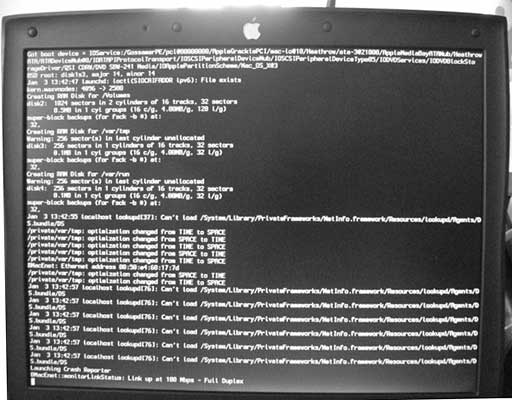
It's normal to see a bunch of text, which is called verbose mode. The Mac OS X installation screen will come up asking you what language you want to install when its finally ready to install OS X.
After that, follow normal installing procedures for OS X, and
you're done.

- Link: XPostFacto
If you find Joe's articles helpful, please consider making a donation to his tip jar.
Recent Mac Fallout Shelter articles
- My Newton: Why I won't buy an iPhone or iPod touch, 09.07. The iPod touch and iPhone sound wonderful, but I love the handwriting recognition, fax support, and email abilities of my Newton MessagePad.
- Network administration tools for Mac OS X users, 06.25. Thanks to Mac OS X, today's Macs are great network citizens and excellent tools for doing network administration.
- Apple's secret battery reset utility for WallSteet and Clamshell iBooks, 07.05. If your old 'Books battery isn't taking a charge like it used to, Battery Reset 2.0 could help recover its useful life.
- Replacing Lombard with a TiBook: Which one is enough?, 04.19. Nice as the Lombard was, it has a new owner. The new 'Book should have FireWire, G4 power, and run Tiger nicely. How much TiBook is enough?
- More in the Mac Fallout Shelter index.
Links for the Day
- Mac of the Day: 15" MacBook Pro Core Duo, Jan. 2006 - The first Intel-based MacBook launched at 1.83-2.0 GHz, had several teething problems.
- Group of the Day: System 6 is the email list for those who choose System 6.
- November 22 in LEM history: 99: Gradebooks - 00: Leveraging Apple design - Quadra 630 to Power Mac 5200 - 02: Laptop or desktop? - 04: SuperDuper: Quick, easy, efficient backup - Cross-platform programming for the rest of us - 05: Mac video surveillance on the cheap - Which OS is best for my vintage Mac? - No 'best browser' for the Mac - Sorry state of browsers for classic Macs - 06: Core 2 means cooler running 'Books - 2.0 GHz G4 upgrade
- Support Low End Mac
Recent Content on Low End Mac
- Apple's Tablet an End Run Beyond Netbooks, Frank Fox, Stop the Noiz, 11.20. Whatever Apple has planned will leverage existing technologies while going beyond what its competitors can offer.
- i5 iMac Benchmarked, Mac mini 'Shouldn't Be Overlooked', Twitter Client for Classic Mac OS, and More, Mac News Review, 11.20. Also why Apple leaves the low end to others, 10.6.2 fixes video playback problem in 27" iMac, 3D Leopard and Snow Leopard performance, and more.
- Apple #4 in Reliability, Apple Tablet a Gadget for All?, HP's i7 Notebook Outdoes Mac Rivals, and More, The 'Book Review, 11.20. Also Flash 10.1 improves video on Hackintosh netbooks, thin-and-light notebooks impress, Windows XP finally on the way out, and more.
- NASA Chemical Sensor for iPhone, Smartphone Death Match, iPhone Earrings, and More, Ian R Campbell, 11.20. Also mobile phone dangers, new apps, GPS solution for iPod touch, new iPod and iPhone cases, and more.
- Replacing the Hard Drive in a Clamshell iBook, John Hatchett, Recycled Computing, 11.19. Yes, it is one of the most difficult Apple notebooks to disassemble and reassemble, but a 10 GB hard drive just will not do.
- IBM Model F: A Great Old Keyboard with an Outdated Layout, Tommy Thomas, Welcome to Macintosh, 11.19. Although it used a different technology than the revered IBM Model M keyboard, the Model F was a great keyboard in its own right.
- Soft Touch Keyboards, Wireless Mouse Options, Loving SeaMonkey 2, and More, Charles W. Moore, Miscellaneous Ramblings, 11.18. Also the future of browsing with PowerPC Macs and the multiple mouse input bug introduced with OS X 10.5.8.
- More links in our archive.
Recent Deals
- Best eMac Deals, 11.18. Used 1 GHz Combo, $100; SuperDrive, $269; 1.25 GHz Combo, $119; SD, $319; 1.42 GHz Combo, $289; SD, $498.
- Best Mac OS X 10.6 and Mac Box Set Deals, 11.18. "Snow Leopard", single user, $25; 5 users, $45; Mac Box Set, single user, $139; 5 users, $180; Server, $414. Shipping included.
- Best Xserve Deals, 11.18. Used 1 GHz dual G4, $649; 2.3 dual G5, $795; 3.0 4-core Xeon, $1,899; refurb 2.26 4-core, $2,499; new, $2,888; refurb 8-core, $2,999; new, $3,449; more.
- Best 15" MacBook Pro Deals, 11.17. Used 1.83 GHz, $750; 2.16, $800; 2.33, $900; refurb 2.4, $1,299; 2.53, $1,449; 2.66, $1,699; 2.8, $1,899; new 2.53, $1,579; 2.66, $1,799; more.
- Best Power Mac G4 and AGP Video Card Deals, 11.17. Used 400 MHz, $50; 933 MHz, $80; 500 dual, $60; 867 dual, $90; 1 GHz dual, $150; 1.25 GHz dual, $225; 1.42 GHz, $499.
- Best Mac OS X 10.5 Deals, 11.17. "Leopard" upgrade, $80; single user license, $135; 5 users, $173; Mac Box Set, 5 users, $230; Server, 10 users, $340; unlimited, $850. Shipping included.
- Best Mac mini Deals, 11.16. Used 1.42 GHz G4 mini, $379; 1.66 GHz Core Solo, $419; 2.0 Core 2, $450; new 2.26 GHz nVidia, $580; 2.53 GHz, $769; Server, $990.
- Best iBook G4 Deals, 11.16. Used 12" 1.07 GHz Combo, $210; 1.33 GHz, $298; 14" 1.33 GHz, $398; 1.42 GHz, $479; SuperDrive, $498.
- Best iPod shuffle Deals, 11.16. Used 1 GB, $35; 4 GB, $65; refurb 1 GB, $39; 2 GB, $59; new 2 GB, $55, 4 GB, $75. New and refurb prices include shipping.
- More deals in our archive.
About LEM | Support | Usage | Privacy | Contacts
Navigation
Used Mac Dealers
Apple History
Video Cards
Email Lists
Favorite Sites
MacSurfer
MacMinute
MacInTouch
MyAppleMenu
InfoMac
Macs Only!
The Mac Observer
Accelerate Your Mac
RetroMacCast
PB Central
MacWindows
The Vintage Mac
Museum
DealMac
DealsOnTheWeb
Mac2Sell
ramseeker
Mac Driver Museum
JAG's House
System
6 Heaven
System 7 Today
the pickle's Low-End
Mac FAQ
Abandonware
Petition
Mac vs. PC Info
Affiliates
The Apple
Store
Mac
Connection
B&H
MacMall
TechRestore
ExperCom
Crucial
Memory
batteries.com
Advertise
MacMinute
MacInTouch
MyAppleMenu
InfoMac
Macs Only!
The Mac Observer
Accelerate Your Mac
RetroMacCast
PB Central
MacWindows
The Vintage Mac
Museum
DealMac
DealsOnTheWeb
Mac2Sell
ramseeker
Mac Driver Museum
JAG's House
System 6 Heaven
System 7 Today
the pickle's Low-End
Mac FAQ
Abandonware
Petition
Mac vs. PC Info
Mac Connection
B&H
MacMall
TechRestore
ExperCom
Crucial Memory
batteries.com