- 2006.07.18
To my chagrin, I haven't been contributing to Low End Mac the
last few weeks. Instead, I found myself working through a few
hardware and software difficulties. Although not generally major,
they did need to be addressed.
In the midst of handling those issues, I took the time to
rearrange the pecking order for my computer systems. What I found
may seem shocking for the guy who spends time testing 680x0 Mac
systems for their ability to play back compressed digital music,
yet here I am, falling back to Mac OS X on my primary computer
system.
At least for the time being, I am content to use OS X as my
main system. I'm fickle, so who knows where I'll be with my
computers in a few weeks time.
I'm sure some people are wondering what prompted this change of
heart. To be clear, I am not abandoning the classic Mac OS
or classic Macs. Besides the fact that my current Mac of choice is
a six-year-old 500 MHz iMac DV SE
from the summer 2000 series, I still have my legacy Mac fleet
operational - mostly anyway.
I'll deal with my Macintosh systems report card in a bit, but
first I'll clarify my absence over the last few weeks.
Three issues led me to this transition back into the OS X
fold.
1. Migrating to the Blue & White G3
Let us take a moment to recall my Power Mac 7600 CD-ROM issue during the
digital jukebox project. This issue precipitated the initial
transference of workflow to the B&W
G3. Over the next few months, I spent more and more time
migrating my entire workflow over from the Power Mac 7600 and
PowerBook 520c to the B&W G3.
Everything ran smoothly, and this system was certainly more
powerful than any of my other Macs. Unfortunately, a boot partition
corruption caused a small fit to get everything back running
smoothly. A more detailed, but far from exhaustive, account can be
found on the
AppleSwitcher Blog. Everyone please take note of issue one.
2. Mom's iMac
Issue two, while not effecting my own computers, actually
preceded the B&W G3 issue. My old iMac, the very same model I'm
back to using now, was until recently under my mother's care. She
needed a computer about a year ago, and I had a bunch of old
systems to use. Consequently, my mother got the best one for her
modest computer needs.
In a way, I am struck by the oddity. I, the computer enthusiast,
am happily futzing about with a cadre of ancient computers. My
mother, the computer user by need, not desire, is using the most
recent system in our family collection. I suppose the safe choice
for her would be OS X on a fully supported model.
It turns out I made the right choice. While a computer savvy
person is more likely to possess the skills needed to wring the
most out of a given system, a less demanding user just wants
something that works. They clearly do not need the newest, most
powerful system available, but a middle ground is required. In my
mother's case, a nearly six-year-old G3 iMac happened to be the
most powerful computer available, but it's clearly far from cutting
edge.
My mother was happy enough to use the iMac for browsing the Web,
sending email, typing the occasional message, or other odd task
until the modem came down with a case of the disconnects. This was
a rather severe inconvenience for someone so reliant on Web access,
and it put a crimp in my normal schedule as I donned my family IT
cap.
Again, more information can be found on the AppleSwitcher Blog,
but I wanted to lay a little groundwork here. No need to leave my
faithful readers completely in the dark. (Clap your hands for more
links given on behalf to shameless self promotion. I'm so vain, I
bet I think this sidebar is about me. Apologies to Carly Simon, and
even Trent Reznor, who used similar lyrics to good effect in a
non-cover of Simon's You're So Vain, for butchering the
lyrics to suit my shameless plugs.)
Replacing the iMac
The fix for my mother was to shop around for a newer computer,
and I was tapped to find a replacement. Donning my system
acquisitions cap, I gleefully hit the Web and local stores looking
for a replacement. I suggested several Mac models, both PowerPC and
Intel, and even other x86 branded computers running Ubuntu
Linux.
Content with the Macintosh platform, I was excited to uncover a
refreshed 12" 1.33 GHz iBook G4
at the local Apple retail store. The $629.95 out the door price
solidified the choice for this upgrade to "obsolescence". My mom
doesn't mind using older technology - after all, she got along fine
with the G3 iMac until the modem became flaky.
I can honestly say this Apple portable, even powered by the
venerable G4 processor, is the nicest Mac I've spent extensive time
using. It runs cool, is very quiet (until the noisy optical drive
is engaged), and it's compact. My mother seems to love the little
'Book. I'm happy to have been granted the chance to test and
configure the iBook before handing it over to my mother. I suppose,
my mother's upgrade to the iBook G4 can be put on the record as
issue number three.
3. Back to the iMac
Suddenly my iMac was free to be redeployed to my particular
computing requirements. My good friend was coming back to me! I, a
clear benefactor of my mother's upgrade, remain happily computing
with the G3 iMac.
Before the internal modem became troublesome, I had upgraded the
iMac with 1 GB RAM and Panther for my mother. With the help of
a Keyspan Twin Serial Adapter I'm back in business with dialup via
my superb external Global Village v.92 serial modem. A kind swapper
from the LEM swap list sold me the
Keyspan adapter for $10. I though the price fitting for salvaging
my first "post Steve Job's second coming" era Macintosh.
Before the summer 2000 iMac DV SE was purchased late summer of
that very same year, I spent my time tooling around with the
original Power Mac, the small footprint 6100. Quite clearly I have a soft spot for
both this iMac and the first Mac I ever owned, my still functional
LC II. I can see myself keeping both
functional for several years to come. Alas, the Power Mac 6100 went
to the great recycler in the sky, because it ceased functioning
(actually, I found out a few year later all I needed was a $5-10
battery to get the computer functioning again, but it's too late
now).
Whither the Classic Mac OS?
I am not abandoning the classic Mac OS, but my primary computer
is no longer running it. Mac OS X 10.3.9 (Panther) is robust,
and a 500 MHz G3 with 1 GB RAM is more than capable of coping
with the demands for increased resources placed by Mac
OS X.
The G3 iMac DV SE is a great Mac for my bedroom desk - quiet,
cool running, compact, and still viable to run a robust,
multitasking, memory protected operating system like OS X.
The difference in stability means I can spend time working or
testing on any of my classic Mac OS machines, but if I need to
browse the Web, the cooperative multitasking OS no longer hogs the
machine while trying to work through a particularly knotty page. I
can easily continue encoding music, watching television,
downloading email, testing some feature on the classic systems
while the iMac handles Web-related tasks without breaking a
sweat.
If a classic Mac OS system ceases to operate effectively, the
iMac can take on more and more tasks without losing
productivity.
Time to break out my Mac system report card and give an overview
to what role my classic Macs playing in my computing life.
My Macintosh Report Card
Blue & White Power Mac G3 - Sold
The B&W G3 comfortably ran Mac OS 9.2.2 and was able to
accomplish nearly everything I threw its way. However, it was sort
of noisy as a bedroom machine and took up a decent amount of space.
Instead of keeping it around for server duty or some other task, I
stripped it back down to the original - almost bare bones - state
from when I acquired the Power Mac.
The 350 MHz processor, revision 2 motherboard, DVD-ROM drive,
and Zip drive all remained. My local craigslist brought me $10, and
the unit went to a first-time Mac user who liked the prospect of
scavenging parts to complete the project. Coming from the Windows
computer realm, he was used to building his own box.
I happily emailed this fine gentleman links to Low End Mac and
other Mac resources and explained the ins and outs of the B&W
G3. I'm just glad the computer went to a good home - a switcher to
the Macintosh platform no less.
Power Mac 7600 - Working Fine
The darndest thing happened during the last few weeks. Oddly
enough, the Power Mac 7600 started operating normally again. Almost
as if the CD-ROM never stopped working in the first place, the
Power Mac 7600 has been the focal point for a new flurry of Old
World Mac activity.
Currently I have two versions of the Mac OS installed, Mac OS
8.1 for a boot loader on one drive and Mac OS 9.1 on a second drive
- and Yellow Dog Linux 2.1 on the same drive, but on a different
partition from the Mac OS 8.1 boot loader.
I'm not running any specific software; the 7600 is more a test
bed for various applications and operating systems.
The only measure I took to rectify the CD-ROM issue was to
remove the old drive and attempt to install a replacement.
Unfortunately, this replacement drive didn't have the same audio
cable connector. A pull from a Mac SCSI external case, I was not
sure the drive was bootable, but I was willing to try. It turns out
I had no need to push this new troubleshooting issue further,
because the old CD-ROM drive has worked fine since I put it back in
its rightful home inside the lower right drive bay. Weird.
The 7600 and I spent many fun hours installing and testing a
variety of older non-Apple operating systems. Very fun indeed.
Look forward to an article dealing with a few PPC Linux options
for Old World ROM Macintosh systems. I would prefer to try some
newer releases than my circa 2001 and 2004 distributions. I'm
thinking Yellow Dog Linux 3.0 (or whatever was the last functional
release on Old World Macs), PPC SuSE (not sure what version still
functions with Old World designs), and one more distribution to be
named later. If anyone has suggestions or information, I'm game for
any compatible, whether officially or not, BSD or Linux. Drop me an
email by clicking on my name near the top of the page. (A
JavaScript enabled browser is necessary to access the email link, a
step taken to help fight spam.)
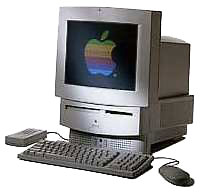 LC 580 - My
Jukebox
LC 580 - My
Jukebox
My LC 580 isn't currently
configured for real work, but it's happily humming right along in
the role of 68k Mac jukebox. Running Mac OS 8.1 with Apple Video
Player and MpegDec, my most often used applications.
PowerBook 520c - My Backup 'Book
The PowerBook 520c is still
configured to be my secondary email, text Web browsing, and basic
text editing system. A dual booting setup with System 7.5.5 and Mac
OS 8.1, it's running SweetMail, WannaBe, Nisus Compact, NotePad
Deluxe, and a VNC viewer. Nice to grab for those times calling for
a little mobile work away from the desk.
Twin LC IIs - Being Configured
Both LC IIs are awaiting some much needed attention so I can
finish doing some tests with my AppleTalk configured collaborative
work environment. It's not a pressing need, but a fun project I
want to finish toying with before AppleTalk is completely
forgotten.
Both LC IIs are positively begging for a processor upgrade. With
only the single LC PDS slot, I surely don't want to lose ethernet
connectivity, so I'm hunting for one or two reasonably priced,
second hand Sonnet Presto
Plus upgrades.
These little devils are scarce. Sheesh, why are all the little
gadgets I desire so hard to find (I mean used, so the prices are
reasonable for my low income budget). Currently, I'm willing to
trade the Power Mac 7600 (G3 upgraded and nearly 500 MB RAM) and
have listed as much on the LEM Swap list. If anyone is interested
in trading, selling, or has reference to a good deal on one or two
Sonnet Presto Plus cards, please email me the information. Again,
my email link is near the top of the page. Thanks.
PowerBook 1400c - A Personal Favorite
First, I need to expend some words gushing about how much I
positively adore the 1400c. I'm of
the mind to consider the PowerBook 1400c as one of my favorite
Macintosh models, either portable or desktop, and there are many
virtues to extoll regarding my love affair with this PowerBook. In
fact, I have an entire article almost finished on my latest
adventures with the PowerBook 1400c and setting up a viable
networking solution.
Clearly I'm not alone in my affection for the PowerBook 1400c.
Several Low End Mac contributors are also quite fond of the 1400
and have written as much in the last several months.
Specifics will have to wait until my next article, but I wanted
to let a couple things be known: Yes, I did list the PowerBook
1400c for trade on the LEM Swap list. My reasons will become clear
with the upcoming article, but suffice it to say, consider the
1400c off the market.
The particular issue I had with networking has been solved, and
although the item I desired in trade, a Sonnet Presto Plus
processor upgrade (not just a processor upgrade, but also a RAM
bump and ethernet card) is still much sought after by yours truly.
However, I no longer feel the need to offer my very nicely kept
PowerBook 1400c for trade.
I'm sorry to leave the audience hanging without more details,
but I have more than enough written for the next Embracing
Obsolescence article.
For now, I think I can safely say that no matter if 680x0,
PowerPC, Old World, New World, Intel, or some yet unnamed future
platform or processor technology, a Mac is still a Mac.
I know all my systems have their good and bad characteristics,
but half the fun for me is tweaking each system until I unlock
their full potential. During these rewarding expeditions, I am safe
in my knowledge a Mac is designed to work with me and not against
me. Every computer platform strives for this goal, but clearly some
have succeeded better than others.



