Yes, it is possible to get on the Internet with an older Mac.
I have had a lot of people asking me about getting an older computer
online. One person I talked to had a Performa 600 without a CD-ROM drive. She
wasn't a computer expert, and she wanted to get online. She couldn't
get anyone within 10 feet of it. Another had a 6100/60, and her ISP told her she
had to get more memory to run their software. This is the ISP that she
had been connecting with for some time already.
The thing that gets to me is that ISPs are raising the requirements
for their software. Sure, maybe their software requires a PowerPC with
32 MB of RAM, but the Internet has no such requirements. You can
sign on to the Internet on almost any computer (even an Apple IIgs!),
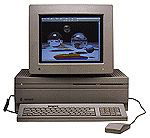 although, you have to be reasonable if you want the "modern"
Internet. You should have at least a 16 MHz 68020 processor (that is,
Macintosh II or LC or better), at least 4 MB of RAM (8
highly recommended), and at least 10 MB of hard disk space.
although, you have to be reasonable if you want the "modern"
Internet. You should have at least a 16 MHz 68020 processor (that is,
Macintosh II or LC or better), at least 4 MB of RAM (8
highly recommended), and at least 10 MB of hard disk space.
You will need a modem. Don't get anything under 14.4 kbps, and I
highly recommend 28.8 or 33.6, because they are inexpensive and yet let
you get to websites fairly quickly. Using a 56K modem on a IIcx is a bit of overkill, since the IIcx
is not a very fast computer, and it can't handle a high speed modem.
Also, the serial ports are limited on some of these older Macs to
certain speeds, which prevents you from using certain types of modems.
The general rule that I usually go by: use a 14.4, 28.8, or 33.6 on a
68K Mac, and 33.6 or 56K on a PowerPC.
Most ISPs will tell you that you need a CD-ROM drive to run their
software, so if you don't have one, you may want to look into one. Make
sure it is an external SCSI CD-ROM; you don't want to end up with an
internal CD-ROM for a PC. You will also need drivers. If you can find
an older version of FWB's CD-ROM Toolkit, pick it up. The APS drivers
tend to work well, too, if you can find a copy.
You will also need System 7.1 or higher. (Okay, it can be done on 7.0
or 7.0.1, but I am only covering installation on 7.1 or better right
now.) If you don't have it, look around on the online auction sites,
such as
eBay, or on the Low End Mac swap
list. If you have a Macintosh
IIvx, IIvi (Performa 600), Colour Classic, LC III, Performa 450 or higher, all in
one LC or Performa, or a Quadra/Centris, you already have at least 7.1
installed. Check the version number and how much RAM is installed in
your system by pulling down the Apple menu and selecting "About this
Macintosh" or "About this Computer." (If you know someone with Internet
access, you can download System 7.5.3 and the System 7.5.5 updater from
Apple's site. Details here.)
Next, you need to get an ISP. The one I am using is EarthLink, because their software is easy
to set up, 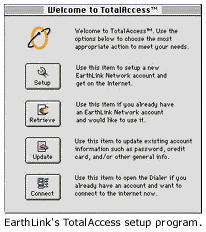 includes everything you need, and
supports older Macs. There are other choices out there, and I recommend
looking around a bit before you decide on one. AOL, SNET, and Prodigy
(if they are still out there) are among the others.
includes everything you need, and
supports older Macs. There are other choices out there, and I recommend
looking around a bit before you decide on one. AOL, SNET, and Prodigy
(if they are still out there) are among the others.
When it comes time to load the software, put the CD into the drive
and click on the installer. You will be taken step by step through
several different prompts. When the installer is finished, it will
launch the account setup program.
You can either configure an existing account or set up a new
account. If you are setting up a new account, just click that button,
and you will be brought through several screens asking you for desired
username and password. After you have gone through the prompts, it may
ask you if you want to install your "Internet Tools." This will install
an older version of FreePPP (2.5), Microsoft Internet Explorer 2.1, and
Microsoft Internet Mail and News (Microsoft's first email program -
it's like Outlook Express). Click yes.
Once it installs and configures your software, you will be prompted
to restart the machine. Do that. When it is back at the desktop you
have a choice to make. You can use Internet Explorer/MSIMN or Netscape
2.02.
If you don't care what browser you use, skip this paragraph. If you
want Netscape, open the "EarthLink Extras" folder. Inside you will find
"Tools for Older Macs." Open that, and mount the self-mounting disk
image. Inside you will find the Netscape Installer. Open that and
follow the directions to install it.
Once your software is set up, it is time to get online! Open either
Internet Explorer or Netscape Navigator. After the splash screen has
appeared, your modem will dial and connect to your ISP. Once all of the
screeching is over, click "stop" (your browser will most likely be
loading an outdated Netscape or Microsoft start page). In the URL box,
type http://www.lowendmac.com.
You should see the Low End Mac website appear. If it doesn't, you may
need to check your software setup or get a new phone number to use. If
you are using EarthLink, you can do that from the "Registration and
Utilities" application.
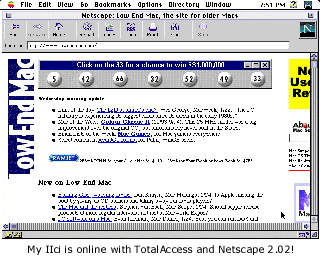
Setting up a Mac with OS 8 is a bit easier than System 7.1. I used
both a Macintosh IIci and a
Quadra 610. The Quadra 610 was
faster to set up, partly because it already had some of the components
installed with OS 8, and partly because it is simply a faster computer
than the IIci.
The IIci set up just as well and went ahead at it's own speed
running System 7.5 and Netscape Navigator 2.02.
The Internet doesn't just let you access a world information on your
older Mac; it also slows it down. If your Quadra 650 felt fast before you put it
online, it will feel considerably slower when it is loading Web pages.
The same is true with a IIsi, LC III, or any older Mac. I am typing on
a Quadra 610 right now, which feels very fast running Mac OS 8.0 and
Word 6.01. Once I put it online, I could see it was struggling a bit at
loading intense images. It also struggled with animations on banner
ads. I have the minimum video RAM in mine, so an upgrade would probably
improve performance in this area.
You can't expect top performance from a Mac that is six or ten years
old, but the performance that they give you is incredible compared to
other computers. A 386 PC would really struggle doing some of the
things these Macs can still do decently. While you can't run the latest
version of Netscape or Internet Explorer on an older Mac, you can run
one that lets you do most of the same things as the newest version.
The Internet should not be limited by your computer. Don't listen to
the ISP's who "require" a Power Mac. If you have a Mac II or LC with
4 MB of RAM, you can use the Net.
Low End Mac is an independent publication and has not been authorized,
sponsored, or otherwise approved by Apple Inc. Opinions expressed are
those of their authors and may not reflect the opinion of Cobweb
Publishing. Advice is presented in good faith, but what works for one
may not work for all.
unless otherwise noted. All
rights reserved. Low End Mac, LowEndMac, and lowendmac.com are
trademarks of Cobweb Publishing Inc. Apple, the Apple logo, Macintosh,
iPad, iPhone, iMac, iPod, MacBook, Mac Pro, and AirPort are
Additional company and product names may be trademarks or
registered trademarks and are hereby acknowledged.
: We allow and encourage links to
any public page as long as the linked page does not appear within a
frame that prevents bookmarking it.
Email may be published at our discretion unless marked "not for
publication"; email addresses will not be published without permission,
and we will encrypt them in hopes of avoiding spammers. Letters may be
edited for length, context, and to match house style.
: We don't collect personal
information unless you explicitly provide it, and we don't share the
information we have with others. For more details, see our



