The Macintosh is probably the most customizable computer system
out there. Ever since System 7 was introduced, the Mac has had to
ability to be as standard or as customized as you want.
You can make an LC III look like
it has OS X on it. You can make the Apple menu work much more
efficiently. You can make the desktop the way you want it. The Mac
doesn't only have personality; it reflects the user's personality
as well.
The first step to completely customize your Mac is to check what
version of the Mac OS you have. In version 7.0 through 7.1.2, you
will be able to use custom icons, a custom desktop pattern, a
custom startup message (you know, where it says "Welcome to
Macintosh" or "Welcome to Power Macintosh" just before it loads the
extensions), and a custom interface.
If you have 7.5.1 through 7.6.1, you will be able to have change
the startup image (in other words, you can change the little
picture that shows a smiling Mac OS logo) simply by using ResEdit
or Resorcerer (a non-Apple resource editing tool) to open the
system file and replacing the startup picture with one of your
choice.
Mac OS 8 users can change their desktop picture in the Desktop
Pictures control panel, as well as the "Mac OS Computer" picture in
the About box (using ResEdit again).
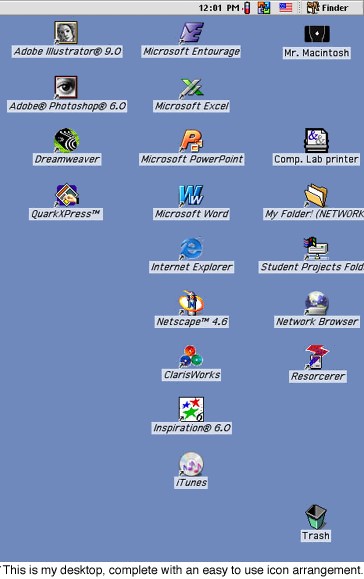
The first step is to customize the desktop with the icons and
positions that you like. I tend to have my printers and drives over
on the far right, leaving a space below the drives and in between
the printers for a CD-ROM disc if I want to use one. That way, the
CD-ROM won't get lost on the desktop. In the next column, I have my
frequently used applications - like Microsoft Word, my email and
web browser, as well as shortcuts to network folders or anything
else I use a lot. If I have enough aliases on the desktop, I will
put my graphics applications over in the third column. There are an
infinite number of ways to arrange your icons - or you don't have
to arrange them at all.
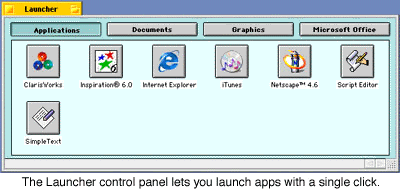
If you want an easy way to launch applications, you can use the
Launcher, which Apple provides with the Mac OS. This control panel
lets you launch applications with a click on a button instead of
double clicking an icon.
You can arrange your hard drive the way you like. Apple provides
a way to easily arrange items in Mac OS 8.x and 9.0 by adding the
Applications, Internet, Utilities, Apple Extras, and Assistants
folders. If you have Mac OS 9.1, those folders will appear in the
Applications (Mac OS 9) folder. I like to use Apple's arrangement,
but you don't have to. You can put everything directly on the hard
drive and not in Applications or Utilities folders at all if you
like. I always rename my document folder Adam's Documents, so I
don't get it mixed up with anything else someone installs onto my
computer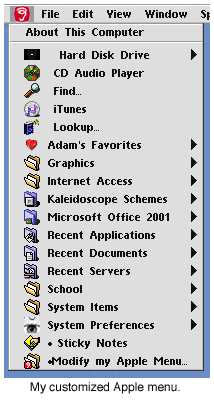 .
.
Arranging your Apple menu is another way to keep organized on
your computer. I like to put my often-used Applications in sub
folders inside the Apple menu. I have created Graphics, Internet
Access, and Microsoft Office subfolders. I moved all of the
"normal" Apple menu items into a subfolder called System Items, and
I have a shortcut to Stickies and my Apple Menu Items folder in the
Apple menu itself. I also have an alias to my hard disk, Apple CD
Audio player, iTunes, and my dictionary/thesaurus.
To customize your interface, you will need to use a utility
called Kaleidoscope ($20
shareware). It has plugins, called schemes, which alter the look of
your menus, windows, icons, and even your pointer. You can make
your Mac look pretty much the way you want. You can even make it
look like Windows 98 if you desire. The best part of Kaleidoscope
is that it runs on almost any Mac (even an SE/30 - check
out b.b.'s page).
There are several versions of Kaleidoscope. Version 1.x is not
very useful these days, since it doesn't work with modern schemes.
You really need to have version 2.1 or later.
One of the best ways to personalize your Mac is to make custom
icons. You can make icons in ResEdit (check out the IconFactory page on
making your own icons), or you can even make icons from designs
drawn in ClarisWorks or AppleWorks.
There are many ways to make your Mac your own. From changing the
name of your hard drive (notice mine is "Mr. Macintosh") to editing
a custom startup screen, the possibilities are endless.
Low End Mac is an independent publication and has not been authorized,
sponsored, or otherwise approved by Apple Inc. Opinions expressed are
those of their authors and may not reflect the opinion of Cobweb
Publishing. Advice is presented in good faith, but what works for one
may not work for all.
unless otherwise noted. All
rights reserved. Low End Mac, LowEndMac, and lowendmac.com are
trademarks of Cobweb Publishing Inc. Apple, the Apple logo, Macintosh,
iPad, iPhone, iMac, iPod, MacBook, Mac Pro, and AirPort are
Additional company and product names may be trademarks or
registered trademarks and are hereby acknowledged.
: We allow and encourage links to
any public page as long as the linked page does not appear within a
frame that prevents bookmarking it.
Email may be published at our discretion unless marked "not for
publication"; email addresses will not be published without permission,
and we will encrypt them in hopes of avoiding spammers. Letters may be
edited for length, context, and to match house style.
: We don't collect personal
information unless you explicitly provide it, and we don't share the
information we have with others. For more details, see our



