When the Colour Classic was
introduced in 1993, it became a success for users who needed a
small computer for a small space. 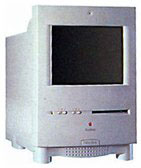 The
cute, compact design and 10" Trinitron colour screen capable of
displaying "thousands of colours" now make it a collectable item
for Macheads everywhere.
The
cute, compact design and 10" Trinitron colour screen capable of
displaying "thousands of colours" now make it a collectable item
for Macheads everywhere.
After the Colour Classic was released, its designers were asked
to make something with a larger screen, CD-ROM, and stereo
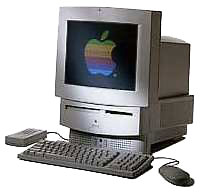
speakers. They came up with the Macintosh LC 520 (a.k.a. Performa 520),
which was basically an LC III, 14"
Apple Colour Display, Apple 300e CD-ROM, and a pair of stereo
speakers - all in one case. The result was to be one of the most
popular consumer and education models produced.
The LC 520 featured the same 25 MHz 68030 processor as the LC
III, an 80 or 160 MB hard disk, and an optional 1x or 2x Apple
 internal caddy-loading CD-ROM drive. A
later version came with a tray loading CD-ROM and a manual-inject
floppy drive. The LC 520 shipped with System 7.1.
internal caddy-loading CD-ROM drive. A
later version came with a tray loading CD-ROM and a manual-inject
floppy drive. The LC 520 shipped with System 7.1.
After the LC 520 came the LC 550
(a.k.a. Performa 550). The 550 featured a 33 MHz 68030 processor,
like the LC III+, 5 MB of RAM, a
160 MB hard drive, and a 2x tray loading CD-ROM drive. The LC 550
shipped with System 7.1; the Performa 550 shipped with System
Software 7.1P6.
At the top of the line came the LC
575 (a.k.a. Performa 575). The Performa 575 featured a 33 MHz
68LC040 processor, 5 MB of RAM, a 2x CD-ROM drive, and a 250
MB hard drive. The 575 was also available to schools with no CD-ROM
drive and 4 MB of RAM. Early versions of the LC 575 shipped
with System 7.1, while later versions shipped with 7.5. Early
versions of the Performa 575 shipped with System 7.1P6, later
versions shipped with 7.5.
Later on, Apple used a similar case for the LC 580. The LC 580 was essentially a
Quadra 630 in an all-in-one case.
The 580 featured the Communications slot, video board slots, and
two RAM slots instead of one (if you look at the 575 logic board,
there is a place for a second RAM slot). The 580 used a less
expensive, non-Trinitron screen, which was rounded and prone to
glare. The 580 was offered with 8 MB of RAM, a 2x CD-ROM
drive, and a 500 or 800 MB hard drive. There was also a version
without the CD-ROM. The LC 580 shipped with System Software
7.5.
I first got into these 500 series Macs when I got an LC 520 from
a thrift store a couple years ago. I consider the design of the 500
series Macs to be one of the best looking designs Apple has come up
with, although I understand the original designers weren't real
crazy about it.
After getting that LC 520 and upgrading it to 12 MB of RAM,
installing a 160 MB hard disk, and upgrading to Mac OS 7.6.1, I got
a Performa 550. Recently I ended up with a 575 as well.
When these 500 series models were introduced, they were meant to
bring families into the Internet age, so they were fully Internet
capable. The 575 still does a decent job on the Internet.
Load it up with Internet Explorer 4.0 or Netscape Navigator 3.02
(4.08 if you have more than 20 MB of RAM), FreePPP, and you are
ready to use the Internet. For a more detailed description, visit
my other article "Getting on the Net with an older Mac".
500 series Macs make good machines for kids. They are all in one
- they don't confuse kids by having many different parts to them.
They have good colour screens, a CD-ROM drive, and, most
importantly, they will run many kids games without a problem. For
example, you can play Where in the World is Carmen Sandiego?
(remember the TV show?), SimCity 2000, and Civilization (the last
two I have and enjoy playing myself).
You can often find a 500 series Mac on eBay
for less than $75, and occasionally one may turn up at your local
thrift shop or garage sale (I got my 520 from a thrift shop, and
the 575 from a garage sale). You can also check newspaper
classified ads.
These Macs make great second or third computers for the family,
as well as great computers for younger child to play games or do
research and writing for school. They don't cost much, but give you
a lot of computer for your money.
As a side note, you may have noticed my "Xcitement" (bad pun)
about OS X, and I have been writing about that quite a bit
recently. Since this is Apple Archive on
Low End Mac, I thought that taking a
break to write about an actual low end Mac was appropriate.
Further Reading
- The reliable all-in-one 500
series, Charles W. Moore, Miscellaneous Ramblings, 2001.06.04.
For inexpensive, reliable word processing and email, these older
Macs are great.
Low End Mac is an independent publication and has not been authorized,
sponsored, or otherwise approved by Apple Inc. Opinions expressed are
those of their authors and may not reflect the opinion of Cobweb
Publishing. Advice is presented in good faith, but what works for one
may not work for all.
unless otherwise noted. All
rights reserved. Low End Mac, LowEndMac, and lowendmac.com are
trademarks of Cobweb Publishing Inc. Apple, the Apple logo, Macintosh,
iPad, iPhone, iMac, iPod, MacBook, Mac Pro, and AirPort are
Additional company and product names may be trademarks or
registered trademarks and are hereby acknowledged.
: We allow and encourage links to
any public page as long as the linked page does not appear within a
frame that prevents bookmarking it.
Email may be published at our discretion unless marked "not for
publication"; email addresses will not be published without permission,
and we will encrypt them in hopes of avoiding spammers. Letters may be
edited for length, context, and to match house style.
: We don't collect personal
information unless you explicitly provide it, and we don't share the
information we have with others. For more details, see our



