Compiled by Charles Moore
and edited by
Dan Knight
- 2002.12.27
Except as noted, prices are in US dollars.
Victorinox
CyberTool (Ruby), a Swiss Army Knife for Geeks
This is very cool. I love my Victorinox Swiss Army Knife, and
here's a new one for people who mess around inside computers.
What was once a simple pocket knife with a few basic implements
has matured into one of the worlds most 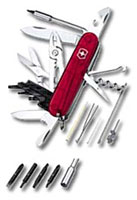 recognized hallmarks of versatility,
reliability and functionality. Precision crafted in Switzerland to
be the finest pocketknives available, Victorinox Original Swiss
Army Knives have been the official equipment on the world's most
remarkable adventures, from exploring the North Pole to NASA space
shuttle missions.
recognized hallmarks of versatility,
reliability and functionality. Precision crafted in Switzerland to
be the finest pocketknives available, Victorinox Original Swiss
Army Knives have been the official equipment on the world's most
remarkable adventures, from exploring the North Pole to NASA space
shuttle missions.
This advanced version of the original Swiss Army knife is the
ultimate techie tool, making computer repairs easier and faster.
Handsome stainless steel with world famous styling features over 34
different functions - including 4 double-head hex bits for
servicing computers.
Tools included: large blade, small blade, scissors, pliers w/
wire cutter, reamer w/sewing eye, corkscrew, mini screwdriver,
straight pin, key ring, toothpick, tweezers, screwdriver, can
opener, bottle opener, #2, #3, Phillips head screwdriver, DIP
switch setter, bit wrench with case, 5mm, 4mm hex socket, #8, #10,
#15 Torx bit, #0, #1 Pozi drive bit.
Comes with manufacturers' one year warranty against defects in
materials or workmanship.
Price: $49.95 from DevDepot.com
iBook Hard Drive Upgrade Tutorial
While it's not recommended, if you're brave and reasonably handy
with tools, it is possible to upgrade the hard drive in your Dual
USB iBook.
An illustrated PDF tutorial created
by CyberGreg shows you how, but think long and hard before taking
the plunge.
iBook Backlight Replacement Tutorial
Is the backlight on your clamshell iBook getting a bit murky?
Check out this
tutorial on how to replace it cheaply (US$12).
This illustrated presentation shows you what to do and how to
avoid some of the potential pitfalls by benefiting from the
author's experience.
You can find replacement backlight tubes at Digi-Key.com or JKL Lamps (see
next entry).
Source of Replacement Laptop Backlights
JKL Lamps offers a
wide variety of miniature lighting solutions that include
incandescents, LED's, fluorescents, neons and a wide array of
special application lamps, LCD's, replacement laptop computer
lights, and instrument cluster illumination.
One of the most common applications for Cold Cathode Fluorescent
Lamps (CCFL's) is LCD backlighting in laptop computers. JKL Lamps
have been used for replacements in laptops/LCD's manufactured by
Apple, AST, Cannon, Compaq, Data World, Dell, DTK, Epson, Everex,
Gateway, Goldstar, Hyperdata, IBM, Mitsubishi, Sharp, Swan, Texas
Instruments, Toshiba, and Zenith Data Systems.
To find your replacement lamp, JKL recommends that you measure
the physical characteristics of your old lamp and find the closest
match on the Fluorescent Lamps Page or identify the manufacturer
and the manufacture model number off the back of the LCD screen
within the laptop and email it to sales@jkllamps.com, or call call
the JKL Sales Department at 1-800-421-7244. The JKL sales
associates have a customer derived cross-reference list for many
laptops. Please note that JKL CCFl Lamps are available from the JKL
Lamps Sales Department and Digikey.
MacSurfer II PC Card Modem
A Mac modem that successfully combines speed and stability.
Equipped with an Intel chipset, the
MacSurfer 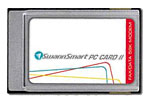 is the fast, reliable way
to browse the Web, send and receive emails and faxes, and view
streamed media. Ideal for educational use and great for games.
is the fast, reliable way
to browse the Web, send and receive emails and faxes, and view
streamed media. Ideal for educational use and great for games.
Software included: WebWorks 2000 is the software toolkit to get
you online easily. It has all the utilities, applications and
information to guide you through modem installation, Web surfing
basics, choosing an Internet Service Provider (ISP) and more. Get
the most out of your time online with WebWorks 2000.
Features & Specifications
Data Mode Compatibility
- ITU-TV.90/V.34+/V.34/V.32bis/V.32
- Up to 56 Kbps receive and 33.6 Kbps transmit.
Fax Mode Compatibility
- ITU-T V.17 / V.29 / V.27ter / V.21
- Group 3
- EIA Class 1
Voice Mode
- Enhanced ADPCM CODEC
- Incoming Call Discrimination
- Concurrent DTMF Detection
- Data Compression/Error Correction
- ITU-T V.42bis/ITU-T V.42
- MNP5/MNP 2-4
Data Throughput
- Up to 115,200 bps
- Operating Features
- Auto Dial and Auto Answer
- Auto Speed Mode/ Mode Selection
- Auto Power Management
- Digital Echo Cancellation
- Answering Machine / Voice Mail
- Full-duplex speaker phone
- ASVD (Asynchronous voice and data)
- V.80 for video conference
- Low power consumption
Minimum Requirements
- PowerPC Processor
- OS 8.0 or higher
- 32 MB RAM
- 1 spare modem port
- 1 CD-ROM drive (drivers also available on floppy disk)
Price: $69
MCE Battery Charger for iBook (Dual
USB)
The MCE
Battery Charger for the 500 and 600 MHz 12-inch dual-USB
iBook provides a convenient 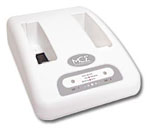 means to charge one or simultaneously charge two Apple
iBook Li-Ion batteries quickly and easily. Two and a half hours is
all it takes to have two fully charged batteries ready for use at
any time.
means to charge one or simultaneously charge two Apple
iBook Li-Ion batteries quickly and easily. Two and a half hours is
all it takes to have two fully charged batteries ready for use at
any time.
Package Contents
- Battery charger
- Universal AC adapter
- User's Guide
Price: $139.95
PowerBook ScreensavRz
ScreensavRz
not only protect your precious display surface from abrasion caused
by the close tolerances in today's ultra-thin notebooks, they clean
your screen too! Made from a woven, ultra-thin (1.5 mil)
optical-grade microfiber cloth, ScreensavRz, even when dry, allow
you to safely clean the screen, or any surface of your
notebook.
This super-soft cloth shields the display surface when
transporting your notebook computer and is machine wash and
dryable. ScreensavRz are so thin, soft and supple, they stow as
easy as a dollar bill. For late model Apple notebooks, combine
ScreensavRz with WildEepz Display Cushions to transform your 'Book
into a rock. Don't betray your portable computer investment,
get saved!
Choose from
- PowerBook ScreensavRz for Titanium, $14.95
- PowerBook ScreensavRz for G3s, $14.95
- PowerBook ScreensavRz for iBook '01, $14.95
Features
- Black color ensures great looks for life.
- Polish your entire notebook - especially good for iBooks.
- Sizes for all recent Apple notebooks.
- Custom sizes, configs available.
- No oily residue like tanned leather.
- Combine with WildEepz for maximum protection on PB G4 and Dual
USB iBook.
Bargain 'Books
There are two different versions of WallStreet running at 233
MHz, the cacheless MainStreet version and the later
Series II with a level 2
cache. It's not always possible to determine from the vendor's
listing which is being offered, so we've included links within this
paragraph to the two models. The same goes for the PowerBook G4/667 (Gigabit
Ethernet/2001) and G4/667
(DVI).
- iBook 600 12", 128/20 GB/CD-ROM, Mac OS 9.2 and 10.1, $949
- iBook 700 12", 128/20 GB/Combo, Mac OS 9.2 and 10.1 $1,199
- iBook 700 14", 256/30 GB/Combo, Mac OS 9.2 and 10.1,
$1,499
- PowerBook G4/550, 256/20 GB/Combo, Mac OS 9.2 and 10.1,
$1,979.10
- PowerBook G4/667, 256/30 GB/Combo, Mac OS 9.2 and 10.1,
$1,999
- PowerBook G4/667, 256/30 GB/Combo, $1,989
- PowerBook G4/667, 256/30 GB/Combo, free 256 MB upgrade,
$1,989
- refurbished PowerBook G4/800, 512/40 GB/Combo, AirPort,
$2,099
- refurbished PowerBook G4/800, 512/40 GB/Combo, AirPort,
AppleCare, $2,349
- PowerBook Pismo G3/500, 128/10 GB/DVD, $1,199.95
- PowerBook Pismo G3/400, 128/6 GB/DVD, $999.95
- PowerBook WallStreet G3/233, 96/2 GB/CD-ROM, 14.1",
$699.95
- PowerBook 3400c/180, 32/1.3 GB/CD-ROM, floppy, $299.95
- PowerBook 1400c w/ G3/333, 64/2 GB/floppy, $294
- PowerBook 1400c/117, 64/2 GB/floppy, $218
- PowerBook G4/667, 512/30 GB/DVD, AirPort, $1,849
- PowerBook G4/667, 256/30 GB/Combo, $1,949



