Low End Mac Reader Specials
TypeStyler For Mac OS X is Now Shipping! Download The Free Fully Functional 60 Day Tryout at www.typestyler.com
Don't install Parallels to play poker online! Poker Mac will show you how
to download and install a native Mac poker application such as Full
Tilt Poker Mac.
Compare products like desktop computers, apple laptops, apple macs, and LCD Monitors side by side! All the information and reviews to make the best purchasing decision for new mobile phones, sat nav systems, or MP3 players. The Ciao online shopping community makes searching products easy for you.
Recycled Computing
Through a Scanner, Darkly Indeed
- 2010.01.08
Follow Low End Mac on Twitter.
Popularity: ![]()
![]()
![]()
Tweet this article. Short link: http://bit.ly/7E2AwU
It's always man against technology, and in the case of recycling old tech, the struggle is squared.
Way back before Christmas break, my boss had found a couple of old CanoScan LiDE 50 scanners hiding in our school. In sort of a banzai challenge, he gave them to me to see if "Mr. Legacy" could get them working.
I have always felt that you can never have too many scanners and that you should never let old tech go to waste. I thought it would be an easy matter to download the drivers from Canon's website, install them, and starting scanning.
"Ha, ha", laughed the Tech Gods. "This puny mortal has no chance against Planned Obsolescence."
It turns out that Canon does not support the LiDE 50 in OS X "Leopard". To be fair, it proved to be difficult to install Canon's scanner utility in Mac OS X 10.4 "Tiger" (maybe it was due to the G3 processor) or Windows XP and get the scanner to work.
Of course, XSane (the scanner application include with Ubuntu) works fine.
A Commercial Solution
This the time for the third party software! In fact, there is a wonderful application called VueScan that supports all sorts of scanners. It also is one of the most complete scanner programs that I have seen. It offers a level of control that is not present in the manufacturer's software. If you do a lot of scanning and need to produce a quality product, you might want to shell out $40 for VueScan.
And therein lies the rub. Schools do not have $40 to shell out to make $50 scanners work. I needed something free.
SANE Doesn't Like Tiger
This lead to fruitless searches on the Internet. Mr. Mike, our in house computer hardware and software repairman, pointed me towards SANE (Scanner Access Now Easy), some free software for Linux. Mr. Mike is also "Mr. Linux" around here and has been encouraging me when I installed Linux on my home Dell computer. As I mention above, the XSane software included with Ubuntu works fine with the CanoScan LiDE 50.
So SANE, the version ported for Mac OS X, should work, shouldn't it?
"Not so fast, monkey-boy," pronounced the Tech Gods. SANE would just not play nice with the scanner. I couldn't seem to get Image Capture to recognize the hardware. The SANE Preference Pane just didn't seem to configure the Canon scanner.
I would have pulled out my hair, but I have so little of it left.
Help from the Mac Community
So I went to Mac Forums, started a new thread, and waited hopefully for some one to give me a solution. A member with the nom de plume of "wherehouse" had an old LiDE 30 that worked with an application named Snac, which was written specifically to make SANE easy to use for OS X users. I downloaded the free application and found that it was written to replace the SANE front-end, which the author of Snac had discovered was too unstable for his liking. I used SANE's back-end with the Snac front-end, and Zowey! The CanoScan LiDE 50 worked!
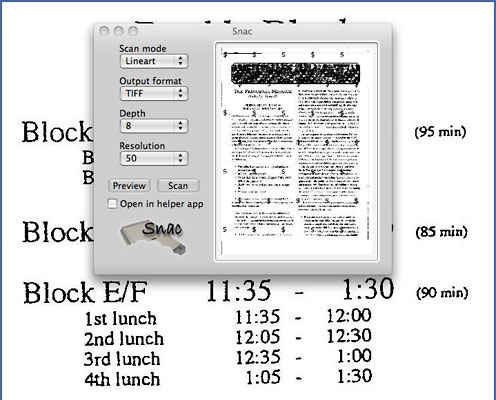
Snac lets you preview and crop your scans.
Snac is a very simple front-end that is perfect for my high school students. Yes, they can play complex video games, use Facebook and Twitter, and email like crazy, but scanning....
This does not bode well for our Social Security checks.
Once again, thanks "wherehouse" and Mac Forums! Problem solved!
Recent Recycled Computing Columns
- Taking Apart the 12" PowerBook, 03.17. There are a lot of steps involved in disassembling a 12" PowerBook. Proceed with caution.
- The Apple Patient, 03.15. The used 12" PowerBook has a dead screen, missing key, damaged case, and minimal memory, but it does work.
- Apple's Almost Netbook, 03.08. No, Apple didn't really make a netbook, but the 12" PowerBook G4 certainly came close - and with far less compromises than a real netbook.
- iPad Perfect for Handheld Computing, 02.05. You can hold the iPad in one hand and operate it with the other, giving it real advantages over a laptop computer.
- More in the Recycled Computing index.
Links for the Day
- Mac of the Day: 17" MacBook Pro Core Duo, Apr. 2006 - The top-end MacBook Pro includes a 1680 x 1050, 2.16 GHz Core Duo CPU, and supports Apple 30" Cinema Display.
- Group of the Day: PCI PowerMacs covers pre-G3 Power Macs and clones with PCI slots.
- March 18 in LEM history: 02: The case for a 'Book - More on living Microsoft free - Prep your low-end Mac for Linux - 03: How good a value is a WallStreet? - 05: How the iPod trounced the Walkman - 08: 13 port USB 2.0 hub
- Support Low End Mac
Recent Content on Low End Mac
- Why I Plan to Stop Using Google Docs, Jason Walsh, Mac Life, 03.16. Jason Walsh continues his search for the perfect word processor and explains why he uses Google Docs - and why he will stop using it.
- Ubiquitous Computing: Tabs, Pads, Books, and Clouds, Adam Rosen, Adam's Apple, 03.16. "Ubiquitous computing names the third wave in computing, just now beginning . . . when technology recedes into the background of our lives."
- Why Run Leopard on Slow G4 Macs?, Simon Royal, Mac Spectrum, 03.15. Tiger has lower demands and runs more smoothly on low-end Macs, but Leopard gives you access to more up-to-date software.
- More links in our archive.
Recent Deals
- Best Intel iMac Deals, 03.17. Used 17" from $600; 20" from $750; 24" from $825; refurb 21.5" nVidia, $999; new, $1,099; refurb Radeon, $1,299; new, $1,399; refurb 27" 3.06, $1,499; more.
- Best G5 iMac Deals, 03.17. 17" 2.0 GHz, $380; 1.9 GHz iSight, $479 shipped; 20" 1.8 GHz, $509 shipped; 2.1 GHz iSight, $549 shipped.
- Best Time Capsule Deals, 03.17. Close-out 500 GB, $140; new 1 TB, $279; used 2 TB simultaneous dual-band, $400; new, $455. Shipping included.
- Best iPad Deals, 03.16. 16 GB iPad, $499; 32 GB, $599; 64 GB, $699; 16 GB with 3G, $629; 32 GB 3G, $729; 64 GB 3G, $829. Free ground shipping.
- Best iPod classic Deals, 03.12. Used 20 GB, $119; 40 GB, $139; 60 GB, $159; 30 GB video, $129; 60 GB, $159; 80 GB, $169; refurb 120 GB, $189; new, $214; 160 GB, $228 shipped.
- Best G3 iBook and AirPort Card Deals, 03.12. 366 MHz 12" clamshell, $89; 466, $125; 500 white CD, $100; 600, $199; 800 Combo, $239; 14" 900, $225.
- Best Xserve Deals, 03.12. Used 1 GHz dual G4, $499; 2.0 dual G5, $599; 2.3, $749; refurb 2.26 4-core Nehalem, $2,499; new, $2,699; 8-core, $3,449; refurb 2.66, $4,299; new, $4,799; more.
- More deals in our archive.
About LEM | Support | Usage | Privacy | Contacts
Navigation
Used Mac Dealers
Apple History
Video Cards
Email Lists
Favorite Sites
MacSurfer
MacMinute
MacInTouch
MyAppleMenu
InfoMac
Macs Only!
The Mac Observer
Accelerate Your Mac
RetroMacCast
PB Central
MacWindows
The Vintage Mac
Museum
DealMac
DealsOnTheWeb
Mac2Sell
ramseeker
Mac Driver Museum
JAG's House
System
6 Heaven
System 7 Today
the pickle's Low-End
Mac FAQ
Abandonware
Petition
Mac vs. PC Info
Affiliates
The Apple
Store
Mac
Connection
B&H
MacMall
TechRestore
ExperCom
Crucial
Memory
batteries.com
MacMinute
MacInTouch
MyAppleMenu
InfoMac
Macs Only!
The Mac Observer
Accelerate Your Mac
RetroMacCast
PB Central
MacWindows
The Vintage Mac
Museum
DealMac
DealsOnTheWeb
Mac2Sell
ramseeker
Mac Driver Museum
JAG's House
System 6 Heaven
System 7 Today
the pickle's Low-End
Mac FAQ
Abandonware
Petition
Mac vs. PC Info
Mac Connection
B&H
MacMall
TechRestore
ExperCom
Crucial Memory
batteries.com



