Digital Fossils is an archeological voyage through the rich strataof our recent electronic past. This is not merely an academic trip,however. Like some fevered Jurassic Park dream come true, these fossilsare brought to life to roam the earth in their natural habitats oncemore. While focusing primarily on vintage Macintosh hardware, theoccasional side exploration will be made into the evolutionary past ofvideo games, digital cameras, and other denizens of the thrift shopcoal beds and yard sale shales which await only some pocket change anda bit of voltage to walk among us again.
I'm easily distracted.
There. I've admitted it. Gotten it out in the open.
I recently had a geniusidea for boosting my writing productivity: I would park accessibleextension cords or AC power supplies for one of my older Mac laptops ina couple of strategic locations (one that could be reached either fromthe dining room table or the futon in the living room, and one near thebed) and drag out an older 'Book to use as naught but a writingtool.
Avoiding Distractions
My stated excuse for this was exactly what I admitted above: Anolder Mac would keep me from being distracted by the intarw3b, and thiswould help my productivity. No more being interrupted by a researchcheck at Wikipedia that turns into a two-hour Wikiwander. No morestopping what I'm doing every 45 minutes for a quick ego check atSitemeter or Technorati.
But that wasn't the whole truth.
If all I wanted was a distraction-free environment, I'd pay $5 plus$20 shipping on eBay for one of the early Pentium laptops out there that havemiraculously escaped the landfill. A bare-bones Win98 installation,delete Solitaire, make sure that it has no wireless card in it, anddown the road I'd go - except that zero distractions was only a part ofthe equation.
The Creative Process
See, I'm not typing business letters here, or entering data intospreadsheets, or whatever; I'm trying to create something, somethingenjoyable for other people to read, out of whole cloth (or awoolly-headed hangover, whichever). I know that there are giftedwriters out there who can compose beautiful essays with crayon on anapkin in the crowd at a hockey game; Zen masters who can contemplatekoans in the middle of a busy lunchtime crowd in Tokyo's Ginza districtwhile being mugged. I'm not one of them. I need that pretty gravel trapwhere somebody's raked everything into serene spirals andcurlicues.
I do my best writing on a Mac.
I briefly considered an AlphaSmart Neo, recommended highly by much better writers than I, but it doesn't really fit my ownpeculiar needs. Yes, the infinite battery life means you can take itanywhere and write when you feel like it, but I usually Sit Down toWrite. There's a clear demarcation between "This is me writing" and"This is me futzing around and doing normal stuff". The instant bootupis neat for those who are hit by a thunderbolt of inspiration and needto get it on the screen fast, but I chew stuff in my head for hours,days, or even weeks. That recent anal bleaching comedy bit? I bounced that off the headsof dinner companions almost two weeks before hitting the "publishpost" button.
Lastly, this stuff is written on the fly. When it's Time to Write, Isit down at the keyboard and bang out the bit in question live inBlogger's "Create Post" window. It gives me 14 lines of text to playwith, and I write from first draft - and then annoy RSS readers byediting from the finished product. If it's a five paragraph post, I doa lot of scrolling. If I'm writing something for the books, I need evenmore than fourteen lines, because I'm constantly going back over what Ijust wrote, so the AlphaSmart is out for me, and a word processingprogram is in.
That word processing program, however, needs to be on something thatdoesn't annoy the pee out of me. Older Wintel laptops, for the mostpart, look like a flat black lunchbox on which someone has dumped atray of Scrabble tiles. We're back to that non-meditative mugging inthe Ginza.
Looking Good
Mac laptops, on the other hand, don't annoy me by constantly waving"Look how ugly I am!" signs in my peripheral vision. I could care lessabout the rest of the thing, the whole "Pentium vs. PowerPC" and "Win98vs. Mac OS 7/8/9" nonsense; once you're inside the word-processingprogram itself, who cares what OS you're using or what CPU is under thehood? You type. Words appear on the screen. Everybody's happy.
Luckily I have several old Mac laptops to choose from, and I've beenpiddling with them and chatting with Marko on the phone and emailingfolks geekier than I to help make up my mind. What I have to choosefrom, I've divided into three rough categories: regular oldnotebook-type notebooks, mini notebooks, and "newer" notebooks. Here'sthe breakdown thus far:
Regular Notebooks
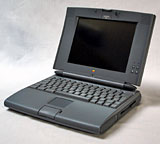 Of the Regular Old Notebook-Type Notebooks,I have three "Blackbird"type machines: the PowerBook 520,520c, and 540c are out because they use differentAC power supplies from my other machines. The 540c has a nice keyboardand an active-matrix LCD. It has PCMCIA slots, and I have a PCMCIA WiFicard, but the antique 68040processor and OS mean I won't be tempted to do much web surfing onit.
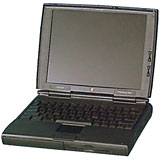 I also have two slightly lessantique machines in the same category, a 190 and a 1400cs. While both are blessed withadequate keyboards, they also both suffer from a similar problem:dual-scan LCD displays. These bug the heck out of me, because if you'renot looking at them at exactly the right angle they wash out tonothing, and the mouse pointer leaves trails like you haven't seensince your last Grateful Dead concert. Not as big a deal when parked ona firm, flat table in a well-lit Starbucks, but a deal breaker for mewhen perched on my lap curled up in the corner of the futon.
Mini Notebooks
Of the Mini notebooks, there are the two PowerBook Duos, a 270c and a 280c. Teeny and light and easy tobalance on a lap, their total absence of built-in media drives orPCMCIA slots means that I couldn't get distracted even if I wanted to.The 280c is the nicer of the two machines, but the keyboard isn't aspositive as I like. I frequently find myself missing keystrokes whentyping fast by not bottoming out the key completely, but that couldprobably be improved with practice.
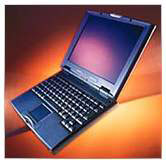 The nicest ofthe minis is a 2400c. A prettylittle machine with a swoopy case that's all gentle arcs and curvedcorners, it has a crisp active-matrix display and is a joy to use,except for one thing: It's hard to get much keyboard into a laptop witha footprint slightly smaller than an 8.5 x 11 sheet of paper. Again, Idon't know how much of that is me not being used to the 7/8ths-scalekeyboard and how much of it is the nature of the beast.
'Newer' Notebooks
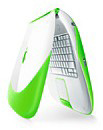 The"newer" G3 'books pose a quandary. The iBook SE is an extremelycompetent machine for being eight years old. It has been my loyalroadwarrior since fall of '01, and quitea few posts on my blog have come from its keyboard. It'scomfortable to type on and has a good screen. And built-in WiFi. Buthow much discipline do I have with the intarw3bz just a click away?
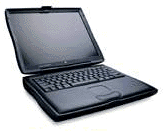 Theother is the WallStreet, which has thebiggest screen of any of my laptops as well as what is widelyconsidered to be one of the best keyboards for writing of any laptopever. Of course, this means it's a hoss, both big in size and weighingin at 7.5 pounds (only two pounds less than a Garand, and how'd you like tohave one of those on your lap all afternoon?)
So I've pulled out the 540c, 280c, 1400c, iBook, and WallStreet, andI'm going to put them through their paces this week. 
Click hereto see what Tamara found to be her ideal writing machine.




