Low End Mac Reader Specials
TypeStyler For Mac OS X is Now Shipping! Download The Free Fully Functional 60 Day Tryout at www.typestyler.com
OWC: Get the Right Memory for Your Mac Top Quality, Competitive Price, Lifetime Backed Free Expert Support + Installation Videos too! MacBook & mini 8GB, iMac 16GB, Mac Pro up to 32GB. Click here
Don't install Parallels to play poker online! Poker Mac will show you how
to download and install a native Mac poker application such as Full
Tilt Poker Mac.
Laptop Hardware Provided by TechRestore - Overnight Mac & iPod Repairs.
Compare products like desktop computers, apple laptops, apple macs, and LCD Monitors side by side! All the information and reviews to make the best purchasing decision for new mobile phones, sat nav systems, or MP3 players. The Ciao online shopping community makes searching products easy for you.
Linux to Mac
Taking Linux to Mac OS X with Virtualization
- 2008.03.17 - Tip Jar
Popularity: ![]()
![]()
![]()
![]()
![]()
If you are moving from Linux to the Mac, you'll find a BASH shell and a set of Unix command line utilities available to make you feel at home. If you need a complete Linux environment for development or special applications, you can run Linux in a virtual machine (VM) using VMware Fusion.
Fusion Basics
Version 1.0 of VMware Fusion was released on August 1, 2007. The shipping version as of this writing is 1.1.1. Fusion only works on Intel-based Macs. It builds on the experience of VMware in the Windows and Linux market. It is comparable in features to VMware workstation, and to its competitor in the Mac market, Parallels.
VMware sells Fusion primarily as a Windows-on-Mac solution. You have dig into the details to learn that it also supports Linux, Solaris, FreeBSD, and other Intel operating systems as guests.
While beta versions suffered with performance issues, the latest version is relatively snappy running different flavors of Linux. I currently have Centos 5.1 and Ubuntu 7.10 running nicely under OS X. Full screen support works as expected. VMware supplies extra software called VMware tools that improves video and mouse performance. Installation of VMware tools in a Linux guest works exactly as on other host operating systems.
Jump Start with Appliances
One of the advantages of the VMware universe is the availability of virtual appliances. Appliances are prebuilt virtual machines that can be downloaded and run with no installation or configuration. Many companies provide special purpose appliances as either demonstrations or deployable applications. There are also hundreds of user provided virtual machines with a variety of Linux distributions, making it easy to try out different flavors of Linux without much work.
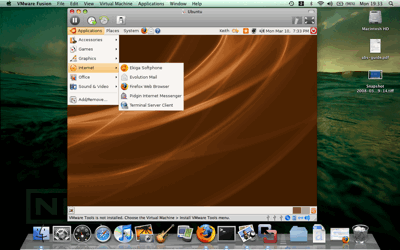
Ubuntu Linux on OS X with VMware Fusion
Fusion can run virtual machines created on the Windows and Linux versions of VMware. I downloaded and tried several appliances and had no problems.
Virtual Appliances and Security
The ease of downloading and running appliances can be a two-edged sword. Keep in mind that a virtual machine is essentially a completely configured computer system that you are booting up on your network. Depending on how it was created, each appliance may have the same access to the network as your host system - and it may also have limited access to host system files.
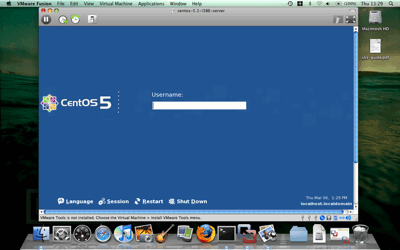
Centos Linux on OS X with VMware Fusion
For user created appliances, you should at least regenerate the system SSH keys and limit access to the network unless you trust the source. A trojaned virtual machine is another vector to get malware inside a network. Be aware of the risks.
The Competition
The main competitor to Fusion is Parallels, a company that gained a lot of traction by being first out of the gate with a high performance virtualization solution for the Intel-based Mac. Parallels was also priced below the VMware offerings on Windows and Linux. However, VMware has matched the Parallels price (currently $79) for their Mac solution.
Since I don't have Parallels, I can't compare the two products.
VMware does have a fully functional 30-day trial, while Parallels does not at this time. (Note: I have no financial or other relationship with either company.)
VMs Are Future Compatible
Some of the benefits of taking Linux with you to OS X are obvious. You can create an exact replica of a production server environment for testing and development. You can safely test new software and roll back to before installation if things don't work out as expected. It also lets you test multiple client environments on one system.
Virtual machines have been around since the 1960s on mainframes, where they have been part of the high reliability and performance equation. Modern microprocessors provide the needed hardware support for virtualization, and it is becoming a common part of computing environments at all levels.
It is interesting that Apple does not allow OS X to be a guest
operating system. My guess is that OS X is designed for specific
sets of hardware, not to handle any old motherboard or collection of
hardware thrown at it like Linux (and to some extent Windows). This
means OS X might not perform well in a virtualized environment.
Apple probably has other reasons, too, but it would be nice to see
OS X as a guest in the future.
Keith Winston is a recent Mac convert after five years of Linux on the desktop. He also writes for Linux.com and created CommandLineMac to focus on the Unix-y power of the Mac. If you find Keith's articles helpful, please consider making a donation to his tip jar.
Recent Linux to Mac Columns
- Automount OS X Home Directories Using OpenLDAP and Linux, 09.28. It's possible to get an OS X Mac to automatically mount a Linux server using OpenLDAP. The tricky part is finding all the steps needed to make it work.
- Introduction to Autofs in Mac OS X, 07.01. "Autofs is often used in enterprise environments to set up network-based home directories and other network mounts for users at login."
- Automating FTP on the Mac, 03.04. There's no shortage of GUI FTP programs, but using the Terminal gives you tools to automate file transfer sessions.
- An RSS News Reader with the Power of Google, 08.20. Unlike browser-based RSS readers or dedicated news reader apps, Google Reader lets you access your favorite feeds from any computer and browser.
- More in the Linux to Mac index.
Links for the Day
- Mac of the Day: 17" iMac G4/800 MHz, July 2002 - The iMac 'grows up' with a 17" 1440 x 900 display.
- Group of the Day: LisaList supports Lisa users.
- November 8 in LEM history: 99: OS 9: I think I like it - 01: The simplified Mac life - Soured on Windows - Flea market Mac - 02: Little room for improvement in new 'Books - Combo drive upgrade for iceBooks - 04: Re-Porter - 05: Fix the old iMac or buy a Mac mini? - Apple's Copland project - 06: MacBook Core 2 - MacBook value equation - Cheap is as cheap does - 07: Problems with Classic mode in Tiger - The G4 Power Mac that won't run Leopard
- Support Low End Mac
Recent Content on Low End Mac
- Quad-Core CPU Makes Sense in MacBook Pro, OS X 10.6 Causing Overheating, Overseas Power, and More, The 'Book Review, 11.06. Also Late 2009 MacBook reviewed, how to add RAM to new MacBook, 18.4in Acer notebook used Intel i7, and SanDisk SSD chosen for Sony VAIO X.
- Dumping Macs for Google Apps, SSD in iMac, Late 2009 iMac Performance Problems, and More, Mac News Review, 11.06. /newsrev/09mnr/1106.html
- WiFi Paranoia, iMac-O-Lantern, Magic Mouse Does Click, Free Clipboard Managers, and More, Charles W. Moore, Miscellaneous Ramblings, 11.05. Also strange time stamps, problem with ColorIt on Intel Mac, and the story behind OS X 10.5.4 install discs.
- IDE Is Dead; Long Live SATA!, Dan Knight, Mac Musings, 11.04. SATA has displaced parallel ATA. While IDE hard drives haven't disappeared, the best deals are in SATA hard drives.
- QuickTime X in Snow Leopard Imports, Trims, and Publishes Video Quickly and Easily, Alan Zisman, Zis Mac, 11.04. The long, slow process of importing video into iMovie to edit it, then render it to another format, is history as QuickTime X does that much more quickly.
- More links in our archive.
Recent Deals
- Best Mac Pro Deals, 11.03. Used 2.66 GHz 4-core, $1,300; 3.0 8-core. $2,299; refurb 2.66 4-core Nehalem, $2,149; 2.93, $2,549; 2.26 8-core, $2,799; 2.93, $4,999.
- Best iPhone Deals, 11.03. New 8 GB iPhone 3G, $$99; refurb 16 GB 3GS, $149; new, $199; 32 GB, $299.
- Best 12" PowerBook G4 Deals, 11.03. Used 867 MHz SperDrive, $348; 1 GHz, $499; 1.33 Combo, $298; SD, $559; 1.5 Combo, $448; SuperDrive, $589.
- Best Power Mac G3 and PCI Video Card Deals, 11.02. Used beige 300 MHz, $25; G4/366, $49; blue & white 350, $80; 400, $90; 450, $105; PCI video cards from $15; shipping additional.
- Best Power Mac G4 and AGP Video Card Deals, 11.02. Used 400 MHz, $50; 733 MHz, $69; 933 MHz, $209; 1.25 GHz dual, $299.
- Best 15" MacBook Pro Deals, 11.02. Used 2.0 GHz, $800; 2.2, $900; 2.4, $1,000; refurb 2.53, $1,449; 2.66, $1,699; 2.8, $1,949; 3.06, $2,169; new 2.53, $1,579; 2.66, $1,799; more.
- Best Mac mini Deals, 10.30. Used 1.33 GHz G4 mini, $379; 1.42, $389; 1.5, $419; 1.83 GHz Core Duo, $350; Core 2, $439; new 2.26 GHz nVidia, $580; 2.53 GHz, $770; Server, $990.
- Best G4 iBook Deals, 10.30. Used 12" 1.07 GHz Combo, $225; 1.33 GHz, $298; 14" 1 GHz, $349; 1.33 GHz, $398; 1.42 GHz SuperDrive, $498.
- Best Classic Mac OS Deals, 10.30. System 6.0.8 floppies, $10; 7.1, $12; 7.5, $20; 7.5 CD, $4; 7.6 $13; 8.1, $11; 8.5, $20; 8.6, $90; 9.0, $20; 9.2.2, $30.
- More deals in our archive.
About LEM | Support | Usage | Privacy | Contacts
Navigation
Used Mac Dealers
Apple History
Video Cards
Email Lists
Favorite Sites
MacSurfer
MacMinute
MacInTouch
MyAppleMenu
InfoMac
Macs Only!
The Mac Observer
Accelerate Your Mac
RetroMacCast
PB Central
MacWindows
The Vintage Mac
Museum
DealMac
DealsOnTheWeb
Mac2Sell
ramseeker
Mac Driver Museum
JAG's House
System
6 Heaven
System 7 Today
the pickle's Low-End
Mac FAQ
Abandonware
Petition
Mac vs. PC Info
Affiliates
The Apple
Store
Mac
Connection
B&H
MacMall
TechRestore
ExperCom
Crucial
Memory
batteries.com
Advertise
MacMinute
MacInTouch
MyAppleMenu
InfoMac
Macs Only!
The Mac Observer
Accelerate Your Mac
RetroMacCast
PB Central
MacWindows
The Vintage Mac
Museum
DealMac
DealsOnTheWeb
Mac2Sell
ramseeker
Mac Driver Museum
JAG's House
System 6 Heaven
System 7 Today
the pickle's Low-End
Mac FAQ
Abandonware
Petition
Mac vs. PC Info
Mac Connection
B&H
MacMall
TechRestore
ExperCom
Crucial Memory
batteries.com



