Low End Mac Reader Specials
TypeStyler For Mac OS X is Now Shipping! Download The Free Fully Functional 60 Day Tryout at www.typestyler.com
Don't install Parallels to play poker online! Poker Mac will show you how
to download and install a native Mac poker application such as Full
Tilt Poker Mac.
Laptop Hardware Provided by TechRestore - Overnight Mac & iPod Repairs.
Compare products like desktop computers, apple laptops, apple macs, and LCD Monitors side by side! All the information and reviews to make the best purchasing decision for new mobile phones, sat nav systems, or MP3 players. The Ciao online shopping community makes searching products easy for you.
Mac2Windows
PC-Mac-Net FileShare
Another Way to Connect Macs with Windows
- 2002.10.23 - Tip Jar
In my previous Mac2Windows column, we took a look at Sharity from Object Development, which aims to plug some of the gaps in OS X's support for Macs in Windows networking. Sharity is more of a plus for OS X 10.1.x users than Jaguar users; while all OS X users will find it a pleasant speed enhancer, 10.1.x users will benefit from its abilities to browse the Windows network and to connect to multiple Windows shares at one time (though this later function is limited in some versions).
- Several careful readers of last week's column noticed that I implied that OS X could only connect to a single Windows share at a time on its own; in fact, this is only true of OS X 10.1.x. Jaguar adds the ability to connect to multiple shared folders at the same time, even on different Windows servers.
There's another alternative for Mac users looking to share files across a network with Windows computers. Australia's Lava Software offers PC-Mac-Net FileShare, a low cost product that is a simple way to connect any of a combination of Classic OS Macs, OS X Macs, Windows 9x, and Windows NT/2000/XP systems - all sharing files in any direction.
In addition to running a copy of the software on each computer (there are versions for the various Mac OSes and the range of Windows OSes), you'll need to have TCP/IP installed on each system and hav some sort of valid network connection. Using it, my iBook with an AirPort card happily exchanges files with the Compaq notebook wired into my router.
PC-Mac-Net FileShare makes no attempts to integrate itself into either the Mac or Windows operating system. Unlike Thursby's Dave, it doesn't become an extension of the Classic Mac OS's Chooser or the OS X Finder's Go menu. Unlike Sharity, nothing is added to basic system folders. It's a simple application that can be started up as needed on each computer.
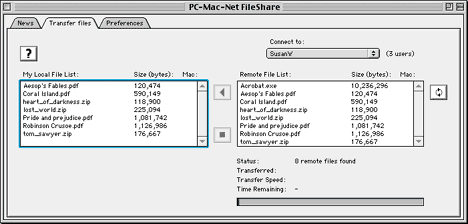
Its looks are pretty minimalist, as well. Whether on Windows or the Mac, it opens into a 3-tabbed window with a tab for Preferences, a tab for File Transfers, and a tab for news from the company (currently announcing the new version 2.1 and a buy-one get-two sale for licenses). The users should make sure their computers have a name, and optionally set a password for file sharing. Workgroup IP addresses can be set manually, which will speed up locating the other computers when the program is started. And users with a firewall may need to edit the port number used by the networking.
In the file transfer dialogue, you choose another system on your network that is also running the program; it scans the network regularly, looking out to see if other computers have joined up. When you select a computer, files available for sharing are automatically listedóboth on your local computer (the one you're sitting at) and the remote one.
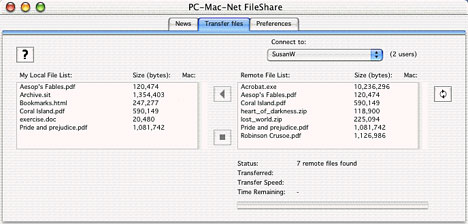
The catch is that PC-Mac-Net FileShare only shows you files in the Shared folder it creates on each computer's desktop. To make other files available for sharing, they have to be copied into that folder. Subfolders created in the Shared folder aren't visible across the network. Lava Software suggests that for the best performance, keep as few files in your Shared folders as possible, moving unneeded files out regularly, and never have more than 200 files in the folder at any one time.
That's about it - a bare-bones approach to Mac/Windows file sharing. If you're prepared to live with moving files to and from a single folder on each system, it may be a winner. Its big plus is the ability to work with your choice of classic OS and OS X Macs and any flavour of Windows from Win95 onwards.
Lava Software has free downloadable versions available in each of its four flavours (Classic OS Mac, OS X Mac, Win95/98/ME and WinNT/2000/XP). These demos will only transfer files smaller than 2 MB and only connect up to three workstations, but they can be used for an unlimited amount of time.
The full versions cost US$24.95 per license, and you'll need a
different license code for each computer that you run it on. At the
moment, they're offering users two product codes with every license
purchased. A license also includes a year's worth of upgrades. The
company is looking at adding folder transfers, chat capabilities,
and enhanced Internet file sharing.
Alan Zisman is Mac-using teacher and technology writer based in Vancouver, BC, Canada. Many of his articles are available on his website, www.zisman.ca. If you find Alan's articles helpful, please consider making a donation to his tip jar.
Recent Columns by Alan Zisman
- QuickTime X in Snow Leopard Imports, Trims, and Publishes Video Quickly and Easily, 11.04. The long, slow process of importing video into iMovie to edit it, then render it to another format, is history as QuickTime X does that much more quickly.
- Another Hard Drive Disaster Ends Happily (Thanks to Time Machine), 10.29. This time it was the MacBook's drive that failed. Thanks to automated Time Machine backup, recovery was easy, although far from fast.
- Preview in Snow Leopard Supports Scanners and Screen Shots, 10.19. The newest version of Preview can even use a remote scanner, creates compact PDFs, and includes three screen capture options.
- Creative's Vado Pocket Camcorders Now Work with Macs, 09.16. Until now, Creative's Vado camcorders didn't play nice with Macs. With the release of Vado Central for Mac, that has finally changed.
- More in the Mac 2 Windows index.
Links for the Day
- Mac of the Day: Mac mini Core Solo, Feb. 2006 - The only Mac to use a Core Solo CPU, this model ran at 1.5 GHz, has integrated graphics, and includes a Combo drive
- Group of the Day: SuperMacs is for those using Umax SuperMac clones.
- November 24 in LEM history: 98: Microsoft's heavy hand - 00: Looking at the iMac - 04: The best Mac for the holidays - Picking the right replacement for a dead mouse - Better battery for 15" AlBook
- Support Low End Mac
Recent Content on Low End Mac
- Pismo WiFi Networking Issue Finally Solved?, Charles W. Moore, Miscellaneous Ramblings, 11.24. It turns out the problems wasn't the Pismo, the Buffalo WiFi card, or Mac OS X 10.4. It was the Wireless G router - Linksys to the rescue!
- Mini VGA to S-video Adapter a No Go for eMacs, Dan Bashur, Apple, Tech, and Gaming, 11.24. You might think that Apple's Mini VGA S-video adapter is a cheap way to connect your eMac or G4 iMac to your TV. You would be wrong.
- Google Calendar with iPhone or iTouch Is Great for Scheduling, John Hatchett, Recycled Computing, 11.24. Web-based Google Calendar allows access and updates from any computing platform, including Mac, Windows, Linux, and iPhone OS.
- Why Spaces is My Favorite Leopard (and Snow Leopard) Feature, Charles W. Moore, Miscellaneous Ramblings, 11.23. Spaces, a feature introduced with OS X 10.5, is like having several monitors on your Mac without the cost and space of using multiple displays.
- i5 iMac Benchmarked, Mac mini 'Shouldn't Be Overlooked', Twitter Client for Classic Mac OS, and More, Mac News Review, 11.20. Also why Apple leaves the low end to others, 10.6.2 fixes video playback problem in 27" iMac, 3D Leopard and Snow Leopard performance, and more.
- Apple's Tablet an End Run Beyond Netbooks, Frank Fox, Stop the Noiz, 11.20. Whatever Apple has planned will leverage existing technologies while going beyond what its competitors can offer.
- Apple #4 in Reliability, Apple Tablet a Gadget for All?, HP's i7 Notebook Outdoes Mac Rivals, and More, The 'Book Review, 11.20. Also Flash 10.1 improves video on Hackintosh netbooks, thin-and-light notebooks impress, Windows XP finally on the way out, and more.
- NASA Chemical Sensor for iPhone, Smartphone Death Match, iPhone Earrings, and More, Ian R Campbell, 11.20. Also mobile phone dangers, new apps, GPS solution for iPod touch, new iPod and iPhone cases, and more.
- More links in our archive.
Recent Deals
- Best G4 iMac Deals, 11.24. Used 15" 700 MHz CD-RW, $150; 800 MHz Combo, $229; 1 GHz, $289; 17" 1.25 GHz, $200; 20" 1.25 GHz, $509.
- Best MacBook Air Deals, 11.24. Used from $899; refurb from $1,099; new 1.6 GHz/120 HD, $1,150 after rebate; 1.8/64 SSD, $1,150 a/r; 1.86/128 SSD, $1,350 a/r; 2.13/128 SSD, $1,694 a/r.
- Best PowerBook G3 Deals, 11.24. Used 233 MHz WallStreet, $75; 266 MHz, $160; 400 MHz Lombard, $199; 400 MHz Pismo, $289; 500 MHz, $350.
- Best 12" PowerBook G4 Deals, 11.23. Used 867 MHz SuperDrive, $348; 1 GHz Combo, $379; SD, $519; 1.33 GHz, $529; 1.5 GHz Combo, $549; SuperDrive, $609.
- Best Mac Pro Deals, 11.23. Used 2.66 GHz 4-core, $1,300; 3.0 4-core. $1,919; refurb 2.66 4-core Nehalem, $2,149; 2.93, $2,549; 2.93 8-core, $4,999; new 2.26 8-core, $2,290.
- Best Time Capsule and AirPort Deals, 11.23. Used 802.11g AirPort Extreme, $49; 500 GB Time Capsule, $150; new, $190; 1 TB dual-band, $280; 2 TB, $469; 802.11n AirPort Extreme, $170.
- Best eMac Deals, 11.18. Used 1 GHz Combo, $100; SuperDrive, $269; 1.25 GHz Combo, $119; SD, $319; 1.42 GHz Combo, $289; SD, $498.
- Best Mac OS X 10.6 and Mac Box Set Deals, 11.18. "Snow Leopard", single user, $25; 5 users, $45; Mac Box Set, single user, $139; 5 users, $180; Server, $414. Shipping included.
- Best Xserve Deals, 11.18. Used 1 GHz dual G4, $649; 2.3 dual G5, $795; 3.0 4-core Xeon, $1,899; refurb 2.26 4-core, $2,499; new, $2,888; refurb 8-core, $2,999; new, $3,449; more.
- More deals in our archive.




