Mac OS X 10.4 "Tiger" has been out since April 29th, and the verdict
is overwhelming positive: 200+ new features including Spotlight, a fast
search function well-integrated with the operating system; performance
that continues to improve, even on older hardware; continuing the
combination of Unix stability and good Apple design and usability. Even
the Windows-press is raving about it, typically comparing it to
Microsoft's seeming inability to get its next-generation Windows,
Longhorn, off the ground.
While Apple released the last major upgrades to OS X more or
less a year apart, it sat on Tiger for 18 months or so; despite this,
there are a number of rough edges.
Let's start with the installation process. Many users will simply
take the easy install route, and it will probably update their existing
system fine and dandy. But try putting it on an older system,
especially one that's a little tight for space, and you may start
running into problems - problems that should have been easily dealt
with.
For example, I was putting Tiger onto my daughter's iBook G3/500; it's been upgraded
to a (more or less) reasonable amount of memory but still has the 10 GB
hard drive that it came with in 2001. The setup program noted that
there might not be enough free drive space, so I opened the custom
options to see what features could be left out.
Space Hogs
By default, Tiger installs all foreign language file sets. These
look like they can be unchecked, but I couldn't uncheck the optional
languages on her system. (Later, when I erased the hard drive and ran a
clean install, I was able to uncheck them - I'm assuming they were
installed in some previous OS X installation, and the Tiger
install can't be used to remove previously installed features).
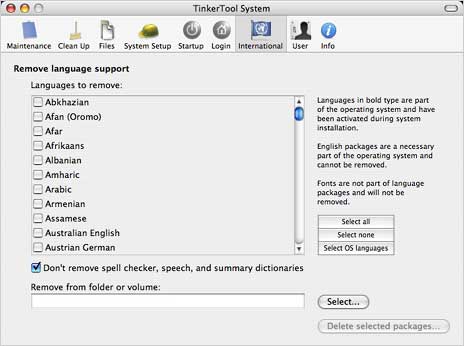
TinkerTools System
After installation, I ran TinkerTools
System, which includes an option to remove unneeded language
files; it removed some 16,000 language packages containing over a
gigabyte worth of files. That's a lot of space on a 10 GB drive.
(Another option: the free Monolingual.
Once-popular Delocalizer
hasn't been updated since OS X 10.2 and probably won't work
now.)
Another space hog is printer drivers. Again, Tiger's setup default
is to simply install all of them - taking another gigabyte or so. The
custom install lets you fine tune that, somewhat. You can choose, for
instance, to leave out all Brother or Lexmark drivers if you don't need
them. But I have one HP and one Canon printer - and the set up options
are all or nothing. Need one HP driver? You need to install them all.
As with the language install, Apple seems to be assuming that users all
have almost infinitely large hard drives, which was certainly not the
case on this system - and probably on many others.
Installation
Installing Tiger on another computer repeatedly slowed to a crawl
until I shut down and disconnected an external hard drive. With that
shut off, the install ran quickly and smoothly. (Tip: Turn off any
unneeded drives or other devices during the installation).
When one system started up after install, there were no drive or
folder icons on the Desktop, and the only way to get to the Finder was
to click its icon in the Dock. Luckily, that problem went away after
another restart.
Another annoyance: The Setup Assistant that automatically runs on
the first startup. On a clean install, it let users pick a keyboard
language and choose a network. But on upgrade installs, does it
actually set up anything? It merely seemed to be an attempt to sell
.mac accounts and then register the user with Apple.
Even Microsoft (despite their product activation "feature") gives
users an option to not register. If you have a live Internet
connection, Setup Assistant will send your information to Apple.
Period.
Changes
Every major operating system release seems to cause problems with
some third party preferences and utilities. I expect these and don't
consider them an annoyance - more just part of the experience of being
an early adopter. 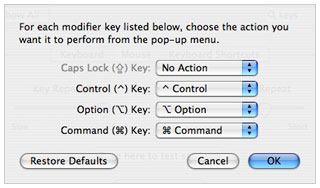 In my
case, there were Tiger-capable updates for the Unsanity programs I
love: FruitMenu and
WindowShade X. I
used uControl to
disable the CapsLock key - it no longer works, but now I can turn that
key off using the Keyboard & Mouse system preference's Modifier
Keys button. I've heard of people reporting problems with Microsoft's
Windows Media Player, but it seems to be working fine for me.
In my
case, there were Tiger-capable updates for the Unsanity programs I
love: FruitMenu and
WindowShade X. I
used uControl to
disable the CapsLock key - it no longer works, but now I can turn that
key off using the Keyboard & Mouse system preference's Modifier
Keys button. I've heard of people reporting problems with Microsoft's
Windows Media Player, but it seems to be working fine for me.
Some users are reporting other glitches, however. I've heard from a
user who now has two Help menus in Safari, for instance, and for whom
Safari seems much slower at loading pages, and another whose previously
quiet PowerBook now has a fan that seems to run much more often and
much more noisily. There are other reports of increased problems with
Windows networks, but I haven't experienced them.
Not a bug but an annoyance: The new Windows-like nags asking them to
confirm what they just asked the system to do. For instance, Safari
noting "'NewApplication.wdgt.sitx' may contain an application. The
safety of this file cannot be determined. Are you sure you want to
download...." How about giving users an option to turn these warnings
off?
The new Mail toolbar icons annoy some users; having the Reply/Reply
All/Forward icons or Delete/Junk icons grouped together makes it more
difficult for some to arrange the Mail toolbar the way they'd like.
(And I've heard from a user who was confusing the left and right arrows
with the similar buttons in most Web browsers, which do very different
things).
In the System Preferences window, the toolbar buttons are simply
gone - instead of letting users add icons for their most-used
preferences, they're expected to use the search field. Surely it
wouldn't have been difficult for Tiger's developers to offer users some
control over the toolbar look and feel in both Mail and System
Preferences.
Then there's Dashboard. Once you add a widget, it's not clear how to
get it off your Desktop. (The solution: click the [+] button, then
click the [x] that appears on each widget). Or to tell the weather
widget that I'm in Vancouver, Canada, not Vancouver, Washington?
(Others have touched on the potential security dangers in Dashboard.)
How about some documentation somewhere?
Don't get me wrong - there's a lot to like in Tiger. Many users will
find Spotlight alone a reason to upgrade. But there are also more rough
edges than I expected - and a little ticklish feeling that Apple is
getting a bit too controlling of the user experience for my taste.
I'm hopeful that OS X 10.4.1 will appear soon, hopefully fixing the
setup (and other) glitches and making the process a bit more helpful
for users with less drive space. And hopefully utilities will arrive
soon to let users turn off unwanted messages, get control back over the
Mail and System Preference toolbars, and more.

Editor's note: This article was received before Apple released the
10.4.1 update on Monday.



