If you're reading this on Low End Mac, I can probably assume that
you'd rather be using a Mac than a Windows computer. You don't need a
lot of convincing that it's a better way to be working with a personal
computer.
The theme of this series of articles has been ways that Macs can
work in a world dominated by Windows computers; this article, however,
is for the would-be Mac-user who has to work on a Windows computer at
work, school, or home.
Despite some reports of installing Mac OS X onto a standard PC,
and despite Apple's Boot Camp and Parallels
Workstation allowing Intel Mac owners to run
Windows, there's no easy way that I'm aware of turning a PC into a
Mac.
allowing Intel Mac owners to run
Windows, there's no easy way that I'm aware of turning a PC into a
Mac.
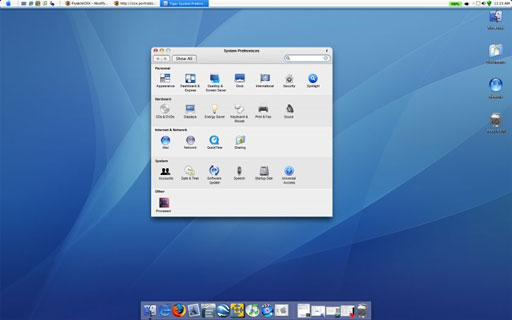
There are, however, ways to make a Windows PC look and feel more
like a Mac. My favourite is a free download that goes by the name
FlyakiteOSX, which
promises to allow users to "Modify. Simplify. Aquafy" their Windows
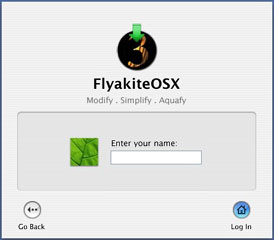
PCs. Their website takes visitors to a bogus OS X boot sequence,
complete with a bogus log-in screen. (You don't really have to type
anything to get to the next page).
 Once into the
website, they explain that FlyakiteOSX is a software package designed
to let a computer running Windows XP look like one running Mac
OS X. The website includes a description of the software,
tutorials, downloads for the FlyakiteOSX software, and links to other
Mac-on-Windows resources.
Once into the
website, they explain that FlyakiteOSX is a software package designed
to let a computer running Windows XP look like one running Mac
OS X. The website includes a description of the software,
tutorials, downloads for the FlyakiteOSX software, and links to other
Mac-on-Windows resources.
 The website
describes FlyakiteOSX as a "transformation pack", something more than
just a skin or a theme changing Windows wallpaper, screensaver,
standard icons, and cursors. It does all that, but it also installs
replaces a variety of system files, tweaks the registry, and installs a
variety of third party software such as two different Docks, a program
to roll-up (windowshade) open windows, an application to add
user-configurable shadows, and one to provide alternatives for folder
icons.
The website
describes FlyakiteOSX as a "transformation pack", something more than
just a skin or a theme changing Windows wallpaper, screensaver,
standard icons, and cursors. It does all that, but it also installs
replaces a variety of system files, tweaks the registry, and installs a
variety of third party software such as two different Docks, a program
to roll-up (windowshade) open windows, an application to add
user-configurable shadows, and one to provide alternatives for folder
icons.
 You get an OS
X-style System Preferences alternative to the Windows Control Panel.
There's even a program to add a Spotlight-like desktop search option.
(If this makes you nervous, it's all completely uninstallable.)
You get an OS
X-style System Preferences alternative to the Windows Control Panel.
There's even a program to add a Spotlight-like desktop search option.
(If this makes you nervous, it's all completely uninstallable.)
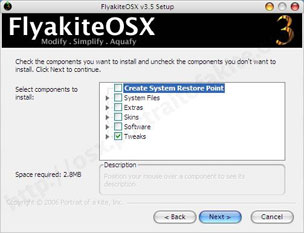
Nicely, it's not all or nothing: Users can choose whether they want
the full meal deal, or they can pick and choose which pieces of the
system to modify - and they can alter their choices at any time.
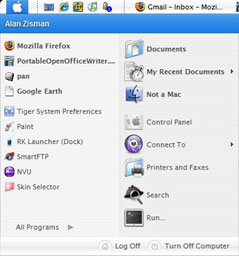 There's a
great attention to detail: A wide variety of icons and other resources
are replaced with more Mac-like equivalents. I really like the
aquafied-look of the Apple Menu/Start Menu, for instance. And the
mapping of the various Control Panel items into the pseudo-System
Preferences panel is nicely done.
There's a
great attention to detail: A wide variety of icons and other resources
are replaced with more Mac-like equivalents. I really like the
aquafied-look of the Apple Menu/Start Menu, for instance. And the
mapping of the various Control Panel items into the pseudo-System
Preferences panel is nicely done.
The end result isn't quite a Mac, however. It's moved the Windows
task bar to the top of the screen and replaced the default Start Button
with a blue Apple icon, but it's not a menu bar. (The program's
tutorial includes links for downloading several Finder wannabe
programs, but none really worked to my satisfaction.)

 The Docks are
kind of nice, but neither of the two included seems to indicate running
programs, at least in my tests, though minimized applications end up on
the right, beside the Trash (er Recycle Bin) icon.
The Docks are
kind of nice, but neither of the two included seems to indicate running
programs, at least in my tests, though minimized applications end up on
the right, beside the Trash (er Recycle Bin) icon.
Some of the visual effects don't quite work 100% either; in some
(but not all) programs, the vertical scroll bar seems to resemble a
series of white and blue sausage links in some software, for
instance.
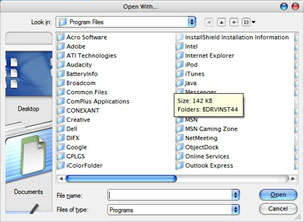 And look at the
side-bar in the Open With dialogue box: The Aqua-style icons are too
large, and there's no way to scroll down to the items pushed out of the
way.
And look at the
side-bar in the Open With dialogue box: The Aqua-style icons are too
large, and there's no way to scroll down to the items pushed out of the
way.
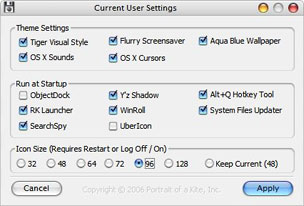
The default mini-icons to minimize, maximize, and shut down a window
are replaced with nice OS X-style glowing yellow, green, and red
bubbles - but in most cases they remain on the Windows-default right
corner of the window rather than the Mac-style left corner. (The online
FAQ suggests purchasing Stardock's WindowBlinds in
order to get this feature.)
Of course, underneath the pretty face, it's still Windows. Internet
Explorer, for instance, gains the About dialogue from the Mac version
of IE, but it still has all the vulnerabilities of the Windows version,
including making it too easy to inadvertently download and install
spyware.
Still, if you're stuck on a Windows XP system, FlyakiteOSX makes it
easier to at least pretend you're using a Mac.