One of Steve Jobs' announcements in his June 12 keynote at this
year's Worldwide Developers' Conference was the release of Apple's
previously Mac-only Safari Web browser for the
Windows-platform.
In fact, what was released was a beta of Safari 3.0, with
versions for Windows (XP and Vista only) and Mac OS X.
The announcement was made in the context of development tools
for Apple's soon-to-be-released iPhone; Jobs suggested that the
iPhone would have a full version of Safari built-in and that by
developing AJAX-style
Web applications that could run on Safari, developers would be
creating apps for the iPhone as well. Jobs called it a "sweet
solution".
Since AJAX applications tend to be made for specific browsers, a
Windows version of Safari would make it easier for non-Mac-using
developers to develop for iPhone.
One Browser for All?
If Safari for Windows is only meant as a tool for iPhone
developers, it may be a success. (Although
stories are appearing in the media of developers grumbling that
they would have preferred the better performance of an
iPhone-native software development kit). But apparently Apple is
also aiming Safari at general Windows users. Jobs claimed that
Safari was the fastest browser in existence - faster than either
Firefox or Internet Explorer for Windows. And on Apple's Safari page, the
headline claims: "The world's best browser. Now on Windows, too".
It proclaims Safari as the "...easiest-to-use web browser in the
world."
Within a few days, Apple's PR department sent out a release
noting that there had been over a million downloads of Safari for
Windows.
Initial feedback has not all agreed with Apple's claims,
however. 18 security flaws were quickly discovered, though, to be
fair, Apple almost immediately addressed them with a (Windows-only)
3.01 update released three days later. Other grumbles were more
because Safari seems like a Mac-application, making it seem out of
place on a Windows desktop.
Mac-users, firmly convinced of the superiority of the Mac
platform may assume that a Mac-app running on Windows should
"obviously" appear superior to Windows users. That's not the
case.
Like most Mac apps, Windows Safari windows can only be resized
from the lower-right corner; Windows users expect windows to be
resized using any border.
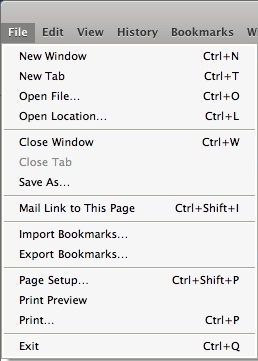
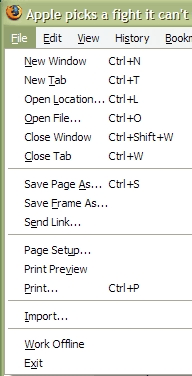
Font rendering in Safari (left) and Firefox (right) on a Windows
computer.
Safari uses Mac OS X font smoothing rather than Microsoft's
ClearType. The result is menu text that looks fuzzier than expected
to Windows users (above).
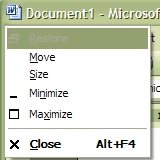 Windows' user interface
standards give windows a "control menu" in the top left corner - a
small copy of the program icon. Clicking on it offers choices to
move, resize, minimize, maximize, or close the application using
the keyboard. It's a leftover from Windows' early years, when it
couldn't assume that there was a mouse connected to a PC, so
Microsoft designed the Windows interface so all features could be
accessed by keyboard alone. (You can open the control menu with the
Alt+spacebar key combination). I suspect few Windows users use the
control menu any more, but without that icon, Safari makes the
title bar at top of the window look empty.
Windows' user interface
standards give windows a "control menu" in the top left corner - a
small copy of the program icon. Clicking on it offers choices to
move, resize, minimize, maximize, or close the application using
the keyboard. It's a leftover from Windows' early years, when it
couldn't assume that there was a mouse connected to a PC, so
Microsoft designed the Windows interface so all features could be
accessed by keyboard alone. (You can open the control menu with the
Alt+spacebar key combination). I suspect few Windows users use the
control menu any more, but without that icon, Safari makes the
title bar at top of the window look empty.
Even more noticeable - Windows windows typically have a coloured
title bar at the top; the Windows version of Apple's iTunes drops
the title bar entirely, putting the menu bar at the top. The
Windows version of Safari has a title bar, but makes it grey,
blending it in with the menu bar and toolbar.
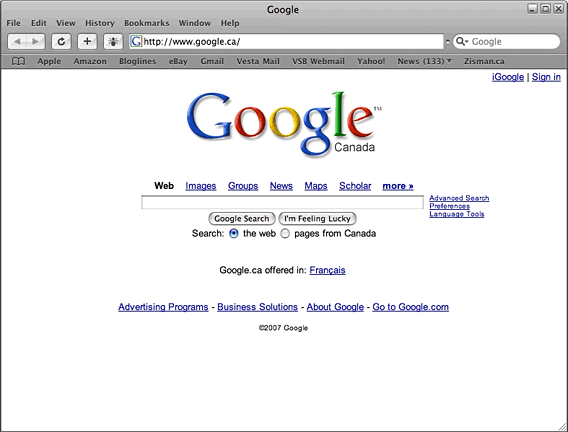
Safari for Windows (above) and Firefox for Windows (below)
These look-and-feel differences from Windows conventions aren't
likely to make Windows users sit back and think, "Wow, Safari looks
much better than other Windows applications." More likely they'll
think Safari looks odd and out of place.
Fast and Beautiful?
Safari Win is not necessarily the most beautiful application on
the Windows platform. However, Apple claims that it's the fastest
browser on that platform.
Maybe they're right. I uninstalled the Safari 3 beta from my
Mac; some actions - particularly sending mail from my Gmail account
- often stalled for long periods of time. And it wasn't a Gmail
problem - opening the account in Firefox, I had no problems sending
the same messages. I haven't tried the same thing in Safari Win, so
I don't know whether it will have the same issues, but I won't
automatically assume the Windows beta is smooth and bug-free. It
is a beta release, after all. [Editor's note: I had horrible
problems using Yahoo Mail with Safari 3 beta. Each character I
typed took several seconds to display. Like Zisman, I quickly
uninstalled the beta. dk]
Frankly, browser page loading speed is no longer, in itself, a
killer feature. The general state of Internet traffic and server
loads makes more a difference than fraction of a second differences
between individual browsers.
Mozilla Firefox has been making a concerted effort to get
Windows users to adopt its alternative to Microsoft's Internet
Explorer. To an extent, they've been successful, but a large
majority of Windows users continue to go with the default that's
built into their system.
Early in June, Browser News
reported that some 79% of online users were using Microsoft IE
(down from a high of 94%), 14% user various Gecko-based browsers
(Firefox, Netscape, Camino, etc.), and about 3% were using
KHTML-based browsers including Safari, OmniWeb, and Konqueror.
[Editor's note: At Low End Mac, half of our Mac-using visitors used
Safari in May - and half didn't. More visitors used Firefox than
Safari and Internet Explorer combined. The 3.4% of our visitors
using Linux don't have the option of running either IE or Safari.
dk]
Firefox's rate of growth has slowed down of late, as most of the
people wanting an alternative have already downloaded it.
Firefox Is Friendlier
It's unlikely that the Windows release of Safari will win over
more than a few Internet Explorer users. If anything, it's more
likely to win over users from Firefox, people who have already made
a decision to try an alternative. However, Firefox has a number of
advantages over Safari on Windows - at least for now - including a
larger user base and a more stable code base. As well, Firefox has
a large and growing library of optional themes and extensions
letting users customize the program's look and feel. Safari for
Windows promises extensions, but going there (at least now) offers
users add-ins to run Flash, RealMedia, and Windows Media file types
- and not much else.
There are other things that Firefox does better. For instance,
when first installed on a Windows system, Firefox offers to import
IE Favorites, Start Page, and connection settings. Safari is able
to import IE Favorites or Firefox bookmarks, but it doesn't offer
to do it automatically, and it took a lot of browsing to find the
location of my Firefox bookmarks. Doable, but not much fun.
I don't think the Windows world needs yet another browser; while
I don't doubt Apple's claim that there were a million downloads of
Safari for Windows within the first 48 hours, I suspect many were
curious, like me, but in the end won't use it on a regular
basis.
My guess: Apple will bundle Safari with the Windows download of
iTunes (as it already does with QuickTime). Windows iPod and iTunes
users will get Safari installed, and Apple will be able to add them
into its user statistics.
That might get Safari onto many Windows user's computers, but I
doubt that many of them will make it their default browser.

Further Reading



