I don't write about printers very often.
Frankly, I don't much care if the latest models offer more
dots-per-inch or pages-per-minute. This year, though, HP's printer
folks have a story worth telling.
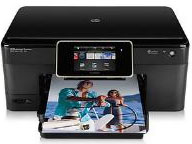
HP Photosmart eStation C310a
They showed off a flock of new models: Photosmart and OfficeJet
all-in-ones aimed at home and small-business users and a new Envy model
that looks more like a high-end audio component than a printer/scanner.
Like other recent models from HP and its competitors, they all sport
touchscreen panels and WiFi wireless connectivity.
But the hardware isn't really the story.
Up until now, before you could use a printer or scanner, you had to
install drivers on your computer - software to tell your computer about
the new connected hardware. Finding and installing drivers has been an
ongoing pain for users, and even more so for manufacturers called on to
write drivers to match printers - new and old - with an ever-expanding
galaxy of computers, smartphones, and other gear.
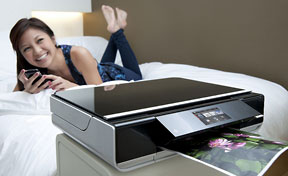
HP Envy 100 e-All-in-One Printer
The new HP models still ship with driver discs, letting Windows and
Mac users print using a USB cable or a WiFi network connection. Setting
up wireless printing is straightforward. The touchscreen interface
makes it easy to enter a wireless password, if needed, right on the
printer. You can even scan across the wireless connection.
But - assuming a WiFi connection to the Internet - each device can
optionally get set up for what HP refers to as ePrinting. Pick
that, and the device goes online to get a unique email address. It's
not easy to remember - 14 letters and numbers @hpeprint.com.
When you send an email bearing an attached document to that address,
the printer will receive it and print the attachment. (That assumes
that you've attached a document in a widely used format: word
processor, image, PDF, and so forth.) The printer applies some smarts
to the task: a photograph will print to photo paper if available, while
a word processing document will be printed on letter-sized paper.
Being able to print this way means that you can print from any
smartphone or tablet app that can attach a photo or document to an
email message, instantly adding printing capabilities to iPads,
iPhones, and Android and BlackBerry devices - all without requiring HP,
Apple, Google, or RIM to write drivers and without requiring users to
install anything extra on their gadgets. (HP also offers a nice
iPhone/iPad app that can print to these printers as well as to other HP
models shared over a wireless network.)
It also enables remote printing. You can similarly print a document
from any location where you have access to email. (An option lets you
control whether ePrinting is available from anyone who knows the
printer's email address or only from specified addresses.)
In order to receive and process emails, these printers have built-in
computer processors. Computers with touchscreens? Might as well have
apps, too - and each one comes with a set of apps. All but the
lowest-end model let users download additional apps right onto the
printer.
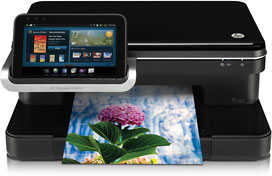
HP Photosmart eStation C510a
The top-end Photosmart model sports a removable 7" touchscreen that,
with the appropriate app, can function as a music player, ebook reader,
and more, with HP promising up to six hours of battery life. (A
minimalist interface lets you continue printing, scanning, and copying
with the touchscreen removed.)
The problem, though, is that - at least for now - the list of apps
is somewhat minimal and not very appealing. Get recipes right at the
printer? No thanks. Even though the models use a version of Android
(not Palm's WebOS, recently purchased by HP), you can't use the wide
range of apps designed for Android smartphones.
Maybe HP's range of apps will expand and become more useful. Maybe
not.
Still, the ability to print to an email address from any device and
any location is a killer feature, and all with no drivers needed. Very
cool.
HP promises that it will be adding ePrint across its product line.

First published in Business in Vancouver November 9-15, 2010 issue
#1098



