Leopard Brings About a Few Changes for Boot Camp Users
- 2007.11.30 - Tip Jar
Bookmark in del.icio.us
Suggest to Slashdot
Low End Mac Reader Specials
Memory To Go Special: New 2008 iMac 2GB $42 / iMac Intel Core2 DUO & MacBook Pro 2GB $36 - 1GB $20. MacPro 8 Core Memory 8GB kit $286 / 4GB kit $143 / 2GB kit $93 -- Free shipping available. LIfetime warranty.
Download Typestyler, still the Ultimate Styling Tool for Internet, Print and Video Graphics. Works great in Classic with a Native OS X Version on the way. Free Tryout: www.typestyler.com
LA Computer Company: Specials on AppleCare, iMac's, Apple Batteries and Apple A/C Adapters. Also Great prices on Used Apple Computers. Call 1-800-941-7654 Click Here.
Other World Computing has the Upgrades, Enhancements, and Accessories for getting the most from your Mac. Quality Products, Competitive Prices, Expert Support Staff - www.macsales.com
Mac users can finally play Party Poker for Mac. Not only that, they can also learn how to play PokerStars for Mac.
Laptop Hardware Provided by TechRestore - Overnight Mac & iPod Repairs.
Compare products like desktop computers, laptops, and LCD TVs side by side! All the information and reviews to make the best purchasing decision for a new cell phone GPS products or MP3 players. The Ciao network makes searching products easy for you.
With the release of Leopard, a number of things have changed with Apple's Boot Camp technology for setting up an Intel Mac to dual-boot between Mac OS X and Windows XP or Vista. Some of these changes were anticipated; some are a bit of a surprise.
As anticipated, OS X 10.4 users running the Boot Camp beta are being told that the pre-release beta program ends on December 31, 2007. Along with the OS X 10.5 Leopard release in October - which includes Boot Camp as a standard feature - Apple had stopped making the Boot Camp beta software available for download. On November 28, Apple noted: "With the introduction of Leopard, the Boot Camp Beta program has ended. The Boot Camp Beta software will expire on December 31, and Apple won't offer further updates of Boot Camp Beta for Mac OS X Tiger." Existing Boot Camp partitions should continue to work after that date, though users of the beta software would be unable to use the Boot Camp Assistant to create or remove Windows partitions or create Windows driver disks.
However, there have been reports that Apple's OS X 10.4.11 update causes problems for users with Boot Camp Windows partitions on their hard drive; according to the report, some people updating to 10.4.11 with Boot Camp installed have been unable to restart after the update. The recommended solution has been to reformat and reinstall - and because the Boot Camp beta is no longer available, that could mean the end of those users' Boot Camp installations, at least if they're not planning to upgrade to Leopard. To avoid these problems, don't update to 10.4.11.
For users who have upgraded to Leopard, there are a few minor changes to Boot Camp. I upgraded a system that already had Boot Camp installed; the Leopard upgrade was unproblematic, and the Boot Camp installation continued to work as advertised.
However, when I started up the Boot Camp Assistant, I was surprised to see that there was no longer an option to create a Windows drivers disc - this had been an option throughout the various beta versions. Apparently this is no longer considered necessary; the Leopard disc 1 can be used in its place. In fact, any Boot Camp users upgrading to Leopard should boot to Windows and then insert their Leopard install CD, giving them the latest versions of Apple's drivers and utilities for Windows.
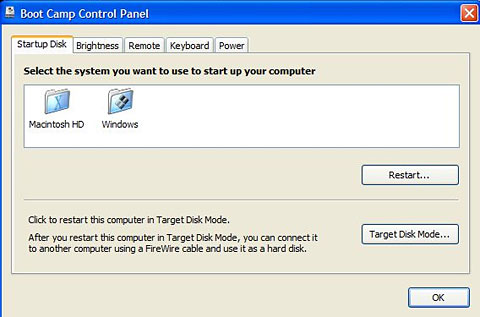
In Windows, where formerly Boot Camp added a Startup Disk control panel (just as it's in the OS X System Preferences), now in Windows Control Panel (at least in the "classic" view that shows all the various Control Panel icons) users get a Boot Camp icon instead. This includes several tabs: one to choose the startup disk, and others to set screen brightness, enable or disable the infrared remote, determine whether the keyboard's function keys are set by default to affect software (i.e. F1 for Help) or hardware (i.e. F1 to lower screen brightness, etc.), and whether the computer should restart after a power failure.
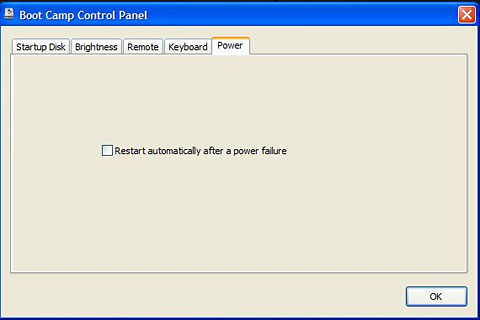
All these same options are available from the Boot Camp icon accessible in the lower-right System Notification Area (a.k.a. the Tray) in the corner of the Taskbar. I'm bemused by Apple's use of a multi-tab dialogue box for this - the options on each tab are pretty minimal; a simpler dialogue box could easily have presented all the options in an attractive manner.
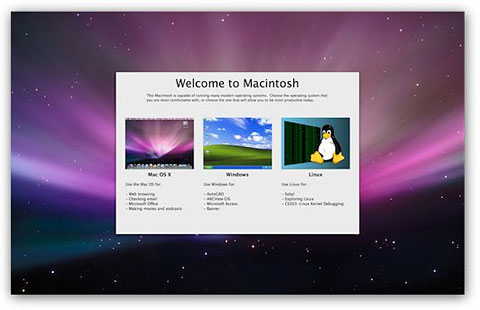
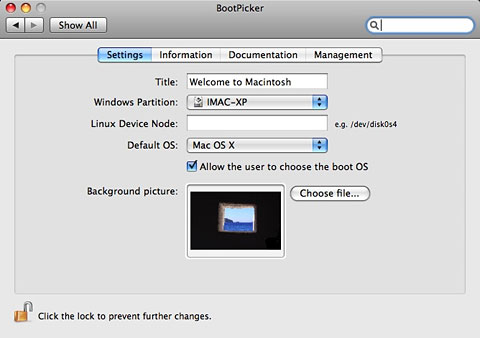
Boot Camp users (whether running Leopard or not) might be interested in the free BootPicker utility from Bombich Software. It's designed to increase the options available to Mac multi-boot users and may be especially useful to system administrators maintaining multiple networked Macs. It pops up an attractive screen immediately prior to log-in, allowing users to pick between Mac OS X, Windows, and Linux (which somewhat confusedly appears even if Linux is not installed).
Among other benefits, this gives users the option of booting to OS X or Windows at every restart without either selecting an OS in the Startup Disk preference item or holding down the Option key during restart.
On the other hand, it's yet another thing to slow down restart.
BootPicker installs as an OS X System Preference.
Alan Zisman is Mac-using teacher and technology writer based in Vancouver, BC, Canada. Many of his articles are available on his website, www.zisman.ca. If you find Alan's articles helpful, please consider making a donation to his tip jar.
Recent Columns by Alan Zisman
- CodeWeavers Brings Google's Chrome Browser to Intel Macs, 10.02. Google's new Chrome browser uses separate processes for each tab and brings other changes to Windows users. Now Mac fans can try it as well.
- Apple Innovation Includes Exploiting Existing Technologies Others Ignore, 09.30. Among other things, Apple's 'think different' innovation means taking advantage of technologies that the PC industry has ignored.
- MacBook Air Makes a Convert, 09.24. Apple's thin, light MacBook Air makes a great field computer for someone who already has a desktop system up and running.
- Free VirtualBox for Mac now a virtual contender, 07.21. A year ago, the Mac version of VirtualBox lacked some essential features. Over the past year, it's grown into a very useful tool.
- More in the Mac 2 Windows index.
Links for the Day
- Mac of the Day: SuperMac S900, Aug. 1996 - This 6-slot tower supported dual CPUs and still has a following.
- List of the Day: Macintel List for discussion and support of Intel-based Macs.
- October 7 in LEM history: 98: Love that PowerBook G3 - 99: Troubleshooting 101 - Love at first sight - 02: Hot rodding a Power Mac for OS X - Beefing up Windows networking - 05: Choose FireWire 800 over USB 2.0 and FireWire 400 - Faster Mac minis shipping - Speedy 100 GB 7200 rpm notebook drives
Recent Content on Low End Mac
- New Apple Notebooks at Zero Minus One Week, Charles W. Moore, 'Book Value, 10.07. It's widely anticipated that Apple will overhaul the MacBook Pro and MacBook lines next Tuesday. What should we expect?
- How to Clone Mac OS X to a New Hard Drive, Simon Royal, Mac Spectrum, 10.07. Whether you want to put a bigger, faster drive in your Mac or clone OS X for use in another Mac, here's the simple process.
- Best 12" PowerBook G4 Deals, Low End Mac Deals, 10.07. Used 867 MHz Combo, no APX, $490; 1.33 GHz, $496; 1.5 GHz SuperDrive, $542.
- Best Mac mini Deals, Low End Mac Deals, 10.07. Used 1.25 GHz G4 Combo, $399; 1.42 SuperDrive, $559; 1.66 Core Duo, $499; new 1.83 Core 2 Combo, $570 after rebate; 2.0 SD, $770 a/r.
- Best Power Mac G3 and PCI Video Card Deals, Low End Mac Deals, 10.07. Used beige 300 MHz, $25; 333, $198; blue & white 300, $49; 350, $55; 400, $90; 450, $105; PCI video cards from $15.
- $19,800 Bentley Ego Laptop Remarkably Similar to 1999 Clamshell iBook, Charles W. Moore, Miscellaneous Ramblings, 10.06. Granted, Apple's iBook didn't have white gold trim, a padded leather exterior, or come in colors to match your Bentley automobile.
- The Cost of Moving to Small Business Server vs. Moving to Leopard Server., Andrew J Fishkin, Best Tools for the Job, 10.06. Upgrading the existing SBS 2003 Server would cost less, the the server will run up against hardware limitations long before a Mac Pro does.
- Use Your FileMaker Pro Databases on Your iPhone, Adam Rosen, Adam's Apple, 10.06. Although there's no version of FileMaker Pro for the iPhone, FMTouch will let you use your data and layouts on it.
- Best eMac Deals, Low End Mac Deals, 10.06. Used 700 MHz CD, $110; CD-RW, $130; Combo, $170; 800 CD, $170; 1 GHz Combo, $250; SuperDrive, $280; 1.25 Combo, $290; SD, $360; 1.42 Combo, $359.
- Best MacBook Air Deals, Low End Mac Deals, 10.06. Used 1.6 HD, $1,299; refurb, $1,499; new, $1,669 after rebate; 1.8, $1,919 a/r; 1.6 SSD, $2,294 a/r; used 1.8 SSD, $1,997; refurb, $2,299; new, $2,349 a/r.
- Best iPod shuffle Deals, Low End Mac Deals, 10.06. Refurb 3G/1 GB, $39; 2 GB, $59; new 1 GB (3G or 4G), $47; 2 GB (3G or 4G), $67. Prices include ground shipping.
- Mac Netbook Coming?, $179 64 GB SSD, Apple Owns 20% of US Notebook Market, and More, The 'Book Review, 10.03. Also head of Norton AntiVirus team uses a Mac, Toshiba demos new battery technology, 1 TB notebook drives due in 2010, bargain 'Books from $150 to $2,699, and more.
- Getting the Most from Your G3 Mac, Simon Royal, Mac Spectrum, 10.03. Most G3 Macs can be upgraded so they can run Mac OS X 10.4 'Tiger' quite nicely. Here's how.
- Apple Drops iPhone NDA, Defecting to Android, Auto Performance Apps for the iPhone, and More, iNews Review, 10.03. Also more research needed on cellphone cancer link, file sharing app for the iPhone, three new power accessories from Macally, several new iPhone apps, and more.
- Best Power Mac G4 and AGP Video Card Deals, Low End Mac Deals, 10.03. Used 450 MHz, $75; 500, $99; 733, $150; 800, $199; 1.25 GHz, C$349; 867 MHz dual, $225; 1 GHz, $349; 1.25, $499; 1.42, $600.
- OS X and Safari Shares Grow in September, Toxic Mac Pro?, Green Hard Drives, and More, Mac News Review, 10.03. Also Vista terrible as Mac market grows, CrossOver Mac Pro reviewed, SimpleTech Pro Drives, and a new toolkit for working on computers.
- Best iBook G3 Deals, Low End Mac Deals, 10.03. Used 300 MHz clamshell, $150; 366, $199; 500 CD, $149; 800, $190; 600 CD-RW, $240; 800 Combo, $300; 900, $399; 14" 600, $360; 900, $469.
- Best Mac OS X 10.0-10.3 Deals, Low End Mac Deals, 10.03. Mac OS X 10.0.3, $30; 10.1, $20; 10.2, $60; 10.3 CD, DVD, $100; CD, $119; 10.1 Server, unlimited users, $65; 10.3 Server, unlimited, $150.
- More links in our archive.
About LEM | Support | Usage | Privacy | Contacts



