MacBook Air and Early Obsolescence
From Bill Brown:
Yo Dan,
Just read in Mac Musings your MacBook Air vs. 12"
PowerBook. The AirBook
has sure caught my eye. My main Mac is my Pismo 'Book now getting long in
the tooth. The ol' Pismo will likely soldier on until it dies, as it
does what I want very well. Yet the AirBook reads like it may become my
road warrior traveling companion. It would certainly justify buying one
of the newer style backpacks for it.
It isn't the weight of the Pismo, it is all the crap I can stuff
into my current huge old style black backpack along with the
Pismo. A new sleek 'pack for the AirBook would give me a chance to
start over with what goes in the 'pack. Don't give me that "Well, clean
out the old backpack" stuff. You know very well we expand into the
space we have until we split the seams. Well, that is my thinking, and
I'm sticking with it.
I say the AirBook "reads" like it may be my next traveling companion
because the nearest Apple Store is two counties away - and our counties
are pretty big around here. So I won't actually get to go see one for a
while, or at least until I pile up enough excuses to go visit the big
city. So all I know is what I read about it along with a few pics.
Adhering to the admonition to never buy 1.0 of anything, I will
likely wait until the first speedbump upgrade for the AirBook before I
look for my Visa card. Like the Apple TV, version two of the AirBook is
going to be better; possibly cheaper too. While waiting for the bump,
here are my thoughts as just one potential consumer:
I should tell you: I have been down this road before. Prior to my
Pismo, my main Mac was a 'Book
2400c. I still have it. It still works well. My 2400 taught me to
live without a floppy long before other Mac users. Or actually to live
with floppy on a dongle. With my Pismo, I use CD/DVDs so seldom that I
do believe living with CD/DVDs on a dongle will be just fine.
That battery you can't change. This bothers me a lot. Batteries get
weak; a slippery slope kind of weakness long before they die. All
'Book-bearing road warriors know this and how to manage it: two
batteries. Some, like me, have two batteries from the gitgo. Some buy
their second at the first sign of weakness in the first. Either way,
you swap batteries when you need to and keep going. That is what sets a
road warrior apart from merely owning a 'Book: you keep going. And
along the way, you think like a janitor to keep going farther.
Maybe AirBook 2.0 will have a user changeable battery. Battery
technology keeps improving very rapidly these days, so this could
happen.
That 2 GB of memory is sufficient - for now. It is also the stuff of
early (if not planned) obsolescence. What will Mac OS X 10.6, 7,
or Mac OS 11 require? Is the 2 GB of memory soldered on the
motherboard? In a single slot? On a daughter card? 2 GB may be the
biggest chip size today. But tomorrow may see the memory people
producing twice or four times this on a single compatible memory card.
This has occurred many times before. I would not fault the AirBook if
its memory is in a single slot. For the good points of the AirBook, I
will happily replace a 2 GB memory card with an 8 GB memory
card when they come along.
Which brings up a question I have yet to read: Can the AirBook even
be opened? I assume you can. But I haven't read this. All I've read is
rehashing of Apple's PR releases. And Apple has never been eager to
tell us to open it up and have a look under the hood. Can we?
If we can open it up and get at things, then we need not fear early
limitations of smallish hard drives and, if memory is in a slot, memory
size. Those industries will stuff far more of each into the same or
smaller parts within months. Not to worry. But we must be able to open
it up.
Networking: Here is a good question. Slow modems gave way to fast
modems gave way to ethernet gave way to wireless b to g to n, which
will eventually give way to ???. It is that ??? that is the question.
Early 100 series 'Books had 2400 modems that could be opened and
replaced by 9600, 14.4, and even 28.8 modems. PCMCIA card modems went
up the scale the same way. Ethernet cards replaced some modems to keep
them going into the broadband era. Wireless "n" dongles and cards can
now replace even early Apple AirPort cards. Is the networking gadget of
the AirBook soldered or swappable?
Ports? I grimace at the few of them. The footprint of AirBook would
seem to have the curbside for more. Maybe version two will have more.
My order of preference for additional ports is FireWire, another USB,
ethernet. I hope the current USB port can provide sufficient power to
drive three USB peripherals from one of those Dr. Bott USB hubs that
looks like a flash drive. Or maybe a new generation third party
mini-dock like the venerable Duos.
Writers are whining about no stereo speakers. Does the AirBook have
a speaker at all? I haven't read about a speaker. It's no Mac with no
KaBoom! I want a speaker, even if a teeny tiny tinny mono speaker.
I understand the "executive" target of the AirBook. It seems
optimized to carry in to a meeting and make presentations. Actually, I
like this as this is one of my two main modes - casual use and
presentations both of which the AirBook seems to be able to do. If I
wanted a full boat powerhouse Mac, I wouldn't be looking here.
Lest Apple be steering us into an era of unalterable soldered
forever components, then I am a candidate for the AirBook. At least for
the AirBook 2.0, that is.
Apple, are you reading?
Bill Brown
Bill,
Thanks for sharing your thoughts. Since Apple offers
built-to-order options for the MacBook Air, I have to assume they can
open it up to swap in the 64 GB solid state drive and possibly the 1.8
GHz CPU. How easy will this be? No idea, but I'm betting on the first
online MBA take-apart guide being online within 24 hours of computers
reaching end users. Probably as challenging as the iPod....
That, of course, means being able to change the
battery, and you can rest assured that NewerTech and others are not
going to let that opportunity pass them by.
We'll also know whether the CPU, RAM, and AirPort are
soldered to the motherboard. My guess is that AirPort is, but that the
RAM and CPU may not be, making upgrades possible down the road. Of
course, you'd need the newly reduced in size version of the Core 2
Duo....
I can't imagine most Mac users who have a desktop
computer will find the limitations of the MBA an obstacle. I do wish it
had an internal or clip-on SuperDrive for watching DVDs in the field,
and I suspect we'll soon see the first SuperDrive that can be clamped
to the MBA.
Dan
MacBook Air Not a Road Apple
From Björn Steiner:
Hi Dan,
I was following the discussion on whether the MBA (kinda like that abbrev.) is a
Road Apple or not. I don't think it qualifies as a Road Apple and am
indeed very pleased by the specs.
One of the most anticipated cons to the MBA is its size, and here is
my biggest point, as I take that as a pro. I am unfortunately forced to
us a Dell Latitude D430 as my business computer, and compared to the
MBA it is much more limited. The MBA full-size keyboard is the absolute
measure for these kind of machines and the best fit by means of screen
is the 13" wide. Even in fold-up table on the plane the 13" wide does
not take more height and depth than the subnotebooks, which is what
matters, as width is typically not a problem. I remember my old IBM
laptop with its folded keyboard, which was a mechanical nightmare
...
My biggest point pro to the MBA compared to my MB - it is so light,
I can take a second (and pleasing) machine along with the nasty Dell
with me to do the serious work....
best
Björn
Björn,
Thanks for sharing your thoughts on the MBA. Great
idea, packing a MacBook Air alongside the Dell you're required to use
for work. :-)
Dan
MacBook Air Doesn't Meet My Needs
From Michael Brandhorst:
I was reading the article The MacBook Air Misses
the Mark by Barry Shell, and I felt compelled to write a
response.
I too was hoping for a 12" PowerBook update or an equivalent. You
see, I currently have a G4 model that will not allow me to run VM
Fusion or Boot Camp. I need to be able to run Windows for just a few
business applications that are not currently supported on OS X
platform. I can tell you that Virtual PC is really not the best way to
go, but for now I guess it will have to do. Ugh.
I was impressed with the "look" of the new MacBook Air; however,
after reading the detailed specifications and the introduction video
from Macworld 08, the only thing that I can say is that I am still
impressed with the "look", but disappointed with everything else. My
PowerBook might have a smaller screen, only 12" vs. 13.3", but I have a
faster and larger hard drive, a built-in SuperDrive, and I don't need
to carry around another device (USB SuperDrive), I have more USB ports,
a FireWire port, built-in ethernet and even a modem, and best of all,
dedicated video.
Okay, the MacBook Air has two things that I would like: the updated
keyboard with backlight and the new touchpad, as mine is showing
wear.
I guess that we got left behind and will just have to wait or, like
you said, I could upgrade to a 15" PowerBook with the Intel processor,
but I like the smaller form factor that the 12" gives me. For now I
will just have to wait to see if Steve decides to give us Mac fans what
we truly want.
Thanks again for such a good article in LEM.
-M Brandhorst
Michael,
Thanks for sharing your thoughts on the MacBook Air
vs. the 12" PowerBook. A lot of PowerBook users are in the same
boat.
Dan
MacBook Air vs. Windows Competitors
From Steven Hunter:
This blog has a good comparison of the MBA to other ultra-thin
notebooks.
http://nunfetishist.livejournal.com/47804.html
Now overall the guy is a little too anti-Apple for my tastes,
but his data is valid.
The Toshiba R500 looks especially impressive being lighter, longer
battery, with a built-in DVD burner. Granted the CPU is slower by 600
MHz but still.
PS: GB£1 ~ US$1.95
- Steven Hunter
Steven,
Thanks for sharing the link. The first thing Rob
Kendrick gets wrong is comparing the top-end $3,100 MacBook Air (1.8
GHz CPU, 64 GB flash drive) with three Windows ultralights rather than
the $1,800 (£1,199) base configuration (1.8 GHz, 80 GB hard
drive). Once you do that, the MBA comes in as a lot cheaper than these
far more expandable models from Lenovo, Fujitsu, and Toshiba. He also
leaves out one important factor: the footprint of these notebook
computers.
If the Lenovo ran Mac OS X, it would be the perfect
replacement for all of those 12" PowerBooks....
Dan
MacBook Air Battery Cost in Europe
From Keith Veitch:
Thanks for taking the time to reply Dan, always good to know that
the guy I read every day, listens to his audience!
My concern about the battery, and the flippant disposable comment,
is that here in Europe the cost of replacing the battery will be about
$200 - about 20% of that is tax, so not an Apple issue, but that still
means $160 compared with $129 in the US. That is an additional cost to
add to the machine every 2 or 3 years.
I am one of those who has waited and waited for an Intel replacement
for their 12" PowerBook and has been so disappointed with this
Airy-Fairy machine that I just bought a copy of Mobile Computer (UK
magazine) to see what alternatives the Dark Side is offering me...
Best regards,
Keith
Keith,
Over the weekend, we've seen reports that the MacBook
Air's battery can be easily replaced, although we won't know for
certain until units reach end-users. If that is the case, expect
third-party replacement batteries to come to market within months - and
for considerably less than Apple charges.
Dan
Antivirus Software for the Mac
From David:
I know you are busy, but is there a shareware antivirus program you
recommend.
Thanks,
David
David,
The only one I've heard of is ClamXav, which is free.
Dan
AAPL Price Drop
From Nigel Tufnel:
I'm not so sure it's 'obvious that Wall Street
agrees'. AAPL often takes a beating post-keynote; so what? I think
there are a fair number of fools in our world, and some of those expect
Apple to introduce an iPhone-type-gamechanger once or twice each year.
I guess that's the downside of being a regularly-innovative company.
Sheesh, the thanks ya get.
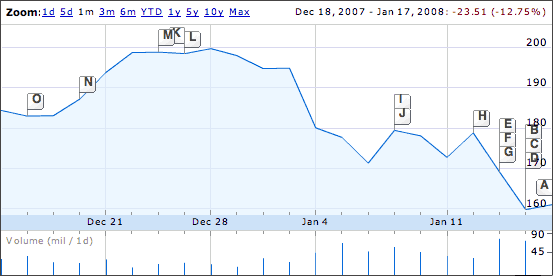
Nigel,
Apple stock is down 20% from its $200 high on December
28, but whether it's "Wall Street" experts or panicky individual
investors driving it there is open to debate. And you're right, it
really doesn't matter to Mac users what value the market puts on AAPL -
it's the value we put on our Macs, iPods, iPhones, and the like that
matters to us.
Dan
Can 2008 Mac Pro Run Tiger?
From Chris L. Mason:
The subject says it all. I'm sure others would like to know this as
well. I'm not ready to go to Leopard, mainly because I don't like
Stacks (which I know will be fixed in 10.5.2) and the Finder doesn't
remember window size and position. Until that is fixed, I'm sticking
with Tiger (and I don't like the new folder icons either). If they
don't fix it in 10.5, I'll wait until 10.6! :)
Thanks,
Chris
Chris,
Although there were a few exceptions in the early days
of System 7, new Macs have traditionally required the version of the
Mac OS that was current at their release as the minimum version they
will run. This might be a good time to pick up a close-out deal on the
older Mac Pro, since it runs Tiger and also allows you a free (or very
low cost) upgrade to Leopard.
Dan
iCab 4 Abandons Support for the Classic Mac OS
From Neil Hughes:
Thanks for the article on iCab - I've been using it since v2.9 and
continue to do so on my B&W G3, which continues to
run OS 8.6/9.2.2 for my remaining classic applications.
I just wanted to point out 2 things related to the article:
- The classic v3.x still shows the taxi cab animation while loading
pages; presumably it is only the OS X version that lost this.
- Although I expect v3.x's time is nearing an end, I would still
expect a number of future upgrades in parallel with v4.x. Alexander
continued to update v2.9.x while v3.x was being introduced in
2005/2006.
Regards
Neil Hughes
Neil,
Thanks for writing. I haven't used iCab 3 with the
Classic Mac OS much, and I run Tiger on my production computer, so I
wasn't aware that the taxi still drove during downloads in iCab 3. I
consider iCab 3 a very usable browser, and it would be great if Clauss
kept improving it.
Dan
Unsupported Leopard on a Digital Audio
From Jesse:
Hi Dan,
I'm a long time reader since a used PowerBook 3400 laptop brought me back
to Macs from the Darkside™. Your webpage convinced me to try a
used Mac as an alternative to a new PC.
I also replaced a 500 MHz Celeron PC box with a G3/400 iMac for our family business
four years ago. But our business computer has been doing double duty
running our local little league the last two years.
So I decided to get a faster Mac, I upgraded to a PowerMac G4/533 DA. I chose
this model after reading information on your site and other sites about
unsupported Leopard
installs.
I hope this lets people know that G4 533 DAs are fine for Leopard. I
think the first ones were just bad luck.
Jesse
- PowerMac G5 DP 1.8 - OS X 10.5.1
- PowerMac G4 533 DA - OS X 10.5.1
- iMac G3 400 - OS X 10.3.9
Well, end of rant. Objective observation of Mac below.
- What unsupported Mac(s) have you installed it on? PowerMac G4
533 MHz Digital Audio
- How much RAM? 512 MB, installed from seller
- How fast a CPU, and what brand, if it's an upgrade? G4 533 MHz
Digital Audio, original
- What video card does your Mac have? 32 MB Nvidia GeForce 2 MX,
original
- Which installation method did you use, a modified installer or
installing from a supported Mac? Installed from a supported Mac. My
G4 has DVD drive installed, but Leopard Assist hack did not work for
me.
- If so, what Mac did you use to run the installer? - Power Mac G5 1.8 GHz DP
- Did you install to a second internal hard drive, an external
FireWire hard drive, or using FireWire Target Disk Mode? FireWire
Target Disk Mode, I had to unplug my HD on my G5 because it already had
10.5.1 installed. Only way it worked for me.
- If you used a FireWire drive, did you clone it to your Mac's
internal hard drive? If so, what program did you use to do this?
N/A
- What doesn't work? Especially check out Time Machine (which
requires a second hard drive at least as big as your main one), DVD
Player, Front Row, and VLC. VLC & DivX players work well. DVD
Player works fine, smooth. (audio works perfect) Cover Flow works nice
if I keep it to smallest icons. I don't have a 2nd drive for Time
Machine or remote for Front Row.
- How does performance compare with Tiger subjectively and
objectively? 10.4 was preloaded from seller (old drive), it was
slower than when I did fresh install of 10.3 (new drive) (I wasn't sure
Leopard would work). Leopard now feels almost as smooth as 10.3,
especially if I would run w/o Cover Flow.
- If you have a chance, run Xbench and Geekbench (before and after
would be nice) and let us know the results. Xbench 23.62 after,
sorry no before.
- Have you made any changes to your Mac since installing Leopard -
more RAM, a better video card, a faster hard drive? How has that
improved things? Upgraded to new 80 GB HD, increased RAM from 512 MB
to 1.25 GB RAM. Will be upgrading to an ATI Radeon 7500 64 MB (new PC
card flashed for Mac from eBay).
All test was done with new HD I bought Mac specifically because it
had original HD, did not want to pay for large hard drives I could not
trust on a business computer. Original HD: 27 GB Quantum.
Mac functioned well with the original 512 MB, only noticed slower
startup and loading of MS Word and Photoshop Elements, large apps.
VLC/Divx were slightly smoother after RAM increase. Disk Images, from
app. Installs, loaded much quicker with the extra RAM.
Note: Screen occasionally does weird pixelating thing (like
satellite TV) while using Leopard. Did not do this the 2 days I loaded
10.3 and was testing all the software. I might be straining the card
with my monitor, I have a 1440 x 900 widescreen at home.
But work will be a smaller 15" 1024 x 768 Dell monitor with the new
64 MB card. (I will have to put a sticker over the Dell logo) LOL
Jesse,
Congratulations on getting Leopard running so well on
your 533 MHz Power Mac. Always helpful to have additional points of
reference for our readers. :-)
Dan
Dan Knight has been publishing Low
End Mac since April 1997. Mailbag columns come from email responses to his Mac Musings, Mac Daniel, Online Tech Journal, and other columns on the site.



