Should I Get a PowerBook G4 or iBook G4?
From Brian Troisi:
I am considering getting an Apple laptop next year. But I am stuck
between getting an iBook G4 or a PowerBook G4. What do you prefer? My
budget would be $600. I will use it for basic Web browsing, iTunes,
iWork, and iLife. I really don't need a really nice one, just one
that's really reliable and low priced. The iBook I wanted was from
Beta Macs (one of these). It doesn't matter where I get the
PowerBook, as long as it's under $600. Any help is appreciated. Thank
you!
Sincerely,
Brian
P.S. I love Low End Mac! Keep up the good work! :-)
Brian,
Count on it - Low End Mac is here for the long
haul.
Let's look at what you can get for $600: From Beta
Macs, a 12" or 14" 1.2 GHz iBook G4 with a Combo drive. From DV
Warehouse, a 12" 867 MHz PowerBook G4, also with a Combo drive. The
iBook is newer, has a 35% faster CPU, and probably has a better
graphics processor. It's more rugged and won't show dings like the
aluminum PowerBook. Both accept a 1 GB RAM upgrade, but the iBook
starts out with 128 MB more and tops out a 1.25 GB vs. 1.125 GB for the
PowerBook. (Okay, not a big deal at that level, but more important
with, say, a 512 MB module, which would give the iBook 768 MB and the
PowerBook 640.)
All things considered, I'd pick the faster, more
rugged, slightly larger and heavier iBook.
Dan
Leopard on Upgraded Beige G3
From James Little:
Hi Dan,
Following up the the previous
email I sent, I have now successfully run the WWDC 2006 version of
Leopard on a Beige G3
desktop upgraded to a G4 600 MHz.
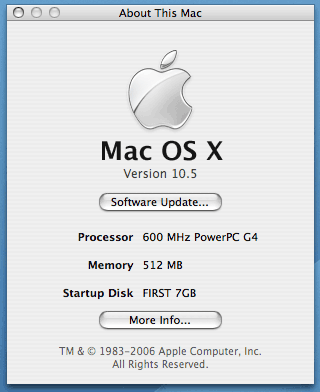 Going
down the path of my previous hunch that the PCI graphics kernel
extensions were causing kernel panics upon startup, this was confirmed
when I got hold of a Yikes
G4 and successfully booted this with a PCI 9200 graphics card all the way to
the graphical desktop. David Zinkin also achieved this over a year ago,
as noted in a previous LEM mailbag.
Going
down the path of my previous hunch that the PCI graphics kernel
extensions were causing kernel panics upon startup, this was confirmed
when I got hold of a Yikes
G4 and successfully booted this with a PCI 9200 graphics card all the way to
the graphical desktop. David Zinkin also achieved this over a year ago,
as noted in a previous LEM mailbag.
However, when I added back the stock ATI Rage 128 graphics card, I
got exactly the same error as the Beige G3.
I found instructions on the Internet on how to disable, via open
firmware, the onboard graphics chip in the Beige G3 and then attempted
to boot Leopard WWDC 06 - which worked! Attached are a system profiler
reports from the Beige G3 and a screen grab.
My next step is to try to install Leopard onto the Yikes G4, adding
back the missing GossamarPE.ktext, which XPostFacto
doesn't include, and if this is successful trying to boot this on the
Beige G3.
James Little
James,
Congratulations on getting as far as you have. I'll be
sure to put a note on the Yikes! page that it can run Leopard with the
Radeon 9200.
Keep us posted on your progress.
Dan
The MacBook Air Makes a Statement
From John Muir:
Hi Dan,
I think Frank Fox is absolutely right about the MacBook Air in his article at LEM.
Just as the iMac led
the way for all future Macs in dropping the floppy disk and several
external connectors, the MacBook Air is the future shape of Apple's
laptops and eventually everyone else's. I'm particularly interested in
seeing how well the flash SSD option works out for people in benchmarks
and real use.
The ultimate successor to my beloved 12"
PowerBook definitely lies in that line . . . once flash
becomes more affordable and wireless connectivity truly ubiquitous. In
the meantime I'll keep a keen look out from over here on my G4!
John Muir
John,
The MacBook Air is shipping, so we should see the
hands-on reviews popping up everywhere in coming days, as well as
benchmarks. I'm as curious as anyone about flash drive performance, and
once prices drop about 80%, they'll become a viable replacement for
notebook hard drives at any price point.
Dan
iPods and iPhones on Low End Mac
From Gene Williams:
Mr. Knight,
I've been reading and enjoying Low End Mac and your various
offerings for several years. Thanks for that.
However, there's something that's been bothering me. (Yeah, I know,
I probably don't have enough to do.)
For Low End Mac's purposes, why are iPods and iPhones considered
Macs? Or even computers for that matter? Other than they are sold by
Apple. Maybe you've covered this in the past and I missed it. If so, I
apologize.
Gene Williams
Gene,
Low End Mac existed for four years before Apple
introduced the original iPod, which we absolutely didn't get at the
time. Our focus has always been and will always remain on Mac OS
computing, but iPods and iPhones and Apple TV and printers and
third-party mice and keyboards and upgrades are all part of the
Macintosh ecosystem.
In fact, the iPhone, iPod touch, and Apple TV all run
versions of Mac OS X, so if we could legitimately cover them
within the scope of Macs. That said, our primary focus is on computers
that run the whole Mac OS and Mac applications. We do give Apple's
consumer side regular coverage, but it's nowhere near the level of
attention that we pay to Macs.
Dan
Difference Between Old and New Xbench Scores
Xbench changes its scoring every 'major' version (which, for them,
is a point release, 1.x.) Partly this is due to compiler differences
that would make comparing scores invalid (Some different benchmark
programs have shown that code and compiler changes can make differences
as big as 25%, so many benchmark programs specifically say each new
version that results are not comparable to old ones.) And partly
I see it as a way of keeping 'baseline' scores current. The Xbench
maker specifically mentions what the '100' baseline is. For 1.2 and
1.3, a 2.0 GHz G5 running Tiger should score 100. In 1.0 and 1.1, I
believe it was a 1.0 GHz G4 running Jaguar.
Ed Hurtley
Ed,
When Macworld changed their baseline between MacBench
5 and 6, they changed the scale from 100 to 1000, which made it
immediately obvious that results couldn't be compared. Xbench going
from a 1.0 GHz G4 to a 2.0 GHz G5 doesn't make it obvious that there's
been a change in the baseline score.
I'm rerunning the 450 MHz dual
benchmarks as I type this, as I've just removed the 1.8 GHz upgrade
so I can send it back to NewerTech - look for a review later this week.
We'll also be posting benchmarks for my dual 1 GHz
Power Mac today.
Dan
Need Help with Mac Classic
From J. Sternickle:
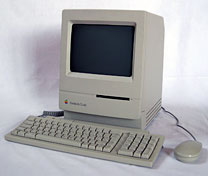 Someone recently gave me a Mac Classic to use for simple
word processing chores.
Someone recently gave me a Mac Classic to use for simple
word processing chores.
The unit is in great shape, but at start up (after smiley Mac and
Welcome to Mac screen) goes straight into the screen saver and will not
unlock from that program.
Is there something I can do at start up to stop the screen saver
from launching.
Thanks for your help.
J. Sternickle
J.,
You're in luck: The Mac Classic was the only Mac every
with an operating system built into ROM. Hold down Cmd-Opt-X-O during
startup, and it will boot into a custom version of System 6. Once
that's running, you should be able to get into the hard drive, remove
the screen saver (which is probably in the Startup Items folder in the
System Folder), and be able to use the computer.
Dan
Unsupported Install of Leopard on 800 MHz iBook
G4
From Matthew Mathison:
Hello,
My name is Matt Mathison, and I would first like to say thank you
for trying to make it easier to install this software on the so called
"unsupported" hardware. I really didn't see how 67 MHz would make a
difference, but it doesn't matter now.
Here are the answers to the questions to help other users:
- What unsupported Mac(s) have you installed it on? - installed on
an iBook G4 (800 MHz version) w/ Upgraded SuperDrive and 120 GB Samsung
HDD
- How much RAM? - 1.12 GB
- How fast a CPU, and what brand, if it's an upgrade? - PowerPC G4
800 MHz core speed
- What video card does your Mac have? - ATI Mobility Radeon
9200
- Which installation method did you use, a modified installer or
installing from a supported Mac? - Installed from supported eMac
with PPC 1.25 GHz processor onto my laptop using FireWire Target Disk
Mode. Worked great, no messing around, insert CD in eMac, plug in
computers, startup laptop in FireWire Target Disk Mode and follow setup
prompts selecting my laptop drive. Installed just installed as if the
hard drive was in the machine. I found that trying to modify the
installer was too much work and got very complicated, if there was an
installer or automated software that could create all this would be
great but I know how much work that would be and I wouldn't put that on
anyone.
- What doesn't work? Especially check out Time Machine (which
requires a second hard drive at least as big as your main one), DVD
Player, Front Row, and VLC. - Have checked out Time Machine could
create backups and restore them no problem, its a great little feature,
DVD Player works excellent, great built in software for a standard
feature for a notebook, Front Row is great. Better than Media Centre,
works excellent all the fade effects, playing videos great no lagging,
audio sounds excellent. haven't checked out VLC.
- How does performance compare with Tiger subjectively and
objectively? - I would honestly say that this runs just as fast or
faster than Tiger. I had all the same specs before and after the
transformation, and I am extremely pleased. I was a bit worried about
problems after reading about it on the Net, but I wanted to see for
myself, and I am so happy with it. There is no way that I am going back
to Tiger now. I knew how good Tiger was after using it on my eMac, and
I am just astounded how great it works on such a low-end spec
machine.
Well I would just like to say that this has been a great triumph for
me. I was disappointed after trying to install this software on my
machine and it wouldn't let me. But the process of installing it using
my laptop in FireWire Target Disk Mode was great. My eMac perceived it
as another HDD in the computer. The process did take a little longer
(nearly 2 hrs) but I'm not going to complain seeing as how I did
install it on what Apple would call "unsupported hardware". I think
they could have let the 67 MHz slide in this case. I mean I know some
people have had a lot of trouble even using other methods (altering the
installer) but I have been really lucky and I am glad it worked for me.
I have attached 2 screen shots for you, one of my desktop right after
the install and one close up of the about this Mac window so you can
see it more clearly. Thank you very much for this and I congratulate
you for working hard to let people like me show off to Apple that once
again it can be done, but I will say this though about Apple, they
shit all over Microsoft!!!
Matthew,
Thanks for sharing your findings. It's beyond me how
Apple determined that an 867 MHz PowerBook G4 or Power Mac G4 should be
able to run Leopard, but a newer 800 MHz iBook G4 (or 800 MHz PowerBook
G4, iMac G4, eMac, or Power Mac G4) would not be supported. I'm sure
they have their reasons, but the good news is that it's easy to work
around the installer.
Dan
Dan Knight has been publishing Low
End Mac since April 1997. Mailbag columns come from email responses to his Mac Musings, Mac Daniel, Online Tech Journal, and other columns on the site.



