eMac Virtual Screen Problem Solved
From Danny:
Dan,
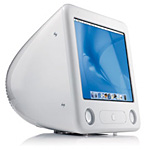 I had a similar problem
to the eMac issue you describe in the column The Future of eMacs in the Age of
Leopard. I found that if you disable SSD and then install the ATI
Displays program (not the updated drivers; this was like the ATI
Displays control panel in Mac OS 9.x), you can "force" single-display
mode and have all resolutions available without the goofball virtual
desktop off to the side.
I had a similar problem
to the eMac issue you describe in the column The Future of eMacs in the Age of
Leopard. I found that if you disable SSD and then install the ATI
Displays program (not the updated drivers; this was like the ATI
Displays control panel in Mac OS 9.x), you can "force" single-display
mode and have all resolutions available without the goofball virtual
desktop off to the side.
Radeon Display Utilities 4.5.7
You can get it from there. Requires 10.2.8 or later, works with
Panther and Tiger. That should save you a clean install, too.
:)
Danny
Danny,
Thanks for writing. This eMac has been frustrating me
for months on and off - mostly off, because the problems (locking up,
USB ports die after a while, sometimes booting into what looks like
4-bit grayscale) have made troubleshooting difficult. I've zapped the
PRAM, cleared the NVRAM, and even wiped an external FireWire drive, put
clean versions of Panther and Tiger on separate partitions, and still
have problems.
Anyhow, I've just installed RDU 4.5.7, rebooted the
computer, and now I have access to all the resolutions the eMac is
capable of supporting. Thanks a million!
Hoping this may help with the other problems I've been
experiencing....
Dan
G4 iMacs Inspire Lust
From Steve Geary:
Dan
The comments I've seen lately about the G4
iMac has caused me to want to throw my 2 cents worth in.
Personally, I fell in love with the G4 iMac after seeing it for the
first time at Micro Center. I thought the design was pure genius, as it
looked like no other computer ever made. It just goes to show what can
be designed in the day of flat panel LCD displays.
 I was
determined to own one, but I lacked finances in those days. Instead I
bought a used 800 MHz G3 14" iBook, as
I needed a laptop more than a desktop at the time. However, when I
heard in 2004 that there was a new iMac on the horizon that was a
completely new design, I felt I had to act fast if I wanted a new G4
iMac.
I was
determined to own one, but I lacked finances in those days. Instead I
bought a used 800 MHz G3 14" iBook, as
I needed a laptop more than a desktop at the time. However, when I
heard in 2004 that there was a new iMac on the horizon that was a
completely new design, I felt I had to act fast if I wanted a new G4
iMac.
Without even knowing what the new G5 iMac would look like, I made
the plunge and bought the very last 17"
1.25 GHz G4 iMac that Micro Center had.
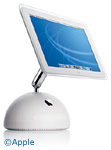
Nope, I do not regret buying it, as I still love the design. Call it
an "iLamp", "Luxo Jr.", "Half-a-VolleyBall", or whatever you want, I
don't care. It definitely is the oddest designed computer ever
made!
I guess that's why I love it.
Even though I've since upgraded to a Dual Core 2 GHz G5 Power Mac,
I'm not selling my G4 iMac!
Keep up the good work!
Sincerely,
Steve Geary
Steve,
I won't deny that the iMac G4 design was sheer genius.
The seemingly floating monitor that pivots and adjusts to your needs is
brilliant. I'm simply not enamored of the overall look of the G4 iMac,
although I know a lot of people love the design.
Dan
Problem with PowerBook 3400c
From Lee Coleman:
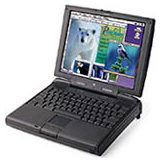 I've tried formatting
disk images of OS 8.6 as stated in your articles to reboot. I've tried
the same with Disk First Aid. I can't get my 3400c to go past this window
I've tried formatting
disk images of OS 8.6 as stated in your articles to reboot. I've tried
the same with Disk First Aid. I can't get my 3400c to go past this window
The finder could not start up because the following
System Library could not be found
SOM
To start up use the CD or Floppy disks that came with your
computer
To start up hold the C key....
Someone gave it to me, I don't have them. and I found stuff off your
site.
I downloaded the manual and found that command-C is supposed to make
the CD drive read during start up. But no dice for me.
All I did last night was download the iCab browser and then shut it down. It was
working great!
What is SOM? How do I install it? Where can I get startup disks to
get me going again? Will you share some copies of your startup/boot
disks?
It's a PowerBook 3400c, OS 8.6. I want it to be my Internet radio
receiver. This Mac important to me in that it's my Alps decal printer
mule.
I appreciate any help or advice.
Very inspiring site BTW. It's making me like that little sucker.
Like an old classic car. Guess I need some "gaskets". : )
Best,
Lee
Lee,
You only have to hold down the C key during startup to
boot from CD, not command-C.
I have no idea what SOM is, sorry. You might try
asking on our PowerBooks list,
which covers all pre-G3 PowerBooks.
I just checked my box of CDs and discovered I don't
even own a copy of Mac OS 8.6 (although I do have 8.5, which can be
updated to 8.6 for free with an updater from Apple). You might try our
Swap List and some of the stores that
advertise on LEM if you need a copy.
Dan
Thanks Dan.
Finding out more about it. System Object Model (SOM). It's gone by
the wayside, but back then it was the thing.
<http://www.mactech.com/articles/mactech/Vol.14/14.06/LibrariesOnTheMac/>
Learning how to create boot disks is complex. I'm using a PowerBook
G4.
This is day 2.
Best,
Lee
IBM Model M Keyboards on Macs
From Aaron Peck:
Hello,
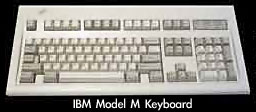 I
stumbled across your page, IBM Model M:
The Best Computer Keyboard Ever, on model M keyboards while
Googling for info on how to use a Model M with my G4s. You mentioned
that you've used your model M with some of your Macs for some time now,
and I'm curious as to how you accomplish this, as every G4 I've tried
to use mine with fails. I know that my PS/2 to USB adapter is good,
because it will work fine as a USB device in Linux and XP. (And, oddly
enough, the keyboard and adapter worked fine on an old Bondi iMac I tried it on under OS 9.)
I'm thinking that maybe the onboard ports on my G4 aren't supplying
enough power, but I'd appreciate your thoughts on it.
I
stumbled across your page, IBM Model M:
The Best Computer Keyboard Ever, on model M keyboards while
Googling for info on how to use a Model M with my G4s. You mentioned
that you've used your model M with some of your Macs for some time now,
and I'm curious as to how you accomplish this, as every G4 I've tried
to use mine with fails. I know that my PS/2 to USB adapter is good,
because it will work fine as a USB device in Linux and XP. (And, oddly
enough, the keyboard and adapter worked fine on an old Bondi iMac I tried it on under OS 9.)
I'm thinking that maybe the onboard ports on my G4 aren't supplying
enough power, but I'd appreciate your thoughts on it.
Thanks,
Aaron Peck
Aaron,
I've never used an IBM Model M keyboard with a Mac.
I've forwarded your email to Andrew Fishkin, the author of that
column.
Also see IBM Model M
and Apple Extended II Among Best Computer Keyboards Ever by Tommy
Thomas, which mentions a USB adapter guaranteed to work with Macs and
the Model M keyboard.
Dan
TrueType Fonts and the Classic Mac OS
From Scott Baret:
There was a recent post on the mailbag about TrueType fonts
rendering slowly and causing system slowdown on System 6/7 systems.
However, there is one minor detail missing there.
On screen, many fonts would render quickly if their bitmapped
counterpart was installed. For example, if one installed the 12-point
Chicago bitmap along with the TrueType version (both versions were
included in the suitcases that came with the system software) it would
appear as quickly as any bitmapped font would despite the fact that its
TrueType counterpart was installed.
Where slowdown occurred was in the case of sizes not installed.
Using Chicago as an example again, there was never an Apple-produced
Chicago 24 point (though Dubl-Click Software did release it as part of
World Class Fonts). In Broderbund's Print Shop, for example, there was
extensive use of larger-size Chicago than 12 point (the only size Apple
supplied). The words in this larger Chicago look good on the screen
when TrueType is used, yet it does indeed take slightly longer for the
program to load as a result of this.
This is why during the 680x0 days the fonts all came with both
bitmapped and outline versions - the slower Macs needed the speed
advantage (and with System 7, it needed all the speed boost it could
get).
Scott Baret
Scott,
I remember the early days of TrueType, back when I was
working at ComputerLand of Grand Rapids (the first Apple dealer in
Michigan!), and some of the guys would remove bitmap fonts for TrueType
fonts to keep the System smaller - not taking into account the
processing overhead of that decision.
Dan
Deinterlacing DVDs?
From Scott Cook:
Hey Dan,
Why exactly would Apple want to deinterlace DVDs? You lose quality
whenever you deinterlace, or interlace for that matter. You should
leave the video alone and just play it the way it was designed. How
many DVDs are interlaced anyway? As far as I know only the full frame
or full screen DVDs are interlaced. I haven't encountered a widescreen
DVD that was interlaced. The same can be said for 3:2 pulldown. Why
would Apple want to do that? Either the DVD is 24 fps or it's 29.97
fps. Either way it should be played in its current format instead of
converted to something else, with a resulting loss of picture
quality... I must be missing something here? I would be interested to
hear your video dude readers comment on this.
I like the new logo by the way.
Scott Cook
Scott,
You've got me on that one. I suspect it has to do with
other video formats that DVD Player plays.
Dan
Allegro USB 2.0 PCI Card Deep Sleep Issues
From Ben Kolstad
Hi, Dan.
Your readers are right; the Allegro USB 2.0 PCI card doesn't support
deep sleep in Power Mac G4 or G5 computers. Any idea why you've not had
an issue with it? I was surprised when I installed mine to discover
that I can go into sleep, but not get out of sleep with
the darn thing installed.
Any ideas on workarounds?
- Ben
From Sonnet's website <http://eshop.macsales.com/item/Sonnet%20Technology/USB2/>:
(2) Allegro USB 2.0 does not support deep sleep in Power Mac G4 and G5
computers. Deep sleep removes power to PCI cards and is not supported
by PCI cards that can connect to external devices.
Ben,
I just checked my Energy Saver settings. My Power Mac
G4, which not only serves as my production machine but also shares my
iTunes and acts as an FTP source for some files linked on Low End Mac,
is set to never go to sleep or power down the hard drives. That's why
I've never had deep sleep problems.
Dan
Dan Knight has been publishing Low
End Mac since April 1997. Mailbag columns come from email responses to his Mac Musings, Mac Daniel, Online Tech Journal, and other columns on the site.



