For those of us who are dedicated Eudora email client users, the
announcement that Qualcomm would terminate development of our beloved
email client and hand off the name to the Mozilla organization for the
purpose of development of an Open Source Eudora email client was cause
for both anticipation and apprehension.
In some respects, this was encouraging news. I'm a fan of Open
Source software, and Steve Dorner, the original author of Eudora for
the Mac, would be a core member of the Eudora development team which
goes by the name of Penelope (the wife of Odysseus
and daughter of Icarius of Sparta).
The more ominous part was that the new "Eudora" was to be based on
Mozilla's Thunderbird email client, which I have never been favorably
impressed by for a whole raft of reasons. I don't like so-called
"three-box" email client user interfaces (ditto for OS X Mail and
a raft of others), and Thunderbird's SMTP implementation is about the
most clumsy and inconvenient I've encountered in any email client.
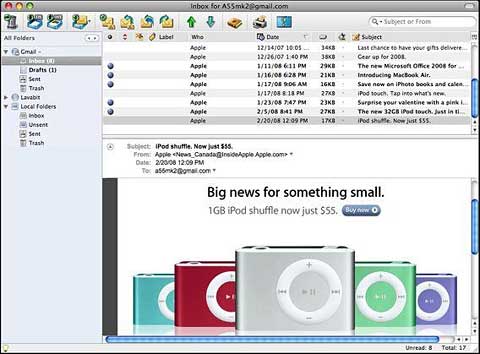
Eudora 8.0 opens with a non-Eudora-like 3-pane window.
The first beta of Penelope (Eudora 8.0.0b1) was released last
September, and I wasted no time bringing down a copy to check out. The
first thing I noticed is that it was huge - nearly 20 MB for the
compressed disk image and more than 50 MB when expanded. That compares
with just 9.1 MB for the last Classic Eudora 6.2.4 disk image, and a
svelte 11.3 MB for the expanded Eudora 6.2.4 application folder. Being
a fan of small, compactly coded software, I was not impressed with
that.
All doubt was removed upon opening Eudora 8.0 for the first time and
being greeted with what is essentially a Mozilla Thunderbird user
interface with Eudora icons grafted on.
Now, if you like the Thunderbird/OS X Mail/MS Outlook/Entourage type
email client interface, this will not be a problem, but as I said
above, I don't care for the three-pane motif.
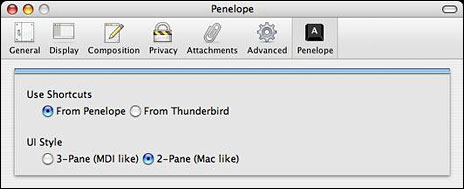
The Penelope/Eudora 8.0 preference pane.
Eudora 8.0 also has an optional 2-pane interface mode, which
allegedly causes mailboxes to open in a similar manner to the
tradiitonal Mac Eudora client: 2-pane message list and message preview.
The list of mailboxes will open in a separate window.
"Mac users might find this interface to be more like Mac Eudora,"
the developers venture hopefully. Uh . . . no, I don't. It's
so clunky that it's just an annoyance.
The real Classic Eudora user interface, which some have declared
"antiquated", is one of the things I like best about the original
Eudora; it was instrumental to my choosing it over, say, Apple's Claris
Emailer back when I came up the Information Highway on-ramp in the
mid-90s.
The Penelope folks affirm: "We are committed to both preserving the
Eudora user experience and to maintaining maximum compatibility, for
both developers and users, with Thunderbird." The problem is, I'm not
sure that objective is going to be achievable in a really coherent
sense. The thing is, what I love about the classic Eudora user
experience, along with its speed, kick-ass search engine, rock-solid
reliability, and fabulous user-configurability and manual control, is
that the Eudora interface is a "non-interface" - I couldn't care less
about the toolbar, which I've always kept turned off. The Mailbox menu
is the core central element of classic Eudora for me, and I manage
virtually everything from mailbox and message document windows. No
central application window at all.
Over the years I've checked out many different email clients, but
none for very long, save for the quirky but dependable Nisus Email, which also has a
minimalist non-interface, and I continue to keep it around for it's
quick message-sending facility. I digress.
Back to our central topic: It's going to take a lot more than
Thunderbird with Eudora icons and menu category names tacked on to make
me a willing adopter of Eudora 8 and beyond. However, I tried not to be
too negative, and there were a few good things about Eudora
8.0.0b1.
It worked (with some qualifications - see below), although not well
enough that I was inclined to import my Eudora Classic mail archives
and settings.
My Eudora Mail Folder, which contains the archived content of my
entire email history back to 1997, is still an astonishingly svelte 339
MB, but I expect it would swell substantially in the conversion to
Thunderbird-style file and interface conventions. I currently have 21
separate email accounts and 65 separate mailboxes configured in Eudora
6.2.4 (the whole works in a 544 MB Eudora folder). Classic Eudora
handles all that gracefully and efficiently. I'm apprehensive that it's
not going to transfer well to the way Eudora 8 handles account
information and files.
Classic Eudora had worked great for me until I upgraded to Mac
OS X 10.5 "Leopard" last November, at which point dialup email
performance went south in a big way. I've determined that this is some
sort of issue with how Leopard interfaces with the Internet, especially
with SMTP servers, over my bog-slow rural dialup connection, and all
POP3 clients I've tried - not just Eudora 6.2.4 - are affected, but I
had hoped that Eudora 8, being a current development, might be an
improvement at least in that department. Nope, it's worse.
I figured I could give the program a fairer trial by configuring
incrementally and afresh rather than swamping it with my convoluted and
complex Classic Eudora settings setup.
Consequently, I proceeded by just configuring a couple of
accounts for starters, and that went okay - sort of. I am especially
impressed by the Gmail account setup wizard, which required me to just
enter my account username in a text field, and then Eudora 8.0 did the
rest of the account configuration quickly and automatically. I also set
up one non-Gmail account.
The Gmail account works reasonably well, except when sending long
messages (i.e.: more than 50 KB), upon which it stalls and the server
times out.
I ran into a familiar Thunderbird Achilles' Heel with the other
account, namely T-bird's clunky and obtuse support of different
outgoing SMTP server configurations for separate email accounts. As
noted, I have 21 accounts configured in Eudora 6.2.4 with a bunch of
different SMTP server configurations respectively. This all works
smoothly and unproblematically with classic Eudora, but I have been
unsuccessful so far in getting it to work with just two different
accounts configured in Eudora 8. I have the alternate server address
for the second account entered and selected, but I just get a cryptic
message dialog telling me that the server may be unavailable or is not
accepting messages. Neither is true. I can send messages through it
just fine with Eudora 6.2.4 (at least when running in Mac OS X
10.4 "Tiger").
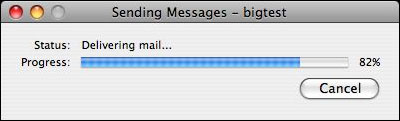 I downloaded Eudora 8.0 beta 2 a couple months back and found
it a bit better than beta 1, and Eudora 8.0b3, which was released last
Friday, is better yet. For one thing, it has a decent Task Progress
dialog now, although it's still not as good as the one in Classic
Eudora. Mac OS X Address Book integration is now turned on by
default, importing mailboxes from Classic Mac Eudora is greatly
improved according to the developers (but I'll continue to take their
word for it for the present). Filter imports are also reportedly
improved, and there have been a variety of refinements and
bugfixes.
I downloaded Eudora 8.0 beta 2 a couple months back and found
it a bit better than beta 1, and Eudora 8.0b3, which was released last
Friday, is better yet. For one thing, it has a decent Task Progress
dialog now, although it's still not as good as the one in Classic
Eudora. Mac OS X Address Book integration is now turned on by
default, importing mailboxes from Classic Mac Eudora is greatly
improved according to the developers (but I'll continue to take their
word for it for the present). Filter imports are also reportedly
improved, and there have been a variety of refinements and
bugfixes.
Back on the downside, when I first started up Eudora 8.0b3 it
insisted on checking and downloading mail from the configured accounts
unbidden, which is behavior that I absolutely loathe. Perhaps that can
be disabled in the preferences, but I intensely dislike software that
decides to do things for me rather than waiting for me to tell it what
to do.
On the plus side and in that vein, as an advocate of plain-text
email, one thing I do like is that Eudora 8.0 disables downloading of
embedded images in email messages by default, leaving it to the user's
discretion to manually bring them down with a convenient button.
Then when the mail download was half-completed, the process stalled,
accompanied by a loud and grating buzzing sound that I could only get
rid of by force-quitting the program. Still plenty of room for
bug-squashing, I guess. When I restarted the program, the download
resumed and finished normally, but reliability is obviously not ready
for prime time yet.
I'm also skeptical that Eudora 8's Search/Find function is ever
going to hold a candle to classic Eudora's fast, slick, and powerful
search engine, but I don't have enough content accumulated yet to give
it a meaningful test.
Anyway, that's pretty much it so far. Eudora 8.0b3 represents some
incremental progress, but it has a very, very long way to go yet if
it's even going to come close to being a halfway-satisfactory
replacement for classic Eudora. I remain skeptical that it will ever
be.
Mac system requirements:
Operating Systems:
- Mac OS X 10.2.x and later
Minimum Hardware:
- Macintosh computer with an Intel x86 or PowerPC G3, G4, or G5
processor
- 128 MB RAM (Recommended: 256 MB RAM or greater)
- 200 MB hard drive space
Eudora 8.0.b3 Release Notes
Includes Penelope version 0.1a22.
See <http://wiki.mozilla.org/Penelope_Extensions> for Penelope
version notes.
Using Thunderbird 3.0a1pre trunk code as of 2007/10/19:
<http://forums.mozillazine.org/viewtopic.php?t=593971>
<ftp://ftp.mozilla.org/pub/mozilla.org/thunderbird/nightly/2007-10-19-03-trunk/>
New Features
- A Linux version of Eudora is now available
- If you select a minimum amount of text before replying to a
message, the reply will only quote the selected text.
<https://bugzilla.mozilla.org/show_bug.cgi?id#394>
- Mac OS X address book integration turned on by default.
<https://bugzilla.mozilla.org/show_bug.cgi?id 3927>
Importing
- Importing mailboxes from Classic Mac Eudora is greatly improved.
<https://bugzilla.mozilla.org/show_bug.cgi?idA4620>
- When importing filters from Classic Eudora, filter actions which
are not currently supported in Thunderbird are preserved so that when
they are supported in future versions of Thunderbird they will be
available to the user.
- When importing Eudora settings, more settings are mapped to
corresponding Mozilla settings. All Eudora settings are stored for
future interpretation without re-importing.
- Fixed bug where Windows Eudora importing would not prompt user for
correct location of data when data is not found.
- Fixed logic reversal bug that caused both Mac and Windows Eudora
address book importing to fail.
Miscellaneous
- Fixes for a variety of problems with unified who column. Local
mailboxes now compare against all POP accounts. Cross-folder views
(e.g., saved searches) now correctly determine the folder for the
messages. The search dialog results panel now follows the useWhoColumn
pref. <https://bugzilla.mozilla.org/show_bug.cgi?id59270>



