Eudora Nicknames Corruption
From John Gladu:
You hit the nail on the head with your writings on Eudora [Odysseus Cometh: The Real
Successor to Eudora and Why Eudora Fans Are
'Doggedly Faithful'].
My current employer forced most of the users away from Eudora years
ago, but there are still a few die-hards here (including myself)
struggling to make it work in an IMAP environment.
One client has several hundred filters, two others have over 900
mailboxes each (one stores them locally [speed!] and the other on the
IMAP server [accessibility]).
The setup that I came up with after our employer turned off POP
packets on 6/30/07 (not just the servers - the packets on the network
too) is to keep the POP account as <dominant>, but set it to not
check mail, and create an IMAP personality. Two simple filters move
mail to and from the POP and IMAP sides - all mail is scanned for "@"
and copied to either the In mailbox (local) or the Sent Message (IMAP).
That way anything sent from Eudora is saved on the IMAP server and
anything received is saved in the fast-search local folder and the
<dominant> account mailboxes are easier to work through.
But I'm experiencing a new problem with my copy of Eudora v6.2.3
(missed the window for buying the 6.2.4 license) on Leopard (current
updates) on my MacBook Pro - corruption of the Eudora Nicknames file.
All is well for a while, but then Eudora hits me with a dialog box when
it opens, that an email address is either too long or otherwise
malformed. It then repeats this dialog a few seconds later. Couldn't
find the problem address, but after a while I noticed that the contents
of the fields in the Address Book were being deleted or scrambled. It
eventually got to the point that I replaced the entire Nicknames file
with an older version that was backed up on a G4.
This doesn't make much sense.
Why would Eudora scramble or delete items from what is really a
tab-delimited text file, but only on an Intel Mac running Leopard?
One thing that I haven't tried is to boot my MacBook Pro in Tiger
for a few months to see if the problem recurs. But I don't want
to...
I was searching for a solution when I found your article.
(I wasn't even aware of the sound-based crashes, as I'd long ago
turned off all sounds in Eudora.)
Thanks for what you're doing and hopefully we'll all be thrilled by
Odysseus.
John Gladu
Hi John,
Thankfully I haven't yet run into any file corruption
issues using Eudora 6.2.4 with Leopard, but TidBITS' Adam Engst has and
wrote about it in How to
Fix Corrupt Eudora Mailboxes.
Probably worth a look in relation to your problem.
I'm still using the ad-supported version of Eudora
6.2.4, which works reasonably well, and the little ad window just
stayed blank for several months and doesn't show up at all these
days.
Charles
No More Eudora Tech Support
From Jannette:
Hello!
I felt like a big chunk of the world had dropped out from under me
just a bit ago. I was grieving as though a world catastrophe had
occurred!
I waited until today to attempt to phone Technical Support at
Qualcomm, to help me coordinate the installation of Eudora 6.2.5.6
(later versions were fighting with Zone Alarm) in my
just acquired used Dell laptop, since I wasn't getting things to work
correctly after I set up the first two mail folders in Eudora as I'd
installed it last week.
The other day I'd found an online FAQ telling me how to install over
and in the directory where XP apparently now insists one put all the
data files. But I find no help to retrieve the original few folders and
emails that had come in since I first installed them to the directory
of my choice (no long paths for me)!
Attempting to find a phone number for Tech Support, I roamed all
over their pages and found none!
In phoning a number I still had for a gal in Qualcomm sales from
2006, I got a recording informing me that Qualcomm no longer sells,
supports (or anything) for Eudora. Whoa! I still have a few paid
support calls left to me, but no one is going to honor them now! And
here I was being so stingy with my calls - only calling when I could
fix my problem no other way!
So, I Googled and found your Ramblings. Well, I recall seeing
something on Mozilla's site a while ago about their teaming up on a
Eudora combo, as I now see your reminder online from yesterday.
You are a Mac fan; and I guess many of us should be, but doubtful
we'll switch over at this stage of the game! Too many things aren't
written for the Mac. And I'm still married to my Ami Pro
word processor!
What can you tell me about what we PC fans are going to have
available to us? Should we just hang in here for a bit and see what
Odysseus does?
Thank you for any information you can provide.
Jannette
Hi Jannette,
My ignorance of PC applications is fairly
encyclopedic, but both the Open Source "Eudora" being developed at
Mozilla.org and the new Odysseus application will be cross-platform,
and both so will work on your Dell.
I'm afraid I can't be much help with your technical
issue. Eudora installation on Macs is generally a slick and painless
procedure. You just run the installer, configure your accounts in the
Settings, and you're good to go. I've used Eudora on Macs since I first
got online and have never had any occasion to call tech support. Like
most things on the Mac, it "just works" - or did before OS X 10.5
Leopard partially broke it and Qualcomm terminated development of the
program.
You might be surprised at the variety of software that
is written for the Mac. No Ami Pro, but an amazingly fine little word
processor called TextEdit comes bundled with OS X. It supports
styles, has inline spell checking and grammar checking, does HTML
conversions, and can even open and save MS Word documents.
And, of course, Intel-based Macs can run Windows
natively, so you can have your cake and eat it too, so to speak.
Charles
Backing Up a G3 Minitower
From: Bill Hatchell:
Charles,
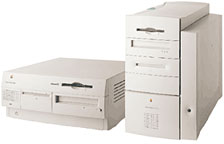 I have this fine old G3 Beige Minitower (366 MHz)
which I want to fine-tune with as many of the old Classic Mac OS apps
as possible, however, that said, I want to plan on an effective backup
program just in case.
I have this fine old G3 Beige Minitower (366 MHz)
which I want to fine-tune with as many of the old Classic Mac OS apps
as possible, however, that said, I want to plan on an effective backup
program just in case.
Do you recommend installation of a PCI card to allow USB/FireWire
backups to say an external FireWire or USB hard drive? Currently, I'm
backing up onto 100 MB Zip disks, which is not all that satisfactory
but acceptable.
What equipment would I need to acquire in order to burn CDs using
installed Mac OS 9.2.2? I'm thinking external CD burner. SCSI? I have
no more than about $100 I would want to invest in a backup solution. I
do possess a FireWire Iomega Zip drive and a SmartDisk external
FireWire HD I've used with G4 Macs, still in use, thus my first
question. Any leads or advice on how to set up the old Beige Minitower
would be appreciated.
Bill
Hi Bill,
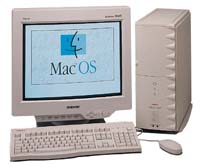 Yes,
absolutely I would recommend installing PCI USB and FireWire cards in
your beige G3. I have both in my old Umax SuperMac S900 (200 MHz 604e) tower
running OS 9, and they work great, including with an external
FireWire CD-burner. Not much setup required. It all just worked for me.
OS 9.2.2 has both USB and FireWire support built-in. Individual
peripheral devices may or may not require proprietary drivers.
Yes,
absolutely I would recommend installing PCI USB and FireWire cards in
your beige G3. I have both in my old Umax SuperMac S900 (200 MHz 604e) tower
running OS 9, and they work great, including with an external
FireWire CD-burner. Not much setup required. It all just worked for me.
OS 9.2.2 has both USB and FireWire support built-in. Individual
peripheral devices may or may not require proprietary drivers.
My daughter also has an S900 with PCI FireWire and USB
support, as well as a 350 MHz G3 processor upgrade. It all works fine.
A friend of mine, who stuck with his Performa 6500 for a long time into
the PowerPC era, used a combination FireWire/USB PCI card with
excellent results as well.
This stuff should all be available used at reasonable
prices, and I'm a big fan of using external hard drives for backup.
Charles
Is Apple Really That Environmentally
Unfriendly?
From Dan Usmar:
Hi there,
I read the latest 'Book Review
with interest [editor's note: actually a year-old column], not least
the section about Greenpeace's complaints about Apple's environmental
policy.
Working in the chemical industry myself, and with a degree of
responsibility for waste disposal, I take their points on product
composition. I work in a different area, so I'm not sure what the
cost/benefit impacts of replacing PVC and BFRs are.
On the other hand, I think it ignores a fairly important. No
computer, from any manufacturer, made much before 2003-2004 will have
been made with much regard to environmental friendliness. On that
basis, there's a whole swathe of legacy hardware heading to landfill
which has never, and will never, meet any of the Greenpeace
requirements.
Which is where Apple's big advantage comes in. Macs just don't die.
They could be packed with depleted uranium, red lead, and DDT, but if
they don't go to the dump, it doesn't matter. The two Macs on my desk
at the moment have a combined age of about 11 years, and they're both
still going strong, doing everything I need. And I know I'm far from
being the only person in this position. I don't pretend to know what
the proportions are, but I'm willing to bet that the ratio of Apple to
PC equipment in the tip is far lower than the installed base figures
would suggest.
Alright, fine, it won't do Apple any harm to make their products
more biodegradable. After all, they will die, one day. But it'll be a
trickle, instead of the wholesale PC flood.
Yours faithfully,
Dan Usmar
Hi Dan,
Thanks for the comment. Good point about the relative
longevity of Macs as opposed to PCs. I still have every Mac I've ever
owned, dating back to a 1988 Mac
Plus, and they all still work. I even have two 2000 vintage
Pismo PowerBooks in
workaday production use running OS X 10.4.11 Tiger very
nicely.
There is the issue of older computers suspected of
being be a significant source of bio-acumulative chemicals like PBDE
flame retardants in the dust of homes, offices, schools, and
businesses, and another flame retardant chemical known to emit from
computer monitors is triphenyl phosphate, which is associated with
allergic reactions in some people such as itching, nasal congestion,
and headaches
I'm personally afflicted with a syndrome referred to
as Multiple
Chemical Sensitivity (MCS), in which one suffers reactions to
environmental exposure to concentrations of many chemical substances
that are hundreds or perhaps thousands of times lower than generally
accepted toxicity thresholds, which makes one's relationship with
computers a bittersweet affair to say the least, since computers
contain a lot of plastics, and plastics tend to gas off chemical vapors
- especially when the machine is new or gets hot.
One hoped-for collateral benefit of the push to
"greener" computers for us MCS folks is possibly less-noxiousness.
Charles
Go to Charles Moore's Mailbag index.



