Opera, which is my workhorse OS
X browser for research and general web surfing, is due to be updated
soon with more speed; innovative new features; a cleaner, more
"Mac-like" appearance; quicker startups; and improved conformity to
Apple Human Interface Guidelines.
While the current (and excellent) final version of Opera is 9.27,
public alphas and betas of the next-generation of Opera have been
available for some time, and a new one, version 9.50 beta 2, was
released last Thursday. It's great to see Opera determined to stay out
there ahead of the browser pack with continued development.
Opera 9.50, named "Kestrel", carries on the Opera hawk names
tradition. Previous versions of Opera 9.x have been dubbed "Merlin."
Perhaps someone at Opera is a vintage aircraft fan, since Kestrel and
Merlin were names used for two very famous World War II Rolls-Royce
aero engines.
New in Opera version 9.50 beta 2:
- Full text history search is now part of the address field, with
better results and better performance.
- Introduced a new security notification scheme in the address
field;
- Added alternative tab-closing behaviors. The preferences now
include the following options when closing a tab:
- Activate the last active tab (default)
- Activate the next tab
- Activate first tab opened from current tab
- New spatial navigation highlighting, similar to the one used in
Opera Mini 4 and the Wii browser.
Some things I've noticed that are not included in the above summary
are that startup time, already much improved over version 9.2.x with
the previous 9.5 beta, seems to be even quicker with beta 2 - and it
should be almost instantaneous on an Intel Mac. Sluggish startup has
been one of the relatively few complaints I've had about Opera's
browsers, and it appears that it's been addressed with this
version.
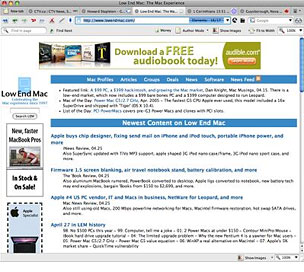 In terms of
interface tweaks, the Opera 9.50 user interface is pretty much the same
as version 9.27, with just some minor changes, a cleaner-looking tab
bar theme, and a slightly narrower window title bar. The only thing new
I've noticed with version 9.5b2 is that the show/hide images button,
which had been banished from the top toolbar to the bottom of the
window in previous Opera 9.5 builds, is back up top as well as down
under, which is quite convenient. I hope they keep both in the
final.
In terms of
interface tweaks, the Opera 9.50 user interface is pretty much the same
as version 9.27, with just some minor changes, a cleaner-looking tab
bar theme, and a slightly narrower window title bar. The only thing new
I've noticed with version 9.5b2 is that the show/hide images button,
which had been banished from the top toolbar to the bottom of the
window in previous Opera 9.5 builds, is back up top as well as down
under, which is quite convenient. I hope they keep both in the
final.
It's fast too, although that's always a challenge to judge
objectively on my dialup connection. Suffice to say that it is fully
competitive speed-wise with the faster browsers I use - Safari,
SeaMonkey/Camino/Firefox, iCab, and the current Opera 9.27 final, which is
usually my default browser for general surfing.
On a less positive note is what is apparently a bug that's been
introduced with beta 2 in the form of a dialog box that appears every
few minutes - even when the browser is in the background - informing me
that authentication has failed on some unspecified page. I have no clue
as to what this is about, but so far I've not discovered how to disable
this nag, which is annoying enough to incline me to revert to Opera
9.2.7 for now, which is no hardship.
The browser's Opera Link feature synchs your bookmarks and Opera's
unique Speed Dial between your computer(s) and mobile phone. Log in
with your Opera username, and your data will always be accessible.
Speaking of Speed Dial, if you're not familiar with it, it's a set
of visual thumbnail Web page bookmarks that appear when you open a new
tab.
Security is enhanced as well. In Opera 9.5, the Fraud Protection
feature is enabled by default, detecting and warning you about
fraudulent websites automatically. Support for Extended Validation
certificates (EV) provides added assurance and trust for secure Web
sites.
With SeaMonkey, Opera shares the distinction of being the last two
Mac OS suite browsers built-in email clients, and Opera email features
improved responsiveness, retrieving and and searching your mail and
news feeds faster than before.
Opera 9.5 also features a new and faster version of Opera's
proprietary Presto browser engine. This adds support for the newest
cutting-edge Web standards and upcoming Web developer tools, and it's
still a modest 14.3 MB download, and retains its light and nimble
feel.
With rewritten core code, Opera 9.5 contains more than a year's
worth of speed, standards, and performance improvements. The Opera
folks say their internal benchmarks show up to a 50% increase in speed
compared to the previous core version in Opera 8. It certainly is fast,
and having been an Opera 8 user (which was no slouch speed-wise in its
day), I'm not inclined to disagree.
Other new features in version 9.50 include AppleScript support,
improved font handling, improved image quality when zooming, respect
for the Full Keyboard Access setting in Mac OS X System
Preferences, full history search, improved site compatibility, access
for everyone, improved platform integration, preview of bookmark and
speed dial synchronization, a rewritten ECMAscript engine, some HTML 5
support, and improved IMAP reliability in the email client module.
Note that if you're already an Opera user, this release uses new
storage and indexing formats for Opera Mail (including newsfeeds). If
you copy your Mail directory from an existing user profile, you will be
prompted to convert all accounts into the new format and reindex your
messages. You will consequently not be able to downgrade to a previous
version of Opera after starting the conversion process.
However, for the Alpha and Beta releases of Opera 9.50, Opera has
thoughtfully provided for them to create new Preferences folders rather
than overwriting your existing Opera 9.x preferences. I just made a
backup copy of my Opera Preferences folder and option-dragged my
Bookmarks, Sessions, and cookies information, etc., into the "Opera
Preferences Beta" preferences folder that the program created upon
startup, and I was away to the races. (I don't use Opera Mail as my
email client, but email files could be likewise copied, with the caveat
that you will lose continuity in your archives due to the file-format
conversions noted above.)
Read the Release Notes changelog for full details on known issues
and unsquashed bugs in this release before switching over.
Here are more of the new features of Opera 9.50 profiled in greater
detail.
Synchronize Your Stuff
Synchronize: the preview, lets you log in just once,Then access your
stuff anywhere, anytime.
This alpha version of Kestrel contains a sneak preview with support
for bookmarks, Speed Dial, and personal bar synchronization between
desktop versions of Opera. To check it out, click File - Synchronize
with My Opera, and follow the instructions.
Full History Search
Most of us have found something interesting online, but later
struggled to find your way back to the small portion of a Web page
where we saw it? Opera 9.5 introduces full history search - with which
you can search the complete content of Web pages you visited, but
without the need to bookmark them.
Unlike previous and other browser history searches which only look
at the URLs of the pages you have visited, full history search searches
the actual content of the Web pages you have visited. When typing a
keyword, Opera 9.5 will automatically search the text of Web pages in
your history.
Full History Search is integrated into the URL field of the Opera
9.5 browser, making it easy and quick to find what you're looking
for.
Status bar with Zoom and Image control
Opera's zoom function and the bandwidth saving control of images are
now made easily available on the Status bar. You can add your own
buttons like the developer console to the Status bar.
Restore closed windows and changes in Speed Dial
Opera 9.50 Kestrel has an improved version of the much loved
trash-can feature by adding support for opening closed windows, not
only the closed tabs. You can also use the undo function now for Speed
Dial.
Improved BitTorrent performance
This build of Opera adds support for BitTorrent Peer Exchange to
allow you to connect to more download hosts and improve your download
speeds.
Platform Integration
Kestrel has been tuned to feel even more integrated with your
platform. Mac users get the subtly cleaner new visual look and feel,
and adds support for Apple's screen reader
"VoiceOver" found in Mac OS X 10.4 Tiger. This allows visually
impaired Opera users to more easily use all of the features in the
browser.
Skin and Mac OS Integration
Skins in Opera 9.5 feature improved conformance to Apple Human
Interface Guidelines, and there is also a new native skin with a
brushed metal appearance [if you must], for those of you into that sort
of look.
Mail improvements
Kestrel features improved stability and performance for Opera's
integrated email client, Opera Mail, with a new mail backend and new
IMAP support. Opera Mail is also claimed to be much faster than in
previous versions of Opera. I've never more than experimented with
Opera Mail, so have no frame of reference to evaluate the enhancements,
but based on the smoothness of the browser experience, I don't doubt
that it crosses over to the email client module.
By the way, if you are an Opera Mail user, note well that you will
need to install this version on top of your existing Opera version to
use this version for mail. Opera will then reindex all your email,
something which can take several minutes if you have thousands of
emails archived.
Opera says that even more amazing stuff will arrive shortly.
It's great to see Opera determined to stay ahead of the browser pack
and pioneering more cool new browser features. Opera was first with
tabs, first with session restore, first with integrated search, first
with mouse gestures; first with mouseover tab thumbnail previews, and
first (still unique) with Speed Dial and built-in BitTorrent
support.
If you're not familiar, Speed Dial, introduced with Opera 9.2, is a
feature that lets users transform their most frequently visited sites
into nine visual bookmarks that are immediately available in any new
tab. With each blank tab, Speed Dial presents a thumbnail preview of
the top nine sites as selected by the user. In addition to fast access
through the Speed Dial, users can also enter the number corresponding
with each bookmarked Speed Dial page in Opera's address field to access
the page.
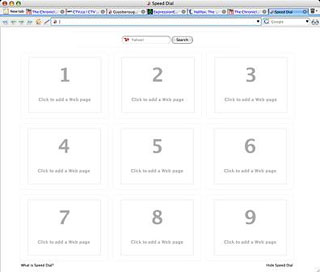 Here's what a fresh tab
window looks like in 9.2 before you configure any favorite sites.
Here's what a fresh tab
window looks like in 9.2 before you configure any favorite sites.
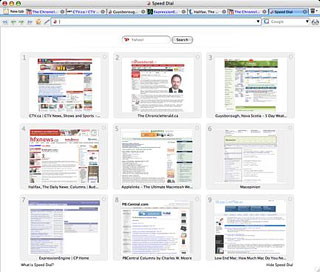
To configure it, just click on one of the nine Speed Dial panes, and
a dialog window will appear with links to the last two-dozen or so
sites you've visited. You can pick sites to add to Speed Dial from the
ones shown, or type or paste in a URL in the field provided, click
"OK," and momentarily a thumbnail preview of the specified Web page
will appear, which you can henceforth use as a shortcut button to load
the site.
Every time you
open a new tab, the Speed Dial buttons will be displayed. You can of
course also use the conventional Bookmarks menu as well.
 While it's not as dramatic an
evolutionary shift as, say, the distinction between Firefox 2 and 3,
I'm really pleased with this latest effort from Opera which has made my
already favorite browser even better. The only reason I might go back
to Opera 9.27 is that pesky authentication dialog if I can't find out
how to get rid of it. The speed and deep feature set are more seductive
than ever.
While it's not as dramatic an
evolutionary shift as, say, the distinction between Firefox 2 and 3,
I'm really pleased with this latest effort from Opera which has made my
already favorite browser even better. The only reason I might go back
to Opera 9.27 is that pesky authentication dialog if I can't find out
how to get rid of it. The speed and deep feature set are more seductive
than ever.
Some folks say they find Opera off-putting because of its slightly
unorthodox user interface. Frankly, the interface appearance is not my
favorite Opera feature by a long shot, but I don't find it a problem,
and I love the functionality - little things like the convenient access
images toggle buttons, or the copied text retains spacing and paragraph
breaks (unlike, say, with Safari), and bigger ones like the fact I can
set a dozen or 18 Web pages loading on my slow dialup connection and
Opera will bring them down sequentially without drama or giving up and
crashing, which has happened in this sort of use with other browsers.
Indeed, one of the thinks that appeals to me about Opera is its
generally solid stability and reliability. It's a great browser that
deserves a larger market share than it has.
Opera is freeware
System requirements: Mac OS X 10.3.9 or later.
System support: PPC/Intel
Go to the Miscellaneous Ramblings Review index.



