Low End Mac Reader Specials
TypeStyler For Mac OS X is Now Shipping! Download The Free Fully Functional 60 Day Tryout at www.typestyler.com
OWC: Get the Right Memory / Ram for your Mac. Top Quality, Competitive Prices, Lifetime Warranty. Expert Support and Video Installation Guidies too! 4.0GB Matched Sets from $87.99, Options up to 32GB. Click here
Don't install Parallels to play poker online! Poker Mac will show you how
to download and install a native Mac poker application such as Full
Tilt Poker Mac.
Laptop Hardware Provided by TechRestore - Overnight Mac & iPod Repairs.
Compare products like desktop computers, apple laptops, apple macs, and LCD Monitors side by side! All the information and reviews to make the best purchasing decision for new mobile phones, sat nav systems, or MP3 players. The Ciao online shopping community makes searching products easy for you.
Miscellaneous Ramblings
Eudora 8 Beta 6 Ready for Everyday Use
Charles Moore - 2009.06.11 - Tip Jar
Popularity: ![]()
![]()
![]()
![]()
Short link: http://bit.ly/6k9an
The Mozilla.org Penelope project recently released the sixth public beta of its slow-gestating replacement for Qualcomm's classic Eudora email client application last week (the first beta was released in September 2006).
I've been a Eudora user since I first got online, and these Eudora betas are a big deal for those of us looking for a satisfactory replacement for Classic Eudora 6, which has been the closest to ideal I've encountered in an email application, doing all I need it to do and executing tasks elegantly and with delightful flexibility. Especially deserving mention are Eudora Classic's superb search engine and its discrete support of multiple email accounts and SMTP server configurations for outgoing mail.
'Eudora-ized' Thunderbird
The proverbial writing has been on the wall since Qualcomm terminated Eudora development in 2006 and handed-off the Eudora brand to Mozilla.org to use on what is a "Eudora-ized" version of its Open Source Thunderbird email application, designated Eudora 8.0.
Classic Eudora took a performance and stability hit with the Mac OS X 10.5 "Leopard" release in 2007. I continued using Eudora 6.2.4 in Leopard on my G4 PowerBook, but it didn't work terribly well, and when I upgraded to a Core 2 Duo Unibody MacBook with Apple's external USB modem in February, I couldn't get the old program to send or receive messages over my finicky dialup connection, so that was the end of the road.
OS X Mail isn't to my taste. I like manual control; Mail tries to do too much for me, and I prefer my email client to have its own discrete address book. I also wasn't smitten with Thunderbird, but after some dithering, I decided to go with T-bird provisionally. After a period of acclimatization, I came to the view that it's more than decent email software.
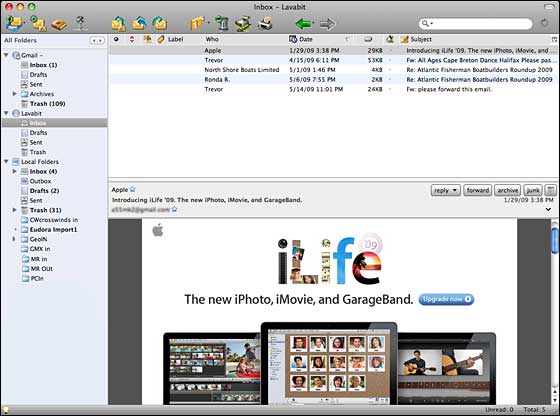
Eudora 8 Beta 6
It's not Classic Eudora, but it's not bad, with some welcome features old Eudora didn't have, such as good HTML support and disabled downloading of embedded images in email messages by default, leaving it to the user's discretion to manually view them if desired, something especially appreciated by users like me on slow connections.
Supports Thunderbird Application Folder
Part of my reason for going with T-bird, at least as a "bridge" solution, is that Eudora 8.0 supports and runs from the user profile(s) in Home > Library > Thunderbird Folder with no adjustment or conversion required when switching back and forth between the two apps, making it unnecessary to import and configure archives contacts and accounts more than once.
Other UI elements, such as the Address Book, look pretty much as they do in Thunderbird.
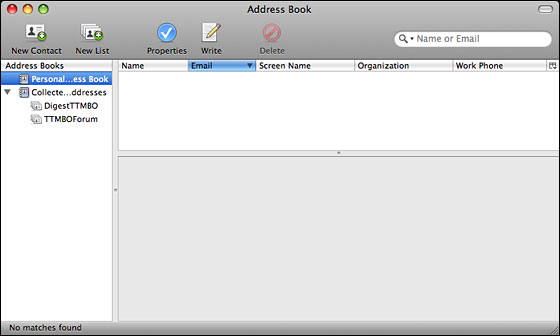
Address book in Eudora 8
I was skeptical that Eudora 8's Search/Find function would be as good as Classic Eudora's fast, slick, and powerful search engine - and it isn't, although it's better than I expected and adequate.
I checked out Eudora 8.0.0b5 back in January and imported all of my account settings and Address Book information from Classic Eudora, a process you implement from the Tools menu, but when I switched to the MacBook, I found beta 5 still not quite as stable as I wanted, so I went with Thunderbird 2.0 (currently version 2.0.0.21) as my workaday email client.
Finally Ready
Eudora 8.0 beta 6 is another story, and I'm finding it finally ready for production service. If the stability I've been getting so far holds up, I'll will continue using it.
Eudora's 8.0b6 is based on Thunderbird 3.0b2 source code, so add-ons that don't work with Thunderbird 3.0b2 probably won't work with this Eudora beta either - not a problem for me, since I don't use any plugins with these applications.
Installation is easy. Just download the disk image, mount it, and drag the Eudora icon to your Applications Folder.
Another Contender
I should note that there's another contender for catching the baton from classic Eudora. MailForge (formerly known as Odysseus) is a Eudora style email client that Infinity Data Systems has been developing since late 2007, and which was just released as a version 1.0 final this week.
See Eudora Successors
Face Off: Eudora 8 Working Well, MailForge Almost Ready to Ship for
a recent look, and I'll be checking out version 1.0 soon.
Appendix: Changes in Version 8.0b6
Changes in Eudora 8.0b6 include upgrades to Penelope version 0.5a3 and the Thunderbird 3.0b2 source code. (Eudora 8 is a branded version of Thunderbird with some extra features added by the Eudora developers, while Penelope is a feature-expansion extension that can be used with either Eudora or Thunderbird.)
Other improvements include a better way to remember the state of folder and thread panes when switching between message and mailbox tabs, and when the preference for opening mailboxes in tabs is turned on, auto-open of mailboxes will now detect if the mailbox is already open in a tab and not open a new copy.
There's now a Add New Toolbar function in the Formatting tab of the Customize Toolbar dialog, and special toolbar items, such as separators, spaces, springs/flexible spaces, have been removed from the Extras panel. The Customize Toolbar dialog now repositions when the toolbar changes.
Use of cmd+M to initiate mail checks has been improved, and there have been a raft of bug fixes.
Mac system requirements are Mac OS X 10.4.x or later, a Mac with an Intel x86 or PowerPC G3, G4, or G5 processor, at least 128 MB RAM, and 200 MB of free hard drive space
For more information and to download, visit <https://wiki.mozilla.org/Eudora_Releases>
See <http://wiki.mozilla.org/Penelope_Extensions> for Penelope version notes.

Charles Moore has been a freelance journalist since 1987 and began writing for Mac websites in May 1998. His The Road Warrior column is a regular feature on MacOpinion, and he is a news editor and columnist at Applelinks.com. If you find his articles helpful, please consider making a donation to his tip jar.
Recent Miscellaneous Ramblings
- WiFi Paranoia, iMac-O-Lantern, Magic Mouse Does Click, Free Clipboard Managers, and More, 11.05. Also strange time stamps, problem with ColorIt on Intel Mac, and the story behind OS X 10.5.4 install discs.
- Google Chrome Mac Preview Has Made a Convert, 11.02. Officially a developer preview, Google's Chrome has finally made it to Intel-based Macs. It's fast, elegant, and could be your next browser.
- Fixing a Narcoleptic PowerBook G4, the Future of Tiger Support, Spam Filtering, and More, 10.28. Also installing Leopard, disappearing features, portable Thunderbird, and web page design issues.
- 2 Wireless Alternatives to Apple's Magic Mouse, 10.27. Whether you prefer buttons to buttonless, are still using Mac OS X 10.4, or don't like Bluetooth, Targus has mice to consider.
- More in the Miscellaneous Ramblings index.
Links for the Day
- Mac of the Day: 17" iMac G4/800 MHz, July 2002 - The iMac 'grows up' with a 17" 1440 x 900 display.
- Group of the Day: LisaList supports Lisa users.
- November 8 in LEM history: 99: OS 9: I think I like it - 01: The simplified Mac life - Soured on Windows - Flea market Mac - 02: Little room for improvement in new 'Books - Combo drive upgrade for iceBooks - 04: Re-Porter - 05: Fix the old iMac or buy a Mac mini? - Apple's Copland project - 06: MacBook Core 2 - MacBook value equation - Cheap is as cheap does - 07: Problems with Classic mode in Tiger - The G4 Power Mac that won't run Leopard
- Support Low End Mac
Recent Content on Low End Mac
- Quad-Core CPU Makes Sense in MacBook Pro, OS X 10.6 Causing Overheating, Overseas Power, and More, The 'Book Review, 11.06. Also Late 2009 MacBook reviewed, how to add RAM to new MacBook, 18.4in Acer notebook used Intel i7, and SanDisk SSD chosen for Sony VAIO X.
- Dumping Macs for Google Apps, SSD in iMac, Late 2009 iMac Performance Problems, and More, Mac News Review, 11.06. /newsrev/09mnr/1106.html
- IDE Is Dead; Long Live SATA!, Dan Knight, Mac Musings, 11.04. SATA has displaced parallel ATA. While IDE hard drives haven't disappeared, the best deals are in SATA hard drives.
- QuickTime X in Snow Leopard Imports, Trims, and Publishes Video Quickly and Easily, Alan Zisman, Zis Mac, 11.04. The long, slow process of importing video into iMovie to edit it, then render it to another format, is history as QuickTime X does that much more quickly.
- More links in our archive.
Recent Deals
- Best Mac Pro Deals, 11.03. Used 2.66 GHz 4-core, $1,300; 3.0 8-core. $2,299; refurb 2.66 4-core Nehalem, $2,149; 2.93, $2,549; 2.26 8-core, $2,799; 2.93, $4,999.
- Best iPhone Deals, 11.03. New 8 GB iPhone 3G, $$99; refurb 16 GB 3GS, $149; new, $199; 32 GB, $299.
- Best 12" PowerBook G4 Deals, 11.03. Used 867 MHz SperDrive, $348; 1 GHz, $499; 1.33 Combo, $298; SD, $559; 1.5 Combo, $448; SuperDrive, $589.
- Best Power Mac G3 and PCI Video Card Deals, 11.02. Used beige 300 MHz, $25; G4/366, $49; blue & white 350, $80; 400, $90; 450, $105; PCI video cards from $15; shipping additional.
- Best Power Mac G4 and AGP Video Card Deals, 11.02. Used 400 MHz, $50; 733 MHz, $69; 933 MHz, $209; 1.25 GHz dual, $299.
- Best 15" MacBook Pro Deals, 11.02. Used 2.0 GHz, $800; 2.2, $900; 2.4, $1,000; refurb 2.53, $1,449; 2.66, $1,699; 2.8, $1,949; 3.06, $2,169; new 2.53, $1,579; 2.66, $1,799; more.
- Best Mac mini Deals, 10.30. Used 1.33 GHz G4 mini, $379; 1.42, $389; 1.5, $419; 1.83 GHz Core Duo, $350; Core 2, $439; new 2.26 GHz nVidia, $580; 2.53 GHz, $770; Server, $990.
- Best G4 iBook Deals, 10.30. Used 12" 1.07 GHz Combo, $225; 1.33 GHz, $298; 14" 1 GHz, $349; 1.33 GHz, $398; 1.42 GHz SuperDrive, $498.
- Best Classic Mac OS Deals, 10.30. System 6.0.8 floppies, $10; 7.1, $12; 7.5, $20; 7.5 CD, $4; 7.6 $13; 8.1, $11; 8.5, $20; 8.6, $90; 9.0, $20; 9.2.2, $30.
- More deals in our archive.
About LEM | Support | Usage | Privacy | Contacts
Navigation
Used Mac Dealers
Apple History
Video Cards
Email Lists
Favorite Sites
MacSurfer
MacMinute
MacInTouch
MyAppleMenu
InfoMac
Macs Only!
The Mac Observer
Accelerate Your Mac
RetroMacCast
PB Central
MacWindows
The Vintage Mac
Museum
DealMac
DealsOnTheWeb
Mac2Sell
ramseeker
Mac Driver Museum
JAG's House
System
6 Heaven
System 7 Today
the pickle's Low-End
Mac FAQ
Abandonware
Petition
Mac vs. PC Info
Affiliates
The Apple
Store
Mac
Connection
B&H
MacMall
TechRestore
ExperCom
Crucial
Memory
batteries.com
Advertise
MacMinute
MacInTouch
MyAppleMenu
InfoMac
Macs Only!
The Mac Observer
Accelerate Your Mac
RetroMacCast
PB Central
MacWindows
The Vintage Mac
Museum
DealMac
DealsOnTheWeb
Mac2Sell
ramseeker
Mac Driver Museum
JAG's House
System 6 Heaven
System 7 Today
the pickle's Low-End
Mac FAQ
Abandonware
Petition
Mac vs. PC Info
Mac Connection
B&H
MacMall
TechRestore
ExperCom
Crucial Memory
batteries.com


